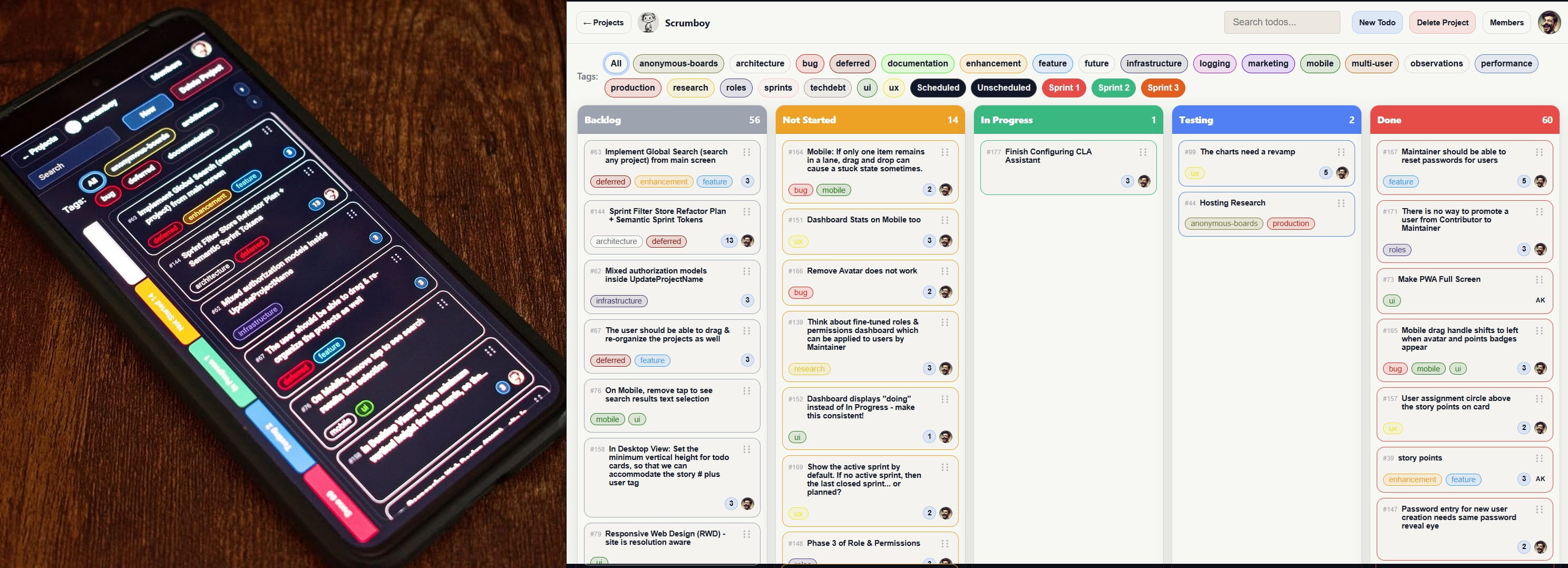
Self-hosted project management & issue-tracking solution + instant shareable & customizable boards + realtime collaboration, automation, API access and MCP-compatible client support and zero SaaS lock-in
에이전트 강화
게시자가 제공하는 설치 방식입니다. PlugMCP 엔드포인트가 아닙니다.
원격 URL인가요, 내 컴퓨터에서 실행하는 명령인가요? 두 설치 방식의 차이
PlugMCP에서 실행
A new server you create. It is not this listing's official endpoint. Use the publisher install when you want their URL and their credentials.
실행게시자 제공
Self-hosted project management • Customizable boards • Cross-project workload and flow analytics • Calendar/Agenda • Sticky-note wall • Imports/Backups • Email notifications • MCP/Agent automation
Runs in seconds. No setup required.
No .env file, TLS certificates, or encryption key are required to start the app.
Scrumboy creates runtime data under ./data by default. The default SQLite database is ./data/app.db, and SQLite may also create app.db-wal and app.db-shm while the server is running.
Pull ghcr.io/markrai/scrumboy:latest (Docker selects the published architecture for your host):
docker run -d \
  --name scrumboy \
  -p 127.0.0.1:8080:8080 \
  -v scrumboy-data:/data \
  ghcr.io/markrai/scrumboy:latest
The mounted /data volume preserves Scrumboy data across container recreation. Open http://localhost:8080. For Compose using the published image, persistence, backup, and configuration details, see docs/docker.md.
To build from a local clone instead of pulling the published image:
docker compose up --build
The repository's docker-compose.yml uses build: . and maps ./data to /data.
Open http://localhost:8080.
go run ./cmd/scrumboy
Open http://localhost:8080.
Windows users can download the windows-amd64 executable from GitHub Releases. Run it from a dedicated writable folder (for example %USERPROFILE%\Scrumboy); it starts a local Scrumboy server at http://localhost:8080. For exact artifact filenames, checksum and provenance verification, runtime-data location, and other release-install details, see docs/install-from-releases.md.
macOS users can download Apple Silicon or Intel builds from GitHub Releases. These binaries require macOS 12 Monterey or later. Extract and run ./scrumboy from a dedicated writable folder; it starts a local Scrumboy server at http://localhost:8080. Current macOS release binaries are not Apple-signed or notarized. For exact artifact filenames, checksum and provenance verification, runtime-data location, Gatekeeper/quarantine troubleshooting, and other release-install details, see docs/install-from-releases.md.
Scrumboy includes a native Android client, implemented with Capacitor, under mobile/capacitor. It connects to a running Scrumboy server; it does not replace or start the server. Build it from source. Release builds require HTTPS to that server. Prerequisites, web-payload packaging, Gradle commands, device connection, and optional signing are in docs/android.md.
SCRUMBOY_ENCRYPTION_KEY is set.SCRUMBOY_ENCRYPTION_KEY + SCRUMBOY_PUBLIC_BASE_URL): see docs/smtp.md.audit_events table; todo/member/project/link actions logged (see docs/audit-trail.md).DATA_DIR disaster-recovery backup (uploaded wallpapers and audit_events are omitted); see docs/diagrams/scrumboy_deployment_ops.md./anon creates a throwaway editable board; Anonymous Mode serves a single no-auth board. These are separate from published read-only boards below./_app while project URLs stay unchanged. Anonymous Mode ignores the flag.SCRUMBOY_ENCRYPTION_KEY.SCRUMBOY_MODE=full, default): Auth can be enabled. First user via bootstrap; then login/session. Backup/export, tags, multi-project. Projects can be user-owned (project_members) or anonymous (shareable by URL): /anon (or /temp) creates a throwaway board and redirects to /{slug}.SCRUMBOY_MODE=anonymous): No auth. Landing at /; live deployment at: https://scrumboy.com/In full mode, access is governed by two separate role systems: instance-wide system roles (Owner, Admin, User) and per-project roles. System roles do not grant project access; project access comes only from project membership.
Owner, Admin, and User control instance-wide capabilities such as user management. Assignment rules and permissions: docs/roles-and-permissions.md.
Project access requires project membership. Per-project roles are Maintainer (full project management), Contributor (limited edits, including body editing on cards assigned to them), and Viewer (read-only). Temporary/anonymous boards use a separate link-based permission model instead of these roles. Details: docs/roles-and-permissions.md.
A fresh Scrumboy install needs no environment variables. Set them only when you want to change deployment defaults or turn on optional features (SSO, email, Web Push, TLS, encryption, and similar).
Scrumboy does not automatically load .env files. Inject variables through your shell, process manager, Docker/Compose, or another launcher.
Full names, defaults, requirements, and interactions: docs/environment-variables.md.
SCRUMBOY_ENCRYPTION_KEY is not required for basic Scrumboy startup. It is required for features that store encrypted authentication/security or calendar data, including 2FA and Agenda calendar feeds. Once encrypted data exists, back up and restore the key with the Scrumboy data; do not casually replace it. Details: docs/environment-variables.md and FAQ.md.
Optional SMTP enables self-service password-reset email (Forgot your Scrumboy password?) for users with a usable Scrumboy-local password; it also depends on SCRUMBOY_ENCRYPTION_KEY and a valid SCRUMBOY_PUBLIC_BASE_URL. SSO credential recovery remains the identity provider's responsibility. Setup and troubleshooting: docs/smtp.md.
Optional email notifications use the same SMTP configuration as password-reset email. They are opt-in per user under Settings → Customization, including per-category choices, and do not require SCRUMBOY_ENCRYPTION_KEY. Setup and category/recipient details: docs/notifications.md.
Optional OpenID Connect / SSO with a standards-compliant identity provider. Accounts may use a local password, SSO, or both; existing local users connect SSO explicitly, and matching emails are not silently linked. Local authentication remains available unless explicitly disabled. See docs/oidc.md, docs/authentication-api.md, docs/recovery.md, and docs/security.md.
If the identity provider is unavailable, a host operator can recover an existing owner's local password via an offline, host-side break-glass path. Stop Scrumboy and back up the database first. Instructions: docs/recovery.md.
App-level TLS / HTTPS is optional: Scrumboy enables HTTPS when both SCRUMBOY_TLS_CERT and SCRUMBOY_TLS_KEY are configured and their files exist; otherwise it runs over HTTP. Details: docs/environment-variables.md.
Install Scrumboy from the browser as a PWA for a standalone, mobile-friendly experience. Background assignment notifications are available through Web Push, which requires server-side VAPID configuration and browser notification permission. See docs/pwa.md and docs/vapid.md.
Scrumboy supports API access tokens for automation and integrations, including programmatic MCP and API access without a browser session. Both the legacy HTTP MCP interface and the native JSON-RPC MCP interface are supported. See docs/mcp.md and API.md.
Scrumboy supports native MCP clients such as Cursor and Claude Code over HTTP Streamable JSON-RPC at /mcp/rpc (stdio is not supported). The older /mcp HTTP interface remains available for legacy and programmatic use. Details: docs/mcp.md, docs/oauth.md, and API.md. Compatible agent workspaces can also use the optional Board Operator package in plugins/scrumboy-board-operator.
Scrumboy can POST JSON event payloads to URLs you register for server-side integrations (your script, gateway, queue worker, and similar). Webhooks are available in Full mode; project maintainers configure them through the HTTP API. They are separate from in-app notifications, browser/Web Push notifications, and realtime board updates via SSE. Full operator and integration details are in docs/webhooks.md.
Scrumboy supports Full and Single-project JSON export. In Full mode, Full export includes durable projects where you are a Maintainer and temporary/expiring boards you created; Anonymous mode uses single-board export instead of Full. Details: docs/backup-and-import.md.
Scrumboy supports three JSON import modes: Replace (destructive; makes the applicable scope match the backup), Merge (matches existing projects by slug when you are a Maintainer, otherwise may create new projects), and Create copy (always creates new projects without overwriting). Anonymous mode has more limited import behavior. Details: docs/backup-and-import.md.
The full documentation set is organized by audience in docs/README.md (operator, feature, security, integration, architecture, and manual-check docs).
Scrumboy is licensed under the GNU Affero General Public License v3 (AGPL v3). See LICENSE for the full text.
Contributing: Contributions use the Developer Certificate of Origin (DCO). Sign off commits with git commit -s (see CONTRIBUTING.md for setup, build, and pull request guidelines).
Code of Conduct: CODE_OF_CONDUCT.md
Bugs and enhancements: GitHub Issues
Security vulnerabilities: Report privately via SECURITY.md (do not open a public issue for security-sensitive bugs).
For any other feedback, questions, or inquiries, please contact the maintainer at [email protected]
Scrumboy is an independent open-source project and is not affiliated with, sponsored by, or endorsed by Scrum.org, Scrum Alliance, Inc., or any other organization associated with Scrum training or certification. Any reference to "scrum" is made solely to describe the project management methodology that the software is intended to support. Google Calendar is a trademark of Google LLC. Apple and iCloud are trademarks of Apple Inc. Trello is a registered trademark of Atlassian Pty Ltd. Scrumboy is an independent project and is not affiliated with, sponsored by, or endorsed by Google LLC, Apple Inc., Atlassian, or Trello, Inc. Provider names and icons are used only to identify the inferred host of a configured ICS feed. Third-party trademarks remain the property of their respective owners.
Self-hosted project management • Customizable boards • Cross-project workload and flow analytics • Calendar/Agenda • Sticky-note wall • Imports/Backups • Email notifications • MCP/Agent automation
도구
아직 도구 목록이 없습니다. 원격 서버는 첫 상태 확인 후에 도구 목록이 생깁니다.
FAQ
이 페이지에서 Cursor, Claude Desktop, Claude Code 또는 VS Code용 stdio 설정을 복사합니다. PlugMCP 프록시가 아니라 게시자의 설치 방식을 사용합니다.
이 레코드에는 필수 환경 변수가 등록되어 있지 않습니다.
Scrumboy은(는) stdio를 통해 로컬에서 실행됩니다.
마지막 확인: 2026-11-17. Self-hosted project management • Customizable boards • Cross-project workload and flow analytics • Calendar/Agenda • Sticky-note wall • Imports/Backups • Email notifications • MCP/Agent automation