powergentic/azd-mcp-ts
An azd template to deploy a Model Context Protocol (MCP) server written in TypeScript to Azure Container Apps using SSE Transport.
Prerequisites
To deploy this template you will need to have the following installed:
에이전트 강화
게시자가 제공하는 설치 방식입니다. PlugMCP 엔드포인트가 아닙니다.
원격 URL인가요, 내 컴퓨터에서 실행하는 명령인가요? 두 설치 방식의 차이
PlugMCP에서 실행
A new server you create. It is not this listing's official endpoint. Use the publisher install when you want their URL and their credentials.
실행게시자 제공
An azd template to deploy a Model Context Protocol (MCP) server written in TypeScript to Azure Container Apps using SSE Transport.
To deploy this template you will need to have the following installed:
An AZD template to deploy a Model Context Protocol (MCP) server written in TypeScript to Azure Container Apps using SSE Transport.
To use this template, follow these steps using the Azure Developer CLI:
Log in to Azure Developer CLI. This is only required once per-install.
azd auth login
Initialize this template using azd init:
azd init --template powergentic/azd-mcp-ts
Ensure Docker Engine is running on your machine. This will be needed by azd to build the Docker image for the app prior to deployment to Azure Container Apps.
Use azd up to provision your Azure infrastructure and deploy the web application to Azure.
azd up
Once the template has finished provisioning all resources, and Azure Container Apps has completed deploying the app container (this can take a minute or so after azd up completes to finish), the MCP server will be running.

To verify the MCP server is running, navigate your browser to the /sse url for the app within your browser.
Example URL:
https://ca-mcp-vnv7lqmg46722.bravebeach-29a82758.eastus2.azurecontainerapps.io/sse
This will open a streaming output within the browser that will look similar to the following:

Congratulations, you now have a simple MCP Server written in TypeScript up and running in Azure! You can now customize this app to build the specific MCP server you need for your AI solution.
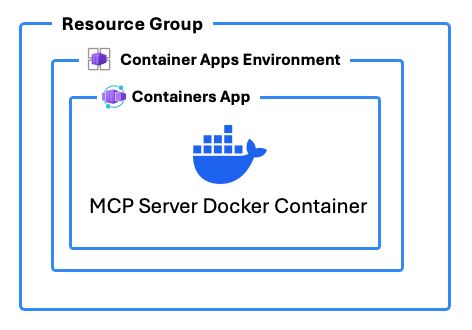
In addition to deploying Azure Resources to host the MCP server, this template includes a DOCKERFILE that builds the MCP server app with TypeScript.
These are the Azure resources that are deployed with this template:
Here are some additional resource links that help explain the topics around building custom MCP Servers in TypeScript and about what MCP and SSE are:
This azd template was written by Chris Pietschmann, founder of Powergentic.ai, Microsoft MVP, HashiCorp Ambassador, and Microsoft Certified Trainer (MCT).
An AZD template to deploy a Model Context Protocol (MCP) server written in TypeScript to Azure Container Apps using SSE Transport.
도구
아직 도구 목록이 없습니다. 원격 서버는 첫 상태 확인 후에 도구 목록이 생깁니다.
FAQ
이 페이지에서 Cursor, Claude Desktop, Claude Code 또는 VS Code용 stdio 설정을 복사합니다. PlugMCP 프록시가 아니라 게시자의 설치 방식을 사용합니다.
이 레코드에는 필수 환경 변수가 등록되어 있지 않습니다.
Azd MCP Ts은(는) stdio를 통해 로컬에서 실행됩니다.
마지막 확인: 2026-10-28. An AZD template to deploy a Model Context Protocol (MCP) server written in TypeScript to Azure Container Apps using SSE Transport.
