paprika-3-mcp
A Model Context Protocol (MCP) server that exposes your Paprika 3 recipes as LLM-readable resources — and lets an LLM like Claude create or update recipes in your Paprika app.
에이전트 강화
게시자가 제공하는 설치 방식입니다. PlugMCP 엔드포인트가 아닙니다.
원격 URL인가요, 내 컴퓨터에서 실행하는 명령인가요? 두 설치 방식의 차이
PlugMCP에서 실행
A new server you create. It is not this listing's official endpoint. Use the publisher install when you want their URL and their credentials.
실행게시자 제공
A Model Context Protocol (MCP) server that exposes your Paprika 3 recipes as LLM-readable resources — and lets an LLM like Claude create or update recipes in your Paprika app.
MCP Server for creating/editing recipes in Paprika 3 with natural language
See anything missing? Open an issue on this repo to request a feature!
create_paprika_recipeupdate_paprika_recipeYou can download a prebuilt binary from the Releases page.
If you're on macOS, the easiest way to install is with Homebrew:
brew tap soggycactus/tap
brew install paprika-3-mcp
Go to the latest release.
Download the appropriate archive for your operating system and architecture:
paprika-3-mcp_<version>_linux_amd64.zip for Linuxpaprika-3-mcp_<version>_windows_amd64.zip for WindowsExtract the zip archive:
unzip paprika-3-mcp_<version>_<os>_<arch>.zip
.zip file and select Extract All, or use a tool like 7-Zip.Move the binary to a directory in your system's $PATH:
Linux:
sudo mv paprika-3-mcp /usr/local/bin/
Windows:
paprika-3-mcp.exe to any folder in your PATH (e.g., %USERPROFILE%\bin)You can verify the server is installed by checking:
paprika-3-mcp --version
You should see:
paprika-3-mcp version v0.1.0
If you haven't setup MCP before, first read more about how to install Claude Desktop client & configure an MCP server.
To add paprika-3-mcp to Claude, all you need to do is create another entry in the mcpServers section of your claude_desktop_config.json file:
{
  "mcpServers": {
    "paprika-3": {
      "command": "paprika-3-mcp",
      "args": [
        "--username",
        "<your paprika 3 username (usually email)>",
        "--password",
        "<your paprika 3 password>"
      ]
    }
  }
}
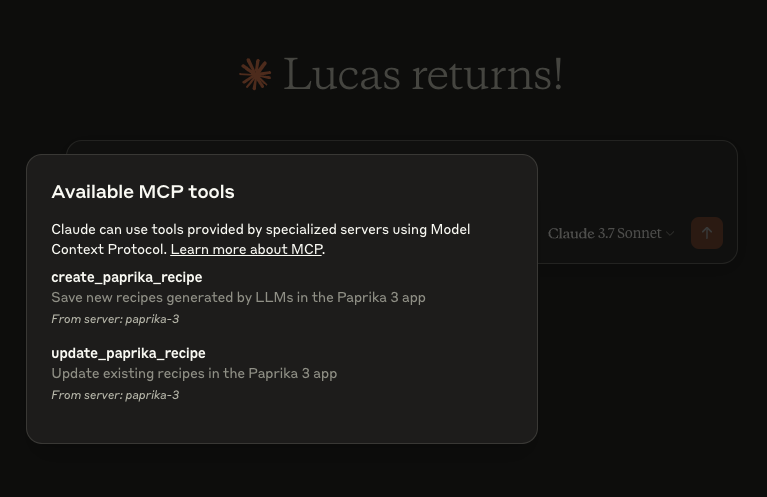
Restart Claude and you should see the MCP server tools after clicking on the hammerhead icon:
This project is open source under the MIT License © 2025 Lucas Stephens.
The MCP server writes structured logs using Go’s slog with rotation via lumberjack. Log files are automatically created based on your operating system:
💡 Logs are rotated automatically at 100MB, with only 5 backup files kept. Logs are also wiped after 10 days.
MCP Server for creating/editing recipes in Paprika 3 with natural language
도구
아직 도구 목록이 없습니다. 원격 서버는 첫 상태 확인 후에 도구 목록이 생깁니다.
FAQ
이 페이지에서 Cursor, Claude Desktop, Claude Code 또는 VS Code용 stdio 설정을 복사합니다. PlugMCP 프록시가 아니라 게시자의 설치 방식을 사용합니다.
이 레코드에는 필수 환경 변수가 등록되어 있지 않습니다.
Paprika 3은(는) stdio를 통해 로컬에서 실행됩니다.
마지막 확인: 2026-10-28. MCP Server for creating/editing recipes in Paprika 3 with natural language
