Wingman
An open-source MCP server that gives your AI a persistent, interactive plan panel - rendered inline in the chat, and now synced across every device.
Sits beside you. Doesn't fly the plane.
Potencialize seu agente
Instalação do publicador. Não é um endpoint do PlugMCP.
Host a copy with our keys and logs.
Ainda não há uma versão empacotada no registro. Siga o README do repositório.
URL remota ou um comando na sua máquina? Como as duas instalações diferem
Rodar no PlugMCP
A new server you create. It is not this listing's official endpoint. Use the publisher install when you want their URL and their credentials.
AbrirDo publicador
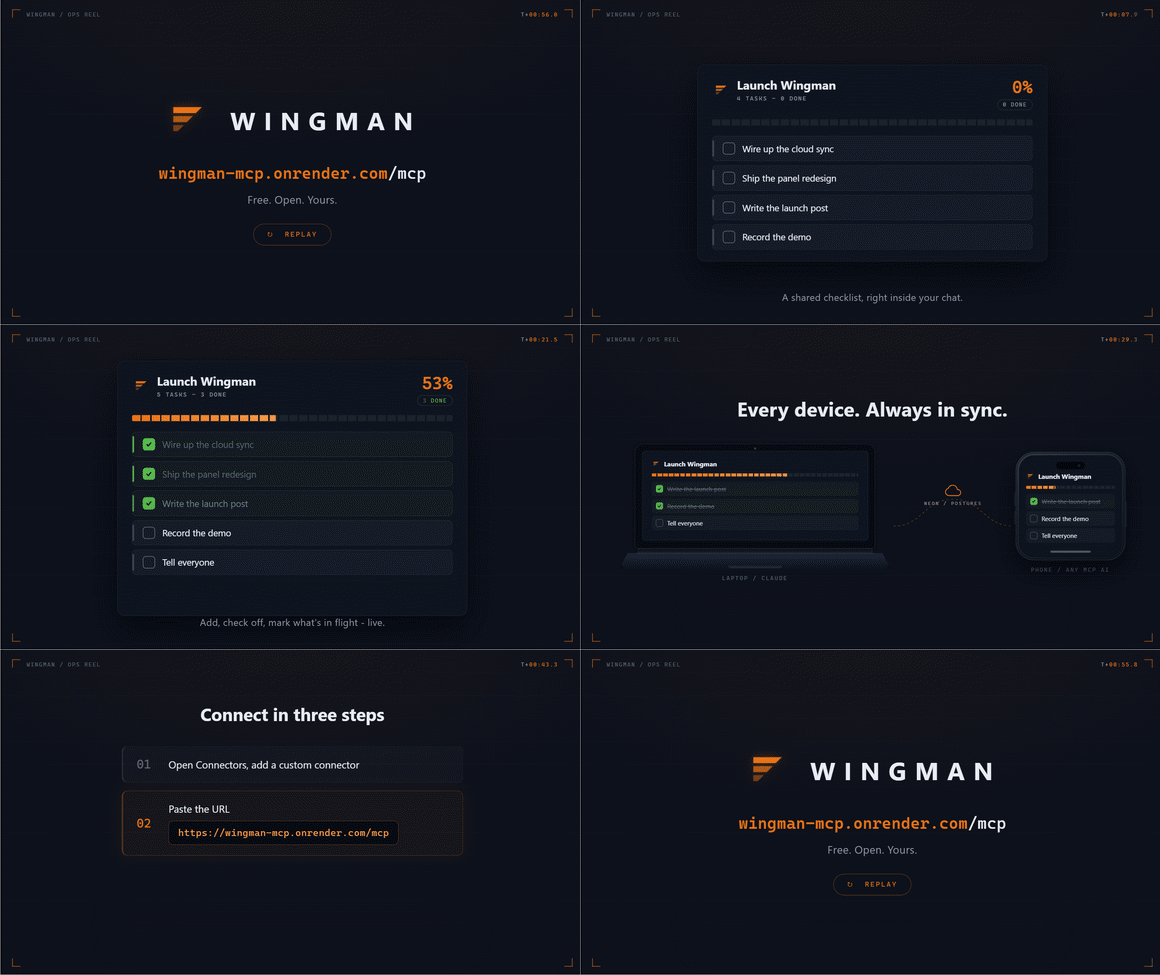
Long Claude conversations lose track of what you were doing, what's done, and what's next. Wingman fixes that.
It gives every Claude conversation a persistent, interactive plan panel - rendered inline as a live UI widget. You click checkboxes. Claude ticks tasks after completing work. Either of you can add, reorder, or rename tasks at any time. The plan survives conversation restarts and lives in local SQLite on your machine.
Think of it as Cursor's plan agent, generalized to any AI conversation and any goal.
pending -> in_progress -> done.pip install wingman-mcp
Works on Windows, macOS, and Linux. Requires Python 3.10+.
Add Wingman to your MCP host config and restart. One block, one restart.
First, install with pipx for the simplest setup:
pipx install wingman-mcp
Then add to your config (~/Library/Application Support/Claude/claude_desktop_config.json on macOS):
{
  "mcpServers": {
    "wingman": {
      "command": "wingman"
    }
  }
}
Note for pip users: If you installed with
pipinstead ofpipx, use the full Python path:"command": "/Library/Frameworks/Python.framework/Versions/3.12/bin/python3"with"args": ["-m", "wingman"].
If you installed with pip instead, use the full Python path. Find it by running which python3 in Terminal, then:
{
  "mcpServers": {
    "wingman": {
      "command": "/path/from/which/python3",
      "args": ["-m", "wingman"]
    }
  }
}
.cursor/mcp.json in your project root, or ~/.cursor/mcp.json globally:
{
  "mcpServers": {
    "wingman": {
      "command": "python",
      "args": ["-m", "wingman"]
    }
  }
}
.vscode/mcp.json:
{
  "servers": {
    "wingman": {
      "type": "stdio",
      "command": "python",
      "args": ["-m", "wingman"]
    }
  }
}
Register Wingman once at user scope and it's available in every project:
claude mcp add wingman -s user -- python -m wingman
All tools work in the terminal. Instead of the clickable panel, Wingman renders a clean text view - a progress bar, your tasks grouped by phase, and checkboxes Claude ticks as it works:
## Whistler - Full Build
`███████████░░░░░░░░░░░`  32/58 done (55%)
_26 pending_

**PHASE 4**
[ ] 26. Build Play, Pause, Stop playback controls
[ ] 27. Build loop toggle
Note: The interactive panel requires a host with MCP Apps support (SEP-1865). Claude Desktop and MCPJam render it fully. Claude Code (CLI), Cursor, and VS Code Copilot Chat receive the clean text view shown above - all tools still work.
Wingman Cloud is the hosted version: your plans live in one place and sync across every device and assistant - Claude desktop, web, and mobile, and ChatGPT - so a plan you build on your laptop is right there on your phone.
Connect it (one time):
In Claude, open Settings -> Connectors -> Add custom connector (on ChatGPT, add it as a custom MCP connector).
Enter the server URL:
https://wingman-mcp.onrender.com/mcp
A browser window opens to sign in with Google or email. Approve it, and you are connected. You only do this once per device; you stay signed in afterward.
That's it - create a plan on one device and it shows up on the others. The interactive panel renders where the host supports it (Claude desktop and ChatGPT today), and the clean text view is used everywhere else.
Wingman Cloud is in early hosted beta. The local
pip install wingmanstays fully supported and zero-telemetry; the hosted service adds accounts and cross-device sync (see Security & privacy below).
ChatGPT can connect to Wingman Cloud as a custom MCP connector. Tools work immediately, and the interactive panel renders inline when you ask ChatGPT to show a plan.
Requires a ChatGPT Plus, Pro, Business, or Enterprise/Edu account on web (Developer Mode is not available on the mobile apps).
1. Turn on Developer Mode
Ctrl + .)2. Add Wingman as a connector
Wingmanhttps://wingman-mcp.onrender.com/mcpdocs/assets/wingman-icon.png
and upload it.Wingman gives your chat a persistent, interactive plan and to-do panel. Create named plans, add and tick off tasks, mark work in progress, and track it all on a live panel. Plans sync across your devices and assistants, so a plan you start here is there in Claude too.
3. Use it
Start a new chat (Developer Mode tools only appear in chats opened after you connect), then try:
Use Wingman to create a plan called "Launch" with three tasks: draft, review, ship. Then show me the plan.
The plan syncs with the same account you use in Claude, so anything you build in ChatGPT is on your other devices too.
First call after an idle spell can take a few seconds - the hosted service runs on a free tier that sleeps when idle, then wakes and is fast.
Just describe what you're working on. Claude creates the plan and renders the panel inline:
You: I want to ship Wingman this weekend - README, PyPI, GitHub, launch post.
     Create a plan.

Claude: [calls create_plan → panel mounts with tasks already populated]
You: Create an empty plan called "Wingman launch"

Claude: [panel mounts showing the empty state]
Hit Build from our conversation → in the panel. Claude scans your chat history and populates tasks from what you've already discussed.
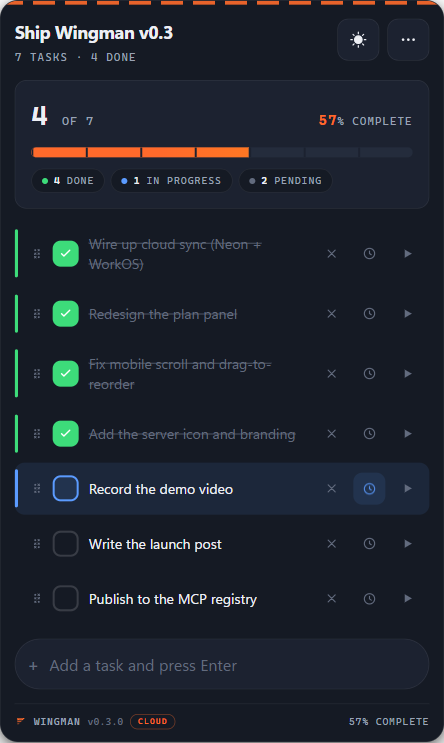
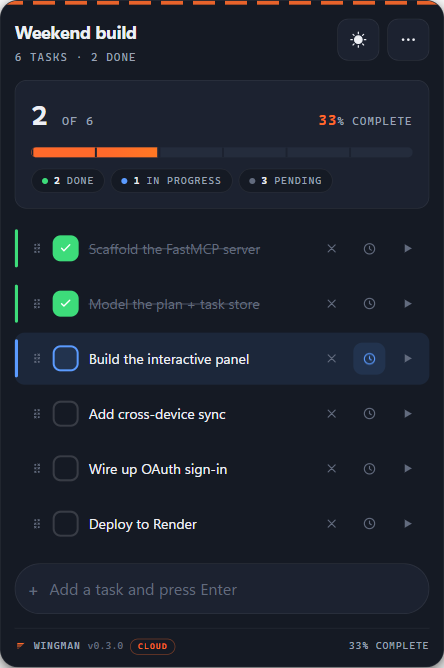
Populated plan
The flight-ops panel: a notched progress tape, a status rail on each row, checkboxes, drag handles, and run buttons. Always visible, never hover-only.
Live status
Tasks check off with an animated settle; the big percent counts up; an in-flight task pulses. State syncs via live polling across any open panels.
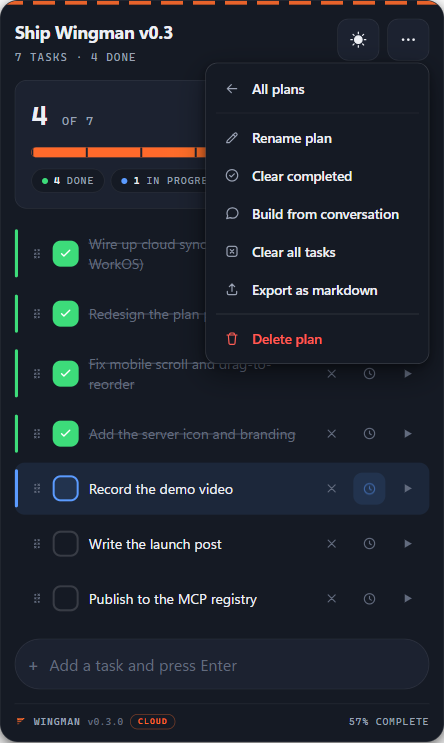
3-dot menu
Rename plan, Clear completed, Build from conversation, Clear all tasks, Export as markdown, and Delete plan - a reachable dropdown on every device.
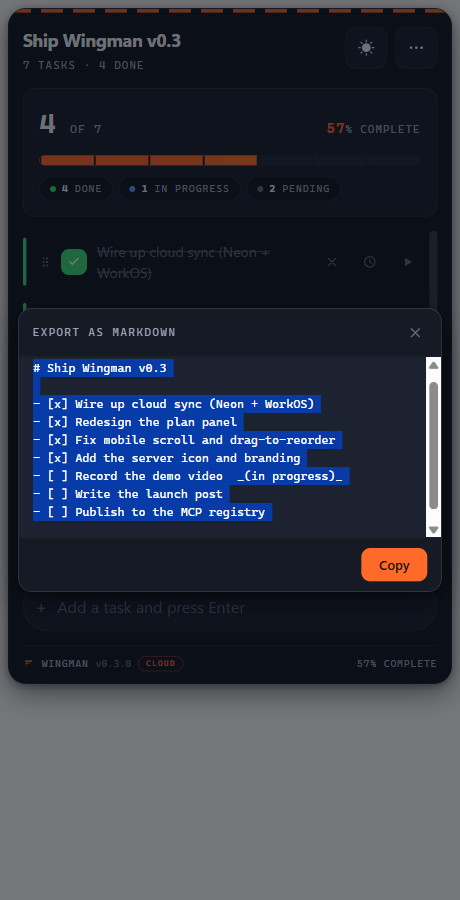
Export as markdown
Export a plan to markdown in an in-panel copy sheet - one tap to grab the whole checklist, no host warnings, no leaving the panel.
On your phone
The same panel reflows for touch: bigger checkboxes, an always-visible delete control, run and in-progress buttons on every row, and a list that grows so the page scrolls naturally.
Light or dark
Follows your theme automatically, and the sun toggle cycles auto - light - dark. The orange runway accent carries across both.
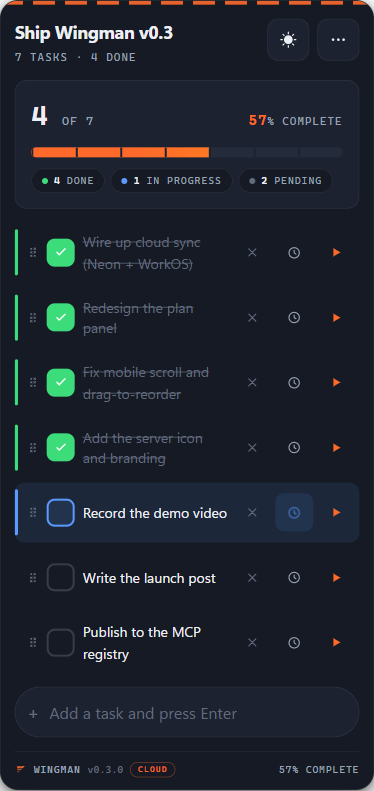
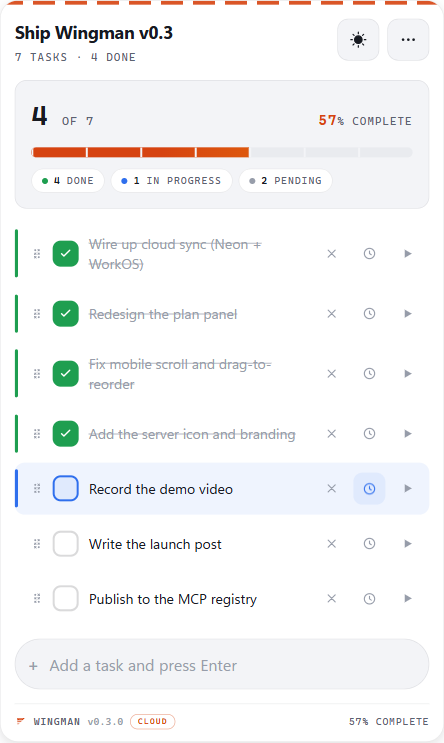
These are the live panel rendered exactly as it appears in Claude. Asset files live in
docs/assets/; the animated hero loop and 3-step connect GIF are captured from the explainer perinternal-launch/connect-walkthrough.md.
Wingman exposes 12 tools to Claude. You don't call these directly - just describe what you want and Claude picks the right one.
There are also 14 internal _ui_* tools used by the panel itself - hidden from Claude, not part of the public API.
Wingman is available as a composable skill for AI agents via skills.sh:
npx skills add adeoluwaadesina/wingman-mcp
Once installed, any MCP-compatible agent can call Wingman's plan management tools as coordination primitives across a multi-step workflow - create plans, track task state, and tick tasks on completion, all from within an orchestrated agent pipeline.
┌─────────────────────────────────────────────────────┐
│  MCP Host  (Claude Desktop / Cursor / MCPJam)        │
│                                                      │
│  ┌──────────────┐     ┌──────────────────────────┐  │
│  │  Claude LLM  │────▶│  Wingman MCP Server       │  │
│  └──────────────┘     │  (stdio transport)        │  │
│         ▲             │                            │  │
│         │             │  12 LLM-visible tools      │  │
│  sendMessage()        │  14 UI-only tools          │  │
│         │             │  ui:// resource (panel)    │  │
│  ┌──────────────┐     │  SQLite store              │  │
│  │  Wingman     │◀────│                            │  │
│  │  Panel       │     └──────────────────────────┘  │
│  │  (iframe)    │  JSON-RPC over postMessage         │
│  └──────────────┘                                    │
└─────────────────────────────────────────────────────┘
                              │
               platformdirs.user_data_dir()
                              │
                         plans.db (SQLite)
Stack: Python 3.10+, FastMCP, SQLite + platformdirs, vanilla HTML/CSS/JS, Sortable.js. No external runtime network calls anywhere.
pip install product, which stays zero-network. The forthcoming hosted Wingman Cloud service (in active development) is a separate, opt-in deployment: it stores plans in Postgres (Neon) and uses server-side analytics (Sentry, PostHog) purely to operate the service. It never logs plan or task content. Using the local install never touches any of that.connect-src 'self'). No cross-origin access... sequences, null bytes, newlines, and tabs are blocked.Streamable-HTTP transport · OAuth 2.1 resource server (WorkOS AuthKit) · multi-tenant Postgres (Neon) with per-user scoping · Render hosting · mobile + cross-device sync · content-free operator metrics. Run it yourself with wingman-cloud once the env vars in .env.example are set, or use the hosted instance above.
Server-pushed updates (MCP notifications instead of polling) · keep-warm ping · Wingman Wrapped (a year-in-review from content-free metrics) · richer status filters.
Wingman Cloud (hosted sync) · redesigned flight-ops panel · in-progress task status · in-panel markdown export · mobile-optimized layout · Wingman brand mark (panel logo, favicon, MCP server icon).
Plan picker (show_plans) · full menu actions (clear all, export, delete) · per-plan task numbering · wider plan-name support ('.:()) · smarter polling backoff · "Build from conversation" in 3-dot menu
Panel doesn't appear after code changes:
The served HTML is cached in memory for the subprocess lifetime. Restart Claude Desktop fully (quit from tray, don't just close the window) after any change to ui/static/*. Hard-refresh the host webview (Ctrl+Shift+R in MCPJam) after restart. The build timestamp in the panel footer confirms which build is live.
Tools don't appear after config change: Quit Claude Desktop fully - closing the window leaves the MCP subprocess running with the old config.
wingman --help shows an MCP protocol error:
Expected. Wingman is an MCP server, not a CLI tool. It speaks JSON-RPC over stdio - running it directly in a terminal produces a protocol handshake error. Use it via your MCP host config.
Issues, PRs, and feedback welcome. This is v0.3 - rough edges exist and are documented above.
If you hit a host-specific rendering quirk (especially on Cursor or VS Code Copilot Chat), open an issue with your host version and what you observed. Host-side MCP Apps behavior varies and real-world reports are the fastest way to track it.
MIT - © 2026 Adeolu Adesina
Built with FastMCP · Powered by MCP Apps (SEP-1865) · Published on PyPI
An MCP server that gives Claude conversations a persistent, interactive plan/to-do panel.
Ferramentas
Ainda não há lista de ferramentas. Servidores remotos recebem uma após a primeira verificação de saúde.
Perguntas frequentes
Copie nesta página a configuração stdio para Cursor, Claude Desktop, Claude Code ou VS Code. Ela usa a instalação do publicador, não um proxy do PlugMCP.
Este registro não lista nenhuma variável de ambiente obrigatória.
Wingman roda localmente via stdio.
Última verificação: 2026-10-27. An MCP server that gives Claude conversations a persistent, interactive plan/to-do panel.
