AlibabaCloud Devops MCP Server provides AI assistants with the ability to interact with the Yunxiao platform, enabling them to read work item contents in projects, automatically write code after understanding requirements, and submit code merge requests. Enterprise development teams can use it to assist with code reviews, optimize task management, reduce repetitive operations, and thus focus on more important innovation and product delivery.
Yunxiao MCP Server provides AI assistants with the ability to interact with the Yunxiao platform. It provides a set of tools that interact with Yunxiao's API, allowing AI assistants to manage Codeup repository, Project, Pipeline, Packages etc.
2026-10-27
Estrelas
178
Ferramentas
—
Disponibilidade
—
Features
alibabacloud-devops-mcp-server provides the following capabilities for AI assistants:
organization-management: Organization management tools (organization list, organization details, department information, organizational roles, member information, etc.)
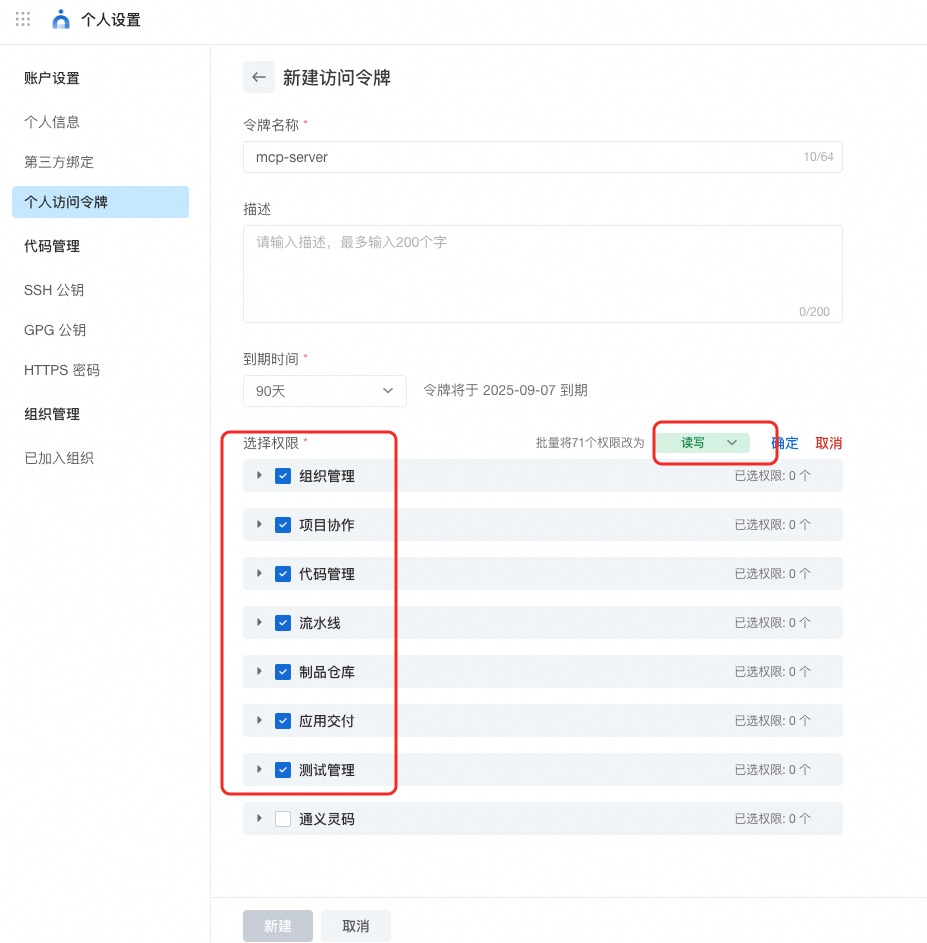
AlibabaCloud Devops Personal Access Token, click here to obtain. Grant read and write permissions to all APIs under organization management, project collaboration, code management, pipeline management, artifact repository management, application delivery and testing management.
Official Hosted MCP Service (No Install)
Yunxiao provides an officially hosted MCP endpoint — no local install or Docker needed. Just point your client at it and authenticate with your Yunxiao token.
Central: https://openapi-rdc.aliyuncs.com/ai/mcp
Region edition: your organization's region domain + /ai/mcp, e.g. https://<your-org>.devops.aliyuncs.com/ai/mcp — the same domain you use to access Yunxiao in your region.
Tip: cut context usage by requesting only the toolsets you need — ?toolsets=code-management,project-management or header X-Devops-Toolsets. See the full guide: docs/hosted-mcp-guide.zh-CN.md.
Quick Start (Self-host, Using Stdio Mode)
Stdio mode is the simplest self-hosting way, suitable for most MCP clients (like Cursor, Claude Desktop, iFlow, etc.). No Docker installation required, just run via npx.
Option 1: Direct Use via NPX (Simplest)
Add the following configuration to your MCP client configuration file:
Replace <YOUR_TOKEN> with your Yunxiao access token
The -y flag automatically confirms installation without manual confirmation
By default the tool calls the Yunxiao Central Station OpenAPI (https://openapi-rdc.aliyuncs.com); no extra configuration is required
If you are on a Region edition (organization-specific domain), set an additional environment variable YUNXIAO_API_BASE_URL to your Yunxiao instance URL, e.g. https://your-org.devops.aliyuncs.com. See the Configuring Region Edition section above for details
This method uses stdio mode, communicating with the MCP client via standard input/output
Using Docker (Optional)
Transport Modes
Mode
CLI Flag
Env Variable
Endpoints
Stdio
(default)
—
stdin/stdout
SSE
--sse
MCP_TRANSPORT=sse
/sse + /messages
Streamable HTTP
--streamable-http
MCP_TRANSPORT=streamable-http
/mcp
Both
--sse --streamable-http
MCP_TRANSPORT=both
/sse + /mcp
Streamable HTTP is the MCP specification's recommended remote transport. SSE is legacy; use both during migration.
Or request header: x-yunxiao-api-base-url: https://your-org.devops.aliyuncs.com
Docker Compose
cp .env.example .env   # set YUNXIAO_ACCESS_TOKEN
docker compose up -d
Client URL: http://localhost:3000/sse (SSE) or http://localhost:3000/mcp (Streamable HTTP)
Toolsets
The server now supports toolsets, allowing you to enable only the tools you need. This can reduce the number of tools presented to the AI assistant and improve performance.
Available toolsets:
organization-management: Organization management tools (organization list, organization details, department information, organizational roles, member information, etc.)
HTTP requests to a Region OpenAPI forward the ingress-provided X-Real-IP as a
single validated address in X-Forwarded-For and X-Real-IP, including token
checks and attachment uploads. The address is request-scoped, not stored in an
MCP session. Missing or invalid X-Real-IP falls back to the socket peer address;
MCP does not select an address from an incoming X-Forwarded-For chain. Stdio and
central OpenAPI requests do not add these headers.
The hosted deployment relies on ingress to overwrite X-Real-IP with the actual
client address and restrict direct access to MCP. No proxy address list or
Express trust proxy configuration is needed. Self-hosted HTTP deployments using
this feature must enforce the same ingress contract; the header itself does not
authenticate an address. A remote AI provider's egress IP may be the client
observed by ingress, rather than the human user's workstation IP.
A
Alibabacloud Devops
aliyun·178 estrelas·
Yunxiao MCP Server provides AI assistants with the ability to interact with the Yunxiao platform. It provides a set of tools that interact with Yunxiao's API, allowing AI assistants to manage Codeup r
Yunxiao MCP Server provides AI assistants with the ability to interact with the Yunxiao platform. It provides a set of tools that interact with Yunxiao's API, allowing AI assistants to manage Codeup repository, Project, Pipeline, Packages etc.
Ferramentas
Ferramentas
Ainda não há lista de ferramentas. Servidores remotos recebem uma após a primeira verificação de saúde.
Perguntas frequentes
Perguntas
Como instalo Alibabacloud Devops?
Copie nesta página a configuração stdio para Cursor, Claude Desktop, Claude Code ou VS Code. Ela usa a instalação do publicador, não um proxy do PlugMCP.
Este registro não lista nenhuma variável de ambiente obrigatória.
Qual transporte Alibabacloud Devops usa?
Alibabacloud Devops roda localmente via stdio.
Quando Alibabacloud Devops foi verificado pela última vez?
Última verificação: 2026-10-27. Yunxiao MCP Server provides AI assistants with the ability to interact with the Yunxiao platform. It provides a set of tools that interact with Yunxiao's API, allowing AI assistants to manage Codeup repository, Project, Pipeline, Packages etc.