Your organization's AI workspace, gateway and agent platform.
Put AI to work across your organization with one self-hosted platform. AIplane
combines the employee workspace, multi-provider model gateway and business
agents—and adds browser control through its dedicated extension. Administrators
connect company systems and define who can access models, tools and workflows.
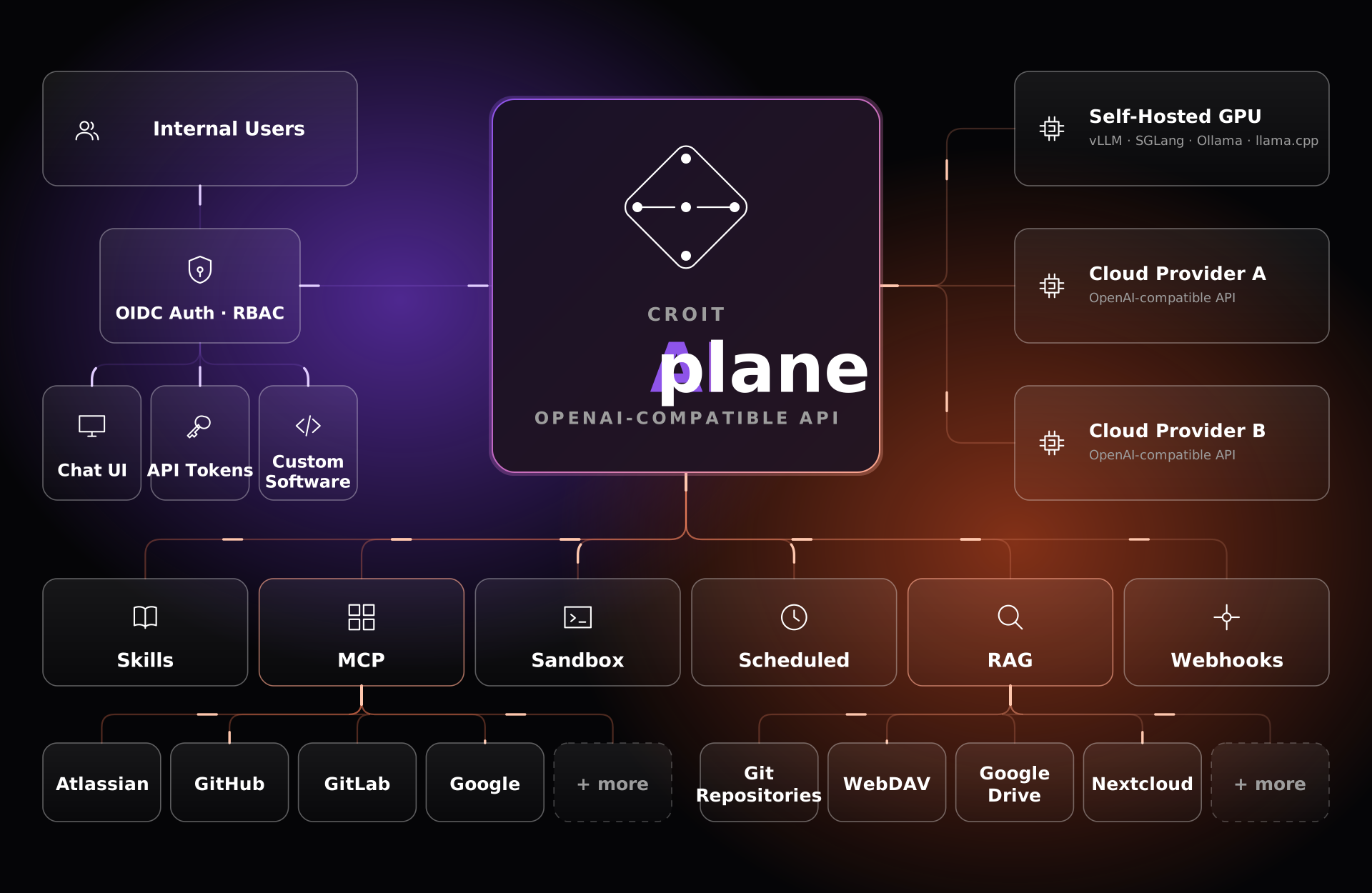
croit AIplane — one plane for all your AI. Self-hosted AI infrastructure connecting applications and users with models, agents, tools and enterprise data: an OpenAI-compatible LLM gateway, server-side agent execution, MCP, RAG, memory, sandbox, identity, RBAC and quotas. Routes across vLLM, SGLang, Ollama and hosted APIs.
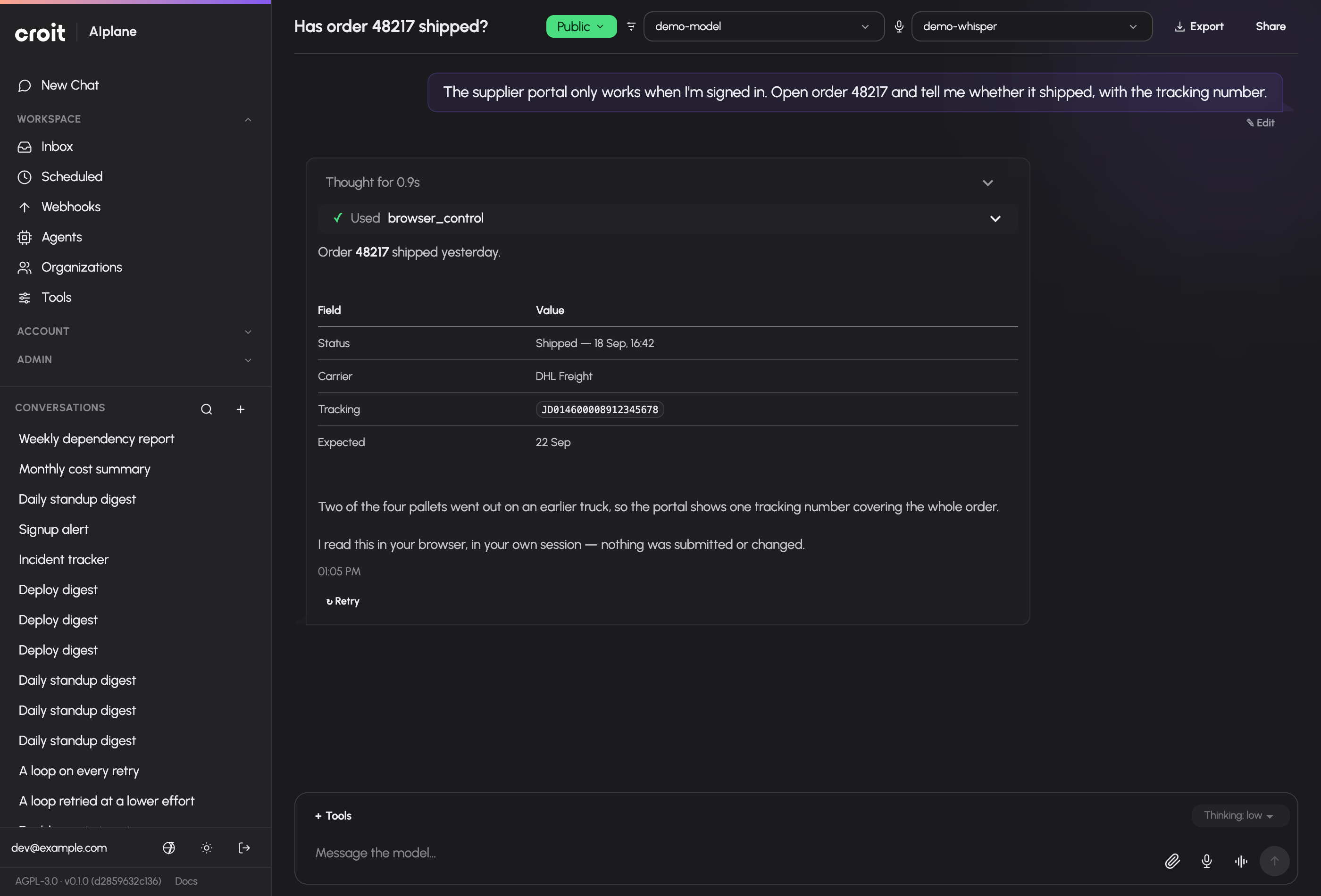
One workspace for models, files and approved tools. Shown with synthetic demo data.
Key features
A workspace your team can use every day
💬 Persistent AI conversations. Choose an allowed model, follow streaming
replies, continue or redirect work, share conversations, fork them, and export
to Markdown or PDF. Explore chat.
📎 Files and versioned documents. Bring files into a conversation, create
editable canvas documents, review revisions, restore earlier versions, and
download generated assets. Explore files and canvas.
🎙️ Voice and image workflows. Dictate messages, use spoken conversations,
generate images and edit them when the installation has the required models.
🧠 Personal memory and reusable skills. Keep preferences and project
context available across conversations; add personal skills for repeatable
instructions. Explore memory · Explore skills.
A gateway for your applications and models
🔀 One model gateway across providers. Connect hosted and self-hosted
backends, organize models into pools, and choose how requests are distributed.
Connect models.
🩺 Keep requests moving when a replica fails. AIplane checks backend health,
balances requests across available replicas and retries eligible failures on
another replica before any model output reaches the client.
🎯 Aliases and automatic routing. Give applications stable model names and
route requests among eligible models by quality, balance or cost.
Configure automatic routing.
🔌 Familiar APIs for existing clients. Connect OpenAI-compatible chat,
embeddings, image and audio endpoints, or use the Anthropic Messages API;
streaming is available where supported.
Use the API.
🧰 Governed tools for applications as well as people. Where supported,
API clients can use server-side tools granted to their token and identity;
AIplane runs approved tools in the gateway and returns the result to the model.
Connect applications.
📈 Live health and load awareness. Inspect upstream health and in-flight
requests; AIplane selects among healthy backends using the configured pool
strategy.
Tools and company knowledge, built into the workflow
🌐 Browser control in the user's browser. The dedicated AIplane extension
lets an assistant navigate, read, click, type and capture pages in a browser
paired with the conversation. Set up browser control.
🔎 Web search and page retrieval. Find current information with configured
search providers, then retrieve readable content from permitted web pages.
📚 Search company knowledge. Index and retrieve approved material from
configured sources such as Git, WebDAV and Google Drive.
Set up knowledge collections.
🧩 Connect tools through MCP and skills. Make approved external services
and reusable instructions available to the people and agents who need them.
Configure integrations.
Agents that can act—and know when to ask
🤖 Build agents around real processes. Define models, instructions,
knowledge, tools, identity checks, state and routes in the agent builder.
Create an agent.
🧪 Test before publishing. Run repeatable test cases against a draft or a
published version, inspect the results and optionally require a passing suite
before publication. Test and publish.
🌍 Publish agents where people need them. Serve an agent in a website
widget or expose it through the A2A interface.
Publish channels.
🤝 Keep people in the loop. Agents and tools can request approval, collect
secure input or hand a task to a person; authorized colleagues respond in the
shared inbox.
⏱️ Automate recurring and event-driven work. Schedule prompts or trigger
runs with webhooks as a personal or organization Dot, then inspect the private
conversation and run history.
Explore schedules, webhooks and inbox.
Controls for administrators
🛡️ Identity and group-based permissions. Sign in through OIDC and grant
access to models, tools, skills and agents by user group.
Manage access.
🔑 Scoped tokens and usage limits. Issue revocable API tokens, restrict
model and tool access, set request, token or cost quotas, and review usage.
⚖️ Compliance-aware model controls. Declare GDPR and NDA coverage for
model pools and configure a content guard to monitor, confirm or deny requests
that target a pool without the declared coverage.
Review model controls · Configure the content guard.
📊 Agent insights and activity history. Inspect run analytics and export
agent activity records for review.
Observe agent runs.
🤖 Personal Dot capacity. Set the active personal-Dot limit per user in
Administration → Settings → Access; the default is four.
Ready to deploy and operate
🐳 Deploy on infrastructure you operate. Choose Docker, Compose,
Podman/systemd Quadlet or Kubernetes with Helm.
Compare deployment options.
🌐 Use AIplane in six languages. The interface ships in English, German,
French, Spanish, Russian and Chinese.
📖 Find the right docs in every installation. Each build includes its
version-matched manual, search, screenshots and Markdown exports for LLMs.
See the docs formats.
People chat in the workspace, applications call the gateway, and agents use
configured tools and knowledge—with access controlled by the installation.
Optional services and capabilities depend on configuration, provider support and
grants. The manual explains prerequisites and controls for each
feature.
AIplane needs an OpenID Connect identity provider and a reachable,
OpenAI-compatible model service. It does not include user-password sign-in or a
model server. Start the container with a persistent data volume and a session
key:
Open http://localhost:8080 on the Docker host and follow the setup screen.
Register its /auth/callback address with your identity provider, sign in, and
connect a model backend under Models → Upstreams. Then open Chat, choose a
model and send a message.
Keep the data volume and session key across container replacements. The key
also derives the default encryption key for stored credentials, so keep it with
your backups. For remote access, put AIplane behind HTTPS. See the
complete installation guide and
deployment options for production setup,
optional services and recovery.
Connect your applications
Use the /v1 API to connect existing software. AIplane supports OpenAI chat
completions and other documented model endpoints, plus the Anthropic Messages
format. The available endpoints depend on configured providers and your access.
Create an API token in Settings → API tokens (/settings/tokens), then use
the model ID or alias exposed by your installation:
Applications can also use granted server-side tools where the endpoint supports
them. User and token restrictions still apply. See the
API reference for supported endpoints and limits.
Documentation for every installation
The complete manual is available inside each packaged installation at /docs/,
including before first login. It includes local search, screenshots, and the
version and commit of the running build. The same Markdown pages are published
as the documentation website and as formats
suitable for language models:
/docs/llms.txt — an index of the manual.
/docs/llms-full.txt — the complete manual in Markdown.
/docs/markdown/ — individual Markdown pages and their image assets.
/healthz and /readyz serve liveness and setup readiness. A Prometheus
scrape endpoint, GET /metrics, is off by default: switch it on with a scrape
token, an allowed IP list or both under Administration → Settings → Access.
Behind a reverse proxy the IP list needs AIPLANE_TRUSTED_PROXIES set to the
proxy. See monitoring.
Personal Dot lifecycle management and directed communication consent changes
require can_manage_dots, enabled through
Administration → Access → Groups. Admins hold this permission; fresh groups
default to disabled. It is independent of agent management and tool grants.
The active count defaults to four per user and four per organization, configured
independently by dots.max_active_per_user and
dots.max_active_per_organization under
Administration → Settings → Access. Idle active Dots count toward their
owner’s limit; deactivated Dots do not. Organization member writers can use
private saved-draft or published test chat with the Dot's own principal grants and explicitly
selected own OAuth account. Their memory reads include the Dot's own notes
and shared organization knowledge; writes from the Dot stay in its own scope.
Published private conversations, schedules and event-driven webhooks retain
their selected version and use the Dot's own identity. Webhook callers receive
only an opaque conversation ID; history and decisions require current member
Write. External organization agent channels remain unavailable; see
Organization Dots.
Optional sandbox execution uses the private sandbox runner.
It confirms container absence before acknowledging release and removing
scratch data, retries failed teardown, and refuses startup if stale labelled
containers cannot be cleared. Personal Dots retain files in /workspace when
the host runner verifies local rootful Linux runsc isolation and the existing
SANDBOX_WORK_ROOT storage with two actual containers. Unsupported or failed
verification reports persistent storage unavailable; ordinary scratch execution
keeps its existing behavior. Back up the runner volume, including retirement
tombstones, together with the gateway database. Browser login profiles remain
separate planned work. See persistent workspace deployment and recovery.
This builds the release binary and the web UI and manual. The frontend/manual
artifact is target/frontend/build/; ship it alongside the binary and set
AIPLANE_STATIC_DIR to its installed location. The runtime image copies this
artifact and does not need Python or Node to serve the application.
For development, use mise run dev for the web UI and gateway, or mise run dev-ui for the isolated browser fixture, including the actual cron worker
against mock model backends and an in-memory database. See the
developer workflow.
Contributing and support
Report reproducible problems through GitHub Issues.
Include the build version, steps to reproduce, expected behaviour and a
redacted error. Keep credentials and private content out of reports. Before
changing behaviour, read the testing strategy.
License
GNU Affero General Public License v3.0 only. See LICENSE.
A
Aiplane
croit·29 estrelas·
croit AIplane — one plane for all your AI. Self-hosted AI infrastructure connecting applications and users with models, agents, tools and enterprise data: an OpenAI-compatible LLM gateway, server-side
croit AIplane — one plane for all your AI. Self-hosted AI infrastructure connecting applications and users with models, agents, tools and enterprise data: an OpenAI-compatible LLM gateway, server-side agent execution, MCP, RAG, memory, sandbox, identity, RBAC and quotas. Routes across vLLM, SGLang, Ollama and hosted APIs.
Ferramentas
Ferramentas
Ainda não há lista de ferramentas. Servidores remotos recebem uma após a primeira verificação de saúde.
Perguntas frequentes
Perguntas
Como instalo Aiplane?
Copie nesta página a configuração stdio para Cursor, Claude Desktop, Claude Code ou VS Code. Ela usa a instalação do publicador, não um proxy do PlugMCP.
Este registro não lista nenhuma variável de ambiente obrigatória.
Qual transporte Aiplane usa?
Aiplane roda localmente via stdio.
Quando Aiplane foi verificado pela última vez?
Última verificação: 2026-10-28. croit AIplane — one plane for all your AI. Self-hosted AI infrastructure connecting applications and users with models, agents, tools and enterprise data: an OpenAI-compatible LLM gateway, server-side agent execution, MCP, RAG, memory, sandbox, identity, RBAC and quotas. Routes across vLLM, SGLang, Ollama and hosted APIs.