swagger-mcp
Overview
swagger-mcp is a tool that reads a Swagger 2.0 or OpenAPI 3.0 specification and dynamically generates MCP tools at runtime — one tool per API endpoint. These tools can be used by any MCP client for LLM-driven API interaction.
Potencialize seu agente
Instalação do publicador. Não é um endpoint do PlugMCP.
Host a copy with our keys and logs.
Ainda não há uma versão empacotada no registro. Siga o README do repositório.
URL remota ou um comando na sua máquina? Como as duas instalações diferem
Rodar no PlugMCP
A new server you create. It is not this listing's official endpoint. Use the publisher install when you want their URL and their credentials.
AbrirDo publicador
swagger-mcp is a tool that reads a Swagger 2.0 or OpenAPI 3.0 specification and dynamically generates MCP tools at runtime — one tool per API endpoint. These tools can be used by any MCP client for LLM-driven API interaction.
mcp server which will dynamically define tools based on swagger
Supported spec formats:
swagger: "2.0") — path/query/header parameters and in: body request bodiesopenapi: "3.0.x") — path/query/header parameters and requestBody with inline or $ref schemasRequired and optional fields are read from the schema's required array and honoured in the generated tool definitions.
If you find this project valuable, please support me on LinkedIn by:
Your support on LinkedIn will help me reach more people and improve the project!
To use swagger-mcp, ensure you have the following dependencies:
go install github.com/danishjsheikh/swagger-mcp@latest
swagger-mcp --specUrl=https://your_swagger_api_docs.json
swagger-mcp --specUrl=https://your_swagger_api_docs.json --sse --sseAddr=:8080
swagger-mcp --specUrl=https://your_swagger_api_docs.json --http --httpAddr=:8080
Xquik publishes a remote OpenAPI document for its X/Twitter automation API.
Because it uses an API key header, pass the key with --security=apiKey and
--apiKeyAuth:
export XQUIK_API_KEY="your-xquik-api-key"

swagger-mcp \
  --specUrl=https://xquik.com/openapi.json \
  --baseUrl=https://xquik.com \
  --security=apiKey \
  --apiKeyAuth=header:x-api-key=$XQUIK_API_KEY
The same arguments can be used in an MCP client config:
{
  "mcpServers": {
    "xquik": {
      "command": "swagger-mcp",
      "args": [
        "--specUrl=https://xquik.com/openapi.json",
        "--baseUrl=https://xquik.com",
        "--security=apiKey",
        "--apiKeyAuth=header:x-api-key=<XQUIK_API_KEY>"
      ]
    }
  }
}
To integrate with mcphost, include the following configuration in .mcp.json:
{
    "mcpServers": {
        "swagger_loader": {
            "command": "swagger-mcp",
            "args": ["--specUrl=<swagger/doc.json_url>"]
        }
    }
}
With bearer auth and path filtering:
{
    "mcpServers": {
        "swagger_loader": {
            "command": "swagger-mcp",
            "args": [
                "--specUrl=https://api.example.com/openapi.json",
                "--security=bearer",
                "--bearerAuth=your-token-here",
                "--includeMethods=GET,POST"
            ]
        }
    }
}
Both Swagger 2.0 and OpenAPI 3.0 request bodies are supported:
parameters with in: body and a $ref or inline schema under definitionsrequestBody.content.<media-type>.schema — resolved from components/schemas if a $ref, or used inline if an object schemaFields listed in the schema's required array are marked as required in the MCP tool. All other fields are optional and are omitted from the request if not provided.
Some Backend:
go install github.com/danishjsheikh/go-backend-demo@latest
go-backend-demo
Ollama
ollama run llama3.2
MCP Client
go install github.com/mark3labs/mcphost@latest
mcphost -m ollama:llama3.2 --config <.mcp.json_file_path>
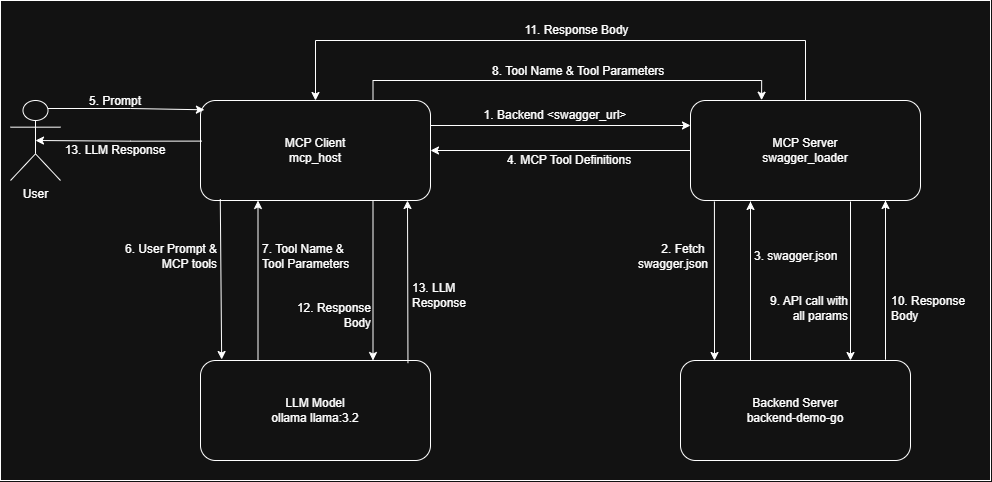
I am working on improving tool definitions to enhance:
✅ Better error handling for more accurate responses
✅ LLM behavior control to ensure it relies only on API responses and does not use its own memory
✅ Preventing hallucinations and random data generation by enforcing strict data retrieval from APIs
If you have insights or suggestions on improving these aspects, please contribute by:
Your input will be invaluable in making this tool more reliable and effective! 🚀
mcp server which will dynamically define tools based on swagger
Ferramentas
Ainda não há lista de ferramentas. Servidores remotos recebem uma após a primeira verificação de saúde.
Perguntas frequentes
Copie nesta página a configuração stdio para Cursor, Claude Desktop, Claude Code ou VS Code. Ela usa a instalação do publicador, não um proxy do PlugMCP.
Este registro não lista nenhuma variável de ambiente obrigatória.
Swagger roda localmente via stdio.
Última verificação: 2026-11-05. mcp server which will dynamically define tools based on swagger
