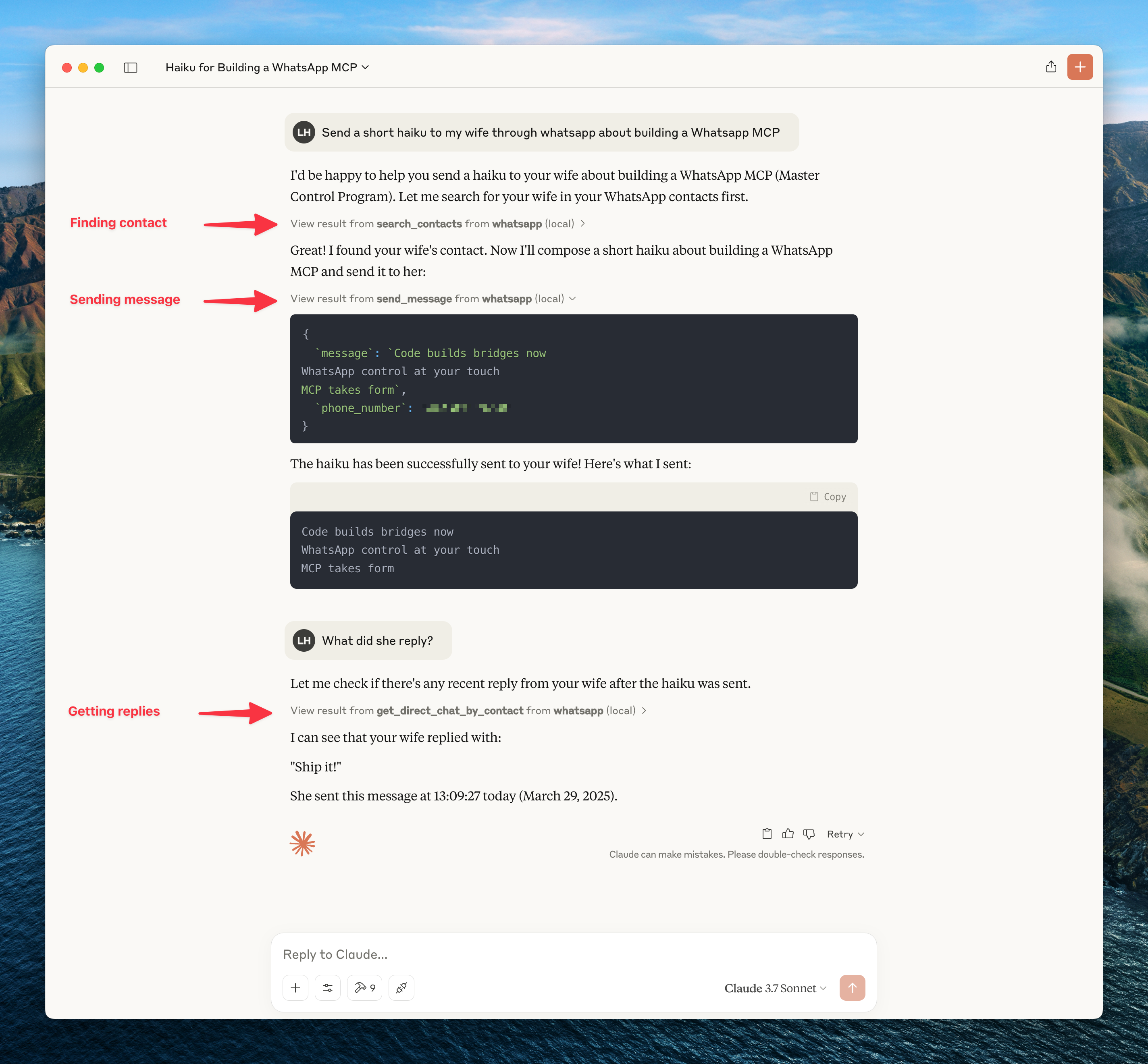
An extended Model Context Protocol (MCP) server for WhatsApp with a toolset-gated, agent-facing surface for messaging, search, media, group management, webhooks, presence, and more.
Built on AdamRussak/whatsapp-mcp (webhooks, containers) which forked (original). Extended with reactions, message editing, polls, group management, presence, newsletters, and more.
To restrict outgoing message delivery to a specified set of allowed contacts or groups (useful for dev environments or enterprise privacy gates), set WHATSAPP_ALLOWLIST_JIDS:
# Allow sending only to specific phone numbers or group JIDs (comma-separated)
WHATSAPP_ALLOWLIST_JIDS=1234567890,[email protected],[email protected]
MCP Tools
Version 0.4.0 exposes the full curated MCP surface by default for compatibility. Users who want a leaner agent context can opt into smaller toolsets.
Default toolsets:
WHATSAPP_MCP_TOOLSETS=all
Lean recommended toolsets:
WHATSAPP_MCP_TOOLSETS=core,send,media
Toolsets:
Toolset
Default
Tools
core
Yes
Search/read tools, contact context, group info, profile picture
send
Yes
send_message, send_reaction, create_poll
media
Yes
send_file, send_audio_message, download_media
history
No
request_history
contacts_write
No
manage_nickname
message_admin
No
edit_message, delete_message, mark_read
groups
No
manage_group
presence
No
set_presence, subscribe_presence
account_admin
No
get_blocklist, manage_blocklist
newsletter
No
manage_newsletter
You can also expose individual tools with WHATSAPP_MCP_TOOLS=manage_group,delete_message.
Breaking change in 0.2.0: older narrow tools are no longer exposed to the agent. Use the merged replacements below.
Send text message (supports optional quoted_message_id to reply/quote)
send_file
Send image/video/document
send_audio_message
Send voice message
download_media
Download received media
send_reaction
React to message with emoji
edit_message
Edit sent message
delete_message
Delete/revoke message
mark_read
Mark messages as read (blue ticks), or as played for voice messages (receipt_type="played")
Chats & Messages
Tool
Description
list_chats
List all chats
get_chat
Get chat by JID
list_messages
Search messages with filters
get_message_context
Get messages around a specific message
request_history
Request older message history
Contacts
Tool
Description
search_contacts
Search by name/phone
list_all_contacts
List all contacts
get_contact_context
Full contact info, related chats, and last interaction
manage_nickname
Set/get/remove/list custom nicknames
Groups
Tool
Description
get_group_info
Group metadata & participants
manage_group
Create/update/leave groups and manage members/admins
create_poll
Create poll in chat
Presence & Profile
Tool
Description
set_presence
Set online/offline status
subscribe_presence
Subscribe to contact's presence
get_profile_picture
Get profile picture URL
get_blocklist
List blocked users
manage_blocklist
Block/unblock users
Newsletters (Channels)
Tool
Description
manage_newsletter
Follow, unfollow, or create channels
Design Philosophy: Lean Transport Primitives
whatsapp-mcp-extended is engineered according to the Unix Philosophy:
Do One Thing Well: Be a rock-solid, production-grade transport layer to WhatsApp (socket lifecycle, messaging CRUD, media downloads, reactions, group administration, webhooks, and safety allowlists).
Composable Primitives: High-level AI features (voice-to-text transcription, vector database semantic recall, LLM summarizers) are kept modular. whatsapp-mcp-extended returns clean, raw media file paths (download_media) and message arrays (list_messages) so AI agents (Claude Code, Cursor, OpenCode, Codex) can chain them with specialized sidecars or plugins.
🔌 Plugins & Extensions
Reference plugins and recipes are available in the plugins/ directory:
plugins/transcribe_voice_notes.py: Local voice note transcription using mlx-whisper or Whisper.
plugins/semantic_recall.py: Multilingual semantic search over message history using sentence-transformers.
All-in-One Fork: Users looking for a pre-packaged ML bundle can check out @simonseifert's fork.
Response data prioritizes complete context with minimal interpretation. See METADATA_PHILOSOPHY.md for:
Why we include raw data instead of pre-computed signals
Design rules: raw facts, countable metrics, exclude nulls
TL;DR: Get all contact info in one response instead of repeated queries. LLM infers tone, urgency, relationships from raw data + metrics.
Webhook System
Real-time HTTP webhooks for incoming messages with:
Triggers: all, chat_jid, sender, keyword, media_type
Matching: exact, contains, regex
Security: HMAC-SHA256 signatures
Retry: Exponential backoff
Access the web UI at http://localhost:8090
Development
Manual Setup
# Bridge (Go 1.25+)
cd whatsapp-bridge && go run main.go

# MCP Server (Python 3.11+)
cd whatsapp-mcp-server && uv sync && uv run python main.py

# Web UI
cd whatsapp-web-ui && npm install && npm run dev
Pre-build Checks
cd whatsapp-mcp-server
uv run python check.py  # Catches errors before docker build
Updating whatsmeow
When you see Client outdated (405) errors:
cd whatsapp-bridge
go get -u go.mau.fi/whatsmeow@latest
go mod tidy
docker-compose build whatsapp-bridge
docker-compose up -d whatsapp-bridge
Ports
Service
Port
Description
Bridge API
8080 (→8180)
REST API
MCP Server
8081
Streamable HTTP transport
Web UI
8090
Chat, contacts, and webhook management
Configuration
Environment variables for the bridge (set in .env or docker-compose.yaml):
Variable
Default
Description
API_KEY
(required)
Bearer token for all authenticated API calls
PRESENCE_PING_ENABLED
true
Set false to stop broadcasting "online" to contacts
PRESENCE_PING_INTERVAL
20m
How often to ping presence. Accepts Go duration strings (20m, 1h). Keep ≥20m to avoid bot fingerprinting
HISTORY_SYNC_DAYS_LIMIT
365
Days of history to sync on first link
HISTORY_SYNC_SIZE_MB
5000
Max history sync size
STORAGE_QUOTA_MB
10240
Device storage quota
API_PORT
8080
Bridge HTTP port (internal)
Quick Commands
After running setup.ps1 once, use the Makefile for day-to-day operations:
make status          # check connection state (connected, needs_pairing, jid)
make pair PHONE=+60123456789   # pair via 8-digit phone code — no QR scan needed
make pairing-status  # check pairing code progress
make pair-reset      # reset pairing state if previous attempt timed out
make reconnect       # force reconnect (no re-pairing)
make logs            # tail bridge logs
make sync-venv       # re-sync Python venv (fix missing module errors)
make open-ui         # open web UI in browser (QR scan, webhooks, contacts)
Session Reliability
Session lifetime rules (WhatsApp-enforced, cannot be changed):
Primary phone must connect to WhatsApp at least every 14 days
The bridge companion device must be active at least every 30 days
WebSocket idle disconnects after ~30 min (auto-reconnects, no re-pairing needed)
What causes permanent logout (requires re-scanning QR):
Phone offline >14 days
Manual unlink from phone (Settings → Linked Devices)
Account risk: This is a third-party bridge using an unofficial API. Use a dedicated non-personal number. WhatsApp has been aggressively detecting and banning automation tools since 2025. For business-critical use, the WhatsApp Business API is the only compliant path.
If the bridge goes unhealthy (needs re-pairing):
make status          # check: needs_pairing=true means re-pair required
make pair PHONE=+60123456789   # preferred: 8-digit code, no QR scan
# or: open http://127.0.0.1:8090 and scan QR
You can also configure a webhook to receive logged_out events so you're alerted immediately when the session is revoked.
Troubleshooting
Bridge needs re-pairing after restart
The bridge stores credentials in store/whatsapp.db. If that file exists but the bridge still shows QR, WhatsApp revoked the session server-side (check your phone → Settings → Linked Devices). Re-pair using make pair PHONE=+60... or open http://127.0.0.1:8090.
Messages Not Delivering
If API returns success but messages show single checkmark:
docker-compose restart whatsapp-bridge
docker-compose logs --tail=10 whatsapp-bridge
# Should see: "✓ Connected to WhatsApp!"
QR Code Issues
# Option 1: phone number code (no QR scan needed)
make pair PHONE=+60123456789

# Option 2: scan QR via web UI
open http://127.0.0.1:8090

# Option 3: terminal QR
docker-compose logs -f whatsapp-bridge
MCP server fails to start (missing module)
make sync-venv # re-runs uv sync in whatsapp-mcp-server/
Check bridge health
curl http://127.0.0.1:8180/api/health
# connected: true/false
# needs_pairing: true means QR/code scan required (not just a reconnect)
# disconnected_for: how long it's been offline
Ainda não há lista de ferramentas. Servidores remotos recebem uma após a primeira verificação de saúde.
Perguntas frequentes
Perguntas
Como instalo Whatsapp MCP Extended?
Copie nesta página a configuração stdio para Cursor, Claude Desktop, Claude Code ou VS Code. Ela usa a instalação do publicador, não um proxy do PlugMCP.
Whatsapp MCP Extended precisa de uma chave de API?
Este registro não lista nenhuma variável de ambiente obrigatória.
Qual transporte Whatsapp MCP Extended usa?
Whatsapp MCP Extended roda localmente via stdio.
Quando Whatsapp MCP Extended foi verificado pela última vez?