Potencialize seu agente
O comando do próprio publicador. Não é um endpoint do PlugMCP.
Host a copy with our keys and logs.
npx -y @fndchagas/[email protected]O Claude Code não tem link de instalação para um comando local. Copie o comando abaixo e execute-o em um terminal.
COOLIFY_BASE_URL=<value> COOLIFY_TOKEN=<secret> COOLIFY_STRICT_VERSION=<value> COOLIFY_ALLOW_WRITE=<value> COOLIFY_ALLOW_UNSAFE_LOGS=<value> COOLIFY_OPENAPI_REF=<value> claude mcp add frndchagas-coolify-mcp -- npx -y @fndchagas/coolify-mcp@2.3.1Execute em um terminal.
{ "mcpServers": { "frndchagas-coolify-mcp": { "command": "npx", "args": [ "-y", "@fndchagas/[email protected]" ], "env": { "COOLIFY_BASE_URL": "<value>", "COOLIFY_TOKEN": "<secret>", "COOLIFY_STRICT_VERSION": "<value>", "COOLIFY_ALLOW_WRITE": "<value>", "COOLIFY_ALLOW_UNSAFE_LOGS": "<value>", "COOLIFY_OPENAPI_REF": "<value>" } } }}claude_desktop_config.json
URL remota ou um comando na sua máquina? Como as duas instalações diferem
Rodar no PlugMCP
A new server you create. It is not this listing's official endpoint. Use the publisher install when you want their URL and their credentials.
AbrirMCP server for Coolify API - enables full deployment workflows from zero to production.
Targets the Coolify v4.3.10 API. Types and schemas are generated directly from Coolify's official OpenAPI spec, so tool inputs always match what the API actually accepts.
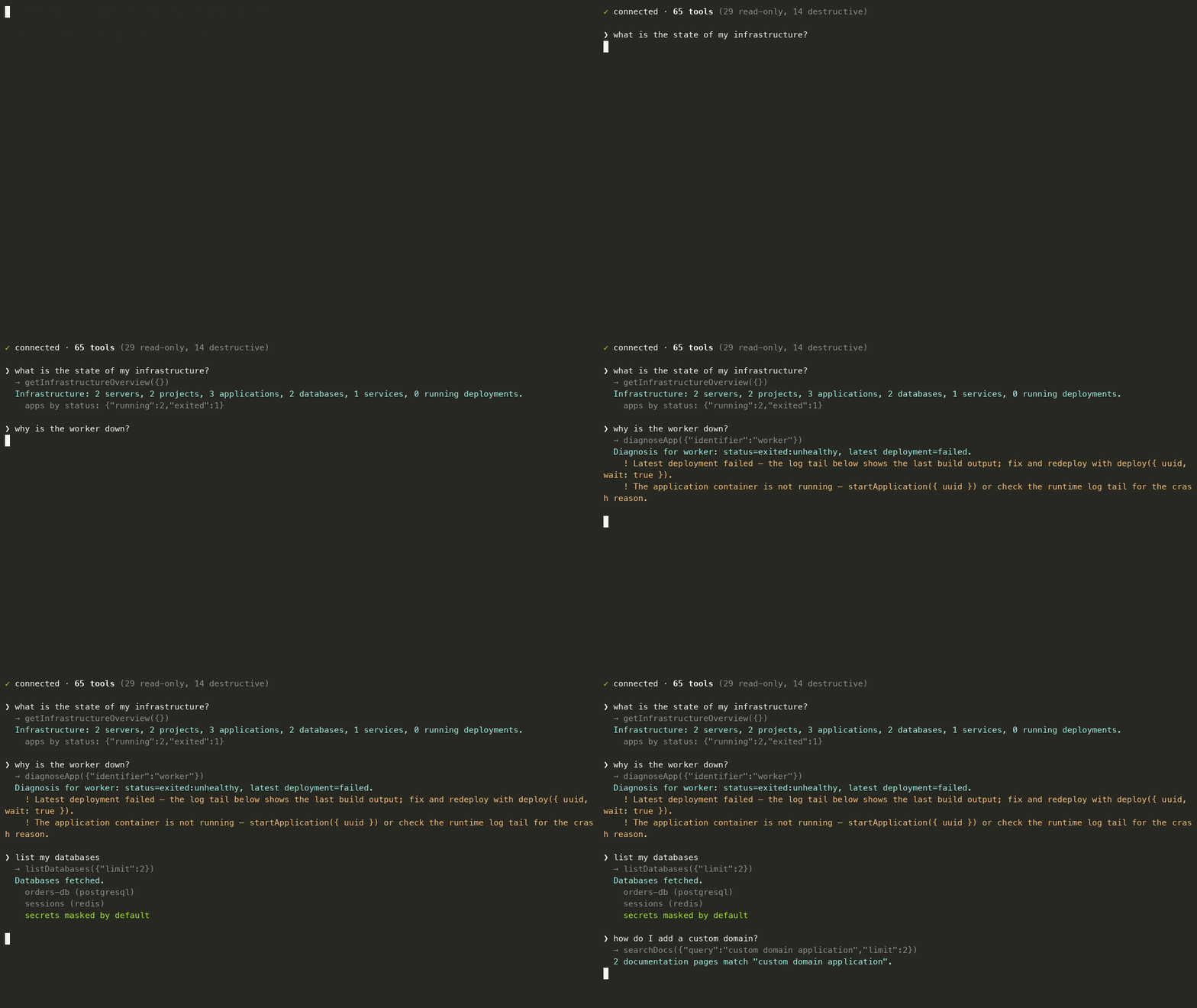
createApplication tool covers public git, GitHub App, Deploy Key, Dockerfile, and Docker Image sources — plus Docker Compose deployments via createService (since Coolify v4.1, compose deployments are services)diagnoseApp finds an app by UUID, name, or domain and aggregates status, recent deployments, failure log tails, runtime logs, and suggested next actionssearchDocs runs full-text search across the official Coolify documentation from a bundled local index — no network neededreadOnlyHint/destructiveHint) so clients can auto-approve reads and gate destructive callsClaude Desktop, one-click: download coolify-mcp.mcpb from the latest release and drag it into Settings → Extensions. You'll be prompted for your Coolify URL and token — no Node install, no JSON editing.
Via npm:
npm install -g @fndchagas/coolify-mcp
# or
npx -y @fndchagas/coolify-mcp
claude mcp add coolify \
  --env COOLIFY_BASE_URL="https://coolify.example.com/api/v1" \
  --env COOLIFY_TOKEN="<token>" \
  -- npx -y @fndchagas/coolify-mcp
codex mcp add coolify \
  --env COOLIFY_BASE_URL="https://coolify.example.com/api/v1" \
  --env COOLIFY_TOKEN="<token>" \
  -- npx -y @fndchagas/coolify-mcp
Or edit ~/.codex/config.toml:
[mcp_servers.coolify]
command = "npx"
args = ["-y", "@fndchagas/coolify-mcp"]
env = { COOLIFY_BASE_URL = "https://coolify.example.com/api/v1", COOLIFY_TOKEN = "<token>" }
~/.mcp.json){
"mcpServers": {
"coolify": {
"type": "stdio",
"command": "npx",
"args": ["-y", "@fndchagas/coolify-mcp"],
"env": {
"COOLIFY_BASE_URL": "https://coolify.example.com/api/v1",
"COOLIFY_TOKEN": "<token>",
"COOLIFY_ALLOW_WRITE": "true"
}
}
}
}
With this MCP, you can deploy an application from scratch:
1. listProjects / createProject       → Get or create a project
2. listEnvironments / createEnvironment → Get or create an environment
3. listServers / createServer         → Get or create a server
4. listPrivateKeys / createPrivateKey → Get or create SSH keys (if needed)
5. createApplication (type: public)   → Create the application
6. applicationEnvs (action: upsert)   → Configure environment variables
7. deploy                             → Trigger deployment
Docker Compose deployments are created with
createServicepassingdocker_compose_raw— since Coolify v4.1 they are services, not applications.
Database and service env vars have their own tools:
databaseEnvsandserviceEnvs.
Disable all write operations:
COOLIFY_ALLOW_WRITE=false
showSecrets: true only when necessaryThe HTTP transport binds to 127.0.0.1 by default. To expose it beyond loopback, set MCP_HTTP_TOKEN — every request to /mcp must then carry Authorization: Bearer <token> (checked in constant time) — and the bind switches to 0.0.0.0 (override with MCP_HTTP_HOST). Binding to a non-loopback host without a token logs a loud warning: anyone who can reach the port controls your Coolify instance.
On MCP clients that support elicitation (Claude Code, VS Code Copilot), deleting a project, application, database, service, server, or private key asks you to confirm first, stating what will be lost. Clients without elicitation behave exactly as before. A decline, cancel, or timeout aborts the call; set COOLIFY_MCP_ELICITATION=off to disable the prompts entirely.
git clone https://github.com/frndchagas/coolify-mcp.git
cd coolify-mcp
npm install
npm run dev
npm run dev            # Run in development mode
npm run build          # Build TypeScript
npm run generate       # Fetch the pinned OpenAPI spec and regenerate types
Version is defined in src/coolify/constants.ts. To update:
COOLIFY_VERSION in src/coolify/constants.tsnpm run generateio.github.frndchagas/coolify-mcpimport { Client } from '@modelcontextprotocol/sdk/client/index.js';
import { StreamableHTTPClientTransport } from '@modelcontextprotocol/sdk/client/streamableHttp.js';
const client = new Client({ name: 'coolify-client', version: '1.0.0' });
const transport = new StreamableHTTPClientTransport(
new URL('http://localhost:7331/mcp')
);
await client.connect(transport);
// List all applications
const apps = await client.callTool({
name: 'listApplications',
arguments: {},
});
console.log(apps.structuredContent);
// Deploy an application
const deploy = await client.callTool({
name: 'deploy',
arguments: { uuid: 'your-app-uuid' },
});
console.log(deploy.structuredContent);
await client.close();
import { Client } from '@modelcontextprotocol/sdk/client/index.js';
import { StdioClientTransport } from '@modelcontextprotocol/sdk/client/stdio.js';

const client = new Client({ name: 'coolify-client', version: '1.0.0' });
const transport = new StdioClientTransport({
  command: 'npx',
  args: ['-y', '@fndchagas/coolify-mcp'],
  env: {
    COOLIFY_BASE_URL: 'https://coolify.example.com/api/v1',
    COOLIFY_TOKEN: '<token>',
  },
});

await client.connect(transport);

const result = await client.callTool({
  name: 'getApplication',
  arguments: { uuid: 'your-app-uuid' },
});
console.log(result.structuredContent);

await client.close();
MIT
MCP server for Coolify — 64 tools to deploy, diagnose, and manage apps, databases, and services on your self-hosted PaaS. OpenAPI-generated schemas, docs search, secrets masked by default.
{ "mcpServers": { "frndchagas-coolify-mcp": { "command": "npx", "args": [ "-y", "@fndchagas/[email protected]" ], "env": { "COOLIFY_BASE_URL": "<value>", "COOLIFY_TOKEN": "<secret>", "COOLIFY_STRICT_VERSION": "<value>", "COOLIFY_ALLOW_WRITE": "<value>", "COOLIFY_ALLOW_UNSAFE_LOGS": "<value>", "COOLIFY_OPENAPI_REF": "<value>" } } }}Ferramentas
Ainda não há lista de ferramentas. Servidores remotos recebem uma após a primeira verificação de saúde.
Perguntas frequentes
Copie nesta página a configuração stdio para Cursor, Claude Desktop, Claude Code ou VS Code. Ela usa a instalação do publicador, não um proxy do PlugMCP.
O publicador lista estas variáveis de ambiente: COOLIFY_BASE_URL, COOLIFY_TOKEN, COOLIFY_STRICT_VERSION, COOLIFY_ALLOW_WRITE, COOLIFY_ALLOW_UNSAFE_LOGS, COOLIFY_OPENAPI_REF.
Coolify roda localmente via stdio.
Última verificação: 2026-10-28. MCP server for Coolify — 64 tools to deploy, diagnose, and manage apps, databases, and services on your self-hosted PaaS. OpenAPI-generated schemas, docs search, secrets masked by default.
