Potencialize seu agente
O comando do próprio publicador. Não é um endpoint do PlugMCP.
Host a copy with our keys and logs.
uvx codesurface==0.8.0O Claude Code não tem link de instalação para um comando local. Copie o comando abaixo e execute-o em um terminal.
claude mcp add io.github.codeturion-codesurface -- uvx codesurface==0.8.0Execute em um terminal.
{ "mcpServers": { "io.github.codeturion-codesurface": { "command": "uvx", "args": [ "codesurface==0.8.0" ] } }}claude_desktop_config.json
URL remota ou um comando na sua máquina? Como as duas instalações diferem
Rodar no PlugMCP
A new server you create. It is not this listing's official endpoint. Use the publisher install when you want their URL and their credentials.
AbrirMCP server that indexes your codebase's public API at startup and serves it via compact tool responses, saving tokens vs reading source files.
Parses source files, extracts public classes/methods/properties/fields/events, and serves them through 5 MCP tools. Works with Claude Code, Cursor, Windsurf, or any MCP-compatible AI tool.
Supported languages: C# (.cs), C++ headers (.h, .hpp, .hxx, .h++), Go (.go), Java (.java), Python (.py), TypeScript/JavaScript (.ts, .tsx, .js, .jsx)
Add to your .mcp.json:
{
  "mcpServers": {
    "codesurface": {
      "command": "uvx",
      "args": ["codesurface", "--project", "/path/to/your/src"]
    }
  }
}
Point --project at any directory containing supported source files (a Unity Assets/Scripts folder, a Spring Boot project, a .NET src/ tree, a Node.js/React project, a Python package, etc.). Languages are auto-detected.
Restart your AI tool and ask: "What methods does MyService have?"
Add this to your project's CLAUDE.md (or equivalent instructions file). This step is important. Without it, the AI has the tools but won't know when to reach for them.
## Codebase API Lookup (codesurface MCP)

Use codesurface MCP tools BEFORE Grep, Glob, Read, or Task (subagents) for any class/method/field lookup. This applies to you AND any subagents you spawn.

| Tool | Use when | Example |
|------|----------|---------|
| `search` | Find APIs by keyword | `search("MergeService")` |
| `get_signature` | Need exact signature | `get_signature("TryMerge")` |
| `get_class` | See all members on a class | `get_class("BlastBoardModel")` |
| `get_stats` | Codebase overview | `get_stats()` |

Every result includes file path + line numbers. Use them for targeted reads:
- `File: Service.cs:32` → `Read("Service.cs", offset=32, limit=15)`
- `File: Converter.java:504-506` → `Read("Converter.java", offset=504, limit=10)`

Never read a full file when you have a line number. Only fall back to Grep/Read for implementation details (method bodies, control flow).
search, get_signature, and get_class accept two optional filters:
file_path: scope results to a directory prefix or exact file (e.g. "src/services/" or "src/services/MergeService.ts")include_tests: include test files in results (default false). Detects __tests__/, tests/, test/, *.test.*, *.spec.*, *_test.*, test_*Every record includes line_start and line_end (1-indexed). Multi-line declarations span the full signature:
[METHOD] com.google.common.base.Converter.from
  Signature: static Converter<A, B> from(Function<...> forward, Function<...> backward)
  File: Converter.java:504-506          ← multi-line signature

[METHOD] server.AlbumController.createAlbum
  Signature: createAlbum(@Auth() auth: AuthDto, @Body() dto: CreateAlbumDto)
  File: album.controller.ts:46          ← single-line
This lets AI agents do targeted reads instead of reading full files:
# Instead of reading the entire 600-line file:
Read("Converter.java")                     # 600 lines, ~12k tokens

# Read just the method + context:
Read("Converter.java", offset=504, limit=10)  # 10 lines, ~200 tokens
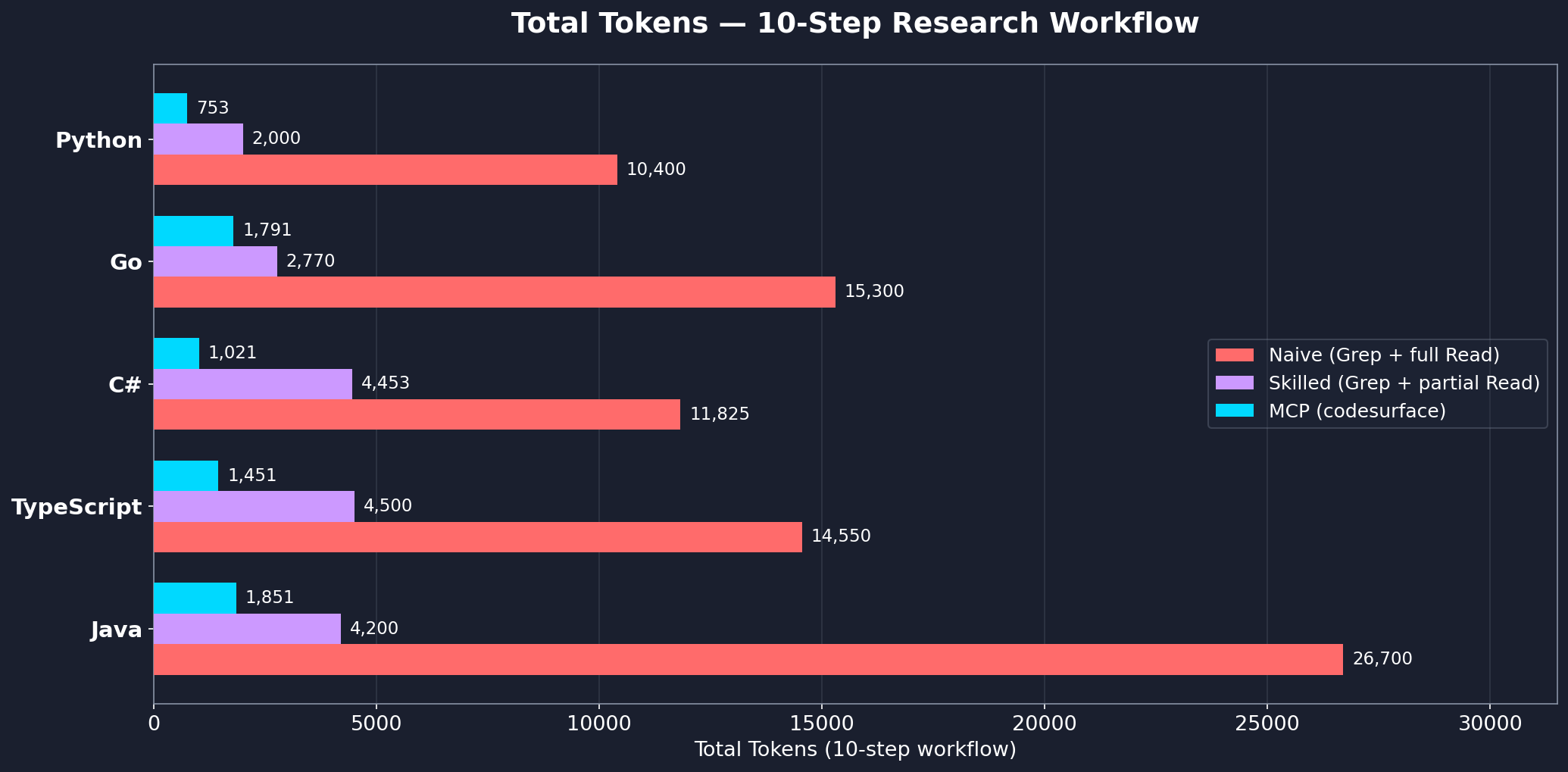
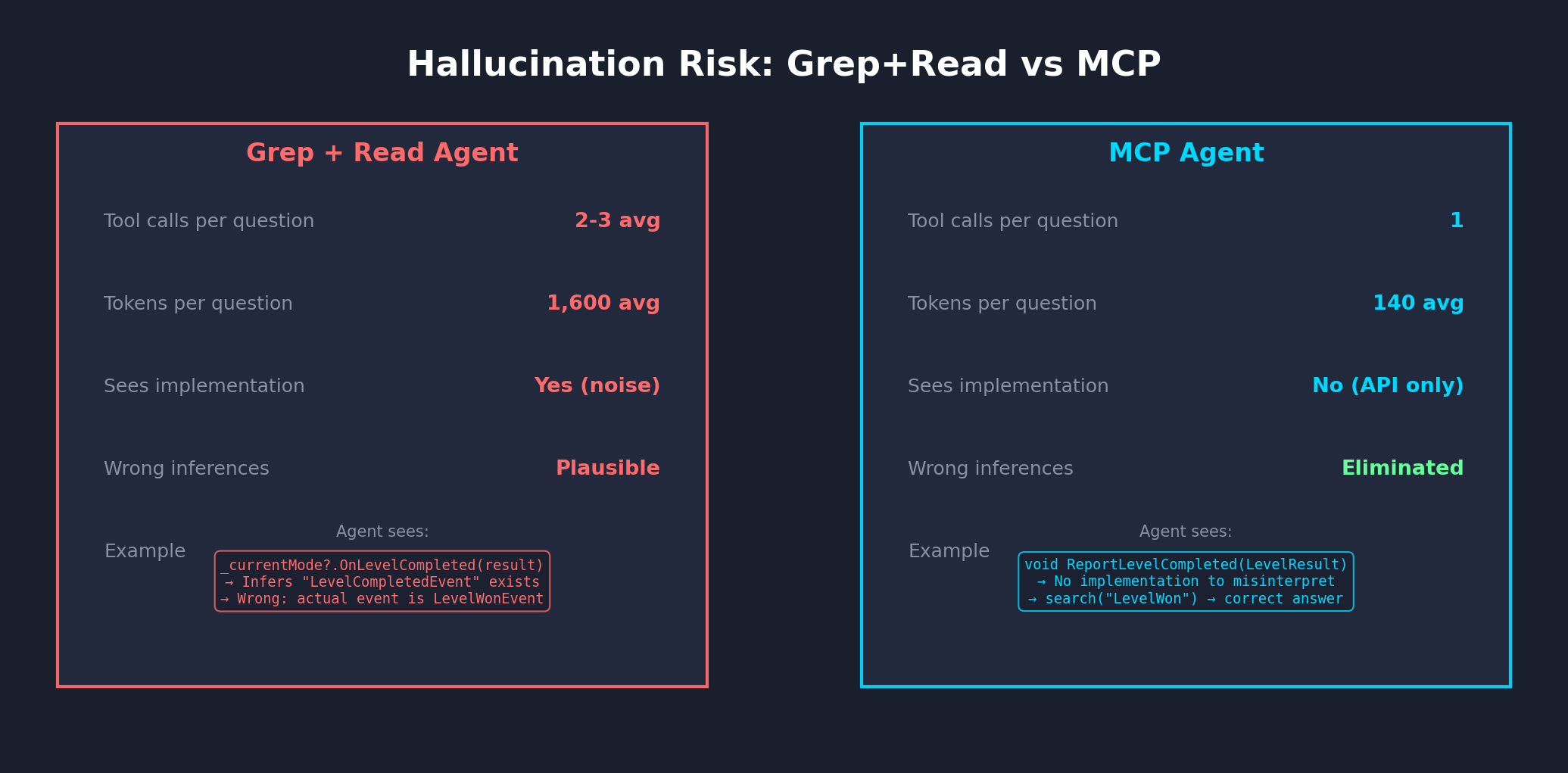
Measured across 5 real-world projects in 5 languages, each using a 10-step cross-cutting research workflow.
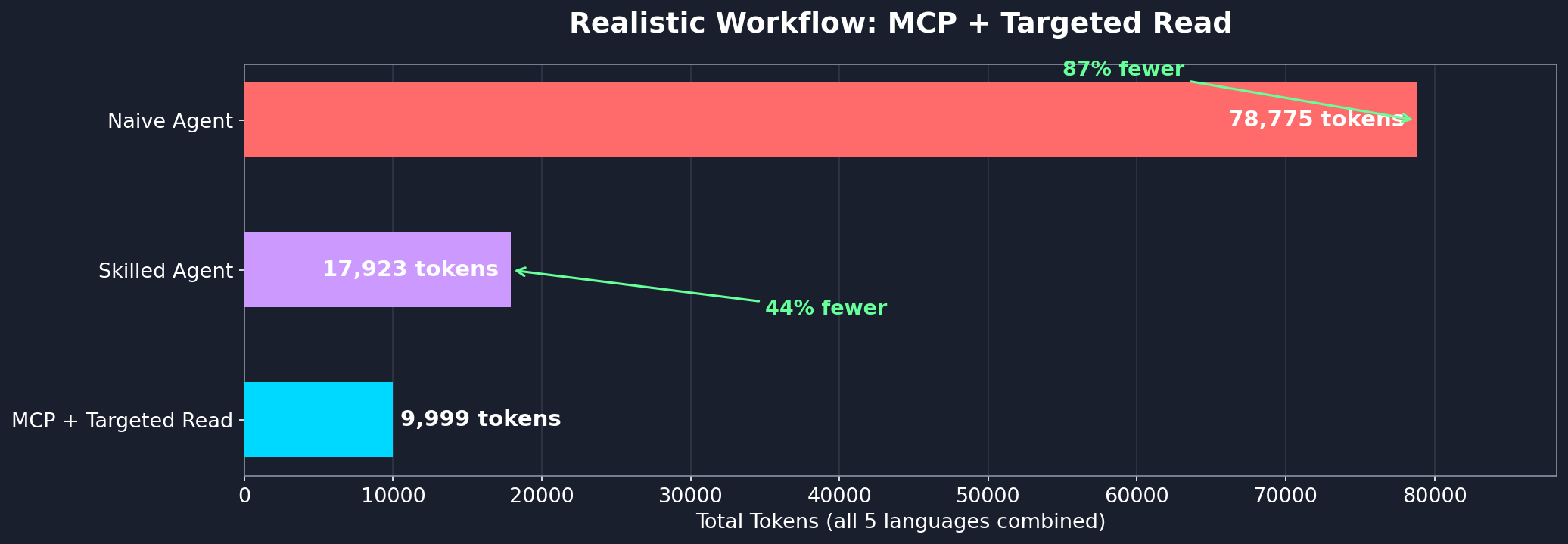
Even with follow-up reads for implementation detail, the hybrid MCP + targeted Read approach uses 44% fewer tokens than a skilled Grep+Read agent and 87% fewer than a naive agent:
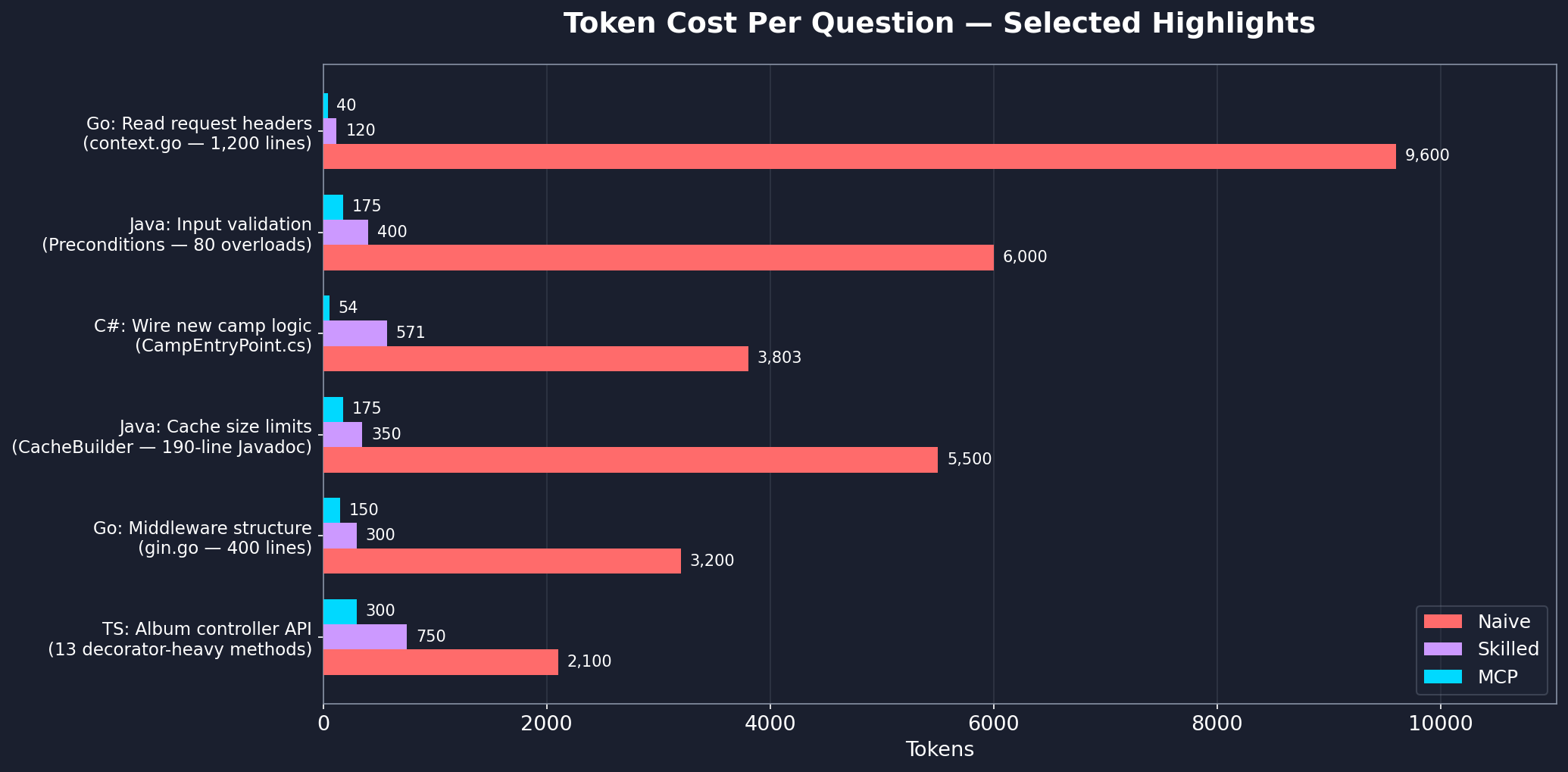
See workflow-benchmark.md for the full step-by-step analysis across all languages.
By default, codesurface skips common vendored, build, and VCS directories: node_modules, vendor, bin, obj, dist, build, target, .git, .venv, __pycache__, and a few dozen others. Git worktrees and submodules are also skipped.
To exclude additional paths:
Project-level (committed): create a .codesurfaceignore file at your project root with one glob per line.
generated/**
docs/**
**/*.pb.go
Per-instance (CLI): pass --exclude with comma-separated globs.
{
  "command": "uvx",
  "args": ["codesurface", "--project", "src", "--exclude", "generated/**,vendor/**"]
}
Other indexing flags:
--include-submodules: index git submodules (skipped by default)--language <name>: pin to a single parser (e.g. --language cpp) instead of auto-detectingEach --project flag indexes one directory. To index multiple codebases, run separate instances with different server names:
{
  "mcpServers": {
    "codesurface-backend": {
      "command": "uvx",
      "args": ["codesurface", "--project", "/path/to/backend/src"]
    },
    "codesurface-frontend": {
      "command": "uvx",
      "args": ["codesurface", "--project", "/path/to/frontend/src"]
    }
  }
}
Each instance gets its own in-memory index and tools. The AI agent sees both and can query across projects.
Using pip install:
pip install codesurface
{
  "mcpServers": {
    "codesurface": {
      "command": "codesurface",
      "args": ["--project", "/path/to/your/src"]
    }
  }
}
codesurface/
├── src/codesurface/
│   ├── server.py           # MCP server with 5 tools
│   ├── db.py               # SQLite + FTS5 database layer
│   ├── filters.py          # PathFilter (default exclusions, .codesurfaceignore, --exclude)
│   └── parsers/
│       ├── base.py         # BaseParser ABC
│       ├── cpp.py          # C++ header parser
│       ├── csharp.py       # C# parser
│       ├── go.py           # Go parser
│       ├── java.py         # Java parser
│       ├── python_parser.py # Python parser
│       └── typescript.py   # TypeScript/JavaScript parser
├── pyproject.toml
└── README.md
"No codebase indexed"
--project points to a directory containing supported source files (.cs, .h, .hpp, .go, .java, .py, .ts, .tsx, .js, .jsx)[codesurface] scanning N files... and [codesurface] done: linesServer won't start
python --version (needs 3.10+)mcp[cli] is installed: pip install mcp[cli]Stale results after editing source files
reindex() manually to force an incremental updateIndexes your codebase's public API and serves it via compact MCP tool responses.
{ "mcpServers": { "io.github.codeturion-codesurface": { "command": "uvx", "args": [ "codesurface==0.8.0" ] } }}Ferramentas
Ainda não há lista de ferramentas. Servidores remotos recebem uma após a primeira verificação de saúde.
Perguntas frequentes
Copie nesta página a configuração stdio para Cursor, Claude Desktop, Claude Code ou VS Code. Ela usa a instalação do publicador, não um proxy do PlugMCP.
Este registro não lista nenhuma variável de ambiente obrigatória.
Codesurface roda localmente via stdio.
Última verificação: 2026-11-09. Indexes your codebase's public API and serves it via compact MCP tool responses.
