Universal Database MCP Server
The security-first, Python-native MCP server for database access from AI agents.
Potencialize seu agente
O comando do próprio publicador. Não é um endpoint do PlugMCP.
Host a copy with our keys and logs.
uvx universal-db-mcp==1.1.2O Claude Code não tem link de instalação para um comando local. Copie o comando abaixo e execute-o em um terminal.
POSTGRES_URI=<secret> SQLITE_PATH=<value> MYSQL_URI=<secret> DUCKDB_PATH=<value> ALLOW_DESTRUCTIVE=<value> MAX_RESULT_ROWS=<value> claude mcp add io.github.fashad-ahmed-universal-db-mcp -- uvx universal-db-mcp==1.1.2Execute em um terminal.
{ "mcpServers": { "io.github.fashad-ahmed-universal-db-mcp": { "command": "uvx", "args": [ "universal-db-mcp==1.1.2" ], "env": { "POSTGRES_URI": "<secret>", "SQLITE_PATH": "<value>", "MYSQL_URI": "<secret>", "DUCKDB_PATH": "<value>", "ALLOW_DESTRUCTIVE": "<value>", "MAX_RESULT_ROWS": "<value>" } } }}claude_desktop_config.json
URL remota ou um comando na sua máquina? Como as duas instalações diferem
Rodar no PlugMCP
A new server you create. It is not this listing's official endpoint. Use the publisher install when you want their URL and their credentials.
Abrir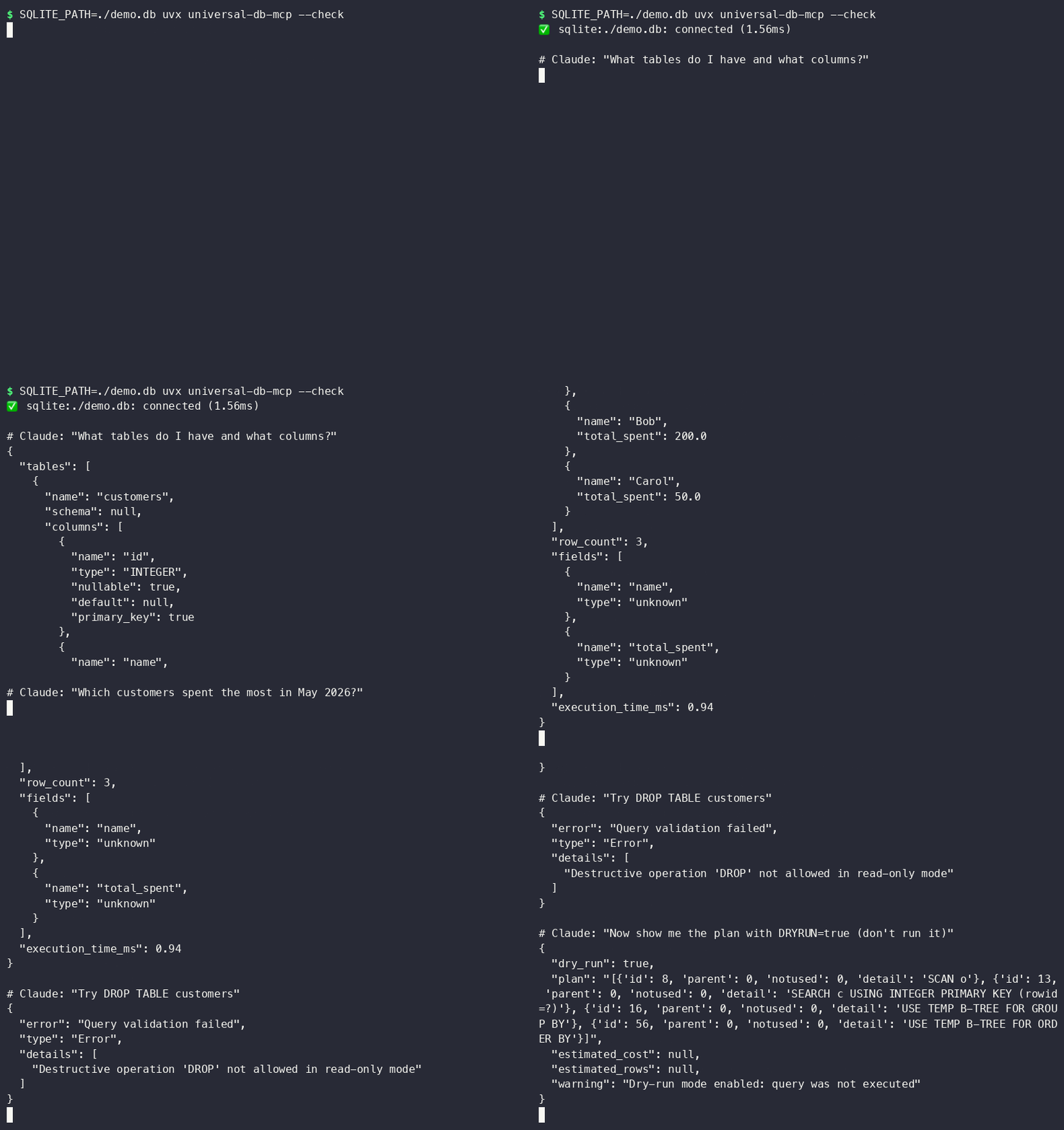
Most database MCP servers give AI agents raw SQL access and hope for the best. This server assumes the LLM is untrusted input and applies 8 layers of injection prevention before any query reaches your database — including blocking UNION attacks, stacked statements, time-based injection, and comment bypasses.
Supports: PostgreSQL · SQLite · MySQL · DuckDB (columnar analytics)
No Docker. No cloud account. No database server to install. DuckDB and SQLite run in-process:
# Query a local SQLite database — one command, zero infra
SQLITE_PATH=./myapp.db uvx universal-db-mcp

# Query a local DuckDB file or parquet files
DUCKDB_PATH=./analytics.duckdb uvx universal-db-mcp

# In-memory DuckDB for throwaway analysis
DUCKDB_PATH=:memory: uvx universal-db-mcp
Add to Claude Code in ~/.claude/mcp_servers.json, or to Claude Desktop in
~/Library/Application Support/Claude/claude_desktop_config.json (macOS) /
%APPDATA%\Claude\claude_desktop_config.json (Windows):
{
  "mcpServers": {
    "mydb": {
      "command": "uvx",
      "args": ["universal-db-mcp"],
      "env": {
        "SQLITE_PATH": "/Users/you/projects/myapp/db.sqlite3",
        "ALLOW_DESTRUCTIVE": "false"
      }
    }
  }
}
Restart Claude Desktop / Claude Code after saving — that's it.
That's it. Claude Code discovers the tools automatically.
More client configs (Claude Desktop, Cursor, Windsurf, Docker) in
examples/.
Read-only by default. Defense-in-depth. Every query validated before it touches the driver.
Full threat model: docs/SECURITY.md
DuckDB runs in-process (no server) and reads Parquet, CSV, JSON natively. Connect AI agents to your analytics data without spinning up a warehouse:
# Query parquet files directly
DUCKDB_PATH=:memory: uvx universal-db-mcp
Then in Claude Code:
You: "Load sales.parquet and show me monthly revenue by region"
Claude: [uses query tool → SELECT region, strftime('%Y-%m', date) AS month, SUM(revenue) ...]
No separate NL-to-SQL tool needed — Claude already does this. Give it the
schema tool and ask in plain English:
You: "Which customers placed more than 5 orders last month?"
Claude: [calls schema() to see table structure, then query() with the
         generated SQL — every query still passes through all 8 security
         layers before touching your database]
Pair with dry_run: true (DRYRUN=true) while prototyping — Claude gets the
query plan back without anything executing.
docker build -t universal-db-mcp .
docker run -i --rm \
  -e POSTGRES_URI=postgresql://readonly:[email protected]:5432/mydb \
  -e ALLOW_DESTRUCTIVE=false \
  universal-db-mcp
See examples/docker_mcp_config.json for
wiring this into an MCP client.
# PostgreSQL
POSTGRES_URI=postgresql://readonly:pass@localhost/mydb uvx universal-db-mcp

# SQLite (local file, zero infra)
SQLITE_PATH=./db.sqlite3 uvx universal-db-mcp

# MySQL
MYSQL_URI=mysql://readonly:pass@localhost/mydb uvx universal-db-mcp

# DuckDB (columnar, in-process analytics)
DUCKDB_PATH=./analytics.duckdb uvx universal-db-mcp

# Multiple databases simultaneously
POSTGRES_URI=... SQLITE_PATH=... uvx universal-db-mcp
v1.1.0: dry-run mode (DRYRUN=true), table allowlists (WHITELISTED_TABLES), query
complexity warnings, structured audit logs, and a --check CLI flag for connectivity
validation. See CHANGELOG.md.
# ── PostgreSQL ─────────────────────────────────────
POSTGRES_URI=postgresql://user:pass@host:5432/db
POSTGRES_READONLY=true          # default: true

# ── SQLite ─────────────────────────────────────────
SQLITE_PATH=/path/to/database.db
SQLITE_READONLY=true            # default: true

# ── MySQL ──────────────────────────────────────────
MYSQL_URI=mysql://user:pass@host:3306/db
MYSQL_READONLY=true             # default: true

# ── DuckDB ─────────────────────────────────────────
DUCKDB_PATH=/path/to/analytics.duckdb   # or :memory:
DUCKDB_READONLY=true            # default: true

# ── Security ───────────────────────────────────────
ALLOW_DESTRUCTIVE=false         # default: false — blocks INSERT/UPDATE/DELETE/DROP
MAX_RESULT_ROWS=1000            # truncate large results
ENABLE_LOGGING=true             # log queries to stderr
QUERY_TIMEOUT=30                # seconds
RATE_LIMIT_RPM=60               # requests per minute
Always use a dedicated read-only account. Never give the MCP server credentials that can modify data.
PostgreSQL:
CREATE USER mcp_agent WITH PASSWORD 'strong_random_password';
GRANT CONNECT ON DATABASE mydb TO mcp_agent;
GRANT USAGE ON SCHEMA public TO mcp_agent;
GRANT SELECT ON ALL TABLES IN SCHEMA public TO mcp_agent;
MySQL:
CREATE USER 'mcp_agent'@'localhost' IDENTIFIED BY 'strong_random_password';
GRANT SELECT ON mydb.* TO 'mcp_agent'@'localhost';
FLUSH PRIVILEGES;
git clone <repo-url>
cd universal-db-mcp
python -m venv .venv && source .venv/bin/activate
pip install -e ".[dev]"

# Run tests (67+ passing, no external DB required for SQLite + DuckDB)
pytest

# Security tests only
pytest tests/test_security.py -v

# With coverage
pytest --cov=src/universal_db_mcp --cov-report=term-missing
src/universal_db_mcp/
├── server.py          # FastMCP server — 5 tools
├── config.py          # Env-var config via Pydantic
├── adapters/
│   ├── base.py        # Abstract adapter + result dataclasses
│   ├── postgresql.py  # asyncpg, connection pool, read-only via init callback
│   ├── sqlite.py      # aiosqlite, read-only via file URI mode=ro
│   ├── mysql.py       # aiomysql, DictCursor
│   └── duckdb.py      # duckdb, thread-pool executor, lock-guarded
└── security/
    └── sanitizer.py   # SQLSanitizer — 8-layer injection prevention

docs/
└── SECURITY.md        # Full security architecture and threat model
Different tools for different jobs. Use this when you want Python-native, local-first, security-hardened access without cloud dependencies.
MIT — LICENSE
Security Notice: This server provides AI agents with database access. Always
use read-only credentials, review docs/SECURITY.md before
production deployment, and never commit .env files.
Security-first MCP server for PostgreSQL, SQLite, MySQL, DuckDB with SQL injection prevention.
{ "mcpServers": { "io.github.fashad-ahmed-universal-db-mcp": { "command": "uvx", "args": [ "universal-db-mcp==1.1.2" ], "env": { "POSTGRES_URI": "<secret>", "SQLITE_PATH": "<value>", "MYSQL_URI": "<secret>", "DUCKDB_PATH": "<value>", "ALLOW_DESTRUCTIVE": "<value>", "MAX_RESULT_ROWS": "<value>" } } }}Ferramentas
Ainda não há lista de ferramentas. Servidores remotos recebem uma após a primeira verificação de saúde.
Perguntas frequentes
Copie nesta página a configuração stdio para Cursor, Claude Desktop, Claude Code ou VS Code. Ela usa a instalação do publicador, não um proxy do PlugMCP.
O publicador lista estas variáveis de ambiente: POSTGRES_URI, SQLITE_PATH, MYSQL_URI, DUCKDB_PATH, ALLOW_DESTRUCTIVE, MAX_RESULT_ROWS.
Universal Db roda localmente via stdio.
Última verificação: 2026-11-09. Security-first MCP server for PostgreSQL, SQLite, MySQL, DuckDB with SQL injection prevention.
