mcp-k8s-ro
A read-only MCP server that gives Claude access to Kubernetes clusters. Built in Go, it communicates over stdio using the MCP protocol.
Potencialize seu agente
O comando do próprio publicador. Não é um endpoint do PlugMCP.
Host a copy with our keys and logs.
docker run -i --rm ghcr.io/your-ko/mcp-k8s-ro:1.2.2O Claude Code não tem link de instalação para um comando local. Copie o comando abaixo e execute-o em um terminal.
KUBECONFIG=<value> claude mcp add io.github.your-ko-mcp-k8s-ro -- docker run -i --rm ghcr.io/your-ko/mcp-k8s-ro:1.2.2Execute em um terminal.
{ "mcpServers": { "io.github.your-ko-mcp-k8s-ro": { "command": "docker", "args": [ "run", "-i", "--rm", "ghcr.io/your-ko/mcp-k8s-ro:1.2.2" ], "env": { "KUBECONFIG": "<value>" } } }}claude_desktop_config.json
URL remota ou um comando na sua máquina? Como as duas instalações diferem
Rodar no PlugMCP
A new server you create. It is not this listing's official endpoint. Use the publisher install when you want their URL and their credentials.
Abrirget, describe, logs, and top style operations. No create, update, or delete. If a mutating operation is needed, the server prints the equivalent kubectl command for you to run manually. Safe to use while on-call at night: Claude can never accidentally mutate your cluster, even under prompt fatigue.claude mcp add --scope user --transport stdio k8s-ro \
-- docker run --rm -i -v ~/.kube:/home/nonroot/.kube:ro ghcr.io/your-ko/mcp-k8s-ro:latest
Pinning a specific version (check the latest release ) is recommended for production use:
claude mcp add --scope user --transport stdio k8s-ro \
  -- docker run --rm -i -v ~/.kube:/home/nonroot/.kube:ro ghcr.io/your-ko/mcp-k8s-ro:1.1.0
Download a pre-built binary from GitHub Releases:
# macOS Apple Silicon — change ARCH for other platforms: darwin-amd64, linux-amd64, linux-arm64
ARCH=darwin-arm64
VERSION=$(curl -fsSL https://api.github.com/repos/your-ko/mcp-k8s-ro/releases/latest | grep tag_name | cut -d'"' -f4)
curl -fsSL "https://github.com/your-ko/mcp-k8s-ro/releases/download/${VERSION}/mcp-k8s-ro-${VERSION}-${ARCH}" -o ~/.local/bin/mcp-k8s-ro
chmod +x ~/.local/bin/mcp-k8s-ro
xattr -d com.apple.quarantine ~/.local/bin/mcp-k8s-ro 2>/dev/null  # macOS only: remove Gatekeeper quarantine
claude mcp add --scope user --transport stdio k8s-ro ~/.local/bin/mcp-k8s-ro
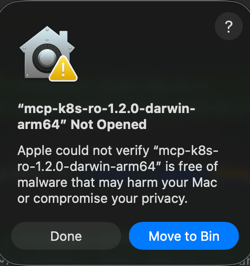
macOS Gatekeeper: The binary is not code-signed, so macOS will block it. The
xattrcommand above removes the quarantine flag. Alternatively, go to System Settings → Privacy & Security and click "Allow Anyway" after the first blocked attempt.
Or build from source:
make build
claude mcp add --scope user --transport stdio k8s-ro ./bin/mcp-k8s-ro
If your kubeconfig is not at ~/.kube/config, set the KUBECONFIG environment variable:
# Binary
claude mcp add --scope user --transport stdio -e KUBECONFIG=/path/to/kubeconfig k8s-ro ~/.local/bin/mcp-k8s-ro

# Docker
claude mcp add --scope user --transport stdio k8s-ro \
  -- docker run --rm -i -e KUBECONFIG=/config/kubeconfig -v /path/to/kubeconfig:/config/kubeconfig:ro ghcr.io/your-ko/mcp-k8s-ro:latest
The server intentionally operates on one kubeconfig context and provides no tool to switch clusters at runtime. The reasons are:
To point the server at a different cluster, stop the server, switch context, and restart:
kubectl config use-context my-other-cluster
# then restart the MCP server / reload Claude Desktop
To work with multiple clusters simultaneously, register a separate server instance per cluster in your MCP config:
{
  "mcpServers": {
    "k8s-staging": {
      "type": "stdio",
      "command": "/path/to/bin/mcp-k8s-ro",
      "env": { "KUBECONFIG": "/path/to/.kube/config" }
    },
    "k8s-prod": {
      "type": "stdio",
      "command": "/path/to/bin/mcp-k8s-ro",
      "env": { "KUBECONFIG": "/path/to/.kube/config-prod" }
    }
  }
}
Claude will address each server by name and each instance only ever sees its own cluster.
This server is published on registry.modelcontextprotocol.io
Read-only Kubernetes MCP server: inspect resources, logs, events, and metrics. Secrets are masked.
{ "mcpServers": { "io.github.your-ko-mcp-k8s-ro": { "command": "docker", "args": [ "run", "-i", "--rm", "ghcr.io/your-ko/mcp-k8s-ro:1.2.2" ], "env": { "KUBECONFIG": "<value>" } } }}Ferramentas
Ainda não há lista de ferramentas. Servidores remotos recebem uma após a primeira verificação de saúde.
Perguntas frequentes
Copie nesta página a configuração stdio para Cursor, Claude Desktop, Claude Code ou VS Code. Ela usa a instalação do publicador, não um proxy do PlugMCP.
O publicador lista estas variáveis de ambiente: KUBECONFIG.
MCP K8s Ro roda localmente via stdio.
Última verificação: 2026-11-10. Read-only Kubernetes MCP server: inspect resources, logs, events, and metrics. Secrets are masked.