shohei
日本語 |
Potencialize seu agente
Instalação do publicador. Não é um endpoint do PlugMCP.
Host a copy with our keys and logs.
Ainda não há uma versão empacotada no registro. Siga o README do repositório.
URL remota ou um comando na sua máquina? Como as duas instalações diferem
Rodar no PlugMCP
A new server you create. It is not this listing's official endpoint. Use the publisher install when you want their URL and their credentials.
AbrirDo publicador
日本語 |
Rust MCP server with 168 security tools for Claude — DNS/DNSSEC, TLS, email security, OSINT, threat intelligence, supply chain & cloud. 0 API keys.
SHOHEI — Security Host Observation & Healthy Evaluation Instrument
shohei v2.5.1 — Rust infrastructure diagnostics library with 168 MCP tools across 62 modules. Comprehensive security, OSINT, threat intelligence, and governance coverage. DNSSEC chain validation, DANE/TLSA, modern protocols, IPv6 dual-stack, security headers, technology fingerprinting, CVE lookup, typosquatting detection, and redirect analysis built in. 0 API keys required — all free/open APIs. Use in Rust projects or hand to Claude for autonomous diagnosis.
. to your domain; per-zone validation runs in parallel; add -v for key tags and algorithm names*.domain records--compare--type a --type aaaa --type mx queries all types concurrently in a single invocation-f domains.txt--watch--features tui)Most infrastructure tools are CLI-only. shohei is built for AI agents:
DnsCheckResult, TlsCheckResult, EmailSecurityResult) — perfect for agentsCompared to alternatives (dig, dog, drill): shohei is composable—use it in tests, monitoring, CI/CD, or hand it to Claude for autonomous diagnosis.
dig = BIND utils 9.16+; q = natesales/q; delv = BIND DNSSEC-validating resolver; drill = ldns-based
v2.4.0 additions: 168 MCP tools across 62 modules, robots.txt/OAuth/OIDC/API exposure, unauthenticated DB/container detection, subdomain takeover (30+ services), DGA risk scoring, DKIM key strength, attack surface composite score, RIPE Stat passive DNS, Azure AD exposure.
v2.5.1 security patch: 9 CRITICAL/HIGH SSRF fixes (VMC fetch, TCP port scan, MX connect, redirect-follow without per-hop validation across 8 modules), 15+ bug fixes (IPv6 DNSBL trailing-dot, Levenshtein panic on IDN, crypto stubs returning
valid=true, hardcoded year comparisons, SPFallqualifier never populated, sequential awaits parallelised), 4× performance improvement on trust/threat scoring viatokio::join!.
shohei v2.5.1 stands out as the most comprehensive free, API-key-free MCP security server:
Key Advantages:
Add to your Cargo.toml:
[dependencies]
shohei = "2.4"
Then import and use:
use shohei::resolver::standard::query;

#[tokio::main]
async fn main() {
    let result = query("example.com", "A").await;
    println!("{:?}", result);
}
For full API documentation: cargo doc --open or docs.rs/shohei.
cargo install shohei
Or download a pre-built binary from the releases page.
For the interactive TUI mode:
cargo install shohei --features tui
shohei is designed to be imported and composed in Rust projects. See the examples/ directory:
Run examples:
cargo run --example propagation_check -- example.com
cargo run --example tls_chain_verify -- example.com
cargo run --example email_security -- example.com
The CLI is a convenient wrapper around the library for manual inspection and testing.
shohei google.com              # A records (default)
shohei google.com --type AAAA  # AAAA records
shohei google.com --type NS    # Nameservers
shohei gmail.com  --type MX    # Mail exchangers

# Multiple record types in one command
shohei google.com --type a --type aaaa --type mx
# Security / DNSSEC-related record types
shohei google.com --type caa       # Certificate Authority Authorization
shohei github.com --type sshfp     # SSH fingerprints
shohei _443._tcp.example.com --type tlsa  # DANE TLSA
Resolve the PTR record for an IP address. IPv4 and IPv6 are both supported.
shohei -x 1.1.1.1              # → one.one.one.one
shohei -x 2606:4700:4700::1111 # IPv6 reverse lookup
Validate the full DNSSEC chain from the root trust anchor down to the target domain. Each zone's DS and DNSKEY records are checked individually.
shohei cloudflare.com --dnssec

# Verbose: show key tags, algorithm names, and KSK/ZSK roles
shohei cloudflare.com --dnssec --verbose
Step through the full resolution path — root servers → TLD nameservers → authoritative nameservers.
shohei google.com --trace
# DNS-over-HTTPS
shohei google.com --doh https://dns.google/dns-query

# DNS-over-TLS
shohei google.com --dot 1.1.1.1:853

# DNS-over-QUIC
shohei google.com --doq 8.8.8.8

# Custom resolver
shohei google.com --server 8.8.8.8
When querying an authoritative server directly, shohei displays the Authority Section (NS referrals) and Additional Section (glue A/AAAA records) — matching dig's default behavior.
# Query the .com TLD nameserver for google.com — shows NS referral + glue records
shohei google.com -s 192.5.6.30 --no-recurse

# Query an authoritative nameserver directly
shohei example.com -s 199.43.135.53 --no-recurse --type ns
Force DNS queries over TCP instead of UDP. Useful for large responses that get truncated (TC bit set) or environments that block UDP/53.
shohei example.com -s 8.8.8.8 --tcp
Strip all decoration and return just the record data — one value per line. Ideal for shell scripting.
shohei gmail.com --type MX --short
Query the same domain from multiple DNS servers simultaneously and diff the results. Useful for detecting CDN anycast differences or verifying a new resolver. Repeat --compare for N-way comparison.
# Show that both servers return the same NS records
shohei cloudflare.com --type NS --server 8.8.8.8 --compare 1.1.1.1

# Reveal CDN-induced A record differences
shohei google.com --server 8.8.8.8 --compare 1.1.1.1

# N-way comparison across three resolvers
shohei google.com --server 8.8.8.8 --compare 1.1.1.1 --compare 9.9.9.9
Fetch the complete zone from an authoritative server. Requires -s to specify the authoritative nameserver.
shohei zonetransfer.me --axfr -s 81.4.108.41
Pipe a newline-separated list of domains and shohei queries each one in sequence.
Lines starting with # are ignored as comments. You can also read targets from a file with -f.
echo -e "google.com\nexample.com\ncloudflare.com" | shohei
cat domains.txt | shohei --type mx --short
shohei -f domains.txt --type mx --short
Repeat the query every N seconds and auto-refresh the display. Press Ctrl+C to stop.
shohei google.com --watch 5         # refresh every 5 seconds
shohei google.com --type A --watch 10
shohei google.com --output json   # JSON for scripting
shohei google.com --output plain  # No colors (CI-friendly)
--features tui)Pre-loads records, DNSSEC chain, and trace in parallel, then presents all three as navigable views.
shohei google.com --tui
 shohei — google.com
┌─ Records ──────────────────────────────────────────────────────────┐
│ Query: google.com (A IN)                                           │
│                                                                    │
│ NAME                                    TTL   TYPE   DATA          │
│ ────────────────────────────────────────────────────────────────── │
│ google.com.                             120   A      142.250.x.x   │
│ ...                                                                │
└────────────────────────────────────────────────────────────────────┘
 [r] Records  [d] DNSSEC  [t] Trace  [↑↓/jk] Scroll  [q] Quit
MCP (Model Context Protocol) Server with 168 tools lets Claude Desktop and other AI agents call shohei diagnostics directly:
# 1. Install shohei
cargo install shohei

# 2. Register MCP server in Claude Desktop config:
# ~/.config/Claude/claude_desktop_config.json
{
  "mcpServers": {
    "shohei": {
      "command": "/path/to/shohei-mcp"
    }
  }
}

# 3. Restart Claude Desktop
# 4. Ask Claude: "Check example.com's TLS certificate"
168 Tools Available to Claude (62 modules):
Example: Claude diagnoses a domain autonomously:
"Check if example.com's mail configuration is correct, and verify its TLS certificate chain" → Claude calls check_email_security + check_tls_chain → returns full analysis
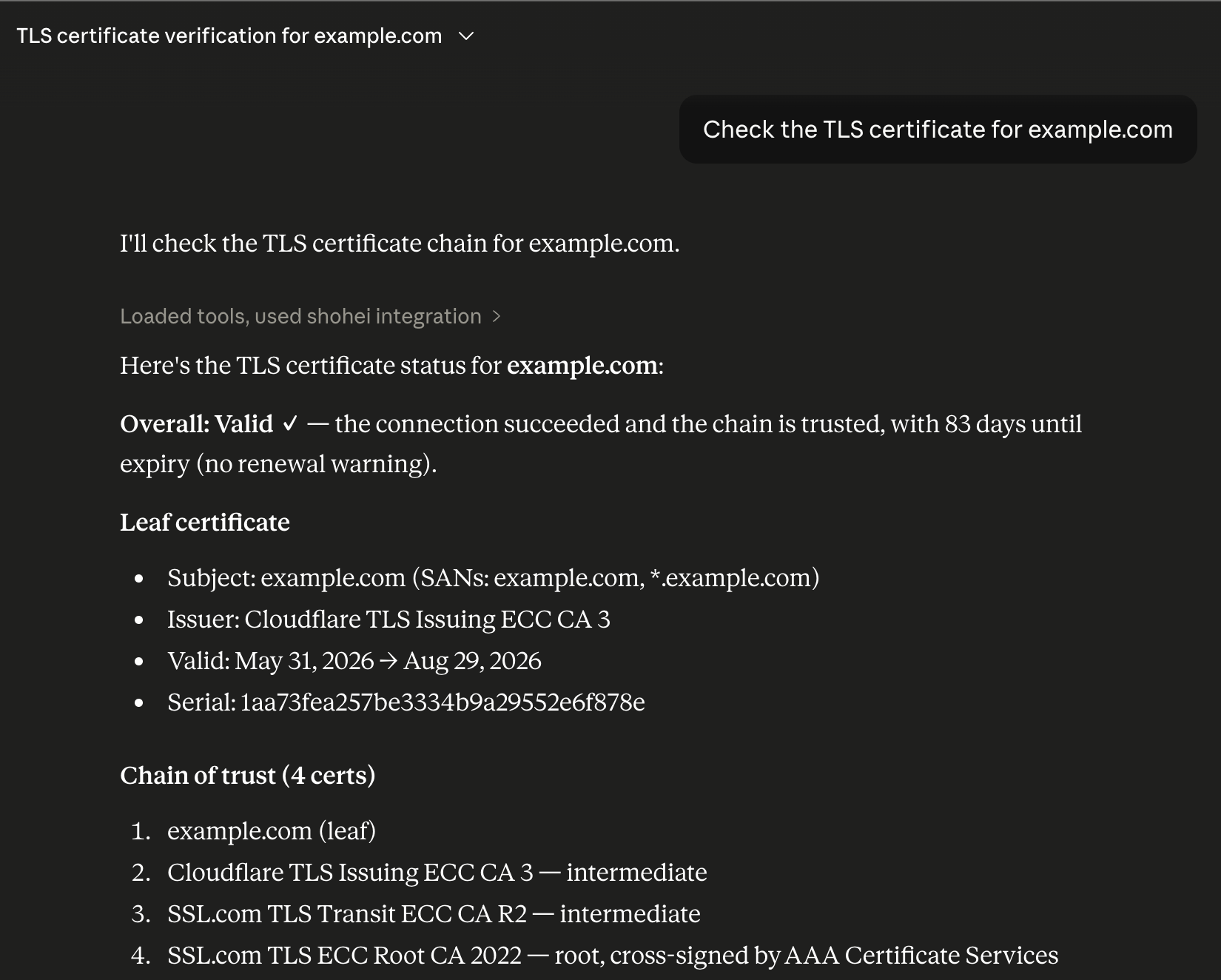
use shohei; in your projects — structured async APIsshohei example.com --dnssec --traceshohei example.com --output jsonSee docs/INTEGRATIONS.md for full details.
tui feature)MIT — see LICENSE
Rust MCP server with 168 security tools for Claude — DNS/DNSSEC, TLS, email security, OSINT, threat intelligence, supply chain & cloud. 0 API keys.
Ferramentas
Ainda não há lista de ferramentas. Servidores remotos recebem uma após a primeira verificação de saúde.
Perguntas frequentes
Copie nesta página a configuração stdio para Cursor, Claude Desktop, Claude Code ou VS Code. Ela usa a instalação do publicador, não um proxy do PlugMCP.
Este registro não lista nenhuma variável de ambiente obrigatória.
Shohei roda localmente via stdio.
Última verificação: 2026-10-27. Rust MCP server with 168 security tools for Claude — DNS/DNSSEC, TLS, email security, OSINT, threat intelligence, supply chain & cloud. 0 API keys.

