pdflens-mcp
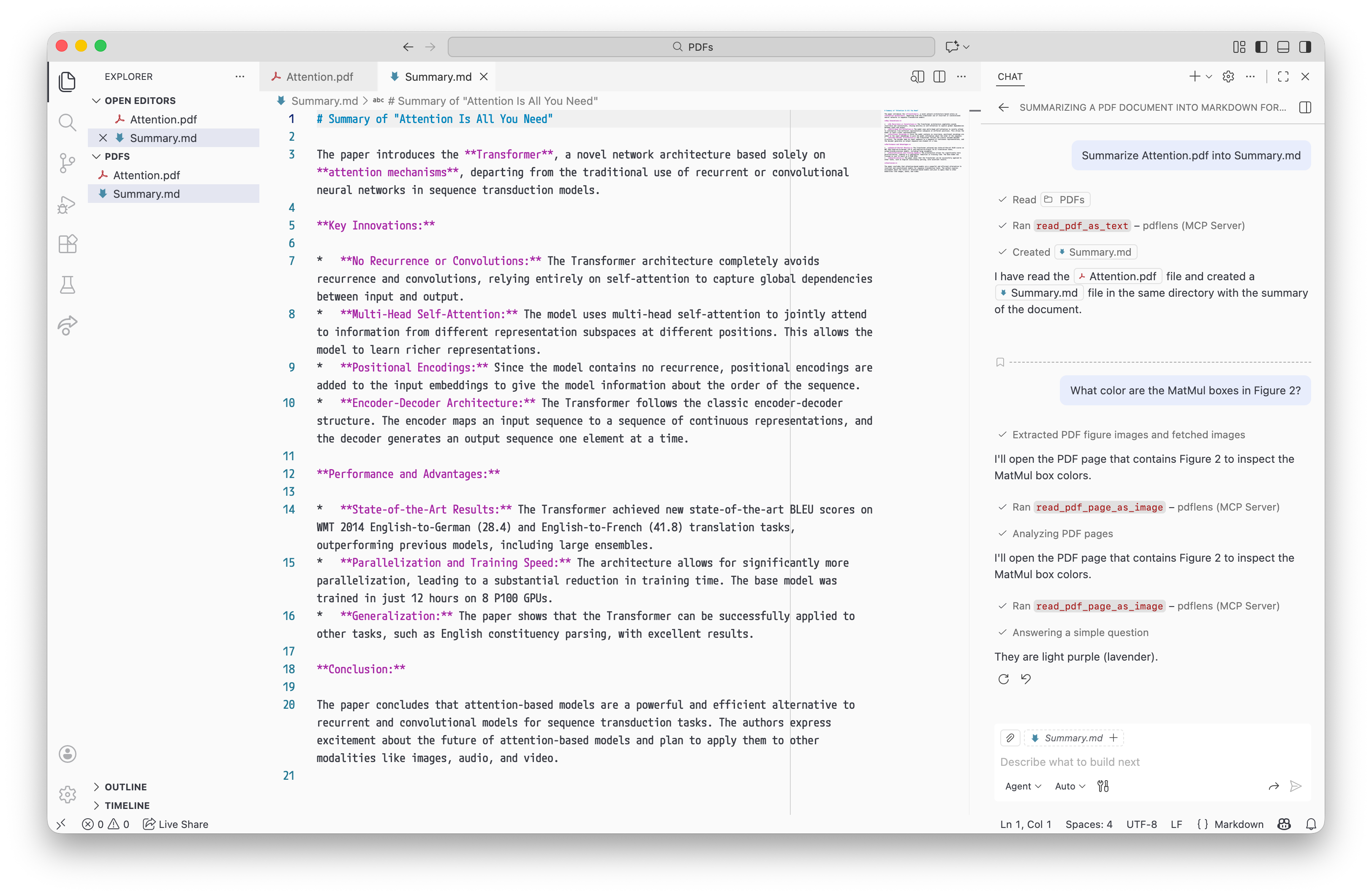
An MCP server for reading PDFs, coded by human, designed for AI.
Potencialize seu agente
Instalação do publicador. Não é um endpoint do PlugMCP.
Host a copy with our keys and logs.
Ainda não há uma versão empacotada no registro. Siga o README do repositório.
URL remota ou um comando na sua máquina? Como as duas instalações diferem
Rodar no PlugMCP
A new server you create. It is not this listing's official endpoint. Use the publisher install when you want their URL and their credentials.
AbrirPdflens MCP is designed to use the MCP Root mechanism for privacy and security boundary within workspaces, so the user can auto-approve all Pdflens MCP tool calls, knowing that LLMs will not accidentally upload PDF contents outside user’s workspaces to LLM inference providers.
However, MCP decided to deprecate the Root mechanism (SEP-2577), and will remove it at around June 2027. The documentation also states that my approach to use MCP Root for access control is wrong.
Until MCP provides an alternative mechanism (e.g., SEP-1708), maintaining the core functionality of this MCP Server is impossible. Therefore, I am pausing the maintenance of this project until I find any alternative method to allow auto-approved PDF reading. Current coding agents may still be able to use Pdflens MCP for now, but newer coding agents will eventually be incompatible with it.
When the day comes, please try other options, for example, running pdftotext and pdftoppm commands inside terminal sandboxes. VS Code supports sandboxes since 1.109, and Zed since 1.14.2. For OCR requirements, please check Firecrawl/pdf-inspector.
get_pdf_num_pagesread_pdf_as_textread_pdf_page_as_image‡‡ Not all MCP clients support images.
Install Rust compiler: https://rustup.rs/
Download and build pdflens-mcp from crates.io
cargo install --git https://codeberg.org/m13253/pdflens-mcp.git pdflens-mcp
Usually, the program is installed to $HOME/.cargo/bin/pdflens-mcp. You can use cargo install --root /another/path pdflens-mcp to set a custom installation path.
Add this MCP server to your MCP client of choice.
(Note: We use sh to expand ~ to your actual home directory. If you are using Microsoft Windows, please instead put the full path to pdflens-mcp.exe to "command" and leave "args" empty.)
If your MCP client supports mcp.json:
{
  "mcpServers": {
    "pdflens": {
      "command": "sh",
      "args": ["-c", "exec ~/.cargo/bin/pdflens-mcp"]
    }
  }
}
Visual Studio Code:
code --add-mcp "{\"name\": \"pdflens\", \"command\": \"sh\", \"args\": [\"-c\", \"exec ~/.cargo/bin/pdflens-mcp\"]}"
Codex
[mcp_servers.pdflens]
command = "sh"
args = ["-c", "exec ~/.cargo/bin/pdflens-mcp"]
Continue.dev
mcpServers:
  - name: pdflens
    command: sh
    args:
      - -c
      - exec ~/.cargo/bin/pdflens-mcp
Kilo Code
{
  "mcpServers": {
    "pdflens": {
        "command": "sh",
        "args": ["-c", "exec ~/.cargo/bin/pdflens-mcp"],
        "alwaysAllow": [
            "get_pdf_num_pages",
            "read_pdf_as_text"
        ],
        "disabledTools": ["read_pdf_page_as_image"]
    }
  }
}
Roo Code
{
  "mcpServers": {
    "pdflens": {
        "command": "sh",
        "args": ["-c", "exec ~/.cargo/bin/pdflens-mcp"],
        "alwaysAllow": [
            "get_pdf_num_pages",
            "read_pdf_as_text",
            "read_pdf_page_as_image"
        ]
    }
  }
}
Zed
{
  "agent": {
    "tool_permissions": {
      "tools": {
        "mcp:pdflens:get_pdf_num_pages": {"default": "allow"},
        "mcp:pdflens:read_pdf_as_text": {"default": "allow"},
        "mcp:pdflens:read_pdf_page_as_image": {"default": "allow"}
      }
    }
  },
  "context_servers": {
    "pdflens": {
      "command": "sh",
      "args": ["-c", "exec ~/.cargo/bin/pdflens-mcp"],
      "remote": true,
      "enabled": true,
    }
  }
}
Pdflens is designed to only read PDFs located within the user’s workspace directories, also called MCP root directories.
Each time before reading the PDFs, it checks the file path after resolving any symbolic links. If the PDF exists but is outside any user’s workspace directories, pdflens will return an error, asking the user to check the root path settings.
If your MCP client doesn’t specify a root path, pdflens will fallback to the current directory it is started in.
{
  "mcpServers": {
    "pdflens": {
      "command": "sh",
      "args": ["-c", "exec ~/.cargo/bin/pdflens-mcp"],
      "cwd": "/path/to/workspace/if/root/path/is/unsupported"
    }
  }
}
Some IDEs and editors allows you to specify where pdflens-mcp runs, so it can access remote files.
On Visual Studio Code, write the MCP configuration on remote workspace settings.
On Zed, specify "remote": true.
This project is developed mainly with human effort. I have throughoutly read and checked every piece of code in this repository to ensure its quality.
An MCP server for reading PDFs, coded by human, designed for AI
Ferramentas
Ainda não há lista de ferramentas. Servidores remotos recebem uma após a primeira verificação de saúde.
Perguntas frequentes
Copie nesta página a configuração stdio para Cursor, Claude Desktop, Claude Code ou VS Code. Ela usa a instalação do publicador, não um proxy do PlugMCP.
Este registro não lista nenhuma variável de ambiente obrigatória.
Pdflens roda localmente via stdio.
Última verificação: 2026-11-05. An MCP server for reading PDFs, coded by human, designed for AI

