A Model Context Protocol (MCP) server and app for creating Datawrapper charts using AI assistants. Built on the datawrapper Python library.
Potencialize seu agente
O comando do próprio publicador. Não é um endpoint do PlugMCP.
Host a copy with our keys and logs.
uvx datawrapper-mcp==0.4.0O Claude Code não tem link de instalação para um comando local. Copie o comando abaixo e execute-o em um terminal.
DATAWRAPPER_ACCESS_TOKEN=<secret> claude mcp add palewire-datawrapper-mcp -- uvx datawrapper-mcp==0.4.0Execute em um terminal.
{ "mcpServers": { "palewire-datawrapper-mcp": { "command": "uvx", "args": [ "datawrapper-mcp==0.4.0" ], "env": { "DATAWRAPPER_ACCESS_TOKEN": "<secret>" } } }}claude_desktop_config.json
URL remota ou um comando na sua máquina? Como as duas instalações diferem
Rodar no PlugMCP
A new server you create. It is not this listing's official endpoint. Use the publisher install when you want their URL and their credentials.
AbrirDo publicador
A Model Context Protocol (MCP) server and app for creating Datawrapper charts using AI assistants. Built on the datawrapper Python library.
A Model Context Protocol (MCP) server and app for creating Datawrapper charts using AI assistants.
Status: early and experimental. This project — including its Claude Code/Desktop plugin and marketplace listing — is under active development, and behavior can change between releases. In particular, the plugin/marketplace install path has known gaps (see issue #78) — don't treat it yet as a finished, zero-maintenance install path for a wider rollout.
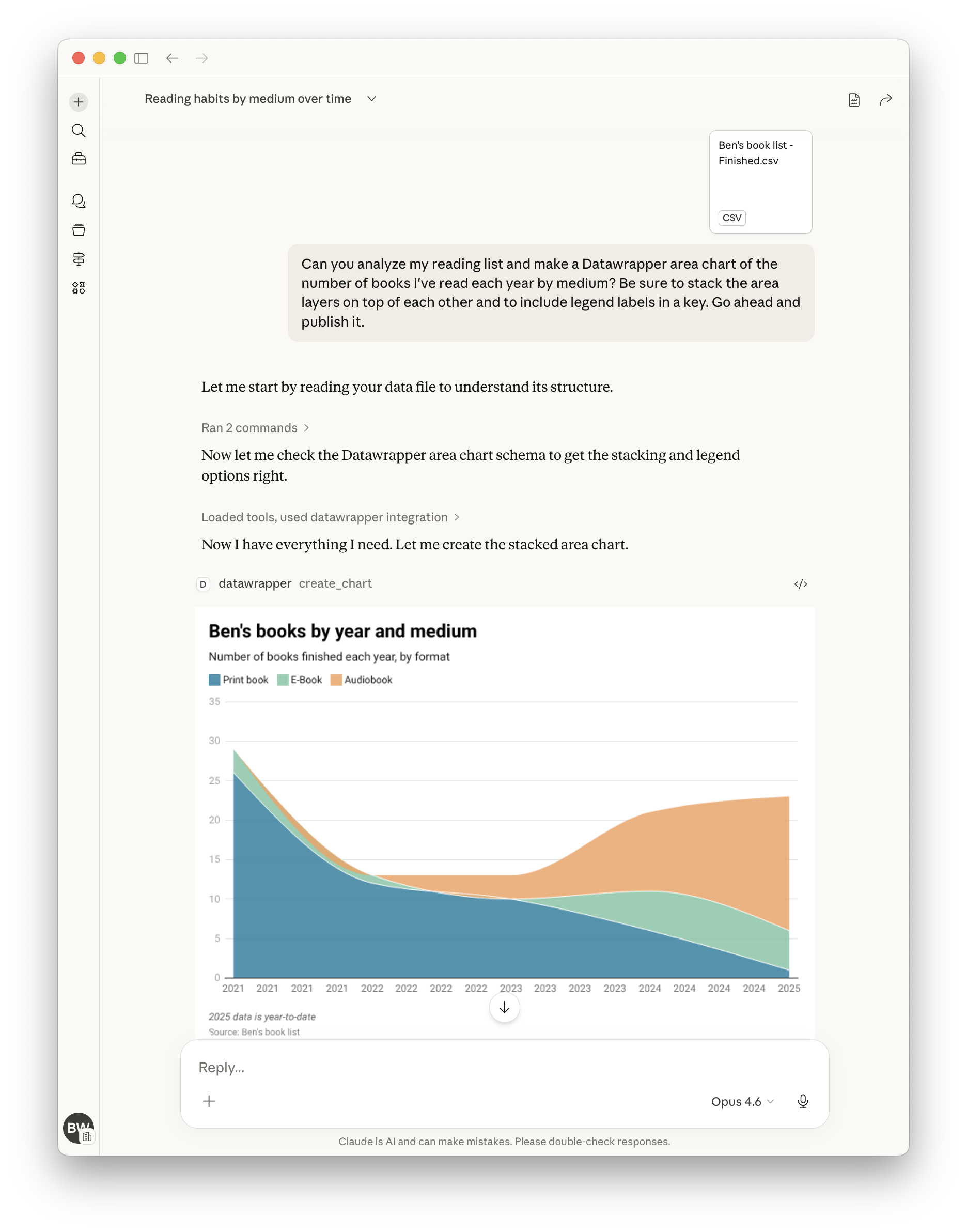
You can provide a data file and simply ask for the chart you want. The draft will soon appear in the panel.
Here's a more complete example showing how to create, publish, update, and display a chart by chatting with the assistant:
"Create a datawrapper line chart showing temperature trends with this data:
2020, 15.5
2021, 16.0
2022, 16.5
2023, 17.0"
# The assistant creates the chart and returns the chart ID, e.g., "abc123"

"Publish it."
# The assistant publishes it and returns the public URL

"Update chart with new data for 2024: 17.2°C"
# The assistant updates the chart with the new data point

"Make the line color dodger blue."
# The assistant updates the chart configuration to set the line color

"Show me the editor URL."
# The assistant returns the Datawrapper editor URL where you can view/edit the chart

"Show me the PNG."
# The assistant embeds the PNG image of the chart in its contained response.

"Suggest five ways to improve the chart."
# See what happens!
bar, line, area, arrow, column, multiple column, scatter, stacked bar
Use list_chart_types to see descriptions, then get_chart_schema to explore configuration options for any type.
{
  "mcpServers": {
    "datawrapper": {
      "command": "uvx",
      "args": ["datawrapper-mcp"],
      "env": {
        "DATAWRAPPER_ACCESS_TOKEN": "your-token-here"
      }
    }
  }
}
For other clients (Claude Desktop, Claude.ai, Cursor, VS Code Copilot, ChatGPT, OpenAI Codex, OpenClaw) and Kubernetes deployment, see the installation guide.
Installing via a plugin marketplace/directory (Claude Desktop's plugin browser, ClawHub, etc.) is still experimental. These interactive install flows currently have no working way to collect required environment variables like
DATAWRAPPER_ACCESS_TOKEN— see issue #78 for details. The manually-edited config shown above (and throughout the installation guide) is the reliable path today.
When connecting to a hosted instance of the server over HTTP, you can authenticate
with your own Datawrapper API token by sending it in the Authorization header:
Authorization: Bearer <your-datawrapper-api-token>
This ensures charts are created under your account instead of the server operator's. The token is read from the header automatically — no need to include it in every tool call.
You can also pass access_token directly as a tool argument, which takes precedence
over the header. When neither is provided, the server falls back to its
DATAWRAPPER_ACCESS_TOKEN environment variable.
Set DATAWRAPPER_MCP_INSTRUCTIONS to have the server hand your own free-text
guidance to connecting MCP clients (many, including Claude, fold this into
the model's context). Use it for house style rules — required fields, naming
conventions, and the like — without forking the server:
"env": {
  "DATAWRAPPER_ACCESS_TOKEN": "your-token-here",
  "DATAWRAPPER_MCP_INSTRUCTIONS": "Every chart needs alt text and a CMS slug in its notes field."
}
A Model Context Protocol (MCP) server and app for creating Datawrapper charts using AI assistants.
{ "mcpServers": { "palewire-datawrapper-mcp": { "command": "uvx", "args": [ "datawrapper-mcp==0.4.0" ], "env": { "DATAWRAPPER_ACCESS_TOKEN": "<secret>" } } }}Ferramentas
Ainda não há lista de ferramentas. Servidores remotos recebem uma após a primeira verificação de saúde.
Perguntas frequentes
Copie nesta página a configuração stdio para Cursor, Claude Desktop, Claude Code ou VS Code. Ela usa a instalação do publicador, não um proxy do PlugMCP.
O publicador lista estas variáveis de ambiente: DATAWRAPPER_ACCESS_TOKEN.
Datawrapper roda localmente via stdio.
Última verificação: 2026-10-28. A Model Context Protocol (MCP) server and app for creating Datawrapper charts using AI assistants.

