powergentic/azd-mcp-ts
An azd template to deploy a Model Context Protocol (MCP) server written in TypeScript to Azure Container Apps using SSE Transport.
Prerequisites
To deploy this template you will need to have the following installed:
Potencialize seu agente
Instalação do publicador. Não é um endpoint do PlugMCP.
Host a copy with our keys and logs.
Ainda não há uma versão empacotada no registro. Siga o README do repositório.
URL remota ou um comando na sua máquina? Como as duas instalações diferem
Rodar no PlugMCP
A new server you create. It is not this listing's official endpoint. Use the publisher install when you want their URL and their credentials.
AbrirDo publicador
An azd template to deploy a Model Context Protocol (MCP) server written in TypeScript to Azure Container Apps using SSE Transport.
To deploy this template you will need to have the following installed:
An AZD template to deploy a Model Context Protocol (MCP) server written in TypeScript to Azure Container Apps using SSE Transport.
To use this template, follow these steps using the Azure Developer CLI:
Log in to Azure Developer CLI. This is only required once per-install.
azd auth login
Initialize this template using azd init:
azd init --template powergentic/azd-mcp-ts
Ensure Docker Engine is running on your machine. This will be needed by azd to build the Docker image for the app prior to deployment to Azure Container Apps.
Use azd up to provision your Azure infrastructure and deploy the web application to Azure.
azd up
Once the template has finished provisioning all resources, and Azure Container Apps has completed deploying the app container (this can take a minute or so after azd up completes to finish), the MCP server will be running.

To verify the MCP server is running, navigate your browser to the /sse url for the app within your browser.
Example URL:
https://ca-mcp-vnv7lqmg46722.bravebeach-29a82758.eastus2.azurecontainerapps.io/sse
This will open a streaming output within the browser that will look similar to the following:

Congratulations, you now have a simple MCP Server written in TypeScript up and running in Azure! You can now customize this app to build the specific MCP server you need for your AI solution.
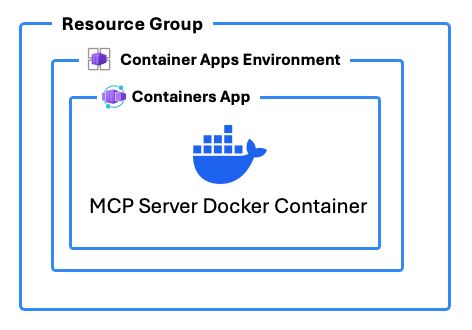
In addition to deploying Azure Resources to host the MCP server, this template includes a DOCKERFILE that builds the MCP server app with TypeScript.
These are the Azure resources that are deployed with this template:
Here are some additional resource links that help explain the topics around building custom MCP Servers in TypeScript and about what MCP and SSE are:
This azd template was written by Chris Pietschmann, founder of Powergentic.ai, Microsoft MVP, HashiCorp Ambassador, and Microsoft Certified Trainer (MCT).
An AZD template to deploy a Model Context Protocol (MCP) server written in TypeScript to Azure Container Apps using SSE Transport.
Ferramentas
Ainda não há lista de ferramentas. Servidores remotos recebem uma após a primeira verificação de saúde.
Perguntas frequentes
Copie nesta página a configuração stdio para Cursor, Claude Desktop, Claude Code ou VS Code. Ela usa a instalação do publicador, não um proxy do PlugMCP.
Este registro não lista nenhuma variável de ambiente obrigatória.
Azd MCP Ts roda localmente via stdio.
Última verificação: 2026-10-28. An AZD template to deploy a Model Context Protocol (MCP) server written in TypeScript to Azure Container Apps using SSE Transport.
