DBPilot
Self-hosted database autonomous diagnostics platform.
Potencialize seu agente
Instalação do publicador. Não é um endpoint do PlugMCP.
Host a copy with our keys and logs.
Ainda não há uma versão empacotada no registro. Siga o README do repositório.
URL remota ou um comando na sua máquina? Como as duas instalações diferem
Rodar no PlugMCP
A new server you create. It is not this listing's official endpoint. Use the publisher install when you want their URL and their credentials.
AbrirDo publicador
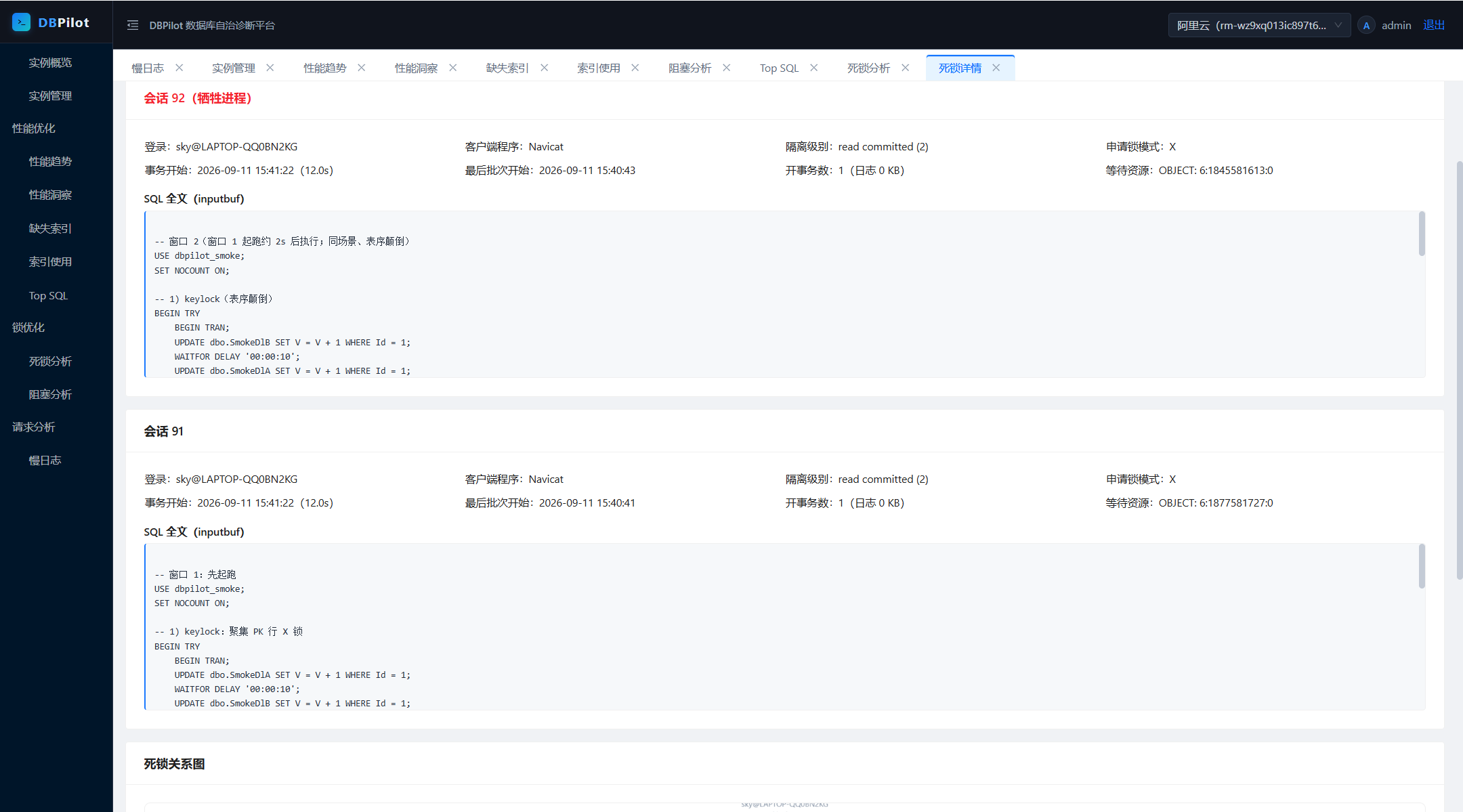
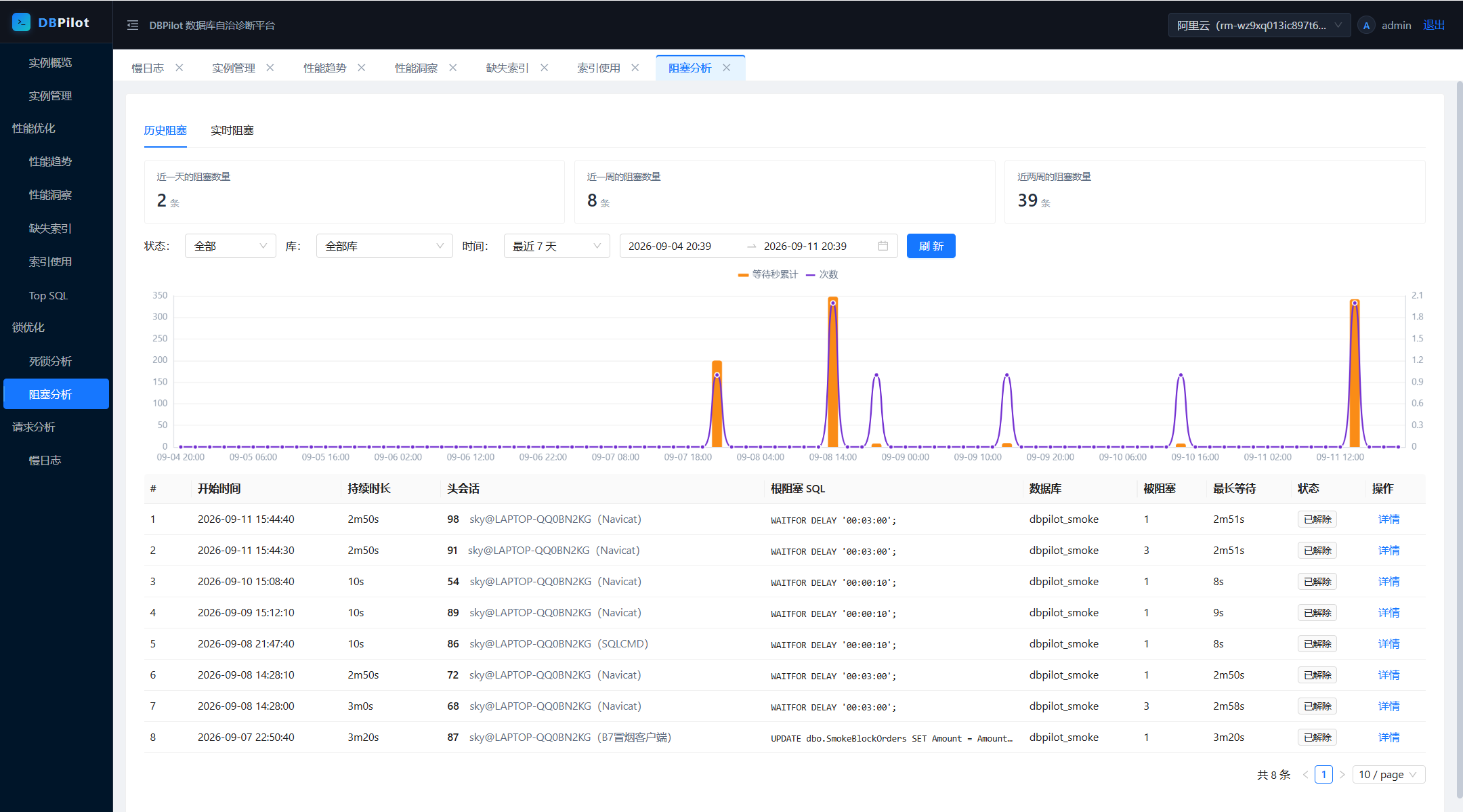
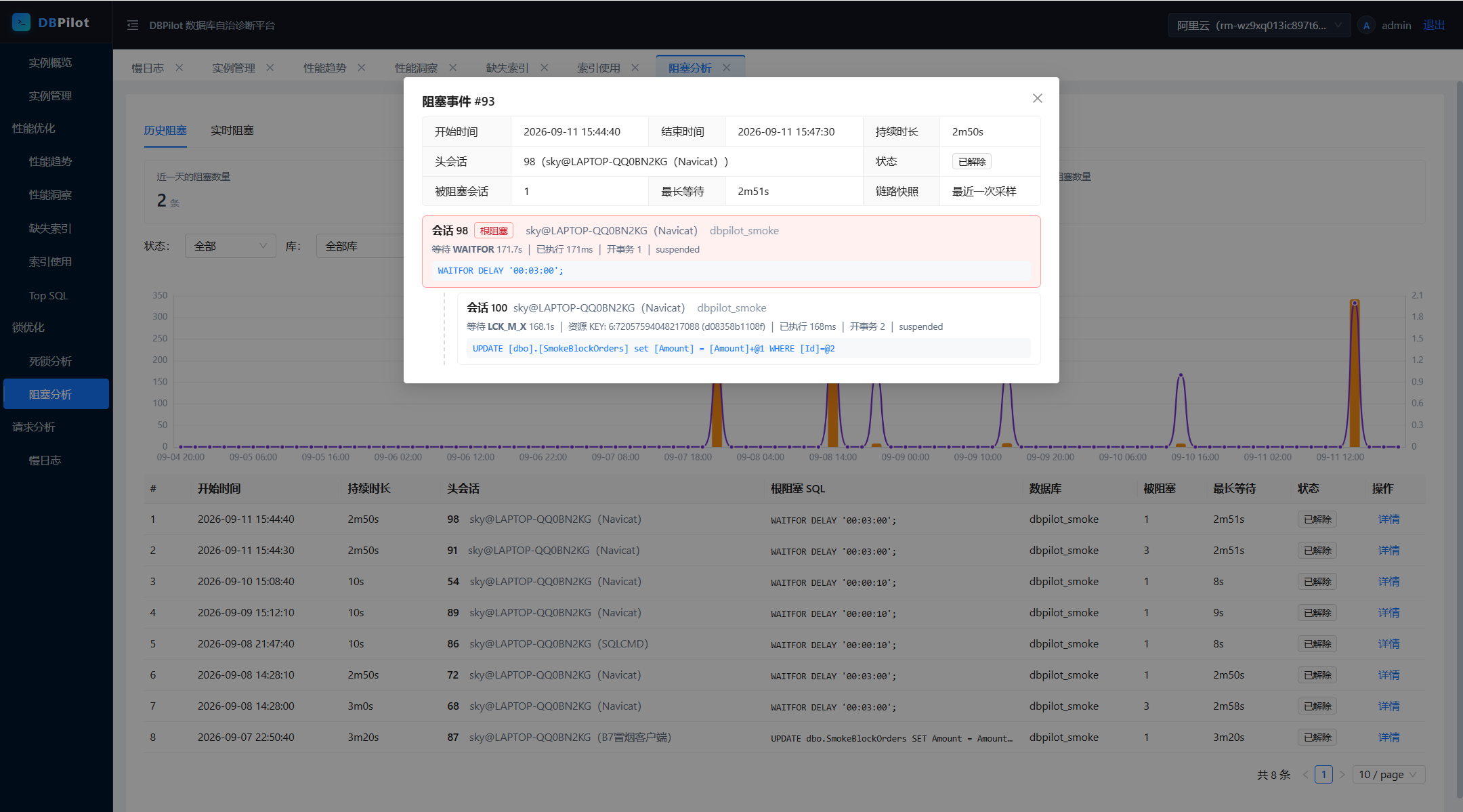
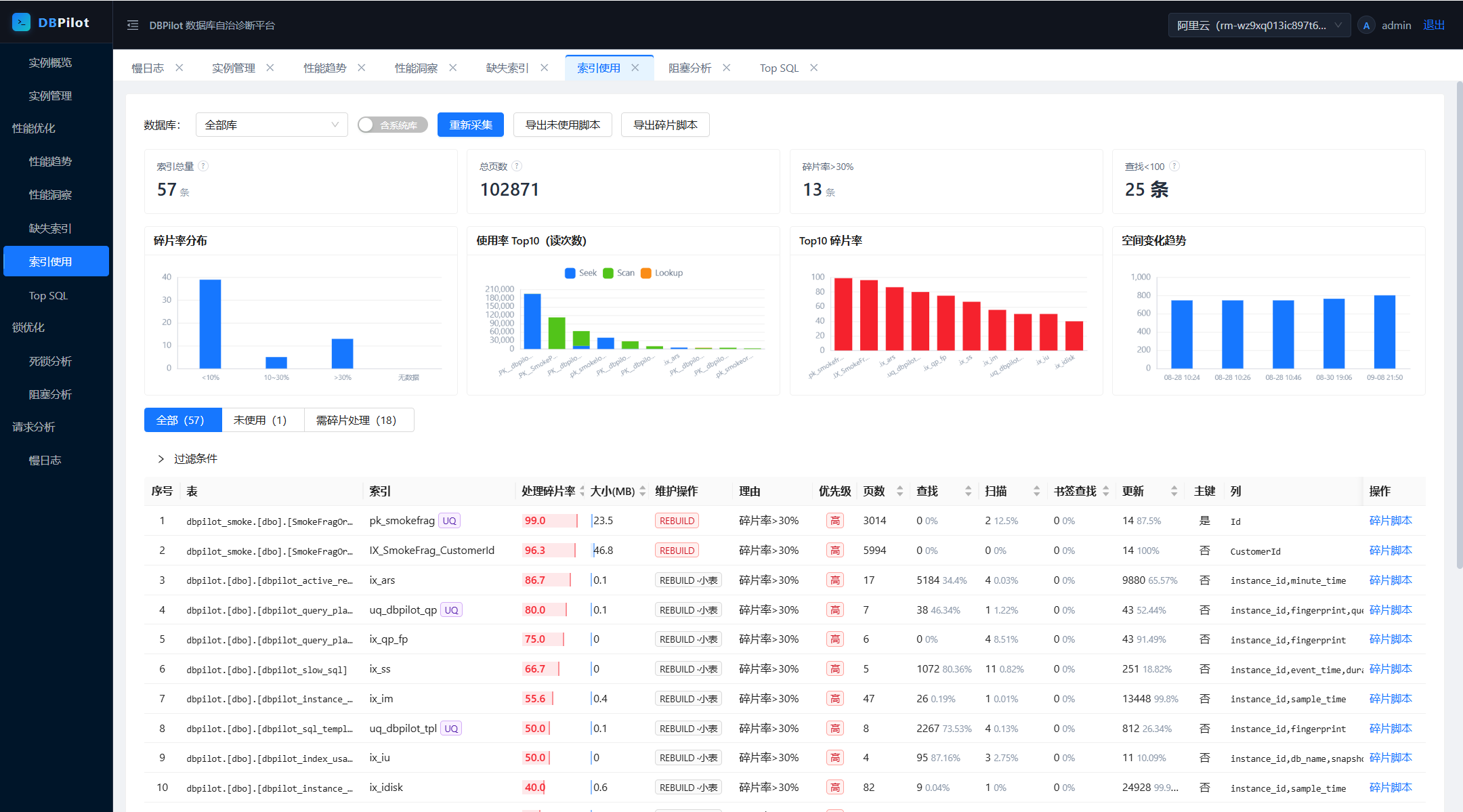
DBPilot continuously samples your instances and serves the day-to-day DBA workflow in one web console: performance trends and insight (AAS load decomposition), Top SQL, query plan change tracking, missing-index advice, index usage & fragmentation, blocking analysis, deadlock analysis, and slow query logs.
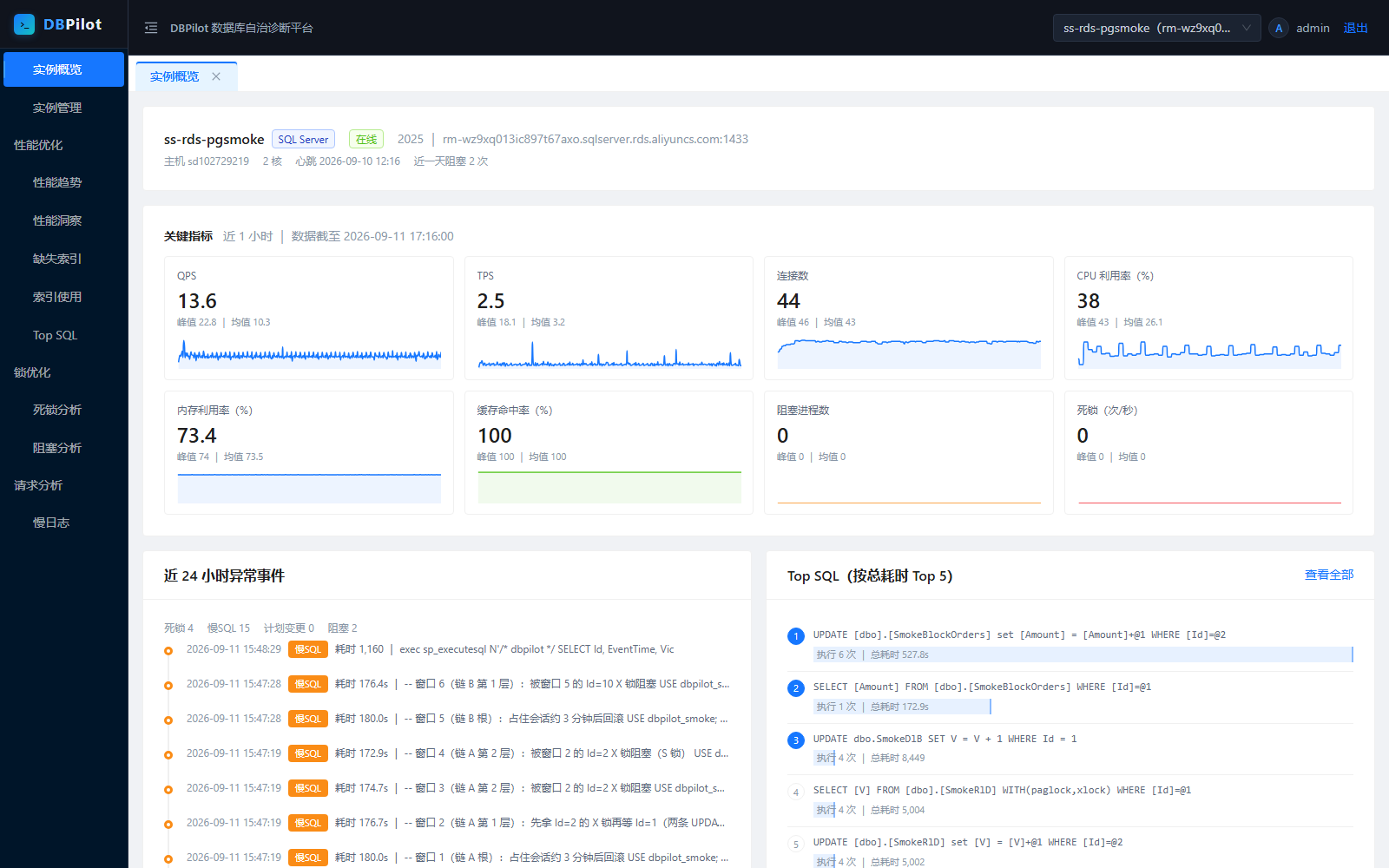
pg_stat_* / performance_schema); business tables are never scanned.| Performance insight (AAS) | Performance trends |
|---|---|
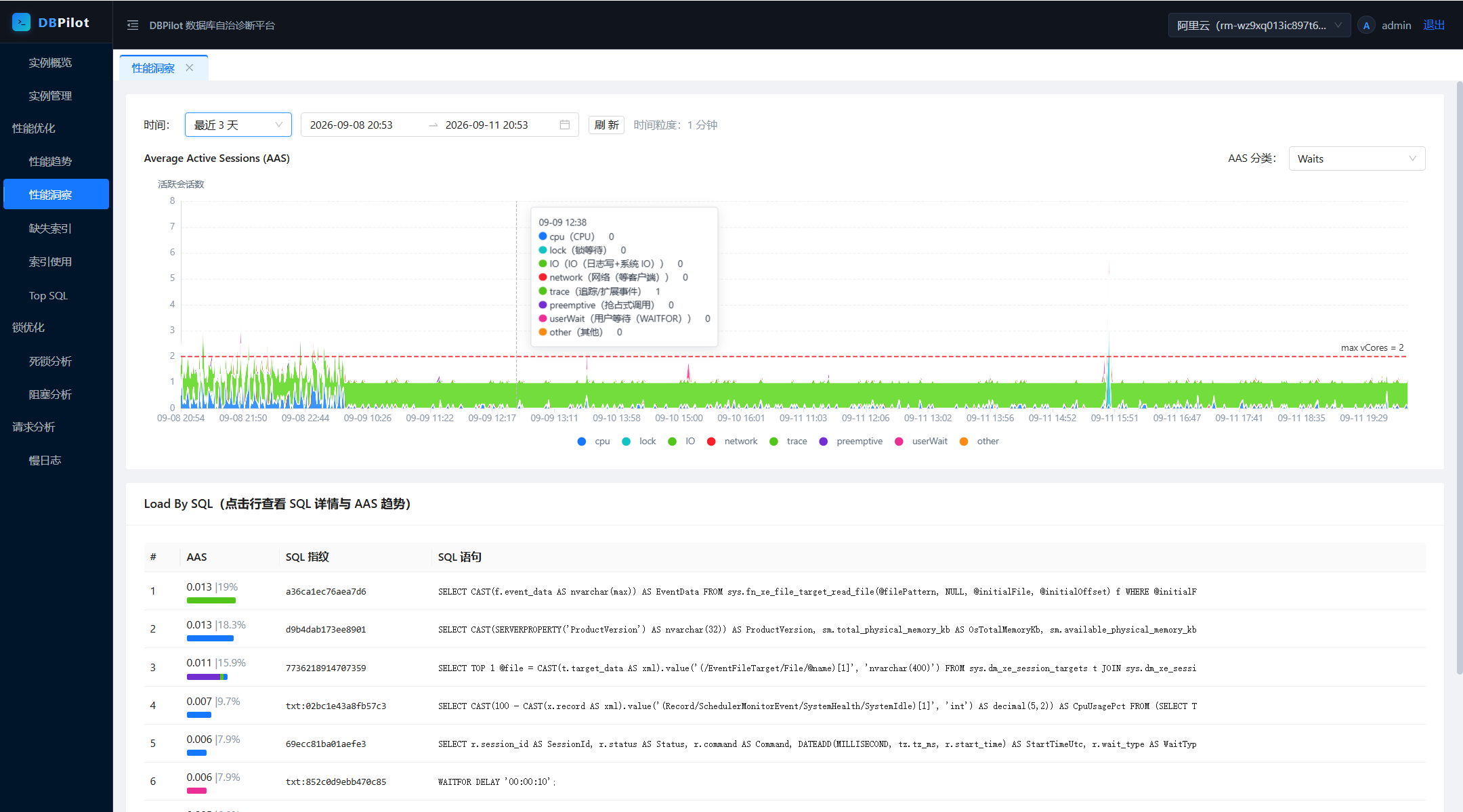 | 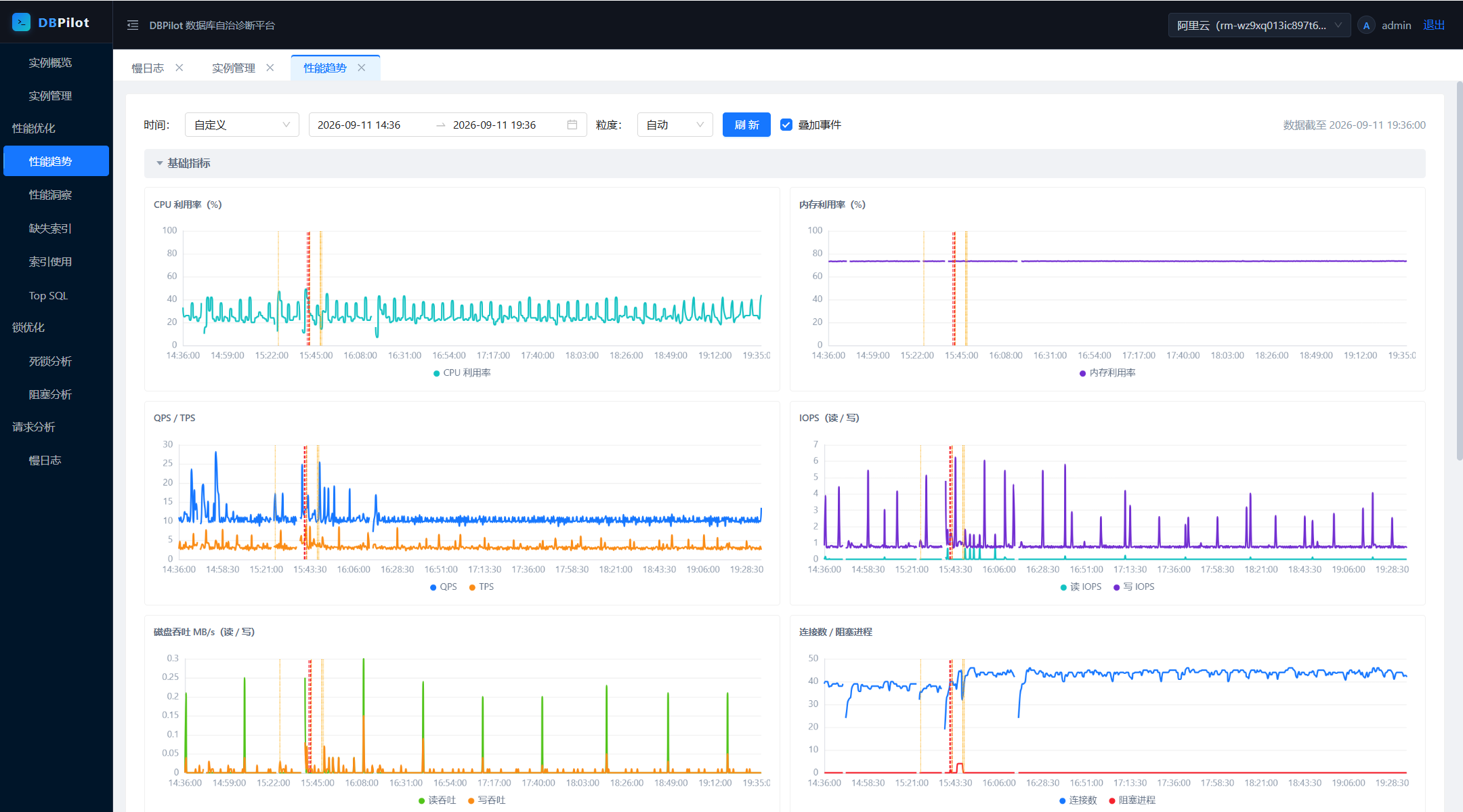 |
| Deadlock analysis | Deadlock event detail |
|---|---|
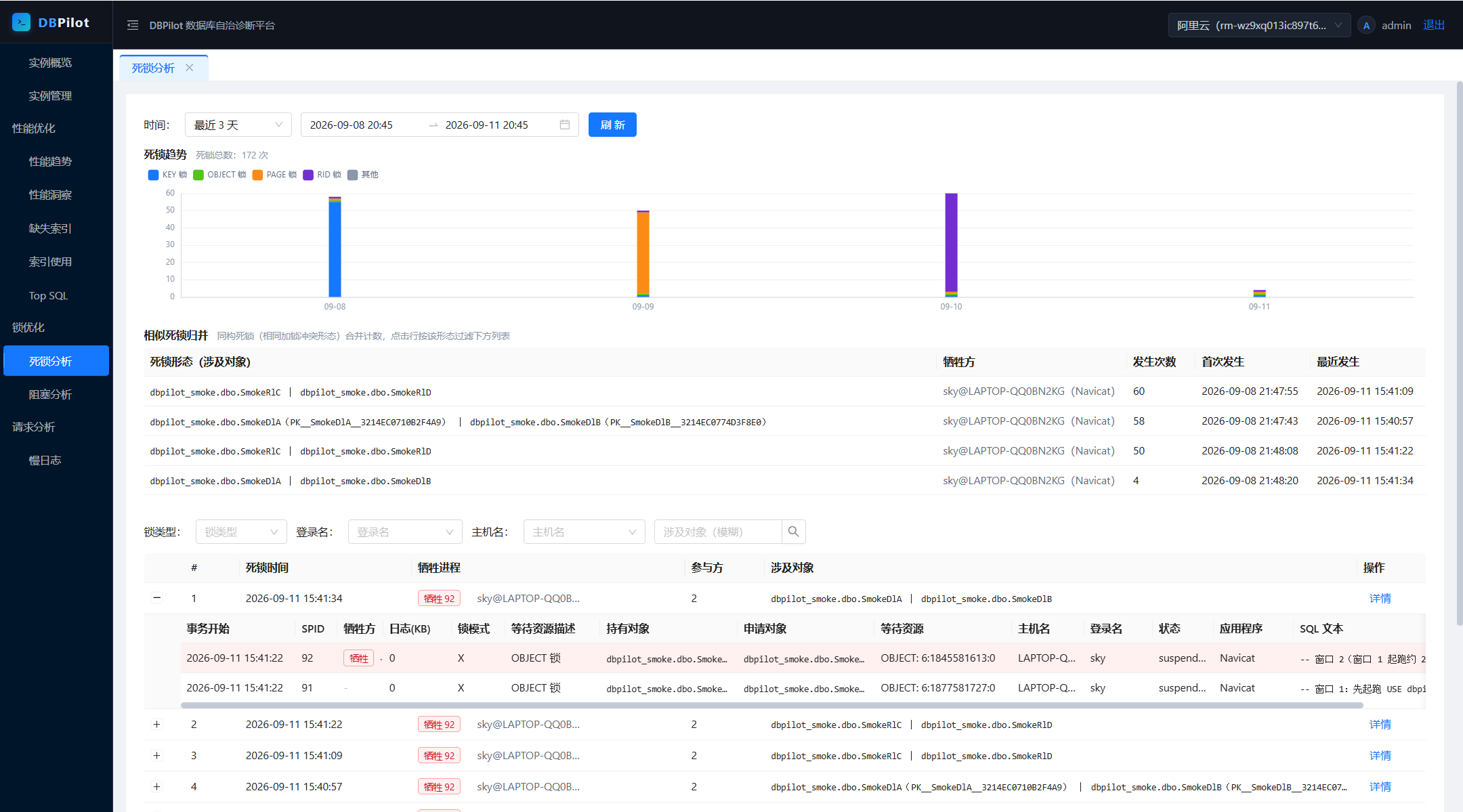 |  |
| Blocking analysis | Blocking chain detail |
|---|---|
 |  |
| Index usage | Slow query log |
|---|---|
 | 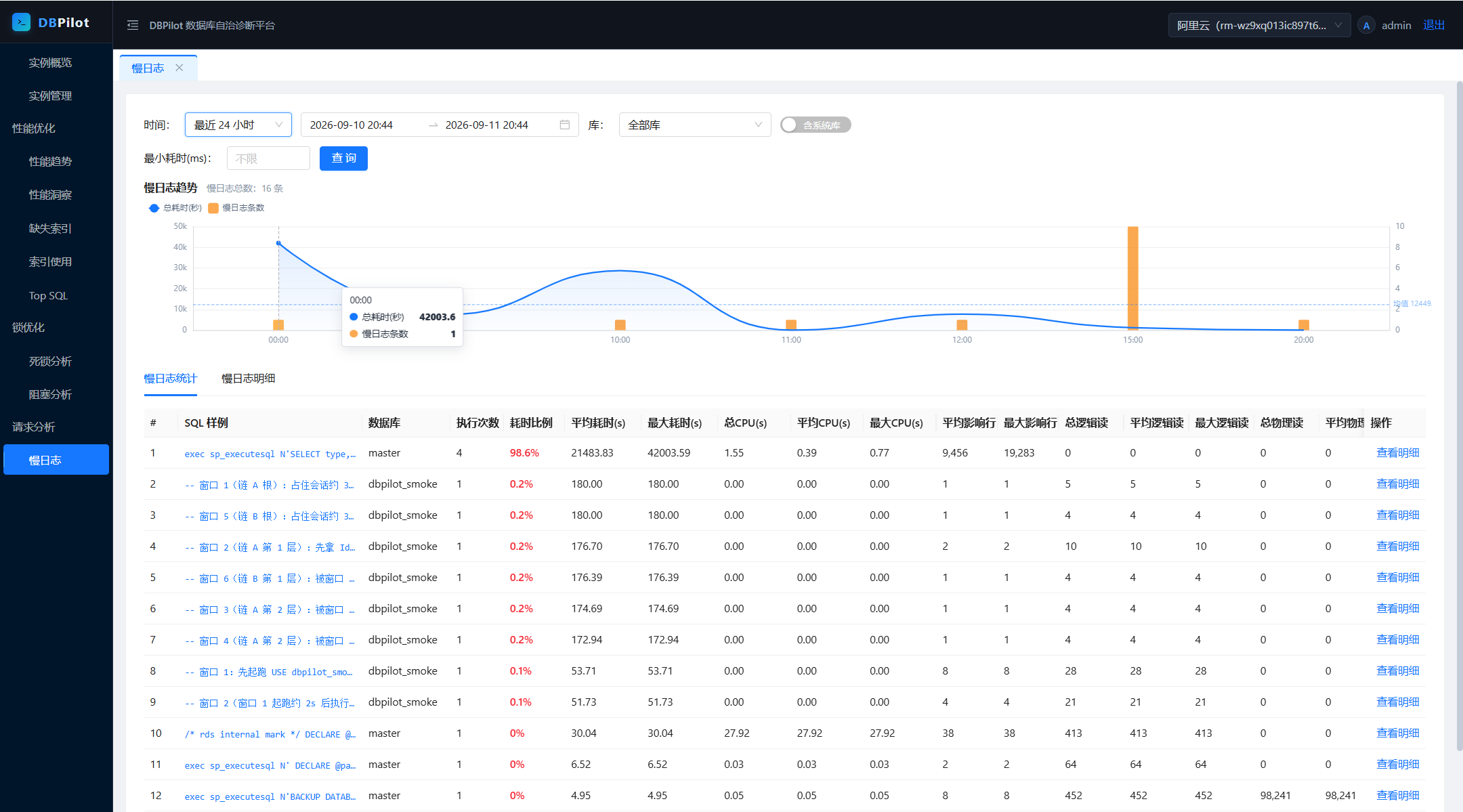 |
Fastest path: NuGet packages (frontend embedded — no Node.js). Requires .NET SDK 8.0+ — packages run on .NET 8 or later.
mkdir dbpilot-demo && cd dbpilot-demo
dotnet new web
dotnet add package DBPilot
Don't name the host project
dbpilotorDBPilot.*— it collides with the NuGet package and restore fails (NU1108).
Program.cs with:using DBPilot.AspNetCore.Extension;
using DBPilot.Core.Providers;
var builder = WebApplication.CreateBuilder(args);
builder.AddDBPilot(o => o.PlatformEngine = DbpilotEngine.Sqlite); // metadata store: SQLite, zero dependencies
var app = builder.Build();
app.UseDBPilot();
app.Run();
appsettings.json with (SQLite flavor):{
"Serilog": {
"MinimumLevel": {
"Default": "Information",
"Override": { "Microsoft": "Warning", "System": "Warning" }
}
},
"DBPilot": {
"ConnectionString": "Data Source=dbpilot_platform.db",
"Mcp": { "ApiKey": "<random key; non-empty enables MCP, empty = off>" },
"Auth": {
"Username": "admin",
"PasswordHash": "pbkdf2$100000$IOaBWezPYRnzEbBWYwLxZA==$xBWm8jjDfanDmyRttfnZoG4MIk8lcF0UnDbpjJuWaEU=",
"Secret": "<your master key (>= 32-char random string)>"
}
},
"AllowedHosts": "*"
}
ConnectionString and Auth:Secret are required — the SQLite file and schema are created on startup; the master key is generated as shown below.PasswordHash is the hash of the default password dbpilot@2026; keep it to log in with the default.dotnet run # → http://localhost:5000
admin / dbpilot@2026 (change it after deployment), then register your first instance: Instances → Add → Test connection → Enable. Real-time pages work immediately; history accumulates.Metadata store: for SQL Server / MySQL / PostgreSQL, switch PlatformEngine and the connection string — that's all; registered instances are unaffected. SQLite suits evaluation and single-machine use; prefer a server engine for production (and multi-process roles). Ready-made hosts: samples/ (SqlServer :5200 / MySql :5201 / Sqlite :5203 / PostgreSql :5204).
Change the login password: passwords are PBKDF2 hashes in DBPilot:Auth:PasswordHash — replace the hash to change the password.
hash.cs outside any project directory (your home dir works). Inside a project, dotnet run would treat it as an argument. File-based apps with #:package need .NET SDK 10; on SDK 8 use the repo-clone alternative below:#:package [email protected]
Console.WriteLine(DBPilot.Core.Auth.PasswordHasher.Hash(args[0]));
dotnet run hash.cs <new-password>
DBPilot:Auth:PasswordHash, restart.Repo clones can skip the steps: dotnet run --project samples/DBPilot.Sample.SqlServer -- --hash <new-password>.
Master key (Auth:Secret, or env DBPILOT_MASTER_KEY) — required, exactly two uses:
Hence startup fails without it, and you should not change it once in use. Generate one:
openssl rand -base64 32      # Linux / macOS / Git Bash
# PowerShell: [guid]::NewGuid().ToString("N") + [guid]::NewGuid().ToString("N")
Two required keys + one required value — DBPilot:ConnectionString, DBPilot:PlatformEngine, and a master key (Auth:Secret or env DBPILOT_MASTER_KEY). Missing → startup error; everything else is optional with defaults.
Monitored instances are never configured here — they live in the UI, credentials encrypted in the metadata DB.
Additionally requires Node.js 20+ (the embedded web UI comes from the frontend build; NuGet packages ship it prebuilt).
git clone https://github.com/SkyChenSky/DBPilot.git
cd DBPilot
scripts\run\setup.bat      # frontend build + compile + sample appsettings.json (default SqlServer host; pass MySql / Sqlite / PostgreSql to switch)
# edit samples/DBPilot.Sample.SqlServer/appsettings.json — fill in the connection string and Auth:Secret
dotnet run --project samples/DBPilot.Sample.SqlServer    # → http://localhost:5200
Non-Windows / manual equivalent:
cd web && npm install && npm run build
cd .. && dotnet build
cp samples/DBPilot.Sample.SqlServer/appsettings.template.json samples/DBPilot.Sample.SqlServer/appsettings.json
Day-to-day dev: scripts\run\dev.bat, or two terminals — dotnet watch --project samples/DBPilot.Sample.SqlServer (backend, Swagger at /swagger) + cd web && npm run dev (frontend → http://localhost:5173). Tests: scripts\run\test.bat (compile + unit tests + frontend build). Self-test load scripts in scripts/test/ — never run them against production databases.
flowchart LR
    subgraph browser["Browser"]
        ui["Web console"]
    end

    subgraph host["DBPilot service (single process)"]
        api["Web API + MCP Server"]
        sched["Background collectors (Quartz)"]
        webhost["Static UI hosting"]
    end

    subgraph platform["Metadata DB (schema auto-created)"]
        tables["Historical data"]
    end

    subgraph monitored["Monitored instances (any number)"]
        dmv["DMV / XE / pg_stat_* / performance_schema"]
    end

    ui --> webhost
    ui -->|API| api
    sched -->|scheduled sampling| dmv
    sched --> tables
    api --> tables
    api -->|real-time queries| dmv
The browser talks only to the DBPilot service: real-time pages query instances directly, history pages read the metadata DB — both share the same data conventions (noise exclusion, fingerprinting, time windows).
Metadata store: SQL Server / MySQL / PostgreSQL / SQLite — independent from the monitored engines, any combination (SQLite = single-executable + single-file embedded deployment).
Prerequisites are minimal and self-checked by the connection-test wizard: MySQL needs performance_schema + slow-log settings; PostgreSQL needs the pg_stat_statements extension; SQL Server works from 2008 up (deadlock capture rides the built-in system_health session). The wizard tells you exactly what to change when something is missing.
A read-only MCP Server (/mcp, Streamable HTTP + API key) hands the platform's evidence — metrics, slow SQL, deadlocks, blocking, indexes — to AI agents as 11 read-only tools. Agents never connect to your databases directly; every call is audit-logged.
Enable (off by default; non-empty ApiKey = on):
"DBPilot": { "Mcp": { "ApiKey": "a sufficiently random key" } }
claude mcp add --transport http dbpilot http://localhost:5200/mcp --header "X-Api-Key: <your-key>"
Then just ask: "use dbpilot to check the instance load over the last hour — any SQL getting slower?" Add --scope user to make it global.
Codex CLI (~/.codex/config.toml):
[mcp_servers.dbpilot]
url = "http://localhost:5200/mcp"

[mcp_servers.dbpilot.http_headers]
X-Api-Key = "<your-key>"
Example projects live in examples/: DBPilot.McpConsole (command-line diagnostic console) and DBPilot.Scenarios (fault-drill project), both referencing the official NuGet packages.
<1% CPU, zero disk pressure. Collectors read in-memory metadata views only — no business-table scans, no physical IO, no locks on user objects.
Built-in mitigations: XE predicates exclude the platform's own traffic, every cron is configurable, instances disable individually, failed connections back off. Same DMV-polling path as SQL Server's own system_health and AWS Performance Insights.
Verify it yourself — after a day of running, the monitoring account's accumulated CPU seconds is the true cost:
SELECT login_name, SUM(cpu_time)/1000 AS cpu_seconds_total
FROM sys.dm_exec_sessions
WHERE host_process_id IS NOT NULL
GROUP BY login_name;
Published on nuget.org:
dotnet add package DBPilot            # metapackage: AspNetCore + all engines, one line
# or pick what you need:
dotnet add package DBPilot.AspNetCore # API / MCP / auth / scheduling / embedded frontend
dotnet add package DBPilot.SqlServer  # engines — SqlServer / MySql / PostgreSql (monitor + storage)
dotnet add package DBPilot.MySql      #   and Sqlite (storage only, embedded deployments)
dotnet add package DBPilot.Sqlite
using DBPilot.AspNetCore.Extension;
using DBPilot.Core.Providers;

var builder = WebApplication.CreateBuilder(args);
builder.AddDBPilot(o =>
{
    o.PlatformEngine = DbpilotEngine.SqlServer;  // no default — set explicitly (or via DBPilot:PlatformEngine)
    // o.WebOnly();                               // delegate sets only what you want to change
});

var app = builder.Build();
app.UseDBPilot();
app.Run();
engine column. Explicit registration (AddDbpilotSqlServer()) mixes in and is required for single-file publishes.DBPilot.AspNetCore → Core → Storage → Common; engine packages depend on Core + Storage.buildTransitive targets copy into wwwroot, plus an embedded-manifest fallback so the UI works even with an empty wwwroot.AddDbpilotWeb / AddDbpilotMcp / AddDbpilotQuartz / ...) remain available.Self-hosted database performance diagnostics for SQL Server, MySQL & PostgreSQL: trends, AAS insight, Top SQL, plan-change tracking, blocking & deadlock analysis. Single-process deploy, built-in MCP
Visão geral
Self-hosted database performance diagnostics for SQL Server, MySQL & PostgreSQL: trends, AAS insight, Top SQL, plan-change tracking, blocking & deadlock analysis. Single-process deploy, built-in MCP server for AI agents.
Ferramentas
Ainda não há lista de ferramentas. Servidores remotos recebem uma após a primeira verificação de saúde.
Perguntas frequentes
Copie nesta página a configuração stdio para Cursor, Claude Desktop, Claude Code ou VS Code. Ela usa a instalação do publicador, não um proxy do PlugMCP.
Este registro não lista nenhuma variável de ambiente obrigatória.
DBPilot roda localmente via stdio.
Última verificação: 2026-10-28. Self-hosted database performance diagnostics for SQL Server, MySQL & PostgreSQL: trends, AAS insight, Top SQL, plan-change tracking, blocking & deadlock analysis. Single-process deploy, built-in MCP server for AI agents.
