gemsAPI
A full-stack interface for managing and executing custom AI instructions ("Gems") with Supabase auth, Gemini multimodal chat, and optional MCP integration.
Potencialize seu agente
Instalação do publicador. Não é um endpoint do PlugMCP.
Host a copy with our keys and logs.
Ainda não há uma versão empacotada no registro. Siga o README do repositório.
URL remota ou um comando na sua máquina? Como as duas instalações diferem
Rodar no PlugMCP
A new server you create. It is not this listing's official endpoint. Use the publisher install when you want their URL and their credentials.
AbrirDo publicador
A full-stack interface for managing and executing custom AI instructions ("Gems") with Supabase auth, Gemini multimodal chat, and optional MCP integration.
A FastAPI and MCP server connected to Supabase table for managing, testing, and programmatically accessing LLM System Instructions, System Prompts, BOTs, Google Gems.
Since the standard Gemini Gems interface does not currently support direct API access, gemsAPI provides a backend service and web UI for storing, managing, and executing custom AI prompts with current Gemini text and image-capable models.

gemsAPI is a full-stack application with a React frontend, FastAPI backend, Supabase database, and Google Gemini AI integration. The system supports multiple transport mechanisms including REST API, MCP SSE transport, and MCP STDIO for Claude Desktop.
Key Components:
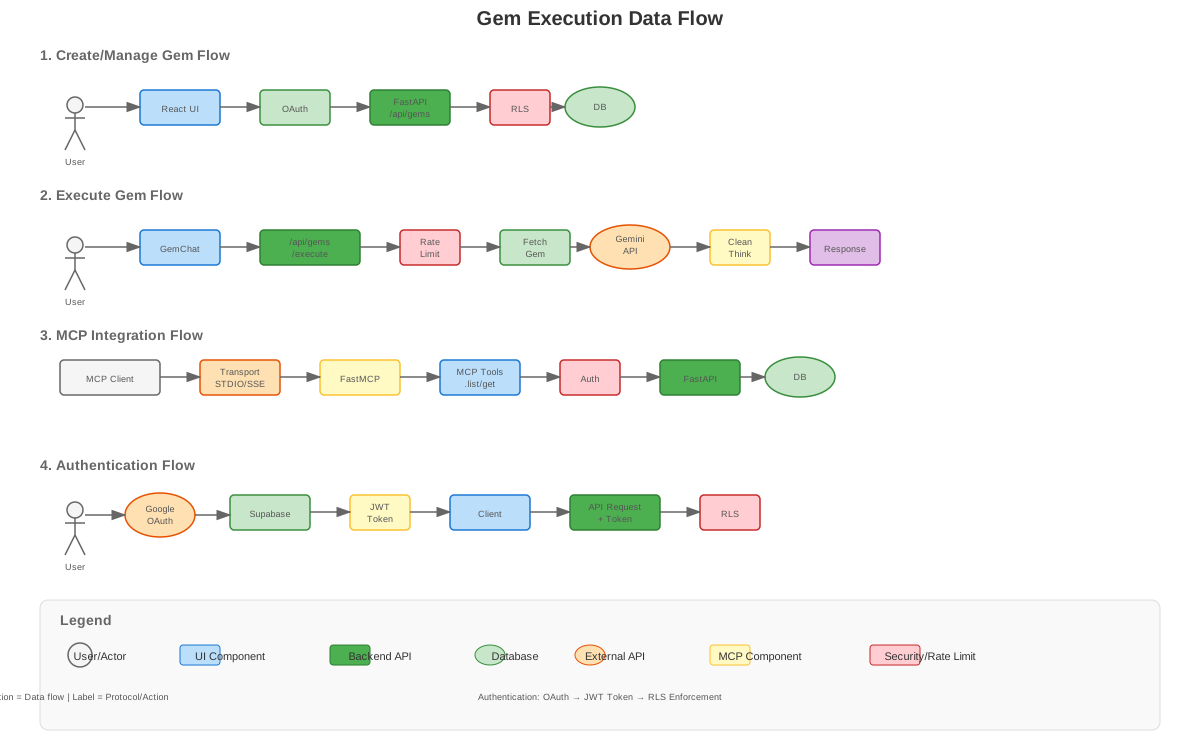
Key Workflows:
AuthContext → Bearer token → RLS Enforcement
Tables:
auth.users - Supabase built-in user authenticationpublic.gems - Gem definitions with user ownership and RLSpublic.admin_users - Administrator accounts for full accessRow Level Security (RLS):
git clone https://github.com/sruckh/gemsAPI.git
cd gemsAPI
Create a .env file in the project root:
cp .env.example .env
Edit .env with your credentials:
# Required
GEMINI_API_KEY=your_gemini_api_key
SUPABASE_URL=your_supabase_project_url
SUPABASE_KEY=your_supabase_service_role_key
VITE_SUPABASE_ANON_KEY=your_supabase_anon_key

# Optional (with defaults)
GEMINI_TEXT_MODEL=gemini-flash-latest
GEMINI_IMAGE_MODEL=gemini-3.1-flash-image
GEMINI_PRO_IMAGE_MODEL=gemini-3-pro-image
PORT=8000
NODE_ENV=production

# MCP Integration
ENABLE_MCP=true
API_TOKEN=your_secure_api_token_for_mcp
docker compose up -d --build
The service will be available at http://localhost:8000
Notes:
npm install inside the container image. No host-side npm install is required when you deploy with docker compose build.cdn.tailwindcss.com is no longer required at runtime.docker-compose.yml passes SUPABASE_URL into the frontend build as VITE_SUPABASE_URL.If you prefer to run without Docker:
Frontend:
npm install
Backend:
pip install -r requirements.txt
npm run dev
uvicorn fastapi_server:app --reload --host 0.0.0.0 --port 8000
Notes:
VITE_SUPABASE_URL and VITE_SUPABASE_ANON_KEY at build/dev time. For manual local development, define them in a Vite-readable env file such as .env.local.SUPABASE_URL, SUPABASE_KEY, and GEMINI_API_KEY at runtime.NODE_ENV=production is used by the backend, but Vite may warn if that variable is present during frontend builds because it prefers controlling frontend mode itself.For the complete database schema with all tables, relationships, and RLS policies, see the ER Diagram above.
Quick Reference:
docs/supabase/gems_table.sqlgemsAPI provides Model Context Protocol (MCP) integration for tool-based access to gems.
curl -H "Authorization: Bearer YOUR_TOKEN" \
  https://your-domain.com/api/mcp/stdio-script \
  -o gemsapi_mcp.py
~/Library/Application Support/Claude/claude_desktop_config.json%APPDATA%\Claude\claude_desktop_config.json{
"mcpServers": {
"gemsapi": {
"command": "python",
"args": ["/path/to/gemsapi_mcp.py"],
"env": {
"GEMSAPI_TOKEN": "YOUR_SUPABASE_ACCESS_TOKEN",
"GEMSAPI_URL": "https://your-domain.com"
}
}
}
}
pip install fastmcp httpx
gems.list: List all gems for authenticated usergems.get: Get a specific gem by ID or namegems.search: Search gems by name or descriptionImage responses is toggled on in the UI, the backend also allows Gemini to return inline generated image parts.Image responses does not force the model to always return an image. Text-only output can still be correct for a given Gem or prompt.Secret hygiene:
SUPABASE_KEY (service role) to VITE_* variablesAPI_TOKEN for server-to-server communication onlynpm run secret:check before committing to scan for leaked tokensAuthentication:
admin_users table# Health check
curl http://localhost:8000/healthz
# List gems (requires auth token)
curl -H "Authorization: Bearer YOUR_TOKEN" \
http://localhost:8000/api/gems
# Execute a gem
curl -X POST http://localhost:8000/api/gems/execute \
-H "Content-Type: application/json" \
-H "Authorization: Bearer YOUR_TOKEN" \
-d '{"gem_name": "MyGem", "user_prompt": "Hello!"}'
# Free-form generation with image-capable response mode
curl -X POST http://localhost:8000/api/gemini/generate \
-H "Content-Type: application/json" \
-d '{"system_instructions":"You are helpful.","user_prompt":"Describe this image.","images":[{"data":"BASE64_BYTES","mime_type":"image/png","name":"example.png"}],"generate_images":false}'
# Scan for leaked secrets before committing
npm run secret:check
# Build image
docker build -t gemsapi:latest .

# Run container
docker run -p 8000:8000 --env-file .env gemsapi:latest
NODE_ENV=production in .envVITE_SUPABASE_KEY is NOT set (security check)distFRONTEND_URL# Forward proxy configuration
location /gemsapi/ {
proxy_pass http://gemsapi:8000/;
proxy_set_header Host $host;
proxy_set_header X-Real-IP $remote_addr;
proxy_set_header X-Forwarded-For $proxy_add_x_forwarded_for;
proxy_set_header X-Forwarded-Proto $scheme;
}
Contributions are welcome! Please follow these guidelines:
git checkout -b feature/amazing-feature)git commit -m 'Add amazing feature')git push origin feature/amazing-feature)npm run secret:check before committingThis project is licensed under the MIT License - see LICENSE for details.
A FastAPI and MCP server connected to Supabase table for managing, testing, and programmatically accessing LLM System Instructions, System Prompts, BOTs, Google Gems.
Ferramentas
Ainda não há lista de ferramentas. Servidores remotos recebem uma após a primeira verificação de saúde.
Perguntas frequentes
Copie nesta página a configuração stdio para Cursor, Claude Desktop, Claude Code ou VS Code. Ela usa a instalação do publicador, não um proxy do PlugMCP.
Este registro não lista nenhuma variável de ambiente obrigatória.
GemsAPI roda localmente via stdio.
Última verificação: 2026-10-28. A FastAPI and MCP server connected to Supabase table for managing, testing, and programmatically accessing LLM System Instructions, System Prompts, BOTs, Google Gems.
