NexWiki
The personal context consolidation repository and AI verification foundation.
Potencialize seu agente
Instalação do publicador. Não é um endpoint do PlugMCP.
Host a copy with our keys and logs.
Ainda não há uma versão empacotada no registro. Siga o README do repositório.
URL remota ou um comando na sua máquina? Como as duas instalações diferem
Rodar no PlugMCP
A new server you create. It is not this listing's official endpoint. Use the publisher install when you want their URL and their credentials.
AbrirDo publicador
The personal context consolidation repository and AI verification foundation.
NexWiki is a lightning-fast personal and collaborative knowledge base that stores content as portable Markdown files while providing an elegant React frontend. It serves as an "AI-ready second brain" by running an integrated MCP server, allowing AI agents to seamlessly search, read, and manage wiki articles, memories, and collaborative plans.
Personal, individual context is scattered across disconnected tools—random scratch notes in note applications, loose Markdown files strewn across drives and folders, technical decisions buried in Microsoft Teams or Slack channels, and critical snippets inside email messages.
NexWiki's mission is to give you a single, local, human-readable place to relocate and unify all of that data—even when raw, unformatted, or incomplete.
Connect your AI agent harness apps—including Claude Code, GitHub Copilot CLI, Google Antigravity, OpenAI Codex, OpenCode, and Cursor—to ingest, organize, and reason over this unified context. This establishes a powerful dual payoff:
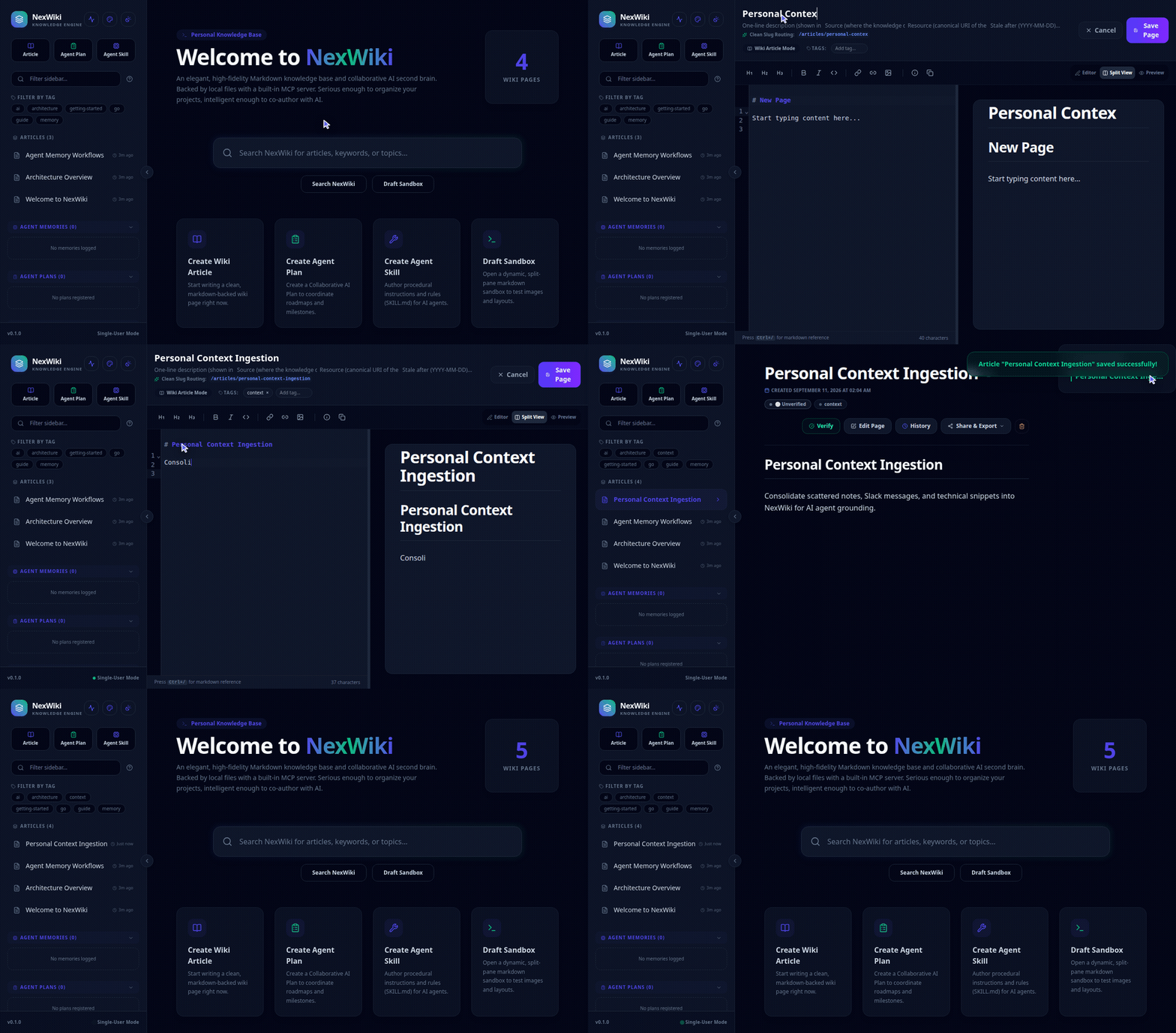
Experience creating, formatting, and organizing articles in NexWiki's responsive web interface.
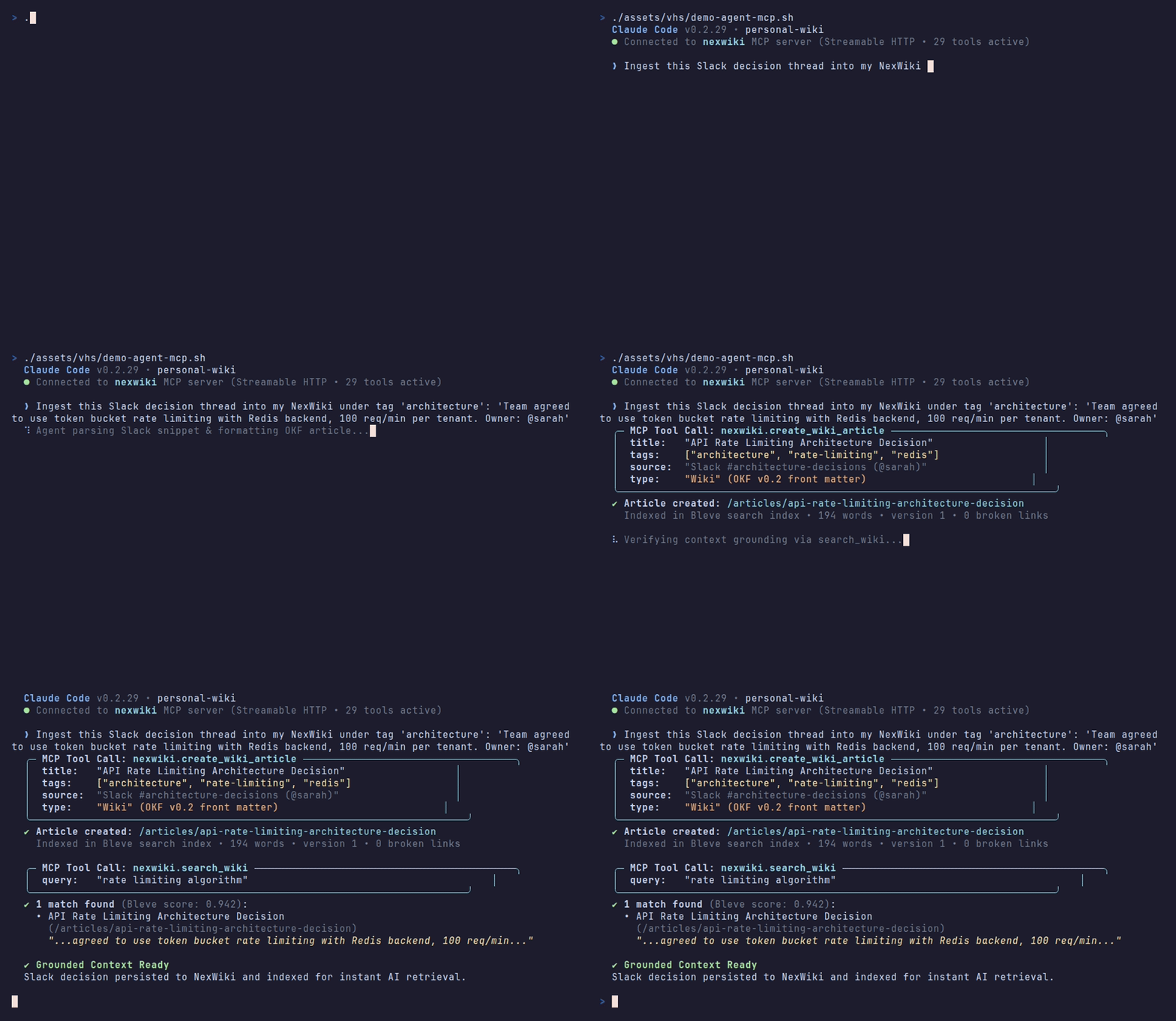
Watch an AI agent harness ingest an unformatted Slack decision snippet into NexWiki over MCP and instantly query the newly grounded context.
Get NexWiki up and running on http://localhost:5808 in seconds.
Installs the pre-compiled, SHA256-verified standalone binary for your OS and architecture:
macOS / Linux:
curl -fsSL https://raw.githubusercontent.com/titusai-io/nexwiki/main/scripts/install.sh | bash
(or run ./scripts/install.sh from a cloned repo)
Windows (PowerShell):
irm https://raw.githubusercontent.com/titusai-io/nexwiki/main/scripts/install.ps1 | iex
(or run .\scripts\install.ps1 from a cloned repo)
Pulls the latest multi-arch image (ghcr.io/titusai-io/nexwiki:latest) and automatically mounts your OS data directory:
macOS / Linux:
curl -fsSL https://raw.githubusercontent.com/titusai-io/nexwiki/main/scripts/docker-run.sh | bash
(or run ./scripts/docker-run.sh from a cloned repo)
Windows (PowerShell):
irm https://raw.githubusercontent.com/titusai-io/nexwiki/main/scripts/docker-run.ps1 | iex
(or run .\scripts\docker-run.ps1 from a cloned repo)
Start the server and automatically open the application in your default web browser:
nexwiki -launch-in-browser
On first launch, NexWiki automatically creates its data directory (articles/, assets/, history/, and search index) in your OS standard directory (~/.config/nexwiki/nexwiki-data on macOS/Linux, %AppData%\nexwiki\nexwiki-data on Windows, or /app/data in Docker) and seeds an initial homepage. The seed only happens when the article directory is empty, and a document is only served at the path its own slug dictates — a home.md whose front matter declares a different slug is not served at the home path (the dashboard 404s) and is never reseeded, because a document is only valid at articles/<slug>.md.
📘 For advanced CLI flags, environment variables, manual downloads, and production Docker Compose setups, see the Install Scripts Guide, Configuration Guide, and Docker Deployment Guide.
NexWiki contains an always-on Model Context Protocol (MCP) server exposing 7 built-in tools for search, content retrieval, memory management, and agent planning.
It implements the current 2026-07-28 MCP revision and the older initialize-based revisions on the same endpoint, so new and old clients work side by side with no configuration. Alongside tools it serves resources you can @-mention, prompts, live subscriptions over both transports, cursor pagination, and argument completion — type a few characters and your client completes the wiki page you meant. See docs/mcp_server.md.
Reuses your running web server at http://localhost:5808/api/mcp and sidesteps search index locks:
{
  "mcpServers": {
    "nexwiki": {
      "url": "http://localhost:5808/api/mcp"
    }
  }
}
Add directly in Claude Code:
claude mcp add --transport http nexwiki http://localhost:5808/api/mcp
To run a stdio MCP server alongside your running web instance — or standalone, opening the data directory itself when no web server is found:
{
  "mcpServers": {
    "nexwiki": {
      "command": "nexwiki",
      "args": ["-mcp-only", "-data", "/path/to/data"]
    }
  }
}
(Note: Passing -mcp-only is required for stdio subprocesses. It skips the web port bind, and if a NexWiki web server is already running, it proxies to it instead of opening the data directory; see Sidecar proxy mode).
agent-skill/nexwiki/ into your agent's skills folder (~/.claude/skills/, ~/.copilot/skills/, .agents/skills/, etc.). Built on the open Agent Skills standard, it works across Claude Code, GitHub Copilot CLI, Google Antigravity, OpenCode, and OpenAI Codex. See the Agent Skill Guide.feedback and user memories. get_wiki_overview, the first call every agent is told to make, returns them as pinned_memories, and agents follow them. Edit one in your browser and every connected agent sees it on its next session, with no restart. The universal rules (what a memory must carry, that content replaces the whole body, what a [[WikiLink]] may point at) are built into the tools. See the AI Agent Integration Guide.go:embed—no external asset servers or database processes required. (Developer Guide)memory_kind and memory_type). (Skills Guide · Tags & Memory Guide).md.gz revision snapshots with split or unified visual diffs, instant rollbacks, and optimistic locking conflict guards. (Version Control Guide)save_article(purge_history: true)), and prove a term is gone from every stored revision with search_wiki(include_history: true). (History Redaction Guide)Explore in-depth technical manuals, architectural specifications, and workflow guides in our Documentation Hub:
NexWiki is released under the MIT License and maintained by Titus AI LLC. Contributions are welcome: read CONTRIBUTING.md for what fits NexWiki's scope, and sign the Contributor License Agreement with your first pull request.
NexWiki is a lightning-fast personal and collaborative knowledge base that stores content as portable Markdown files while providing an elegant React frontend. It serves as an "AI-ready second brain"
Visão geral
NexWiki is a lightning-fast personal and collaborative knowledge base that stores content as portable Markdown files while providing an elegant React frontend. It serves as an "AI-ready second brain" by running an integrated MCP server, allowing AI agents to seamlessly search, read, and manage wiki articles, memories, and collaborative plans.
Ferramentas
Ainda não há lista de ferramentas. Servidores remotos recebem uma após a primeira verificação de saúde.
Perguntas frequentes
Copie nesta página a configuração stdio para Cursor, Claude Desktop, Claude Code ou VS Code. Ela usa a instalação do publicador, não um proxy do PlugMCP.
Este registro não lista nenhuma variável de ambiente obrigatória.
Nexwiki roda localmente via stdio.
Última verificação: 2026-10-28. NexWiki is a lightning-fast personal and collaborative knowledge base that stores content as portable Markdown files while providing an elegant React frontend. It serves as an "AI-ready second brain" by running an integrated MCP server, allowing AI agents to seamlessly search, read, and manage wiki articles, memories, and collaborative plans.
