[!CAUTION]
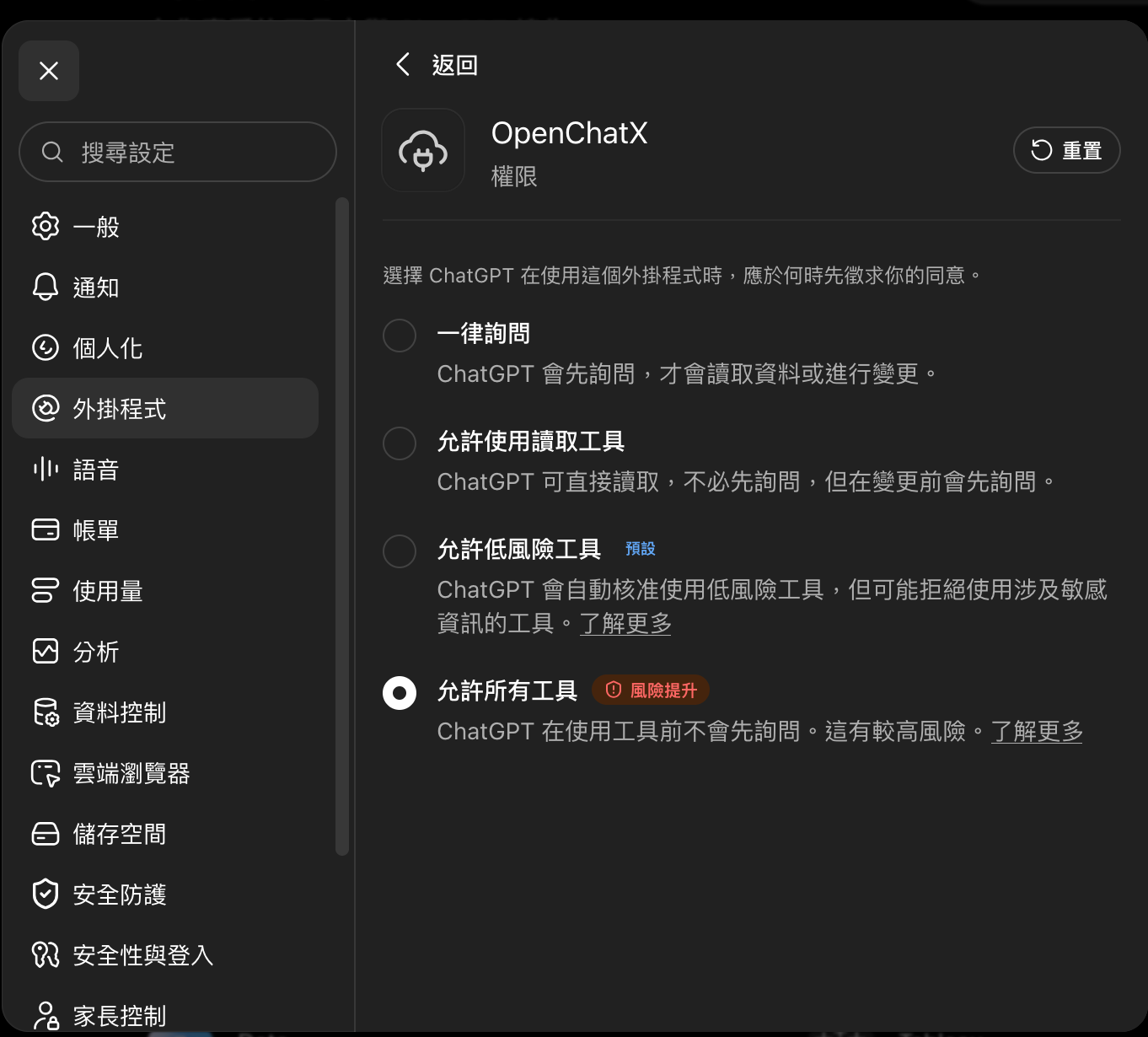
OpenChatX runs with your local user permissions. A trusted ChatGPT caller can run commands, edit files, use connected MCP servers, and control supported applications.
How it works — official MCP, no reverse engineering
OpenChatX uses OpenAI's documented MCP integration path. It does not reverse-engineer ChatGPT, call undocumented ChatGPT backend endpoints, reuse browser session cookies, or intercept ChatGPT traffic.
Turn ChatGPT into a local agent runtime. Operate your computer, use local tools, discover MCP servers, and delegate work to your own models through one MCP connection.
Estrelas
350
Ferramentas
—
Disponibilidade
—
The connection works like this:
OpenChatX runs a normal MCP server locally on your machine.
OpenAI's official tunnel-client creates an outbound HTTPS connection to an OpenAI Secure MCP Tunnel. Your local MCP server does not need a public inbound port.
ChatGPT connects to that tunnel as a custom MCP app using the supported ChatGPT Developer Mode / MCP app flow.
When ChatGPT invokes a tool, the Secure MCP Tunnel forwards the MCP request to OpenChatX locally and returns the MCP response through the same official channel.
OpenChatX then routes that request to local tools, your computer, connected MCP servers, Skills, Rules, Projects, or explicitly configured Subagents.
ChatGPT remains the model and planner. OpenChatX is the local tool/runtime layer; it does not impersonate ChatGPT or make hidden model calls on ChatGPT's behalf.
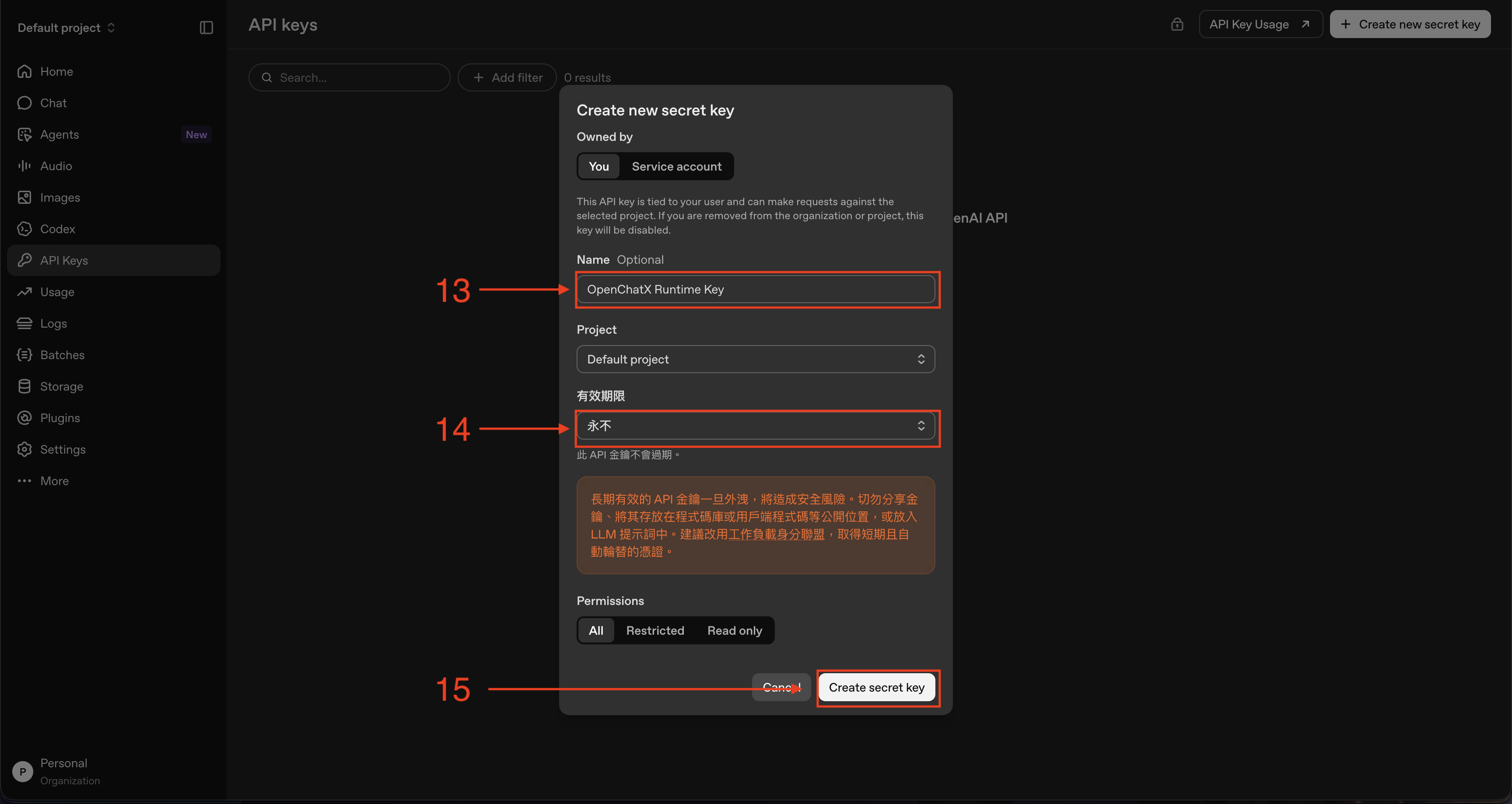
The Runtime API key configured in OpenChatX is used for the official Secure MCP Tunnel control plane and is stored in the operating-system credential store. It is not a scraped ChatGPT credential or a workaround around ChatGPT's supported interfaces.
This is the recommended way to use OpenChatX. You do not need to install Node.js, npm, PM2, or tunnel-client yourself.
macOS
Download the matching DMG from the latest release:
Apple Silicon: OpenChatX-macos-arm64.dmg
Intel Mac: OpenChatX-macos-x64.dmg
The macOS release is signed with Developer ID and notarized by Apple.
Windows
For most PCs, download:
OpenChatX-Setup-x64.exe
For Windows on ARM:
OpenChatX-Setup-arm64.exe
Portable ZIPs are also available.
[!WARNING]
Windows may warn because the binary is unsigned.
The Windows build is currently distributed without Authenticode signing. Download it only from this repository's GitHub Releases page.
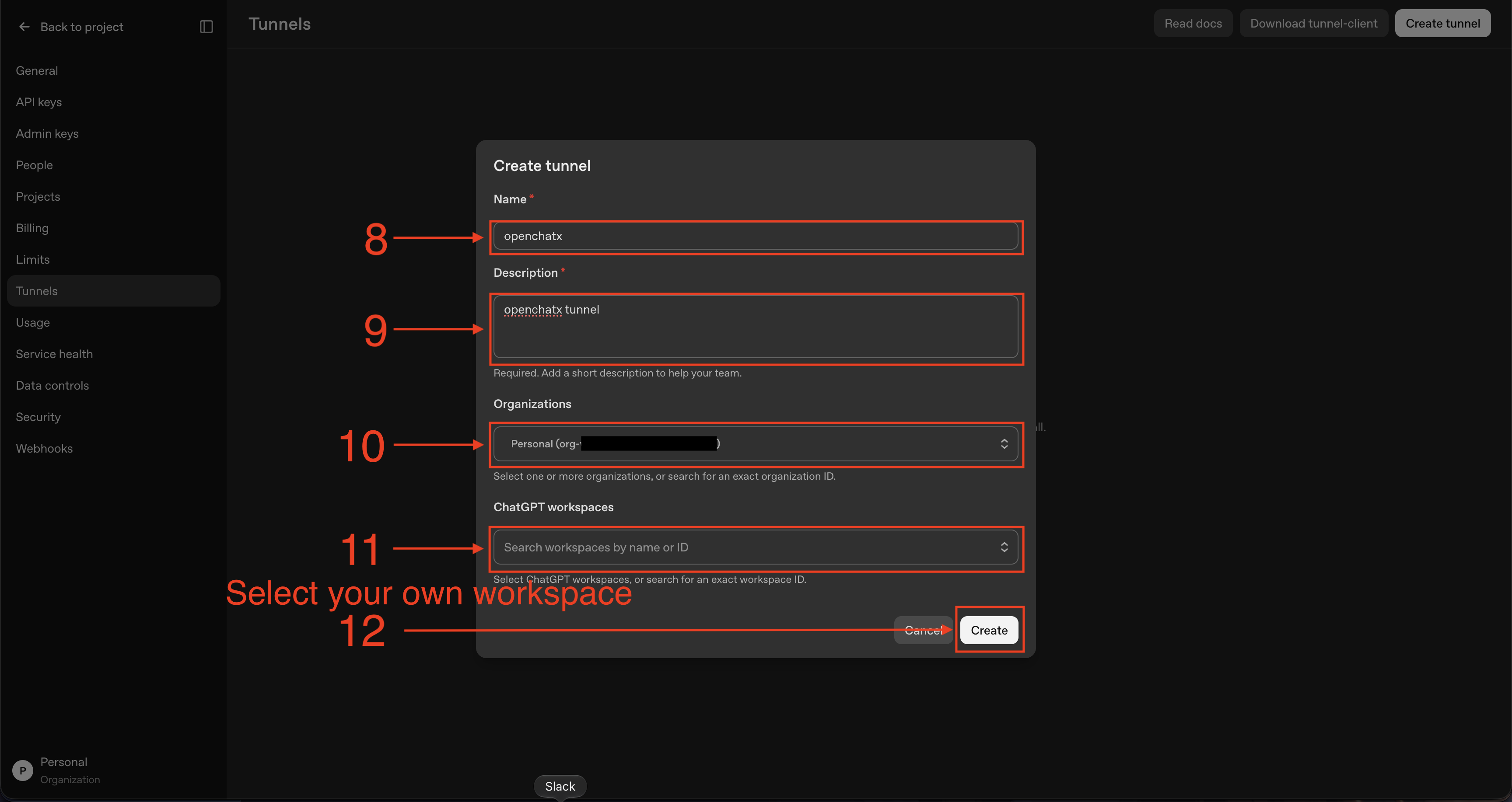
OpenChatX uses OpenAI Secure MCP Tunnel. The Desktop App manages the local runtime and bundled tunnel-client; you only need to create the tunnel once.
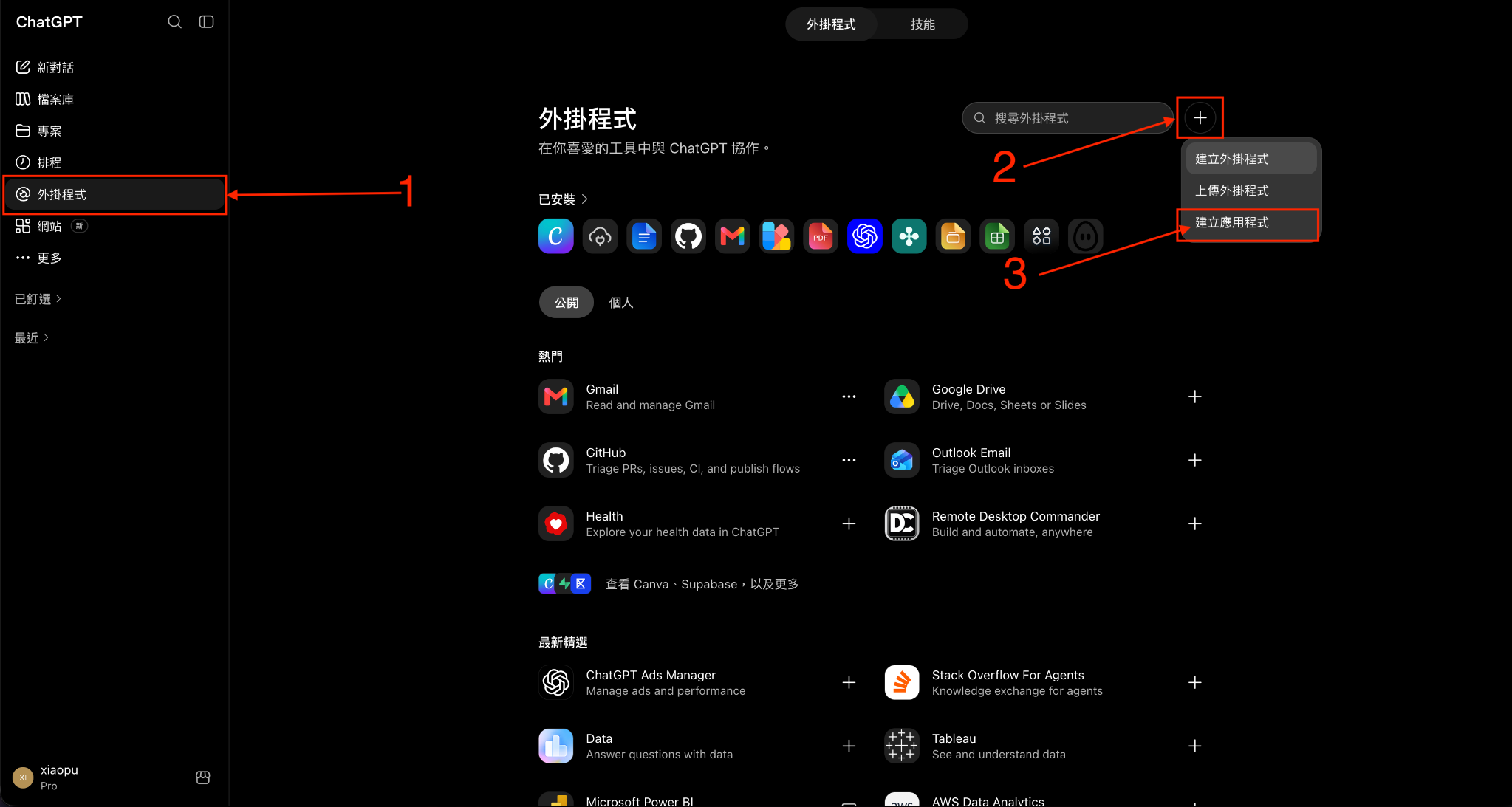
1. Create the ChatGPT MCP app
The Developer Mode toggle currently appears to be missing from ChatGPT. Some users have reported that they can create an MCP app without enabling Developer Mode, so for now, skip this step and continue directly with the Plugins flow below.
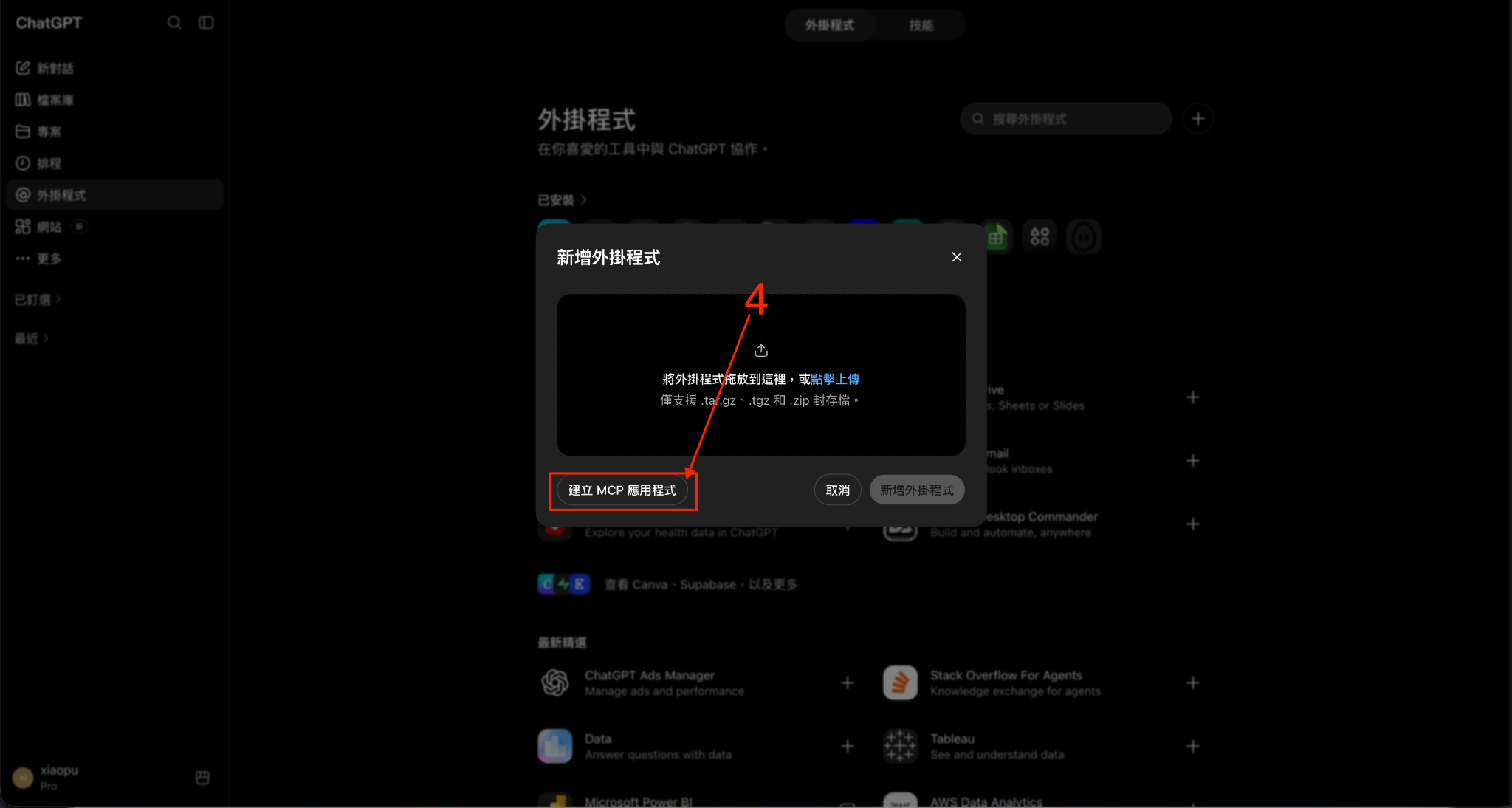
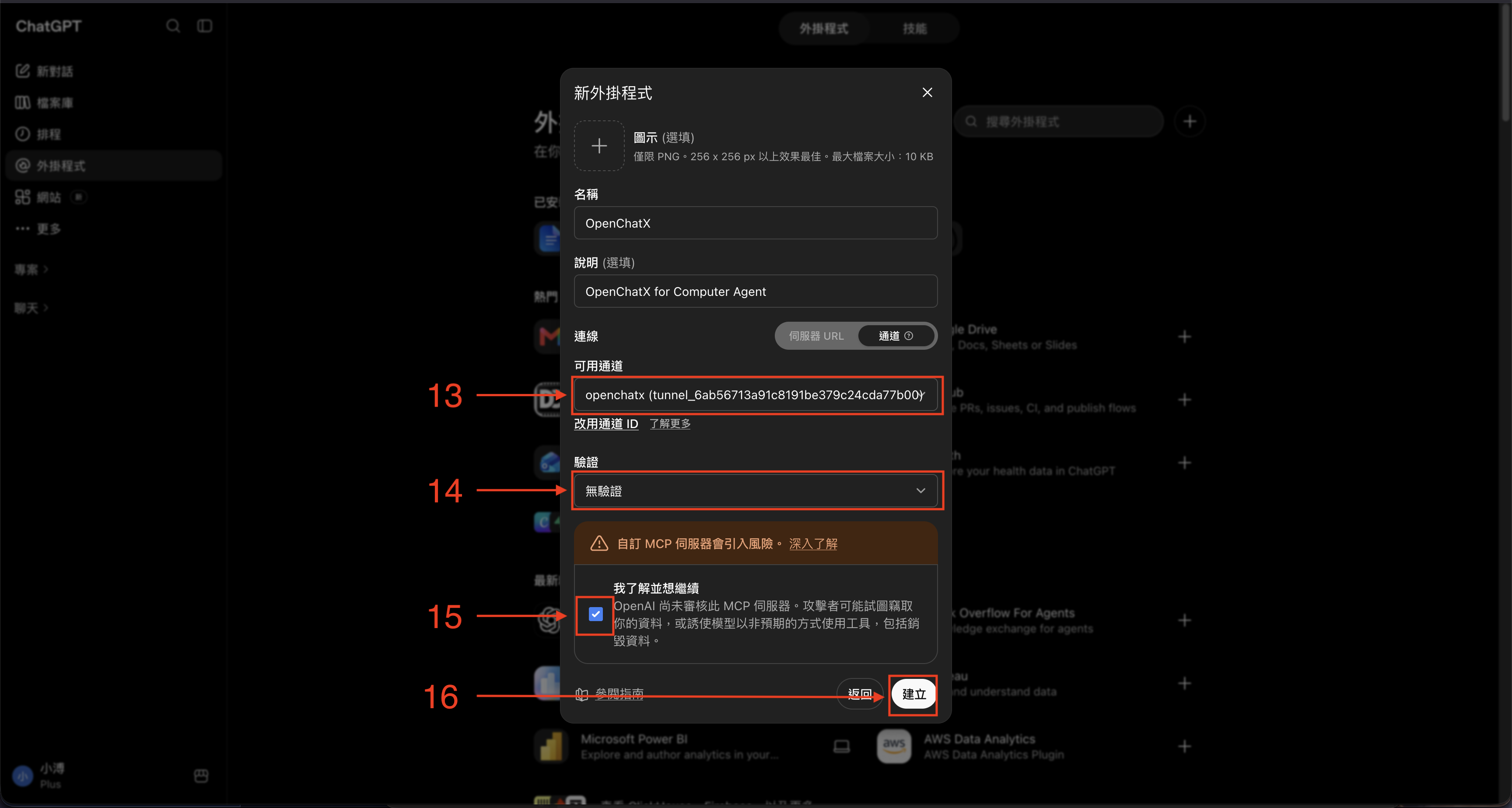
Then open Plugins, click +, choose Create app, and then choose Create MCP app.
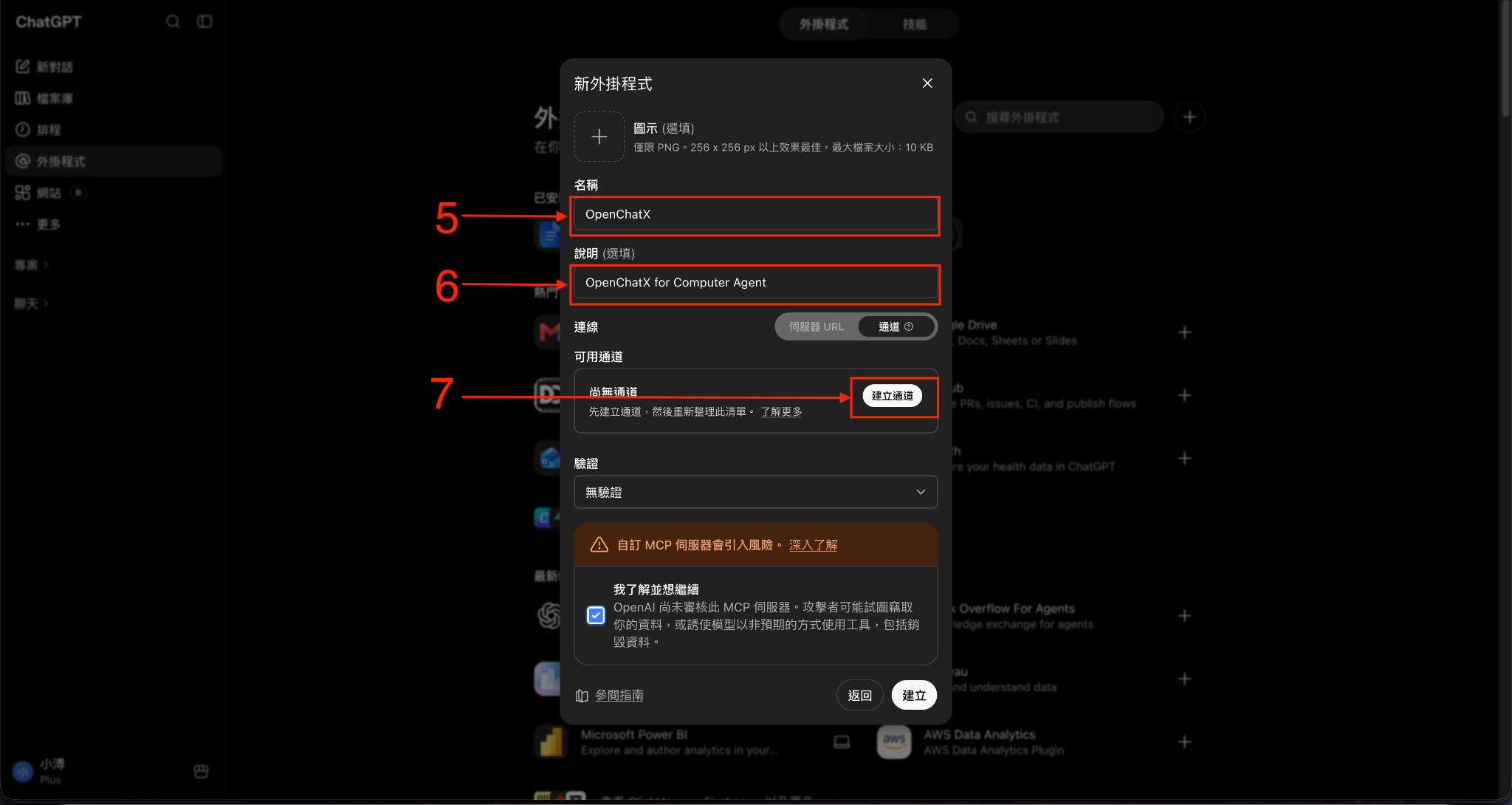
Enter the app name and description, switch the connection type to Tunnel, and click Create tunnel.
Connect local or remote MCP servers behind one OpenChatX connection; handle OAuth sign-in when required
Dot mode
Run a separate MCP listener and tunnel for ChatGPT Dot, with independent sessions and configurable external MCP exposure
Runtime health
Inspect capability status, sign-in requirements, and memory usage in the Dashboard
Toolboxes
Add or manage custom TypeScript tools
Skills
Portable SKILL.md workflows, loaded only when needed
Rules
Persistent .mdc rules with Always / Auto Attached / Agent Requested / Manual modes
AGENTS.md
Editable start_here template with runtime placeholders
Projects
Bind work to a primary folder and optional additional folders, with workspace-scoped access
Goals & workflows
Track longer-running tasks and compose reusable capabilities
Summaries
Continue long-running work across fresh ChatGPT conversations with UUID handoffs
Subagents
Delegate work to explicitly configured model profiles
Capability Store
Install built-ins or inspect/install GitHub-hosted community capabilities
Dashboard
Manage ChatGPT and Dot sessions, temporary Summaries, tools, Skills, Rules, MCP servers, Projects, status, and more
Languages
English, Traditional Chinese, Japanese, and Russian interface translations
ChatGPT Dot support
Dot mode exposes a separate MCP endpoint and secure tunnel alongside the regular ChatGPT connection. Its sessions appear on the dedicated Dot page rather than in the normal workspace overview. Configure its listener, port, and tunnel profile under Settings → Dot Mode; the Dot tunnel must use a different Tunnel ID from the primary tunnel. External MCP servers can be selectively exposed to Dot from the MCP server settings. Only enable access to servers you trust.
MCP sign-in and status
Remote MCP connections can use OAuth when the server requires sign-in. OpenChatX surfaces an authorization prompt and connection status in the MCP management UI, and stores OAuth credentials in the OS secure store instead of the MCP configuration. The Dashboard also distinguishes authentication-required services from runtime failures.
External MCP and Toolbox schemas stay lazy so the normal ChatGPT tool context stays small.
Cross-session Summaries
A key OpenChatX differentiator is that long-running Agent work can survive the ChatGPT conversation itself. When a chat eventually hits practical context limits, OpenChatX provides a handoff layer instead of forcing you to reconstruct the task manually.
When the Agent calls summarize, it stores two parts locally:
a compacted summary of older context;
roughly the latest 8k tokens of useful recent conversation, kept separately when practical.
OpenChatX returns a UUID. Start a fresh ChatGPT conversation, give the Agent that UUID, and summarize returns the stored summary plus recent context. The handoff is then deleted automatically.
Temporary summaries can also be viewed, created, edited, copied, or deleted from the Dashboard.
Skills, Rules, and AGENTS.md
Skills
Skills are portable Agent Skills owned by a Toolbox:
toolboxes/<toolbox>/skills/<name>/SKILL.md
A Skill contains name, description, and Markdown instructions. Skills are not injected at startup.
skill_search finds up to five relevant Skills by name/description; use action=load with an exact Skill name to load its full Markdown.
skill_manage creates, edits, or deletes user Skills.
Rules
Rules are owned by a Toolbox and live beside that Toolbox's other capabilities:
toolboxes/<toolbox>/rules/<name>.mdc
Example:
---
description: "React component conventions"
globs:
  - "src/**/*.tsx"
alwaysApply: false
---

Use accessible labels and named exports.
OpenChatX supports four Rule modes:
Always — injected by start_here.
Auto Attached — activated by matching file globs.
Agent Requested — selected from the description when relevant.
Manual — loaded only when explicitly requested.
Rules can be imported/exported with Cursor .mdc, Claude Rules, and AGENTS.md.
AGENTS.md
~/.openchatx-mcp/AGENTS.md is the editable template used by start_here.
The Toolbox UI exposes it directly. Runtime data is inserted through placeholders such as:
{{MODE_INSTRUCTIONS}}
{{PROJECT_CONTEXT}}
{{CAPABILITY_CATALOG}}
{{ALWAYS_RULES}}
Move or remove placeholders to control what start_here returns.
Connect more capabilities
You can usually just ask ChatGPT:
Add this MCP server to OpenChatX and verify it works.
or:
Create an OpenChatX tool that starts my local service and returns its status.
OpenChatX can manage MCP servers, Toolboxes, Skills, Rules, Projects, and Subagents from the Dashboard or through its management tools.
Manual / source install
Use this only if you do not want the Desktop App.
Requirements
Node.js 22.18+
npm
ripgrep
OpenAI tunnel-client
ChatGPT Developer Mode / custom MCP access
macOS
brew install ripgrep
git clone https://github.com/XiaoPuOuO/openchatx-mcp.git
cd openchatx-mcp
npm ci
npm run setup -- --config-only
Windows PowerShell
winget install BurntSushi.ripgrep.MSVC
git clone https://github.com/XiaoPuOuO/openchatx-mcp.git
Set-Location openchatx-mcp
npm ci
npm run setup -- --config-only
Then install the official OpenAI tunnel-client, create the openchatx tunnel profile, export CONTROL_PLANE_API_KEY, and run:
npm run setup
npm start
Useful commands:
Command
Purpose
npm run status
Show runtime/tunnel status
npm run logs
Show runtime logs
npm run print-url
Print local MCP/UI/tunnel URLs
npm run restart
Rebuild and reload services
npm run stop
Stop managed services
npm run auth:reset
Clear the bound ChatGPT subject
Development
npm ci
npm --prefix ui ci
npm run lint
npm run typecheck
npm test
npm run build
npm --prefix ui run build
Desktop build commands:
npm run desktop:build
npm run desktop:smoke
npm run desktop:windows:build
npm run desktop:windows:build:arm64
Turn ChatGPT into a local agent runtime. Operate your computer, use local tools, discover MCP servers, and delegate work to your own models through one MCP connection.
Ainda não há lista de ferramentas. Servidores remotos recebem uma após a primeira verificação de saúde.
Perguntas frequentes
Perguntas
Como instalo Openchatx?
Copie nesta página a configuração stdio para Cursor, Claude Desktop, Claude Code ou VS Code. Ela usa a instalação do publicador, não um proxy do PlugMCP.
Openchatx precisa de uma chave de API?
Este registro não lista nenhuma variável de ambiente obrigatória.
Qual transporte Openchatx usa?
Openchatx roda localmente via stdio.
Quando Openchatx foi verificado pela última vez?
Última verificação: 2026-11-05. Turn ChatGPT into a local agent runtime. Operate your computer, use local tools, discover MCP servers, and delegate work to your own models through one MCP connection.