User Prompt MCP Server
mcp-name: io.github.Jacob-J-Thomas/user-prompt
A Model Context Protocol (MCP) server that gives AI agents the ability to ask users clarifying questions mid-task via a pop-up terminal window. Built with .NET 8 and C#.
Усильте агента
Собственная команда издателя. Не эндпоинт PlugMCP.
Host a copy with our keys and logs.
nuget UserPromptУ Claude Code нет ссылки для установки локальной команды. Скопируйте команду ниже и выполните её в терминале.
claude mcp add io.github.jacob-j-thomas-user-prompt -- nuget UserPromptВыполните в терминале.
{ "mcpServers": { "io.github.jacob-j-thomas-user-prompt": { "command": "nuget", "args": [ "UserPrompt" ] } }}claude_desktop_config.json
Удалённый URL или команда на вашем компьютере? Чем различаются два способа установки
Запустить на PlugMCP
A new server you create. It is not this listing's official endpoint. Use the publisher install when you want their URL and their credentials.
ЗапускОт издателя
mcp-name: io.github.Jacob-J-Thomas/user-prompt
A Model Context Protocol (MCP) server that gives AI agents the ability to ask users clarifying questions mid-task via a pop-up terminal window. Built with .NET 8 and C#.
An MCP server that enables AI agents to ask users clarifying questions via pop-up terminal windows.
Long-running AI agents (like Claude Code, IDE copilots, or custom agentic workflows) often encounter situations where they need human input — ambiguous requirements, unexpected errors, or design decisions that could go multiple ways. Without a mechanism to ask, the agent either guesses (often incorrectly) or stops entirely and waits for the user to notice.
This MCP server exposes a single tool, user_prompt, that an AI agent can call at any point during execution. When invoked, a new terminal window opens on the user's machine displaying the agent's questions. The user types their answers and the responses are returned directly to the agent, allowing it to continue working with the additional context.
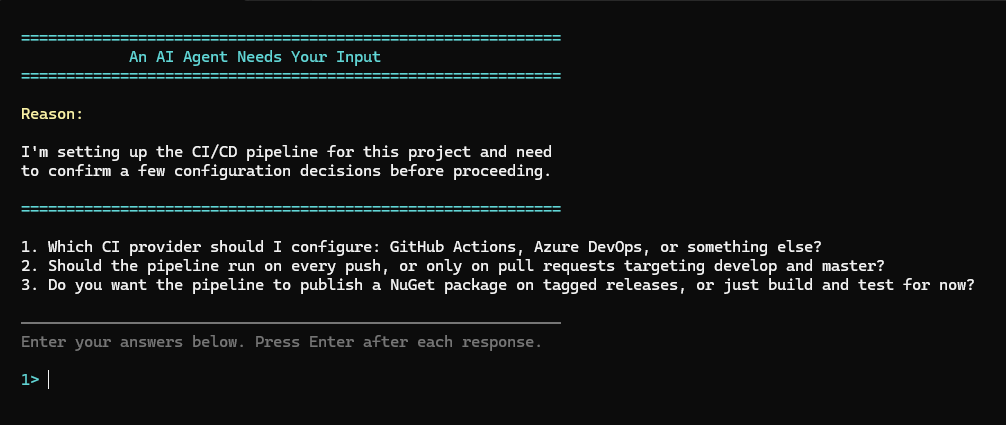
pwsh) must be installedNote: Pre-built releases have no other dependencies. The .NET Global Tool and Build from Source options require the .NET 8.0 SDK or later.
Pick one of the three install options below. Each option walks you through installation, client configuration, and updates end-to-end.
Self-contained executables — no .NET SDK required.
1. Download
Grab the zip for your platform from the latest release:
2. Extract
Unzip to a permanent location, for example:
C:\Tools\UserPromptMcpServer\~/tools/UserPromptMcpServer/3. Configure your MCP client
Claude Code (CLI):
claude mcp add user-prompt -- "C:\Tools\UserPromptMcpServer\UserPromptMcpServer.exe"
Other clients — point the command at the executable (see Client Configuration Reference for full examples):
{
  "command": "C:\\Tools\\UserPromptMcpServer\\UserPromptMcpServer.exe"
}
Updating: download the new release and replace the files in the same folder.
Requires the .NET 8.0 SDK or later. The tool is added to your PATH automatically.
1. Install
dotnet tool install -g UserPrompt
2. Configure your MCP client
Claude Code (CLI):
claude mcp add user-prompt -- user-prompt
Other clients — the command name is user-prompt (see Client Configuration Reference for full examples):
{
  "command": "user-prompt"
}
Updating:
dotnet tool update -g UserPrompt
Requires the .NET 8.0 SDK or later.
git clone https://github.com/Jacob-J-Thomas/user-context-retrieval-mcp-server.git
cd user-context-retrieval-mcp-server
dotnet publish UserPromptMcpServer -c Release -r win-x64 -o ./publish
Replace
win-x64with your platform's runtime identifier (e.g.osx-arm64,linux-x64).
Then configure your client the same way as Option A, pointing at the executable inside ./publish/.
This server uses the stdio transport — it does not listen on a port. The MCP client launches the server process and communicates with it over stdin/stdout. Replace the command/path below with the value from whichever install option you chose.
Add the following to your claude_desktop_config.json:
{
  "mcpServers": {
    "user-prompt": {
      "command": "/path/to/UserPromptMcpServer.exe"
    }
  }
}
Config file location:
Add the following to .cursor/mcp.json (project-level) or ~/.cursor/mcp.json (global):
{
  "mcpServers": {
    "user-prompt": {
      "command": "/path/to/UserPromptMcpServer.exe"
    }
  }
}
Add the following to ~/.codex/config.toml (global) or .codex/config.toml (project-level):
[mcp_servers.user-prompt]
command = "/path/to/UserPromptMcpServer.exe"
Or via the CLI:
codex mcp add user-prompt -- /path/to/UserPromptMcpServer.exe
Any MCP client that supports the stdio transport can launch this server. Point it at the executable (or the user-prompt command name if using the .NET Global Tool).
Once configured, the user_prompt tool is available to the AI agent automatically. The agent decides when to invoke it based on its own judgment — no manual triggering is required.
Tool name: user_prompt
{
  "name": "user_prompt",
  "arguments": {
    "reason": "The project has no database configuration and I need to set one up.",
    "questions": [
      "Which database engine should I use (PostgreSQL, SQLite, SQL Server)?",
      "Should I include Entity Framework Core as the ORM?"
    ]
  }
}
User responded to 2 question(s):

1. Q: Which database engine should I use (PostgreSQL, SQLite, SQL Server)?
   A: PostgreSQL

2. Q: Should I include Entity Framework Core as the ORM?
   A: Yes, use EF Core with code-first migrations
When the tool is invoked, a new PowerShell window opens displaying:
1>, 2>, etc.) — one Enter per answerIf the user does not respond within 10 minutes, or closes the window without answering, the agent receives a descriptive fallback message and can decide how to proceed.
UserPromptMcpServer/
├── UserPromptMcpServer.csproj   # Project file (.NET 8)
├── Program.cs                   # MCP server entry point (stdio transport)
└── Tools/
    └── UserPromptTool.cs        # Tool implementation
tools/call JSON-RPC request over stdinAll temporary files are created under %TEMP%/UserPromptMcpServer/<session-guid>/ and are cleaned up after each invocation regardless of outcome.
Contributions are welcome! To make sure your change gets merged, please open an issue first to discuss the proposed change and get approval before starting work.
git checkout -b feature/my-feature)dotnet build)developgit clone https://github.com/Jacob-J-Thomas/user-context-retrieval-mcp-server.git
cd user-context-retrieval-mcp-server
dotnet restore UserPromptMcpServer/UserPromptMcpServer.csproj
dotnet build UserPromptMcpServer/UserPromptMcpServer.csproj
This project is licensed under the Apache License 2.0. See LICENSE for details.
Jacob Thomas — @Jacob-J-Thomas
An MCP server that enables AI agents to ask users clarifying questions via pop-up terminal windows.
{ "mcpServers": { "io.github.jacob-j-thomas-user-prompt": { "command": "nuget", "args": [ "UserPrompt" ] } }}Инструменты
Списка инструментов пока нет. У удалённых серверов он появляется после первой проверки состояния.
FAQ
Скопируйте на этой странице конфигурацию stdio для Cursor, Claude Desktop, Claude Code или VS Code. Она использует установку издателя, а не прокси PlugMCP.
В этой записи не указано обязательных переменных окружения.
User Prompt работает локально через stdio.
Последняя проверка: 2026-11-09. An MCP server that enables AI agents to ask users clarifying questions via pop-up terminal windows.
