A comprehensive Model Context Protocol (MCP) server for cybersecurity vulnerability assessment, providing tools to search GitHub repositories, query NIST NVD, access CISA's Known Exploited Vulnerabilities catalog, and analyze repository contents for CVE research and proof-of-concept discovery.
📹 Demo
MCP server for finding out what level of vulnerability a CVE is
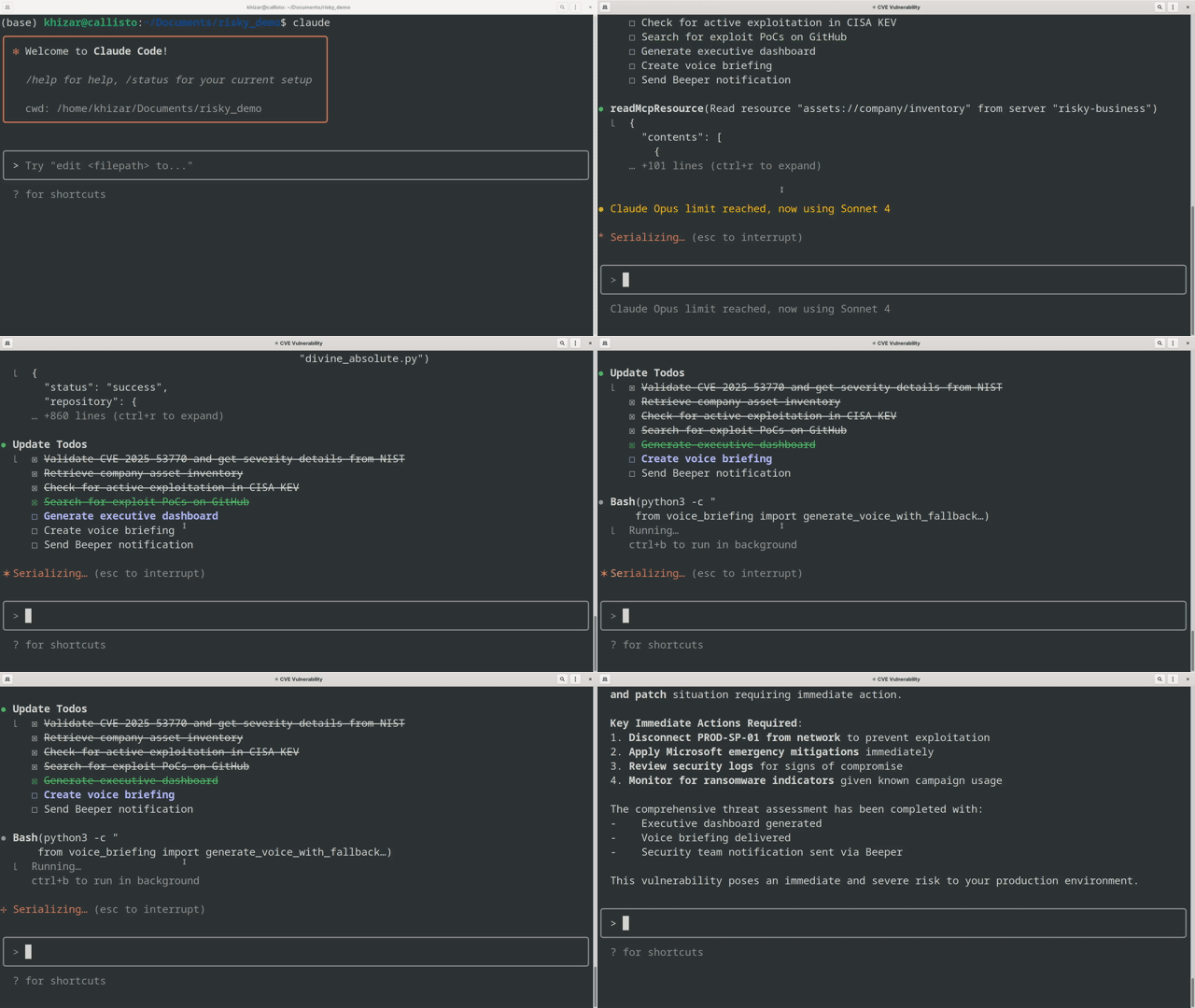
The demo demonstrates a complete vulnerability assessment for CVE-2025-53770:
✅ Validate CVE-2025-53770 and retrieve severity information from NIST
✅ Analyze business impact by checking company asset inventory
✅ Check for active exploitation in CISA KEV database
✅ Search for proof-of-concept exploits on GitHub
✅ Generate executive dashboard with findings
✅ Create and deliver voice briefing
✅ Send summary to Beeper chat
Sample Alert Message (Sent via Beeper)
🚨 CRITICAL SECURITY ALERT - CVE-2025-53770 🚨

Severity: CRITICAL (CVSS 9.8)
Status: ⚠️ ACTIVELY EXPLOITED IN THE WILD

Company Impact: 🔴 AFFECTED
• Asset: PROD-SP-01 (SharePoint Server 2019 Enterprise)
• Environment: Production
• Criticality: High

Threat Intelligence:
• Listed in CISA KEV with known ransomware usage
• Multiple proof-of-concept exploits publicly available on GitHub
• Vulnerability allows unauthenticated remote code execution
• This is a patch bypass for CVE-2025-49704

Immediate Actions Required:
✓ Apply Microsoft security updates IMMEDIATELY
✓ If updates cannot be applied, disconnect SharePoint from network
✓ Monitor for suspicious activity in SharePoint logs
✓ Review CISA mitigation guidance

Technical Details:
• CWE-502: Deserialization of Untrusted Data
• Affects SharePoint 2016, 2019, and Subscription Edition
• Exploitation requires network access only (no authentication)

⏰ Due Date: July 21, 2025 (per CISA BOD 22-01)

Voice briefing has been generated. Please take immediate action to protect company assets.
🛠️ Tools
search_github_repositories
Search GitHub repositories using the GitHub API.
Parameters:
query (string, required): Search query with keywords and qualifiers
sort (string, optional): Sort by "stars", "forks", "help-wanted-issues", "updated", or "best-match" (default)
order (string, optional): "desc" (default) or "asc"
per_page (integer, optional): Results per page, 1-100 (default: 5)
page (integer, optional): Page number (default: 1)
get_cve_from_nist
Query NIST National Vulnerability Database for CVE details.
Parameters:
cve_id (string, required): CVE identifier (e.g., "CVE-2023-1234" or "2023-1234")
include_poc (boolean, optional): Include PoC-specific terms (default: true)
advanced_cve_search_strategies
Comprehensive guide for advanced CVE repository searching techniques.
📊 Resources
kev://cisa/catalog
Access the complete CISA Known Exploited Vulnerabilities catalog with active exploitation data.
assets://company/inventory
Company asset inventory for vulnerability impact assessment, including environment, criticality, and vendor information.
🚀 Quick Start
Prerequisites
Python 3.8+
uv (recommended) or pip
Optional: GitHub Personal Access Token for higher API rate limits
Optional: NIST API Key for increased rate limits
Installation
Clone the repository
git clone https://github.com/khizar-anjum/risky-business-mcp.git
cd risky-business-mcp
Set up Python virtual environment
# Create a virtual environment
python3 -m venv venv

# Activate the virtual environment
# On Linux/macOS:
source venv/bin/activate
# On Windows:
# venv\Scripts\activate

# Install dependencies
pip install -r requirements.txt
Optional: Set up API authentication
# GitHub Personal Access Token from https://github.com/settings/tokens
export GITHUB_TOKEN="your_github_token_here"

# NIST API Key from https://nvd.nist.gov/developers/request-an-api-key
export NIST_API_KEY="your_nist_api_key_here"
Running the Server
With virtual environment activated:
# Make sure the virtual environment is activated
source venv/bin/activate  # Linux/macOS
# or
# venv\Scripts\activate  # Windows

# Run the MCP server
python main.py
Development mode (with MCP Inspector):
# With venv activated
mcp dev main.py
Claude Desktop Integration
Add the server to your Claude Desktop configuration:
This project is licensed under the MIT License - see the LICENSE file for details.
Disclaimer: This tool is for legitimate security research and educational purposes. Users are responsible for ensuring their use complies with applicable laws and GitHub's terms of service.
R
Risky Business
khizar-anjum·Звёзд: 4·
MCP server for finding out what level of vulnerability a CVE is
Списка инструментов пока нет. У удалённых серверов он появляется после первой проверки состояния.
FAQ
Вопросы
Как установить Risky Business?
Скопируйте на этой странице конфигурацию stdio для Cursor, Claude Desktop, Claude Code или VS Code. Она использует установку издателя, а не прокси PlugMCP.
Нужен ли API-ключ для Risky Business?
В этой записи не указано обязательных переменных окружения.
Какой транспорт использует Risky Business?
Risky Business работает локально через stdio.
Когда Risky Business проверялся в последний раз?
Последняя проверка: 2026-10-27. MCP server for finding out what level of vulnerability a CVE is