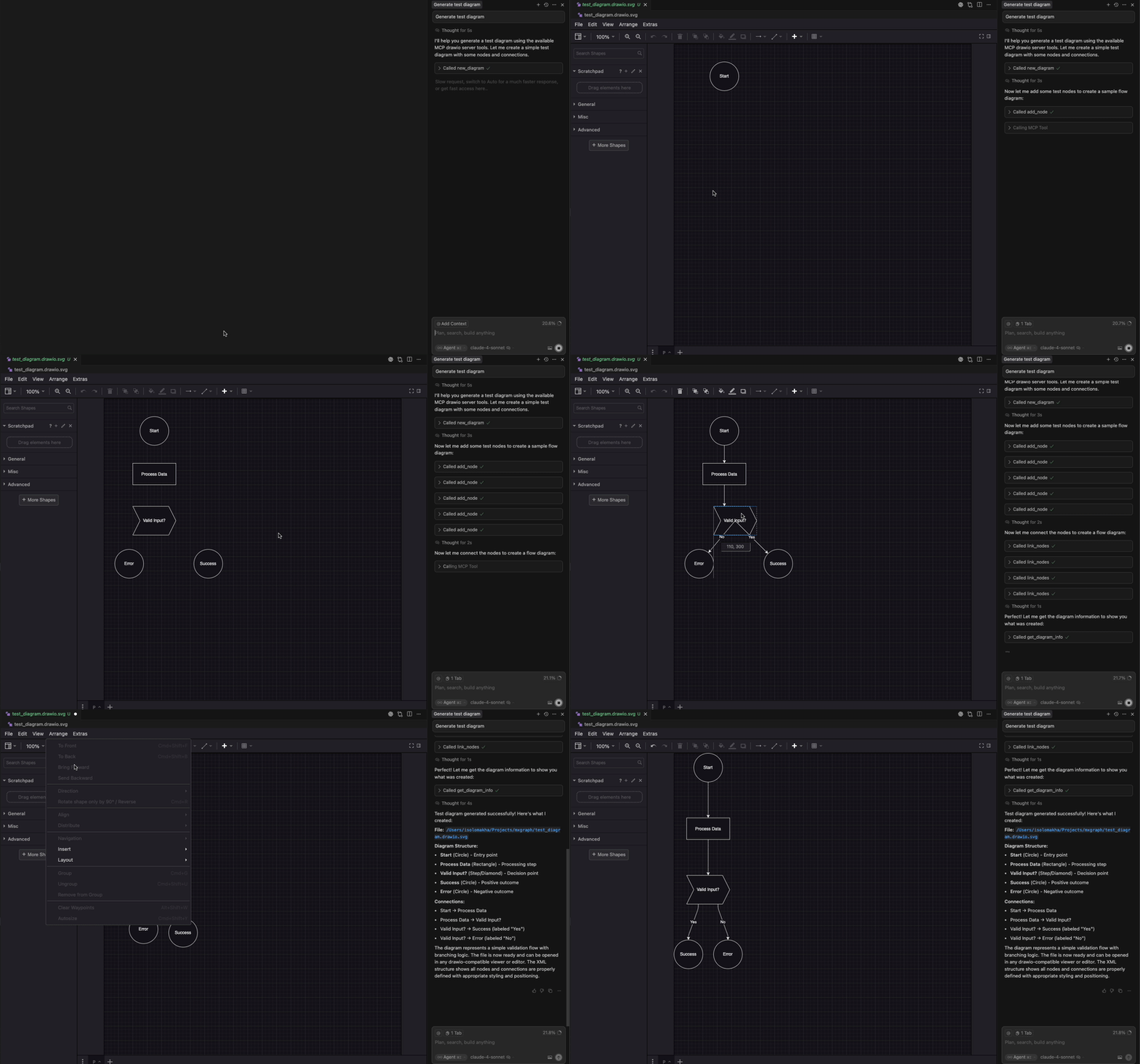
A Model Context Protocol (MCP) server that provides programmatic tools for creating and managing draw.io diagrams using mxgraph. Generate architecture diagrams, flowcharts, and other visualizations through a clean API that works with Claude Desktop and other MCP-compatible clients.
Overview
MCP server for generating draw.io diagrams using mxgraph. Create and manage diagrams programmatically or with AI and VSCode extension.
Звёзды
31
Инструменты
—
Аптайм
—
This server enables you to build diagrams incrementally by providing stateless tools that operate on .drawio.svg files. Each operation specifies the target file, making it compatible with VSCode's draw.io extension while maintaining a clean separation between diagram state and server operations.
Key Features
Stateless API: Each tool call specifies the target file path
VSCode Compatible: Generates .drawio.svg files that work seamlessly with VSCode draw.io extension
Rich Node Types: Support for rectangles, ellipses, cylinders, clouds, actors, and more
Connection Management: Create labeled connections with various styling options
Batch Operations: Create, update, and link multiple nodes in a single MCP call for efficient diagram building
Flexible Positioning: Precise control over node placement and sizing
MCP Integration: Works with Claude Desktop and other MCP-compatible applications
TypeScript: Full type safety and IntelliSense support
Demo
Installation
Prerequisites
Node.js 18.0.0 or higher
npm or yarn
Configuration
MCP Client Setup
Add this configuration to your MCP client (e.g., Claude Desktop, Cursor):
For hierarchical only: direction ∈ "top-down" | "left-right" (default: "top-down")
nodes (array, required): Array of node objects to add, each containing:
id (string, required): Unique identifier for the node
title (string, required): Display label (supports newlines with \n)
x (number, required): X coordinate position
y (number, required): Y coordinate position
kind (string, required): Node shape type
parent (string, optional): Parent node ID (default: "root")
width (number, optional): Custom width
height (number, optional): Custom height
corner_radius (integer, optional): Corner radius in pixels (≥ 1). Only applies to RoundedRectangle. Default is 12 when kind is RoundedRectangle and corner_radius is omitted. The effective visual radius is capped by draw.io/mxGraph to at most half of the shorter side of the node.
Available Node Types:
Rectangle: Standard rectangular node
Ellipse: Oval-shaped node
Cylinder: Database/storage representation
Cloud: Cloud service representation
Square: Square with fixed aspect ratio
Circle: Circular node
Step: Process step shape
Actor: UML actor (stick figure)
Text: Text-only node
RoundedRectangle: Rectangle with rounded corners (supports corner_radius in pixels)
Note: The layout runs once after all insertions and considers existing edges in the diagram file. For best results when edges are created or modified later, a dedicated layout_diagram tool is recommended (to be added).
link_nodes
Create one or more connections between existing nodes in a single operation.
Parameters:
file_path (string, required): Path to the diagram file
edges (array, required): Array of edge objects to create, each containing:
from (string, required): Source node ID
to (string, required): Target node ID
title (string, optional): Connection label
dashed (boolean, optional): Whether to use dashed line style
reverse (boolean, optional): Whether to reverse arrow direction
undirected (boolean, optional): Create an undirected edge (no arrows). Overrides reverse.
When undirected is true, the edge is rendered without arrowheads (no arrow at either end). The reverse parameter is ignored; dashed is still respected.
Undirected edges use a canonical ID format of ${min(from,to)}-2-${max(from,to)} when a new edge is created.
If an edge between the two nodes already exists (in either direction or with the canonical ID), calling link_nodes again will update that existing edge’s label and style rather than creating a duplicate. The existing edge ID is preserved (no renaming).
edit_nodes
Modify properties of one or more existing nodes or edges in a single operation.
Parameters:
file_path (string, required): Path to the diagram file
nodes (array, required): Array of node/edge objects to update, each containing:
id (string, required): Node or edge ID to update
title (string, optional): New display label
kind (string, optional): New shape type (nodes only)
x (number, optional): New X coordinate (nodes only)
y (number, optional): New Y coordinate (nodes only)
width (number, optional): New width (nodes only)
height (number, optional): New height (nodes only)
corner_radius (integer, optional): Corner radius in pixels (≥ 1). Applies when the node is RoundedRectangle. If switching kind to RoundedRectangle and omitted, default 12 is applied. Ignored for other kinds.
Списка инструментов пока нет. У удалённых серверов он появляется после первой проверки состояния.
FAQ
Вопросы
Как установить Drawio?
Скопируйте на этой странице конфигурацию stdio для Cursor, Claude Desktop, Claude Code или VS Code. Она использует установку издателя, а не прокси PlugMCP.
Нужен ли API-ключ для Drawio?
В этой записи не указано обязательных переменных окружения.
Какой транспорт использует Drawio?
Drawio работает локально через stdio.
Когда Drawio проверялся в последний раз?
Последняя проверка: 2026-10-27. MCP server for generating draw.io diagrams using mxgraph. Create and manage diagrams programmatically or with AI and VSCode extension.