MCPLoadTester
MCPLoadTester is a load testing toolkit for Model Context Protocol (MCP) servers.
It allows performance testing of MCP tools and agents using:
- Apache JMeter
- k6 (planned)
- CLI tools (planned)
Power your agent
การติดตั้งจากผู้เผยแพร่ ไม่ใช่เอนด์พอยต์ของ PlugMCP
URL แบบรีโมตหรือคำสั่งบนเครื่องของคุณ? การติดตั้งสองแบบต่างกันอย่างไร
รันบน PlugMCP
A new server you create. It is not this listing's official endpoint. Use the publisher install when you want their URL and their credentials.
เปิดจากผู้เผยแพร่
MCPLoadTester is a load testing toolkit for Model Context Protocol (MCP) servers.
It allows performance testing of MCP tools and agents using:
Apache JMeter sampler plugin for load testing Model Context Protocol (MCP) servers over stdio, HTTP, and HTTP+SSE.
This project now builds a thin plugin jar:
JMETER_HOME/lib/extJMETER_HOME/libJMETER_HOME=/path/to/apache-jmeter-5.6.3 ./gradlew installLocalWithDeps
Use this only if dependencies are already managed elsewhere.
JMETER_HOME=/path/to/apache-jmeter-5.6.3 ./gradlew installLocal
./gradlew jar
Jar path:
build/libs/jmeter-mcp-sampler-<version>.jar
Each tagged release now publishes a Plugins Manager descriptor asset:
https://github.com/AndreyVMarkelov/MCPLoadTester/releases/latest/download/plugins-repo.json
To add this custom repo in JMeter, set in user.properties:
jpgc.repo.address=https://jmeter-plugins.org/repo/;https://github.com/AndreyVMarkelov/MCPLoadTester/releases/latest/download/plugins-repo.json
Then restart JMeter and open Plugins Manager.
The catalog/display name is MCPLoadTester JMeter MCP Sampler.
Path note: commands and scripts/... arguments below are relative to this repository root.
Run JMeter from the repo root, or use absolute paths.
Installation > Recommended local install above).Thread Group -> Add -> Sampler -> MCP Sampler.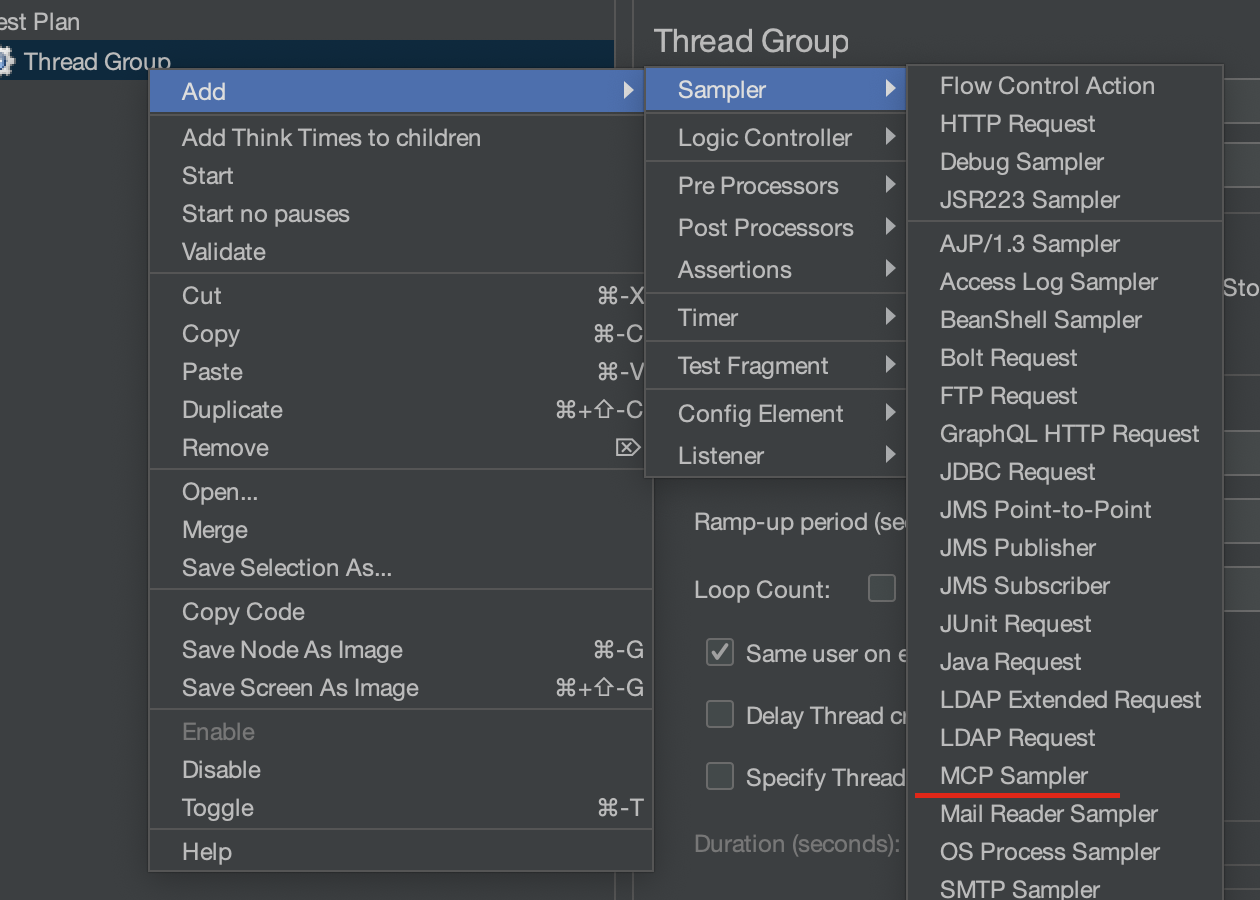
Transport: stdioCommand: python3Arguments: scripts/mock_mcp_server.pyMCP Method: tools/listClient name: jmeter-mcp-sampler (default)Client version: 1.0.0 (default)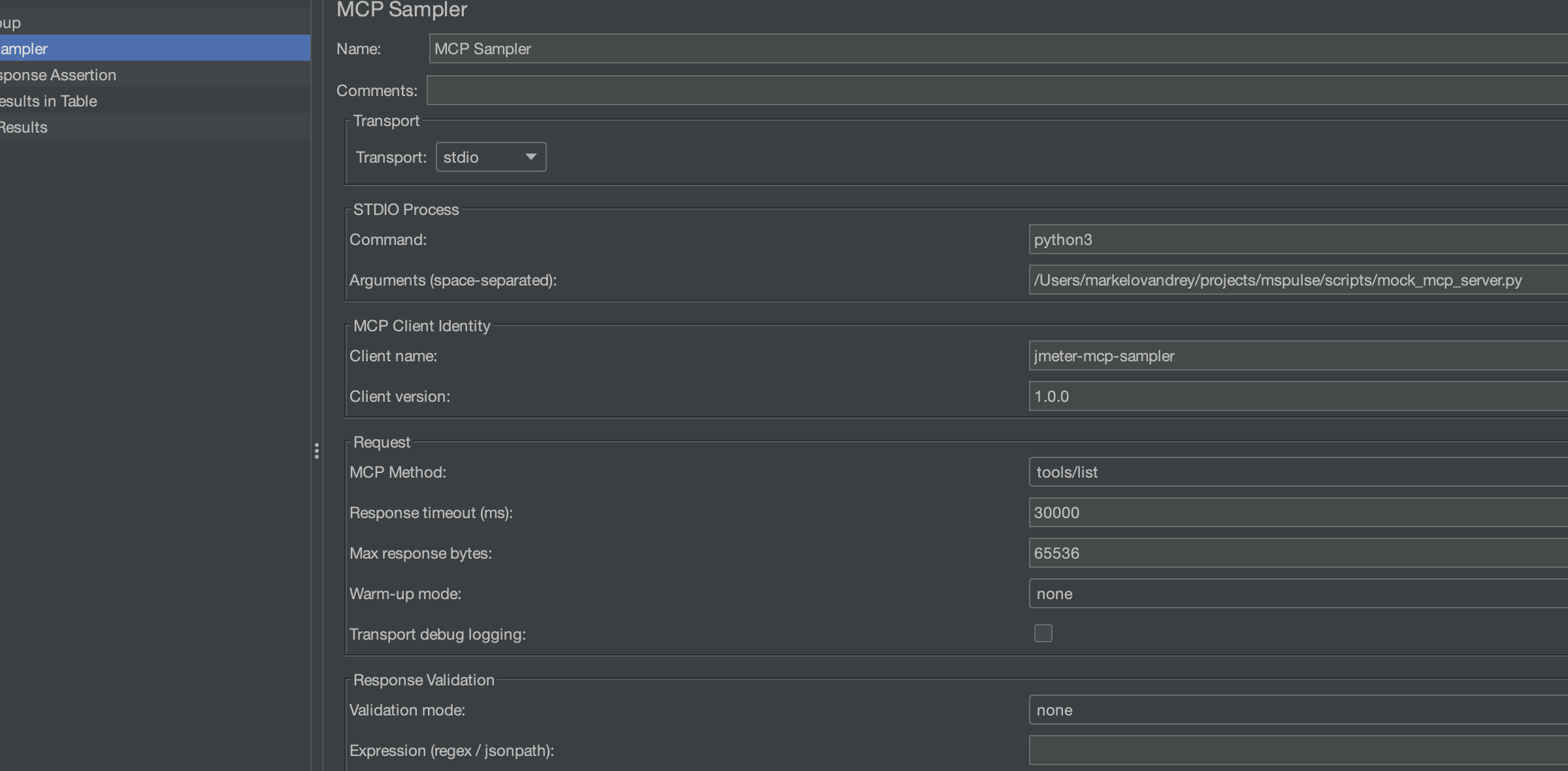
Field to Test: Response DataPattern: echo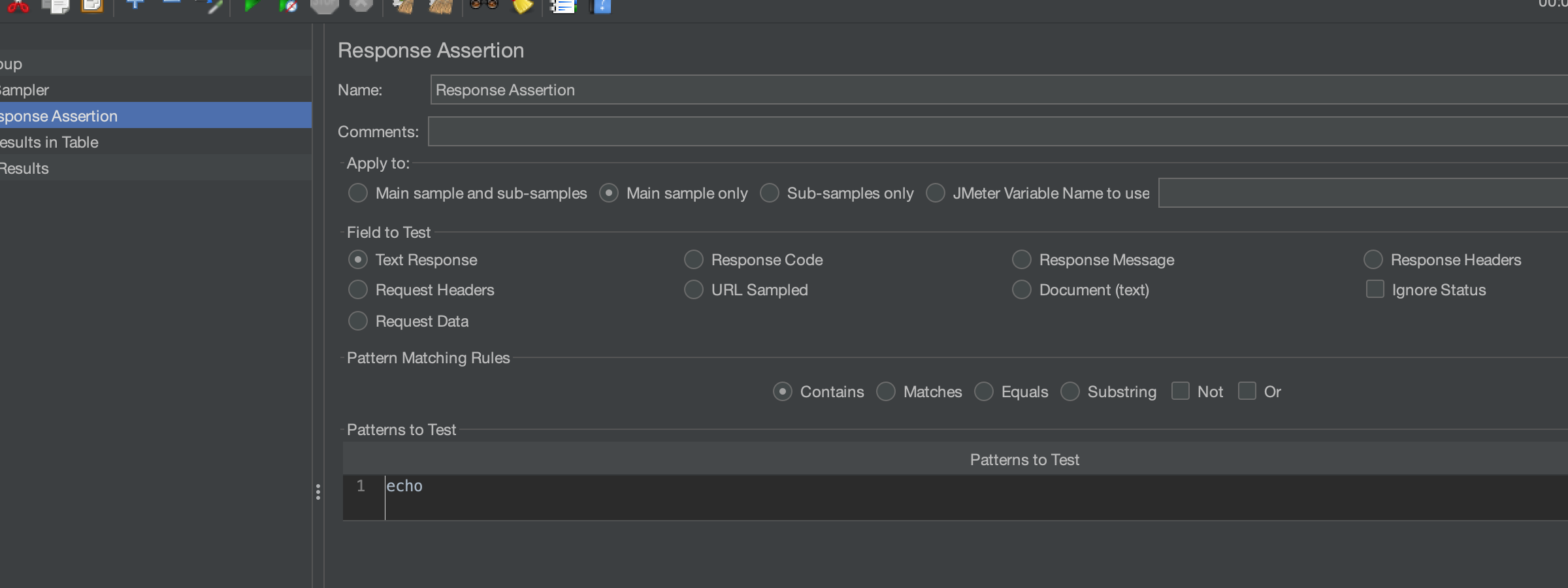
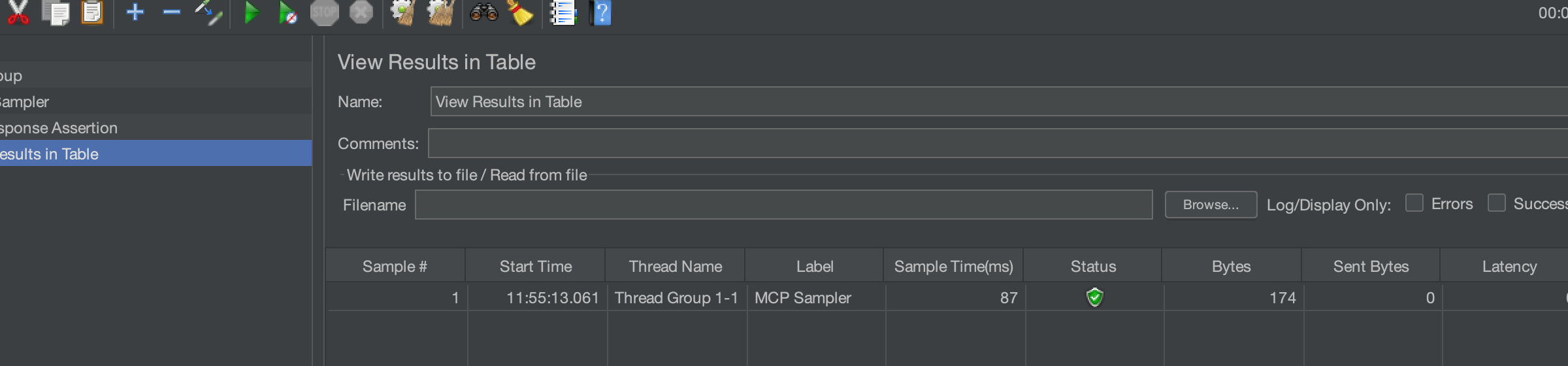
node scripts/mock_http_sse_mcp_server.js
Transport: http+sseHTTP base URL: http://127.0.0.1:8080SSE endpoint path: /eventsHTTP send path: /rpcMCP Method: tools/listValidation mode: none (when using JMeter Response Assertion)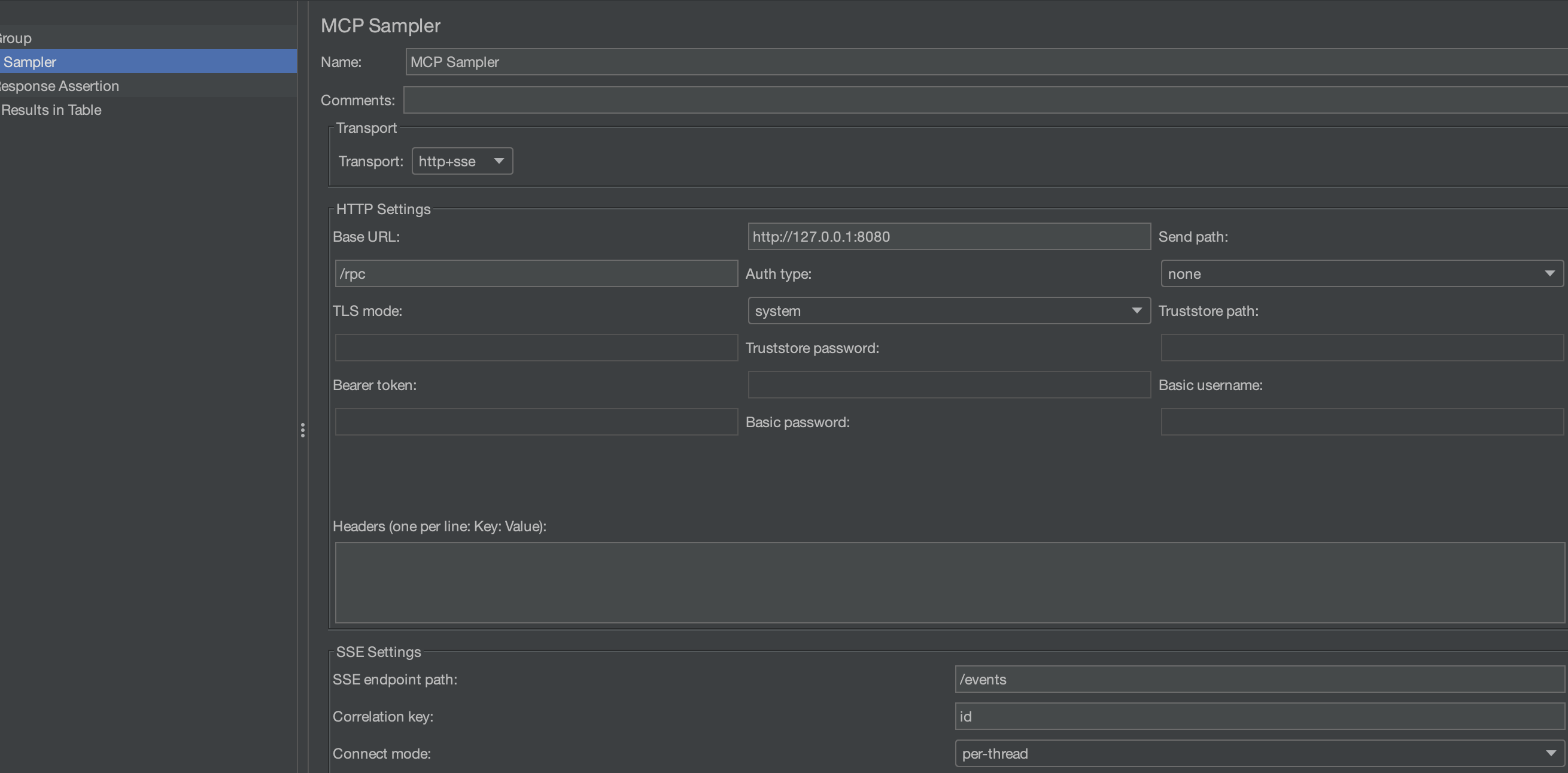
Field to Test: Response CodePattern: 200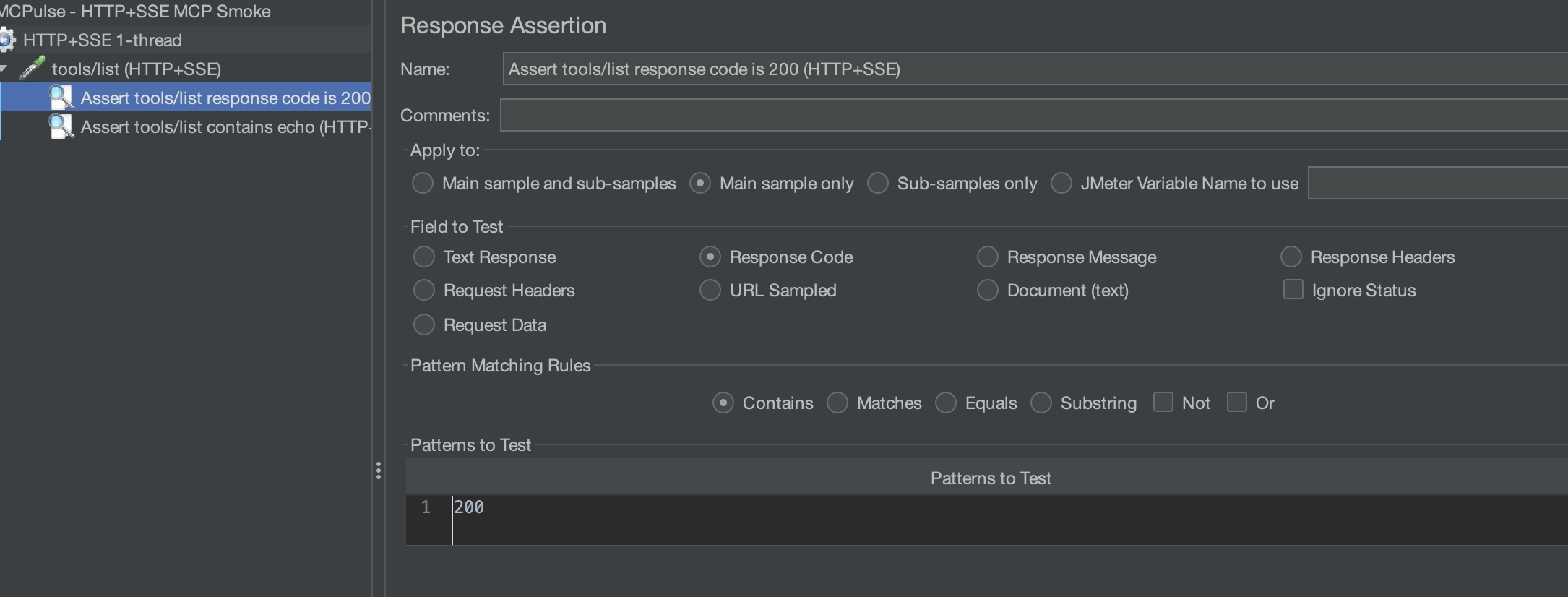
Response Code = 200, sample is green).Alternative: use built-in sampler validation instead of JMeter assertions:
Validation mode: regexValidation expr: echoScreenshot guide and catalog: docs/images/README.md
File: scripts/mock_mcp_server.py
Start manually:
python3 scripts/mock_mcp_server.py
Behavior:
initialize returns server mock-mcp-server.tools/list exposes one tool: echo.tools/call with tool echo echoes arguments back and returns content.resources/list returns one in-memory resource.-32602.Useful tools/call sample:
{"message":"hello","count":2}
Expected response includes:
content[0].text like echo: hello (count=2)echo.message = "hello"File: scripts/mock_calc_mcp_server.js
Start manually:
node scripts/mock_calc_mcp_server.js
Behavior:
initialize returns server mock-calc-mcp-server-ts.tools/list exposes tools add and divide.tools/call validates numeric a and b.-32000.-32602.Useful tools/call samples:
{"a":40,"b":2}
{"a":10,"b":0}
Expected:
add returns numeric value (42 for sample above).divide with b=0 returns error Division by zero.File: scripts/mock_perf_mcp_server.py
Start manually:
python3 scripts/mock_perf_mcp_server.py --base-delay-ms 5 --jitter-ms 10 --slow-every 20 --slow-delay-ms 200
Behavior:
tools/list exposes sleep, payload, cpu.sleep tool supports controlled delay.payload tool returns a large blob for payload-pressure testing.cpu tool burns CPU loops and returns accumulator.Useful tools/call payload samples:
{"delayMs":50}
{"sizeKb":256}
{"loops":300000}
File: scripts/mock_http_sse_mcp_server.js
Start manually:
node scripts/mock_http_sse_mcp_server.js
Behavior:
/events/rpc and /messageinitialize, tools/list, tools/call, resources/listmcp-server-fetch (via uvx):
Command:   uvx
Arguments: mcp-server-fetch
mcp-server-filesystem:
Command:   uvx
Arguments: mcp-server-filesystem /tmp
github-mcp-server:
Command:   github-mcp-server
Arguments: stdio
Requires GITHUB_PERSONAL_ACCESS_TOKEN.
Each profile builds image, runs a test plan, writes JTL + HTML report to results/.
docker compose --profile mock-echo up --build
docker compose --profile mock-calc up --build
docker compose --profile perf-cold-start up --build
docker compose --profile perf-tail up --build
docker compose --profile perf-payload up --build
Reports:
results/docker-mock-echo/report/index.htmlresults/docker-mock-calc/report/index.htmlresults/docker-perf-cold-start/report/index.htmlresults/docker-perf-tail/report/index.htmlresults/docker-perf-payload/report/index.html./gradlew test
./gradlew check
JMETER_HOME=/path/to/apache-jmeter-5.6.3 ./gradlew installLocalWithDeps
JMETER_HOME=/path/to/apache-jmeter-5.6.3 ./gradlew mockAll
JMETER_HOME=/path/to/apache-jmeter-5.6.3 ./gradlew perfAll
Additional CI/release details are documented separately.
Results file ... is not empty in Docker:
results.jtl before run.JMETER_HOME is not set:
JMETER_HOME=/path/to/apache-jmeter-5.6.3.No sampler appears in JMeter:
lib/extlibMIT
Apache JMeter sampler plugin for load testing Model Context Protocol (MCP) servers over stdio, HTTP, and HTTP+SSE.
เครื่องมือ
ยังไม่มีรายการเครื่องมือ เซิร์ฟเวอร์แบบรีโมตจะได้รายการหลังการตรวจสอบสถานะครั้งแรก
FAQ
คัดลอกคอนฟิก stdio สำหรับ Cursor, Claude Desktop, Claude Code หรือ VS Code ได้ในหน้านี้ คอนฟิกนี้ใช้การติดตั้งของผู้เผยแพร่ ไม่ใช่พร็อกซีของ PlugMCP
ระเบียนนี้ไม่ได้ระบุตัวแปรสภาพแวดล้อมที่จำเป็น
MCPLoadTester ทำงานแบบโลคัลผ่าน stdio
ตรวจสอบล่าสุดเมื่อ 2026-10-28 Apache JMeter sampler plugin for load testing Model Context Protocol (MCP) servers over stdio, HTTP, and HTTP+SSE.
