Mantle is not a framework. Your application keeps its entry point, routes,
auth and database handles, and selects only the surfaces it needs: REST, an
MCP (Model Context Protocol) server, a web module for llms.txt and sitemaps,
Better Auth sign-in, and a native admin console.
What Mantle gives you
Agent-native app SDK and backend compiler: YAML manifests to native SQL (SQLite, Cloudflare D1, PostgreSQL) and typed TypeScript; optional REST and MCP.
2026-11-15
ดาว
—
เครื่องมือ
—
อัปไทม์
—
One Manifest, connected interfaces. Schema, View, Procedure, and Trigger
describe your data and behavior. The compiled definitions power typed APIs,
HTTP routes, MCP tools, and Admin. Manifest features.
Typed queries and actions. Generate TypeScript bindings for entries,
declarative Views, and Procedures. Keep host-only reads private with internal
Views. Typed queries.
Admin that follows your model. Manage live records, publish content, run
reports, and invoke business actions. Configure columns, filters, and actions
with Manifest uiSchema. Admin customization.
Tools for browser and remote agents. Admin supports WebMCP using the
signed-in admin session. Remote MCP clients connect through authenticated
endpoints, with authorization checked on each call.
MCP and WebMCP.
Publishing and public pages. Draft/publish workflows, localized content
and full-text search, managed in Admin and served over REST and MCP. The
optional web() module serves llms.txt, a sitemap, Markdown alternates and
canonical head tags from public Views.
Public pages.
Embed in an existing application. Mount the REST, MCP or Admin surface
you need inside your own Worker or server entry.
Service composition.
Guarantees the compiler enforces. Row policy is compiled into every
generated query. A single-row write must affect exactly one row, which makes
optimistic concurrency (OCC) explicit, and a SQL Procedure's statements
commit atomically. The closed manifest grammar reports actionable
diagnostics instead of guessing.
Built for coding agents.mantle help prints the docs that match your
installed version, mantle init writes an app shell, and pnpm accept
runs role-based acceptance of the running app.
Build with an agent.
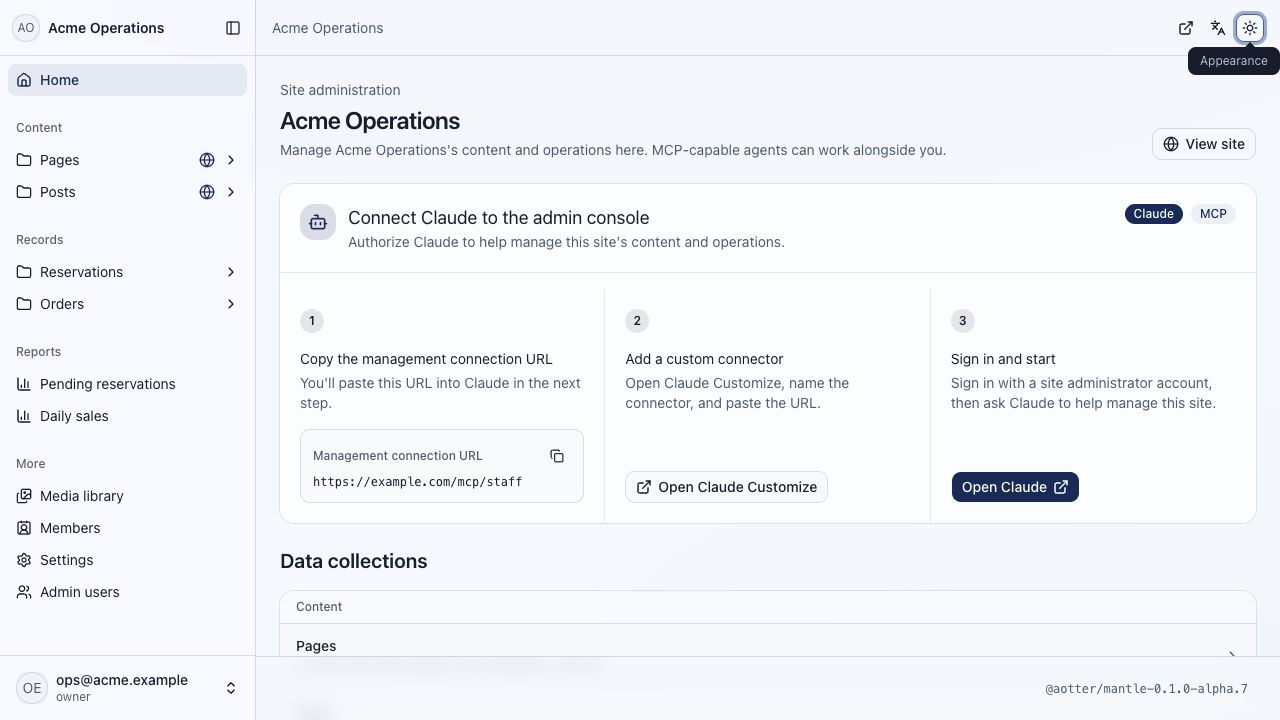
Admin for people and agents
Give admins a workspace for content, operational records, reports, and actions.
In browsers supporting WebMCP, agents can discover and invoke admin tools from
Admin, inspect the current page, and navigate alongside the user. Calls use the
current admin session and retain server-side authorization and concurrency checks.
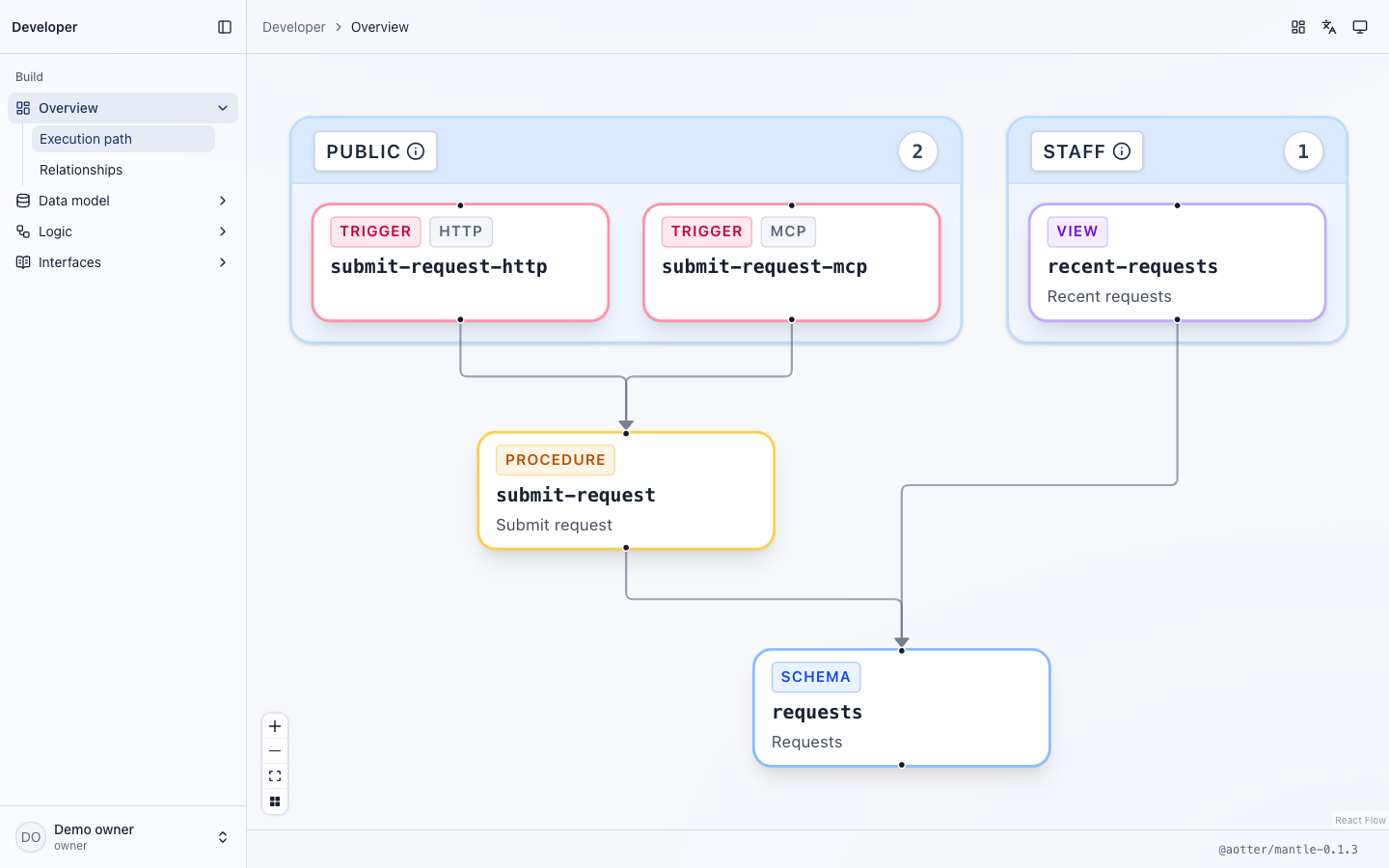
Developer UI and application API docs
Explore your application's Schemas, Views, Procedures, Triggers, and their
relationships in the admin-only Developer UI. Its HTTP, MCP, and WebMCP docs
show the application's projected routes and tool schemas, with links back to
the owning definitions.
Developer UI rendered locally from the intake example. The graph describes
compiled declarations; it does not certify runtime or deployment health.
The application serves the console at /admin from the Admin that mantle bundle
builds into dist/client/admin; this view draws from the admin-only
GET /admin/api/developer-console.
Together with the requests Schema, this defines the read used by the admin
report and its MCP tool. A Procedure handles submissions, with Triggers choosing
HTTP and MCP exposure.
Install the Mantle skill to get guided setup for your application and the
features you need:
npx skills add aotter/mantle@mantle
Ask your agent to follow the installed skill and describe what you want to build.
Without a version the skill follows main, the latest stable release. To match
your application's SDK exactly, add its release tag:
npx skills add aotter/mantle#v0.2.0@mantle. main can lag an alpha release on develop.
See the agent setup guide for supported
editors, plugins, and project instructions.
Build it yourself
Use Node 22.22+ and install an exact 0.2.x version of @aotter/mantle, with
matching Admin/UI packages when selected. npx mantle help prints the
installed docs one topic at a time.
mantle init <directory> writes a Cloudflare D1 app shell once: email OTP
sign-in, admin and user roles, Admin, MCP and REST. The app owns that code
from then on; mantle init never overwrites it. To add Mantle to an app you
already have, skip init and write manifests.
After you edit manifests, run
mantle generate <target> <output-directory> <manifest>..., for example
mantle generate cloudflare-d1 generated manifests/*.yaml.
The generator writes native TypeScript/SQL and Workers split-build settings;
your application supplies its entry, routes, auth and database handles. In an
app written by mantle init, pnpm accept starts the app for role-based
acceptance.
PostgreSQL and SQLite are the two built-in dialects. Manifest SQL uses the
compiler's PostgreSQL syntax and is rendered for the selected target.
PostgreSQL uses Bun.SQL on Bun and postgres.js on Workers; other native handles
need an application-owned adapter. Upgrading from 0.1.x:
the upgrade guide; an existing PostgreSQL
service also reads the release notes.
Package
Purpose
@aotter/mantle
Native SDK, private compiler, generator and CLI; selected driver, auth, REST, MCP, web and site/media primitives.
@aotter/mantle-ui
Pure UI: generic interaction controller, React components, visual kit and design tokens. No SDK dependency.
@aotter/mantle-admin
Admin app library and thin server, preview and Admin MCP App. Uses UI and public SDK contracts; the SDK remains a peer.
FAQ
What is Mantle?
Mantle is an open-source (Apache-2.0) agent-native application SDK and backend
compiler. It compiles YAML manifests (Schemas, Views, Procedures
and Triggers) into native SQL for SQLite, Cloudflare D1 and PostgreSQL, plus
typed TypeScript operations, on Cloudflare Workers or Bun, with optional REST,
MCP, web, auth and admin surfaces.
Is Mantle a framework?
No. Mantle does not own your entry point, router or auth, and it does not take
control of your app. Your application imports the generated operations, passes
its own database handle and verified caller, and mounts only the surfaces it
selects. mantle generate writes only generated/ and Wrangler build keys.
mantle init writes a starting shell once; after that the code is yours.
How is Mantle different from an ORM or a headless CMS?
Instead of building queries in application code, you declare SQL Views and
Procedures in manifests; the compiler checks them and emits native SQL with row
policy, single-row write checks and atomic Procedures. A headless CMS is usually
a separate product with its own content model. Mantle gives you publishing
workflows, an admin console and public pages inside your own application and
database, for content you model yourself.
Which databases and hosts does Mantle support?
Mantle supports SQLite (Cloudflare D1 or bun:sqlite) and PostgreSQL, on
Cloudflare Workers or Bun, through four generator targets: cloudflare-d1
(Cloudflare D1 on Workers), cloudflare-postgres (PostgreSQL via postgres.js,
usually with Hyperdrive, on Workers), bun-sqlite (bun:sqlite) and
bun-postgres (Bun.SQL). Manifest SQL uses PostgreSQL syntax and is rendered
for the selected dialect.
How do AI agents use Mantle?
Coding agents build Mantle apps with the version-matched skill, mantle help
and the compiler's diagnostics; at runtime, AI agents call the app's Model
Context Protocol server at /mcp and /mcp/admin. /mcp serves the tools your
public MCP Triggers expose, and /mcp/admin serves admin tools to admin roles.
Each call keeps its declared authorization, row policy and input checks. See
MCP and agents.
Can Mantle serve llms.txt, a sitemap and Markdown pages?
Yes. The generated web() module reads public Views and serves /llms.txt,
/sitemap.xml, .md Markdown alternates and canonical head tags. SQL controls
what is visible, so unpublished drafts stay out. Your app owns the HTML. For
page layouts, JSON-LD and languages, see
Public pages: SEO, AEO and languages.
Does Mantle run migrations?
No. Apply the generated schema.sql to an empty database for the first
install. After that, migrations belong to the application and its native tool.