MCP Drill
A high-performance stress testing platform for MCP servers and gateways.
Simulate thousands of concurrent MCP clients, identify performance bottlenecks, and validate your infrastructure before production.
Power your agent
การติดตั้งจากผู้เผยแพร่ ไม่ใช่เอนด์พอยต์ของ PlugMCP
URL แบบรีโมตหรือคำสั่งบนเครื่องของคุณ? การติดตั้งสองแบบต่างกันอย่างไร
รันบน PlugMCP
A new server you create. It is not this listing's official endpoint. Use the publisher install when you want their URL and their credentials.
เปิดจากผู้เผยแพร่
Built to battle-test Peta, an MCP control plane and runtime. If you're building MCP infrastructure, MCP Drill helps you break it before your users do.
┌──────────────────────────────────────────────────┐
│                    Control Plane                 │
│  ┌────────────┐  ┌────────────┐  ┌────────────┐  │
│  │Run Manager │  │ Scheduler  │  │  HTTP API  │  │
│  └────────────┘  └────────────┘  └────────────┘  │
└─────────────────────────┬────────────────────────┘
                          │
            ┌─────────────┼─────────────┐
            │             │             │
      ┌─────┴─────┐ ┌─────┴─────┐ ┌─────┴─────┐
      │  Worker   │ │  Worker   │ │  Worker   │
      │ (VU Pool) │ │ (VU Pool) │ │ (VU Pool) │
      └─────┬─────┘ └─────┬─────┘ └─────┬─────┘
            │             │             │
            └─────────────┼─────────────┘
                          │
                   ┌──────┴──────┐
                   │ MCP Target  │
                   └─────────────┘
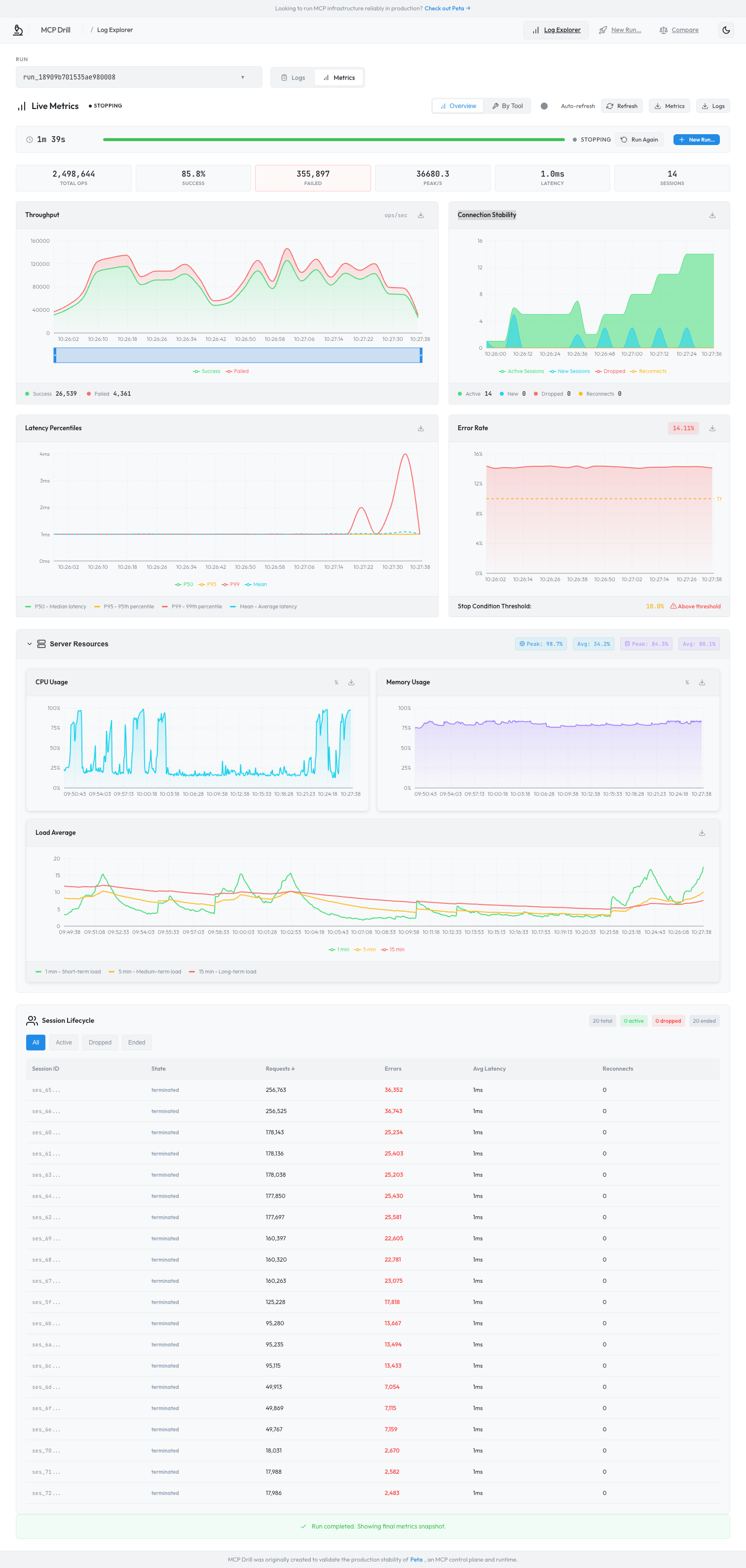
Real-time performance monitoring with throughput, latency percentiles, error rates, and server resource utilization:
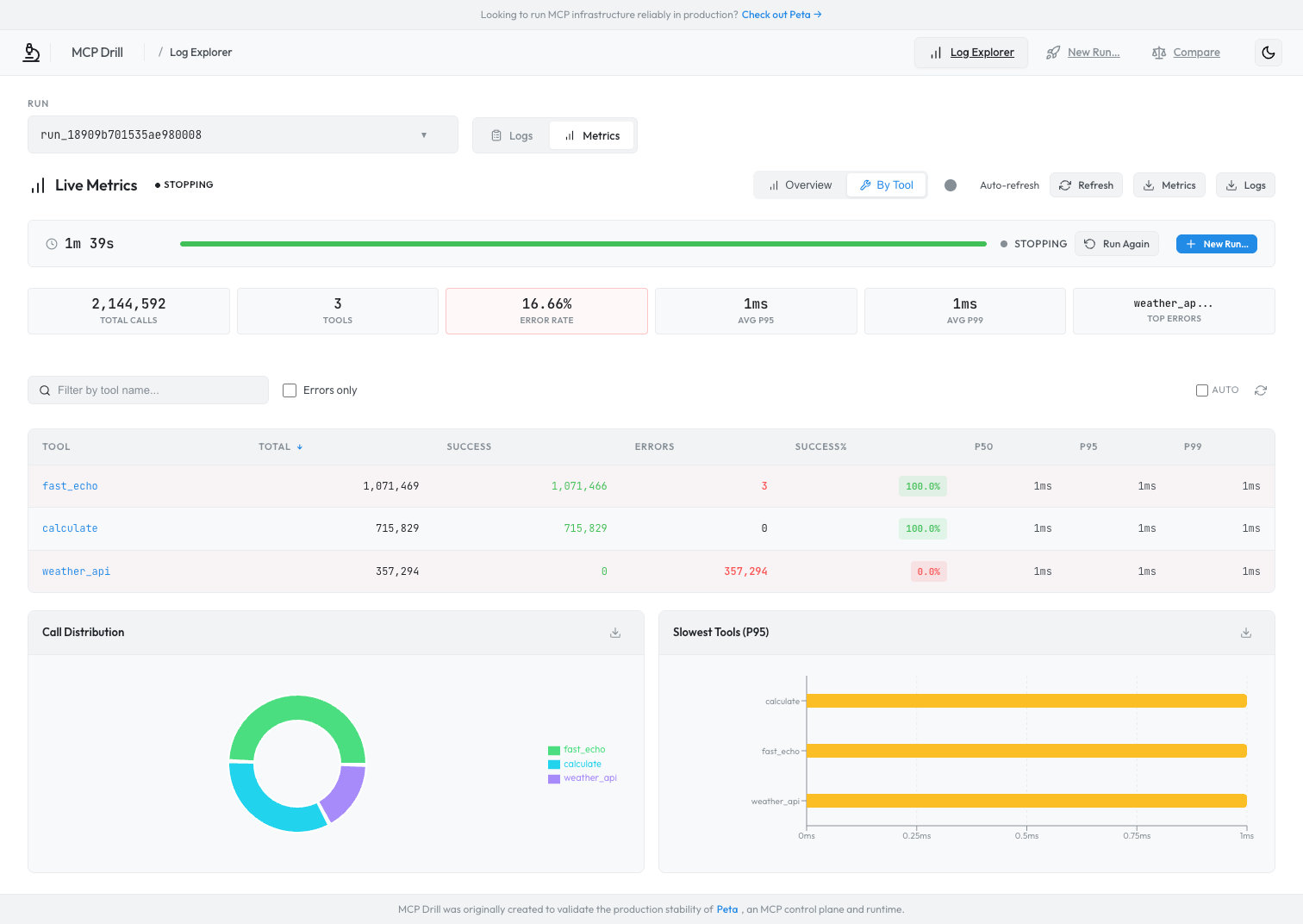
Per-tool breakdown with success rates, latency distribution, and error analysis:
Prerequisites: Docker Engine + Docker Compose v2 (docker compose).
If you see build warnings, also ensure Buildx is installed (docker buildx version).
git clone https://github.com/bc-dunia/mcpdrill.git
cd mcpdrill

# Core (server + worker)
docker compose up -d

# With mock server for testing
docker compose --profile mock up -d

# Full stack (mock + agent)
docker compose --profile full up -d
Open http://localhost:8080/ui/logs/ — the Web UI is embedded in the server.
Scale workers: docker compose up -d --scale worker=5
Notes
- Ports are bound to
localhostby default (seedocker-compose.yml). Update the port mappings if you need LAN/remote access.- The default compose config runs in insecure mode for local development (
--insecure,--insecure-worker-auth) and enables private-network discovery (--allow-private-discovery) for Docker testing. Don’t expose it publicly without enabling auth.- API rate limiting is disabled in the default compose config (
--rate-limit=0) to avoid429responses during high-volume telemetry shipping.--profile fullenables the telemetry agent and uses extra container capabilities for PID discovery. If it’s blocked in your environment, use--profile mockand runmcpdrill-agenton the MCP host instead.
Prerequisites: Go 1.24+, Node.js 18+ (for Web UI)
git clone https://github.com/bc-dunia/mcpdrill.git
cd mcpdrill
make dev
This starts all services on loopback (no auth required):
Stop with make dev-stop. View logs with make dev-logs.
For the Web UI in development mode (with hot reload):
cd web/log-explorer
npm install
npm run dev
Open http://localhost:5173. Or build and embed into the server: make frontend then restart the server to access at /ui/logs/.
Click "New Run" in the Web UI to create and start a test using the built-in wizard.
Or via CLI:
curl -X POST http://localhost:8080/runs \
  -H "Content-Type: application/json" \
  -d "{\"config\": $(cat examples/quick-start.json)}"

# Start the run (replace with your run_id from the response)
curl -X POST http://localhost:8080/runs/{run_id}/start
Results appear in real time in the Web UI dashboard.
Note: The quick-start config targets
http://127.0.0.1:3000/mcp(IPv4). Usinglocalhostmay fail due to IPv6 resolution on some systems.
Optional: Server Resources (CPU/Memory)
The Web UI can display server-side CPU/memory metrics, but this requires the optionalmcpdrill-agent. The quick-start config hasserver_telemetry.enabled: falseby default. To enable it, see Server Telemetry Agent section below.
MCP Drill includes a built-in mock MCP server with 27 tools for isolated testing without external dependencies.
Make sure the mock server is running (e.g. docker compose --profile mock up -d or make dev) before calling localhost:3000.
# List available tools
curl -X POST http://localhost:3000/mcp \
  -H "Content-Type: application/json" \
  -d '{"jsonrpc":"2.0","method":"tools/list","id":1}'

# Call a tool
curl -X POST http://localhost:3000/mcp \
  -H "Content-Type: application/json" \
  -d '{"jsonrpc":"2.0","method":"tools/call","params":{"name":"fast_echo","arguments":{"message":"hello"}},"id":2}'
See examples/quick-start.json for a complete test configuration. Full tool documentation: Tool Testing Guide.
Note: MCP Drill works perfectly without the telemetry agent. This is an optional add-on for correlating client-side load test metrics with server-side resource usage.
Monitor server-side metrics (CPU, memory, threads, file descriptors) from your MCP server during load tests.
┌─────────────────────────────┐          ┌─────────────────────────┐
│   Your MCP Server Host      │          │   Control Plane         │
│                             │          │                         │
│  MCP Server   mcpdrill-agent│─────────▶│  Correlates metrics     │
│  (port 3000)       │        │  HTTPS   │  with test runs         │
│       ▲            │        │          │                         │
│       └── monitors─┘        │          │                         │
└─────────────────────────────┘          └─────────────────────────┘
# Build the agent
make agent

# Enable on control plane
./mcpdrill-server --addr :8080 --enable-agent-ingest --agent-tokens "secret-token"

# Run agent on your MCP server host
./mcpdrill-agent \
  --control-plane-url http://localhost:8080 \
  --agent-token "secret-token" \
  --pair-key "my-test" \
  --listen-port 3000
{
  "scenario_id": "capacity-test",
  "server_telemetry": {
    "enabled": true,
    "pair_key": "my-test"
  },
  "target": { "url": "http://localhost:3000/mcp" }
}
What is
pair_key?
The pair key links metrics from a specific server with your test runs. Use the same value for--pair-keywhen starting the agent and in your run config'sserver_telemetry.pair_keyto correlate server-side resource metrics (CPU, memory) with client-side load test results.
See Agent Telemetry Guide for full details.
# Create a run
curl -X POST http://localhost:8080/runs -H "Content-Type: application/json" -d @config.json

# Start / Stop / Emergency stop
curl -X POST http://localhost:8080/runs/{run_id}/start
curl -X POST http://localhost:8080/runs/{run_id}/stop -d '{"mode":"drain"}'
curl -X POST http://localhost:8080/runs/{run_id}/emergency-stop

# Status and events
curl http://localhost:8080/runs/{run_id}
curl -N http://localhost:8080/runs/{run_id}/events
Published to GitHub Container Registry on every release:
# Pull a specific release (recommended)
docker pull ghcr.io/bc-dunia/mcpdrill/server:0.1.3

# Or use :latest for the most recent release
docker pull ghcr.io/bc-dunia/mcpdrill/server:latest
Note: Git tags use a
vprefix (v0.1.3), but Docker image tags do not (0.1.3). Multi-arch images are published forlinux/amd64andlinux/arm64.
docker compose up -d                       # server + worker
docker compose --profile mock up -d        # + mock server
docker compose --profile full up -d        # + mock server + agent
docker compose up -d --scale worker=5      # scale workers
make docker-build                          # all images
make docker-build VERSION=v0.1.3           # with version tag
make docker-server                         # server only
Images are automatically built and published to GHCR on tag push via GitHub Actions.
Pre-built configs in examples/:
quick-start.json - Minimal test against mock servertool-testing/ - Tool validation scenariosscenarios/ - SSE and streaming testsmulti-node/ - Docker Compose and KubernetesMIT License - see LICENSE for details.
MCP Drill was originally created to validate the production stability of Peta, an MCP control plane and runtime. If you're building MCP infrastructure that needs to scale, Peta handles the hard parts — routing, auth, observability — so you can focus on your agents.
A high-performance stress testing platform for MCP servers and gateways.
เครื่องมือ
ยังไม่มีรายการเครื่องมือ เซิร์ฟเวอร์แบบรีโมตจะได้รายการหลังการตรวจสอบสถานะครั้งแรก
FAQ
คัดลอกคอนฟิก stdio สำหรับ Cursor, Claude Desktop, Claude Code หรือ VS Code ได้ในหน้านี้ คอนฟิกนี้ใช้การติดตั้งของผู้เผยแพร่ ไม่ใช่พร็อกซีของ PlugMCP
ระเบียนนี้ไม่ได้ระบุตัวแปรสภาพแวดล้อมที่จำเป็น
Mcpdrill ทำงานแบบโลคัลผ่าน stdio
ตรวจสอบล่าสุดเมื่อ 2026-10-28 A high-performance stress testing platform for MCP servers and gateways.
