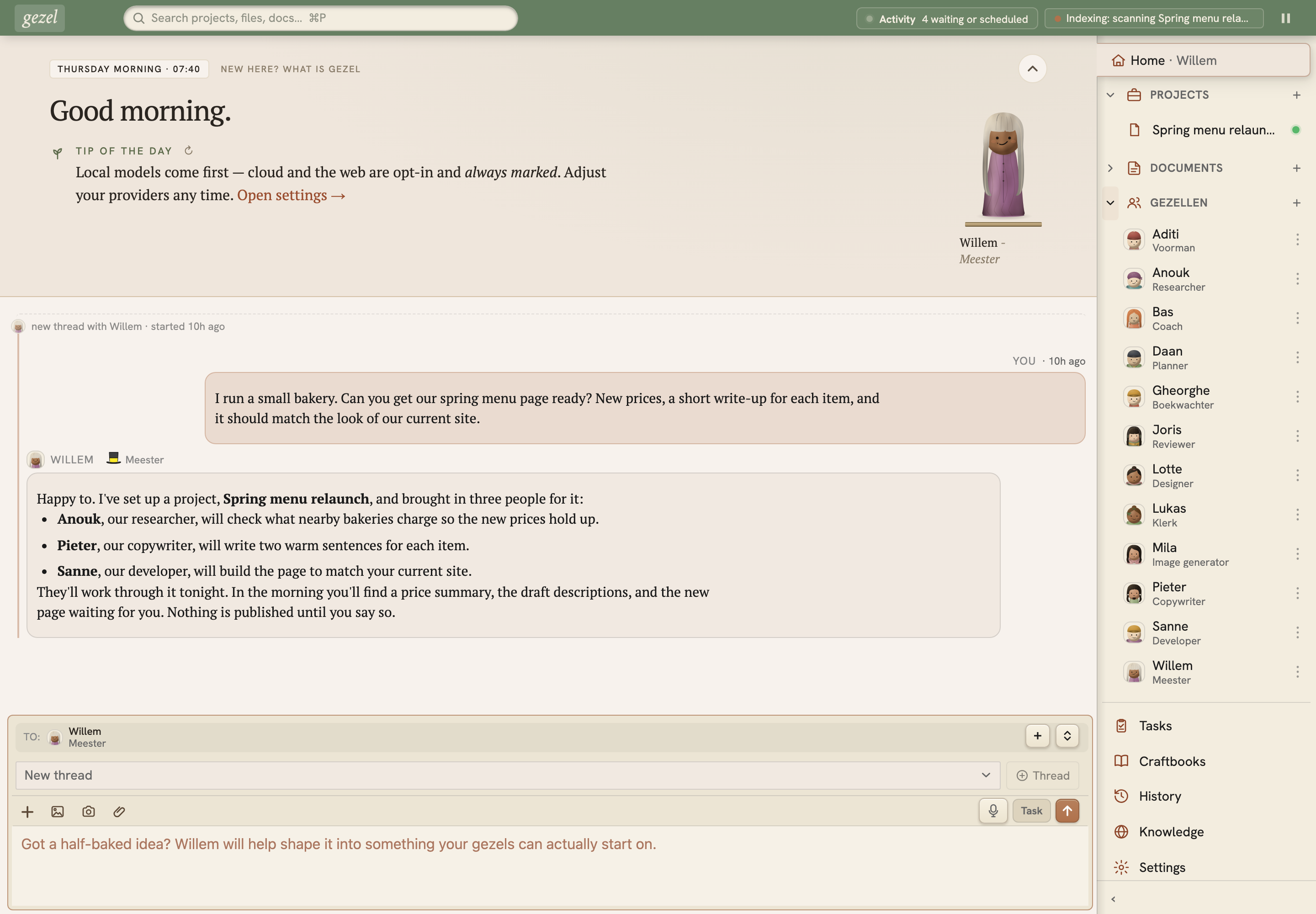
Gezel is a free, open-source desktop app that gives you a crew of AI helpers (a researcher, a writer, a developer, and more) working on your own computer. Tell the Meester what you need and they bring in the right helpers. The work can run overnight, and in the morning it's waiting for you as reports and suggested changes. Your own files only change when you say so.
Gezel's Model Context Protocol server: gives gezels and other MCP clients access to memory, workspace files, artifacts, tasks, and team tools.
Project status: early preview. Gezel is usable, but installers, data formats, extension APIs, and model support may still change. Keep backups of important work and expect rough edges. Please report issues.
What it does
A crew, not a chat box. Each helper (a gezel, Dutch for journeyman) has a name, one role, a short list of tools, and a memory of past work. Your first conversation is with the Meester, who sets up the project and brings in the helpers it needs.
Apps built around your work. Combine a custom page, project files, gezel roles, and craftbooks into a reusable Gezel app. Start with the app-building guide, page APIs, and page style guide.
Work that keeps going while you're away. The Night Shift runs from 22:00 to 06:00 by default, or whenever you start it. Your crew works through tasks, reviews and indexing, and leaves a morning summary with reports and proposed changes for you to approve.
Tested plans for real jobs. More than 250 craftbooks, step-by-step plans with a quality check at the end, cover jobs such as research briefs, slide decks, Word documents, code reviews and websites.
Built for the AI on your computer. Gezel recommends models that fit your hardware and runs them on bundled engines (llama.cpp and MLX). Focused roles and step-by-step plans are what let smaller models finish multi-step work, and we publish measured results for the models we test.
Or use the plan you already pay for. Gezel can work through the Claude, ChatGPT or GitHub Copilot plan you already have, using the Claude and Codex command-line tools or a Copilot sign-in. OpenAI and Anthropic API keys work too, and each gezel can use a different provider.
Yours, as plain files. Projects, conversations and memories are saved on your own disk as Markdown, JSON and SQLite you can read, search and back up.
What you need
Minimum
Recommended
Mac
M1 or newer with 16 GB of memory
24 GB of memory or more
Windows or Linux
A graphics card with 8 GB of its own memory (NVIDIA RTX 2070, 3070, 4060, 5060; AMD Radeon 6600, 7600)
16 GB or more (NVIDIA RTX 4080, 5070 Ti; AMD Radeon 9070)
The minimum runs everyday models for chat, drafting and focused single tasks. The recommended tier adds larger models for multi-step work with tools. Models download the first time you use them. Without hardware like this, you can use a cloud plan instead.
gezel.com picks the right installer for your machine, and every build is also on the releases page. Prefer a terminal? See the CLI reference.
Linux installers require glibc 2.38 and the GCC 14.1 C++ runtime or newer, on both x64 and arm64. Ubuntu 24.04 LTS with current updates and Debian 13 meet these requirements; Ubuntu 22.04, Debian 12 and RHEL 9 do not. See the native runtime requirements for details.
What “local-first” means
Gezel does not put a Bendyline cloud service between you and your models. The daemon, application state, projects, sessions, documents, memories, and rebuildable indexes live on the machine running Gezel. Primary state is stored in inspectable files where practical.
The default data location depends on how the daemon is hosted:
Hosting mode
Default data location
Development or per-user daemon
~/.gezel/ (or $GEZEL_HOME)
Windows system service
C:\ProgramData\Gezel\
macOS system service
/Library/Application Support/Gezel/
Linux system service
/var/lib/gezel/
Local-first does not mean that every configuration is offline. Gezel uses the network when you choose a cloud model provider, install or invoke a networked toolset, search the web, download models or native engines, pair a remote inference device, or check for updates. Content sent to those services is governed by their policies. A local-model-only setup can keep inference local, but downloads and update checks can still use the network.
Packaged installs communicate with gezeld over loopback TLS using scoped bearer credentials. Gezel also runs model-authored tools and scripts, so treat untrusted content as potentially hostile and choose the security level appropriate for the project. Shared-machine deployments have an additional caveat: every account allowed to read the machine service's runtime credential is trusted as a first-party client.
Read Security Architecture for the threat model, enforced controls, and known limitations. Report vulnerabilities privately through Security Policy. Third-party components and their licenses are recorded in NOTICE.
Every release publishes a SHA256SUMS manifest and SLSA build provenance for each installer, so a download can be checked against what the pipeline actually produced. macOS and Windows installers are additionally signed and, on macOS, notarized; Linux packages are not GPG-signed, which makes these checks the verification path there. Verifying your download has the per-platform commands.
Architecture
Electron desktop app ─┐
CLI / other clients ──┼── loopback HTTPS + bearer token ──► gezeld
                      │                                     ├─ file-backed Store
                      │                                     ├─ sessions, tasks, memory
                      │                                     ├─ local/cloud model providers
                      │                                     └─ per-session MCP tool bridge
React UI ◄────────────┘
The Electron app is an OS integration shell and supervisor. The gezeld service owns state, provider routing, tools, background work, and the HTTP API. Clients use @bendyline/gezel-client instead of assuming the service runs in-process, so the same protocol works with embedded, per-user, system-service, and configured remote hosting modes.
See AGENTS.md for the full runtime model, disk layout, package map, and engineering conventions.
Develop locally
Source builds require Node.js 24 or newer and the pnpm version pinned by the repository (11.15.1). CI uses Node 24, whose bundled Corepack can provision that pnpm version:
pnpm typecheck
pnpm lint
pnpm test
pnpm test:e2e:web:run
The optional visual regression suite compares reviewed
desktop, tablet, and phone baselines with pnpm test:e2e:visual on macOS 26 ARM64;
it is available locally or by manual workflow and does not block CI.
คัดลอกคอนฟิก stdio สำหรับ Cursor, Claude Desktop, Claude Code หรือ VS Code ได้ในหน้านี้ คอนฟิกนี้ใช้การติดตั้งของผู้เผยแพร่ ไม่ใช่พร็อกซีของ PlugMCP
@bendyline/gezel ต้องใช้ API key ไหม?
ระเบียนนี้ไม่ได้ระบุตัวแปรสภาพแวดล้อมที่จำเป็น
@bendyline/gezel ใช้ทรานสปอร์ตแบบใด?
@bendyline/gezel ทำงานแบบโลคัลผ่าน stdio
@bendyline/gezel ถูกตรวจสอบล่าสุดเมื่อใด?
ตรวจสอบล่าสุดเมื่อ 2026-11-16 Gezel's Model Context Protocol server: gives gezels and other MCP clients access to memory, workspace files, artifacts, tasks, and team tools.