archdiagram
Turn an architecture description into an editable diagram whose nodes are the official vendor service icons (Azure App Service, AKS, Key Vault, S3, GKE, ...) - not a flowchart of labelled boxes.
Power your agent
การติดตั้งจากผู้เผยแพร่ ไม่ใช่เอนด์พอยต์ของ PlugMCP
URL แบบรีโมตหรือคำสั่งบนเครื่องของคุณ? การติดตั้งสองแบบต่างกันอย่างไร
รันบน PlugMCP
A new server you create. It is not this listing's official endpoint. Use the publisher install when you want their URL and their credentials.
เปิดจากผู้เผยแพร่
Turn an architecture description into an editable diagram whose nodes are the official vendor service icons (Azure App Service, AKS, Key Vault, S3, GKE, ...) - not a flowchart of labelled boxes.
Turn an architecture spec into editable diagrams with official vendor service icons (Azure/AWS/GCP/K8s) - .pdf/.drawio/.vsdx. Usable by AI agents via skill or MCP server.
A coding agent (Cursor, Claude Code, Codex) translates a natural-language architecture into a small JSON spec; the deterministic Python core renders that spec to:
Lucid note: Lucid does not map draw.io's named vendor stencils or its
img/lib/...icon references, so those render blank on import..drawio/.vsdxtherefore embed icons (--drawio-mode portable) to maximise render success, and the PDF is the reliable icons-always-render deliverable for Lucid.
Rendered from the specs in examples/ - same engine, real vendor icons.
| Azure | AWS | GCP |
|---|---|---|
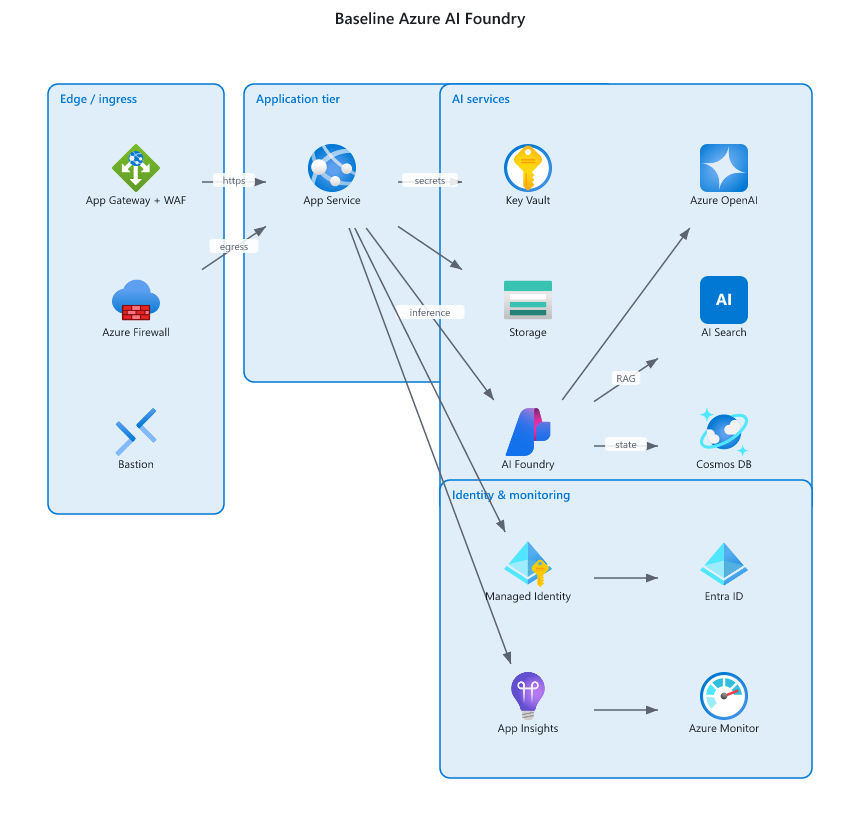 | 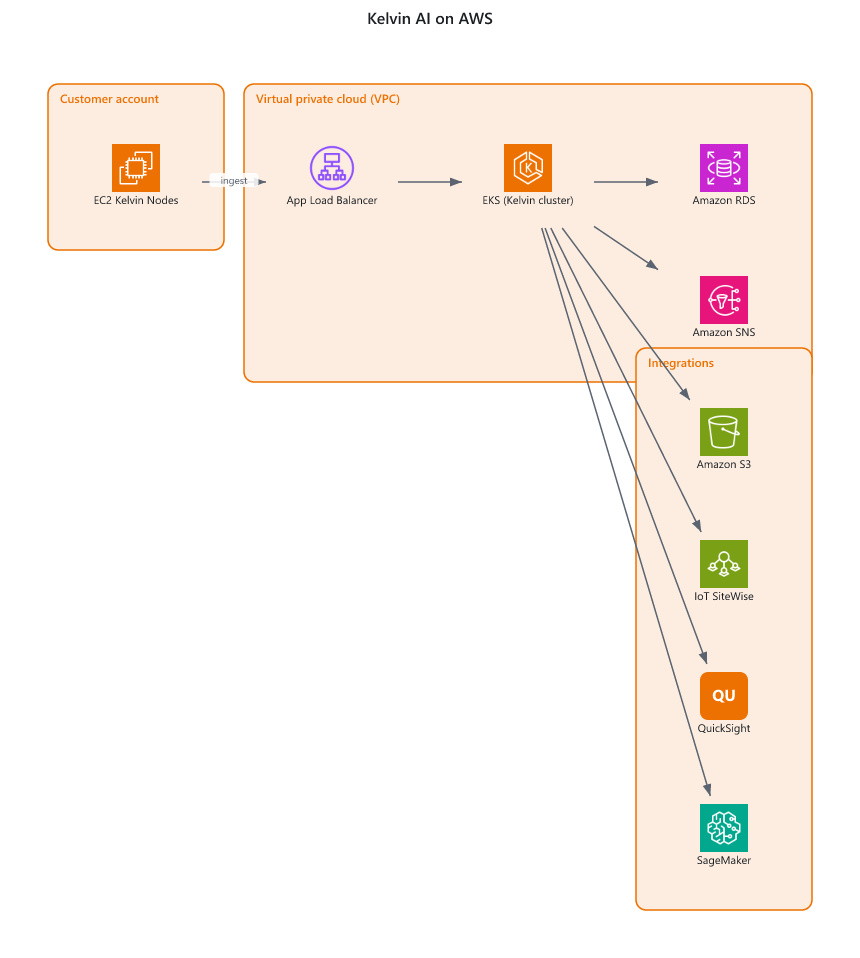 | 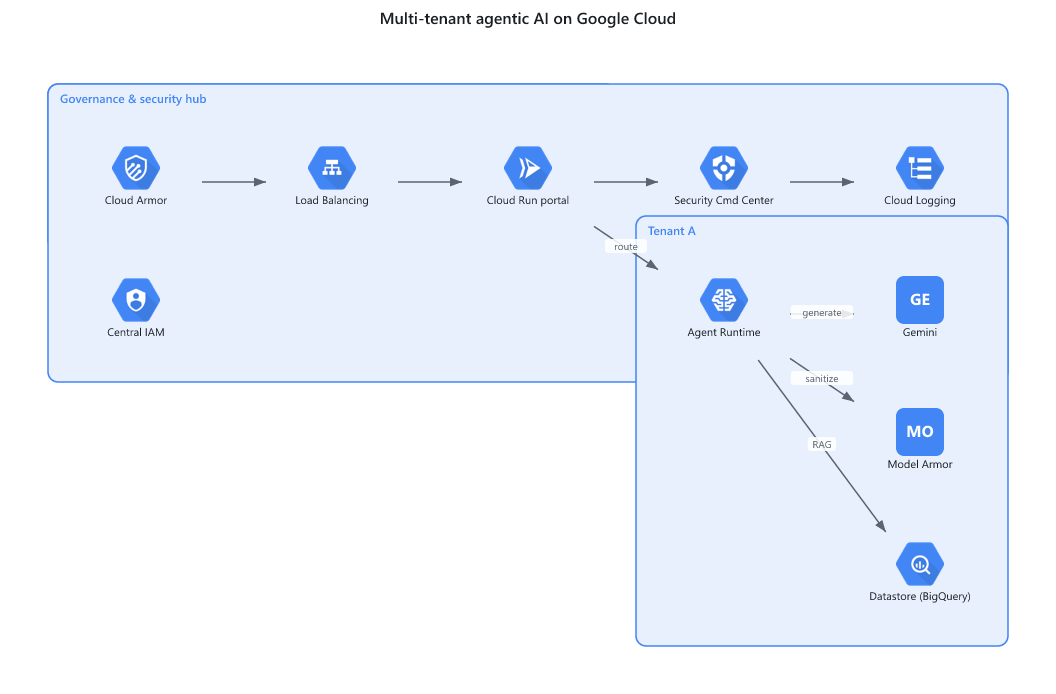 |
jsonschema). .vsdx is written with zipfile + xml.unittest.mcp SDK - only inside mcp_server/.@resvg/resvg-js - rasterise icons to PNG; used by .vsdx (embedded glyphs) and .pdf.
If absent, .vsdx falls back to labelled boxes and .pdf errors with an install hint.pdfkit + svg-to-pdfkit - SVG -> PDF for .pdf.tools/download_icons.py.# 1. (optional) fetch vendor icons into the local cache
python -m tools.download_icons --vendors azure,aws,gcp,kubernetes
# 2. (optional) install the Node rasterise/pdf bridge
cd node && npm install && cd ..
# 3. render a spec
python -m archdiagram.cli render examples/sample_spec.json --format pdf -o out/arch.pdf
python -m archdiagram.cli render examples/sample_spec.json --format drawio -o out/arch.drawio --drawio-mode portable
python -m archdiagram.cli render examples/sample_spec.json --format vsdx -o out/arch.vsdx
{
  "title": "Web platform",
  "direction": "LR",
  "groups": [{ "id": "app", "label": "Application tier", "vendor": "azure" }],
  "nodes": [
    { "id": "web", "service": "azure.app_service", "label": "Web App", "group": "app" },
    { "id": "aks", "service": "azure.aks",         "label": "AKS",     "group": "app" },
    { "id": "kv",  "service": "azure.key_vault",   "label": "Key Vault" }
  ],
  "edges": [
    { "source": "web", "target": "aks", "label": "http" },
    { "source": "aks", "target": "kv" }
  ]
}
service is "<vendor>.<service_key>". Unknown services degrade gracefully to a labelled box.
Node positions are computed by a deterministic, hand-rolled layered layout (no graphviz). Provide
explicit x/y on a node to override the computed position.
This repo is built to be driven by agentic AI tools (Cursor, Claude Code/Desktop, Codex, ...) straight from Git. Pick either path:
Clone the repo and point your agent at skill/SKILL.md. It
teaches the agent the spec schema, catalog lookup, and render commands so it can
go from a natural-language architecture to rendered files. See also
AGENTS.md.
git clone https://github.com/bharathgnana/archdiagram.git
cd archdiagram && python -m tools.download_icons
pip install "archdiagram[mcp]"
python -m mcp_server.server          # stdio transport
Exposes validate_spec, render_diagram, search_catalog, and list_catalog
tools. A sample client config is in examples/mcp.json
(drop it into .cursor/mcp.json or claude_desktop_config.json).
archdiagram/        pure-Python core (spec, layout, catalog, emitters)
mcp_server/         optional MCP server (only place the `mcp` SDK is used)
node/               optional Node bridge (resvg rasterise + svg->pdf)
tools/              icon downloader + icon source map
skill/              SKILL.md for agentic AI tools
examples/           sample specs + mcp.json
tests/              stdlib unittest suite
python -m unittest discover -s tests
Anyone can clone, install (pip install -e .), and use it. To propose changes,
fork and open a pull request - see CONTRIBUTING.md for the
dev setup and workflow.
Turn an architecture spec into editable diagrams with official vendor service icons (Azure/AWS/GCP/K8s) - .pdf/.drawio/.vsdx. Usable by AI agents via skill or MCP server.
เครื่องมือ
ยังไม่มีรายการเครื่องมือ เซิร์ฟเวอร์แบบรีโมตจะได้รายการหลังการตรวจสอบสถานะครั้งแรก
FAQ
คัดลอกคอนฟิก stdio สำหรับ Cursor, Claude Desktop, Claude Code หรือ VS Code ได้ในหน้านี้ คอนฟิกนี้ใช้การติดตั้งของผู้เผยแพร่ ไม่ใช่พร็อกซีของ PlugMCP
ระเบียนนี้ไม่ได้ระบุตัวแปรสภาพแวดล้อมที่จำเป็น
Archdiagram ทำงานแบบโลคัลผ่าน stdio
ตรวจสอบล่าสุดเมื่อ 2026-10-28 Turn an architecture spec into editable diagrams with official vendor service icons (Azure/AWS/GCP/K8s) - .pdf/.drawio/.vsdx. Usable by AI agents via skill or MCP server.
