@boomlinkai/image-worker-mcp
Power your agent
การติดตั้งจากผู้เผยแพร่ ไม่ใช่เอนด์พอยต์ของ PlugMCP
URL แบบรีโมตหรือคำสั่งบนเครื่องของคุณ? การติดตั้งสองแบบต่างกันอย่างไร
รันบน PlugMCP
A new server you create. It is not this listing's official endpoint. Use the publisher install when you want their URL and their credentials.
เปิดจากผู้เผยแพร่
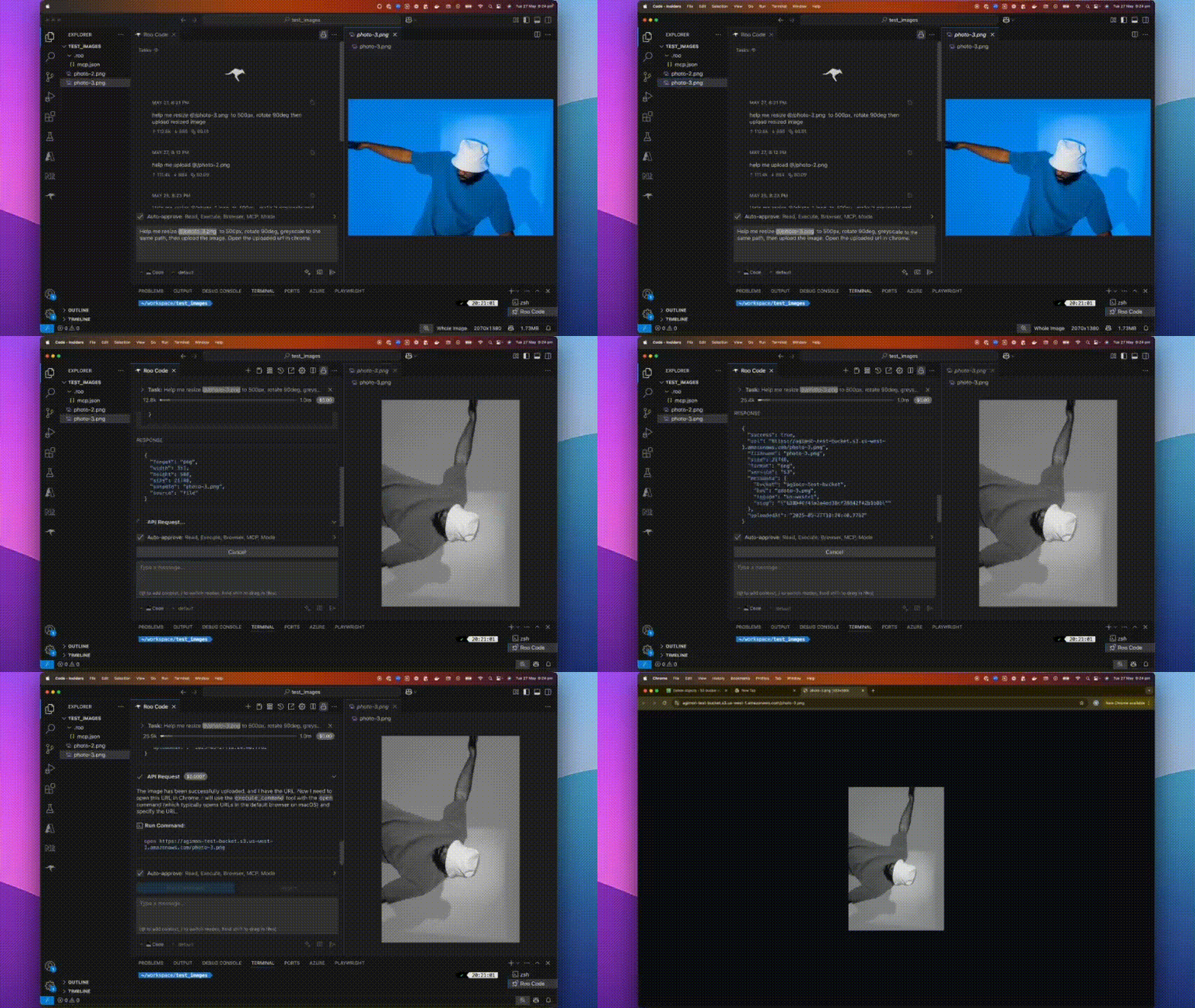
A fast, plug-and-play MCP server for image processing and cloud uploads, designed for AI assistants and automation workflows.
A lightweight server implementing Model Context Protocol (MCP) for automated image manipulation and uploads. It makes image resizing, converting, optimizing, and uploading seamless for devs, AI tools, or automated pipelines.
Use npm (or yarn/pnpm):
npm install -g @boomlinkai/image-worker-mcp
# or
yarn global add @boomlinkai/image-worker-mcp
# or
pnpm add -g @boomlinkai/image-worker-mcp
Or use it instantly (no install):
npx @boomlinkai/image-worker-mcp
npx @boomlinkai/image-worker-mcp
Resize an image:
{
  "tool_code": "use_mcp_tool",
  "tool_name": "resize_image",
  "server_name": "image-worker",
  "arguments": {
    "imageUrl": "https://example.com/original.jpg",
    "width": 800,
    "format": "webp",
    "outputPath": "./resized_image.webp"
  }
}
Upload an image:
{
  "tool_code": "use_mcp_tool",
  "tool_name": "upload_image",
  "server_name": "image-worker",
  "arguments": {
    "imagePath": "./resized_image.webp",
    "service": "s3",
    "filename": "my-optimized-image",
    "folder": "website-assets"
  }
}
The MCP server works via stdio, making it easy to plug into AI tools and code editors.
Add to ~/.cursor/mcp.json:
{
  "mcpServers": {
    "image-worker": {
      "command": "npx",
      "args": ["-y", "@boomlinkai/image-worker-mcp"]
    }
  }
}
resize_imageResize and transform images via:
imagePath, imageUrl, or base64Image (input)width, height, fit, format, quality, rotate, etc.upload_imageUpload any image (by path/url/base64) to:
service: s3 | cloudflare | gcloudfilename, folder, public, etc.Set these for your chosen cloud provider:
AWS S3
export AWS_ACCESS_KEY_ID=xxx
export AWS_SECRET_ACCESS_KEY=xxx
export S3_BUCKET=your-bucket
export S3_REGION=us-east-1
# Optional: S3_ENDPOINT=https://...
Cloudflare R2
export CLOUDFLARE_R2_ACCESS_KEY_ID=xxx
export CLOUDFLARE_R2_SECRET_ACCESS_KEY=xxx
export CLOUDFLARE_R2_BUCKET=your-bucket
export CLOUDFLARE_R2_ENDPOINT=https://...
Google Cloud Storage
export GCLOUD_PROJECT_ID=xxx
export GCLOUD_BUCKET=your-bucket
# Optionally: GCLOUD_CREDENTIALS_PATH=/path/to/key.json
Default upload service:
export UPLOAD_SERVICE=s3
⚠️ Never commit credentials to source control. Use environment variables or secret managers.
sharp is auto-installedbrew install vips (sharp dependency) or use Node 18+.PRs and issues welcome! Please open an issue or submit a pull request.
Vuong Ngo – BoomLink.ai
MIT

Effortlessly resize, convert, optimize, and transform images with a single MCP server—then upload them directly to S3, Cloudflare R2, or Google Cloud Storage. Ideal for AI workflows, automation script
ภาพรวม
Effortlessly resize, convert, optimize, and transform images with a single MCP server—then upload them directly to S3, Cloudflare R2, or Google Cloud Storage. Ideal for AI workflows, automation scripts, and developers who want seamless image handling in one tool.
เครื่องมือ
ยังไม่มีรายการเครื่องมือ เซิร์ฟเวอร์แบบรีโมตจะได้รายการหลังการตรวจสอบสถานะครั้งแรก
FAQ
คัดลอกคอนฟิก stdio สำหรับ Cursor, Claude Desktop, Claude Code หรือ VS Code ได้ในหน้านี้ คอนฟิกนี้ใช้การติดตั้งของผู้เผยแพร่ ไม่ใช่พร็อกซีของ PlugMCP
ระเบียนนี้ไม่ได้ระบุตัวแปรสภาพแวดล้อมที่จำเป็น
Image Worker ทำงานแบบโลคัลผ่าน stdio
ตรวจสอบล่าสุดเมื่อ 2026-10-28 Effortlessly resize, convert, optimize, and transform images with a single MCP server—then upload them directly to S3, Cloudflare R2, or Google Cloud Storage. Ideal for AI workflows, automation scripts, and developers who want seamless image handling in one tool.