https://github.com/user-attachments/assets/d5407fc3-be1f-4b1d-8f88-afb7468ec917
Browsentic - a completely integrated agentic browser harness
No account · No auth · No API key · No cloud · No telemetry · Local first
Power your agent
คำสั่งของผู้เผยแพร่เอง ไม่ใช่เอนด์พอยต์ของ PlugMCP
Host a copy with our keys and logs.
npx -y [email protected]Claude Code ไม่มีลิงก์ติดตั้งสำหรับคำสั่งแบบโลคัล ให้คัดลอกคำสั่งด้านล่างแล้วรันในเทอร์มินัล
claude mcp add browsentic -- npx -y browsentic@0.9.2รันในเทอร์มินัล
{ "mcpServers": { "browsentic": { "command": "npx", "args": [ "-y", "[email protected]" ] } }}claude_desktop_config.json
URL แบบรีโมตหรือคำสั่งบนเครื่องของคุณ? การติดตั้งสองแบบต่างกันอย่างไร
รันบน PlugMCP
A new server you create. It is not this listing's official endpoint. Use the publisher install when you want their URL and their credentials.
เปิดจากผู้เผยแพร่
https://github.com/user-attachments/assets/d5407fc3-be1f-4b1d-8f88-afb7468ec917
No account · No auth · No API key · No cloud · No telemetry · Local first
An agentic browser harness: run the agent CLI you already use (Claude Code, Codex, Cursor) in your real, signed-in browser from a side panel. Sets up Browsentic Bridge and the extension; MCP is optional.
Your real, logged-in browser, driven from an AI side panel by the agent CLI you already have. Also an optional MCP server, so any MCP client can drive the same browser.
Browsentic is your browser's superpower, free and open source. One install sets up everything, the extension included.
macOS: one line installs the app, which brings Node and everything else:
curl -fsSL https://browsentic.com/install.sh | sh
Windows: one line in PowerShell installs the Windows app (experimental):
irm https://browsentic.com/install.ps1 | iex
Any platform, with Node.js 20 or newer:
npx browsentic@latest setup
Setup asks which browser you use and opens Browsentic's store page in it (the apps do the same from their Overview tab). Press Add to Chrome (Add in Firefox; Edge first asks you to allow extensions from other stores), and the extension connects to Browsentic Bridge by itself; if it asks for a code, enter the one setup shows. From then on it updates itself from its store.
The extension is on the Chrome Web Store for Chrome, Brave, Arc, Vivaldi and Opera, on Edge Add-ons for Edge, and Firefox gets an add-on signed by Mozilla:
If you added the extension from a store first, run the same line, and the two connect as soon as the Bridge is in place.
The side panel runs on an agent CLI you are signed in to: Claude Code, Codex or another supported one. It uses the one you already have, so there is no API key, no account and no extra subscription.
Full guide, Firefox and unpacked installs included: browsentic.com/docs/guide/install
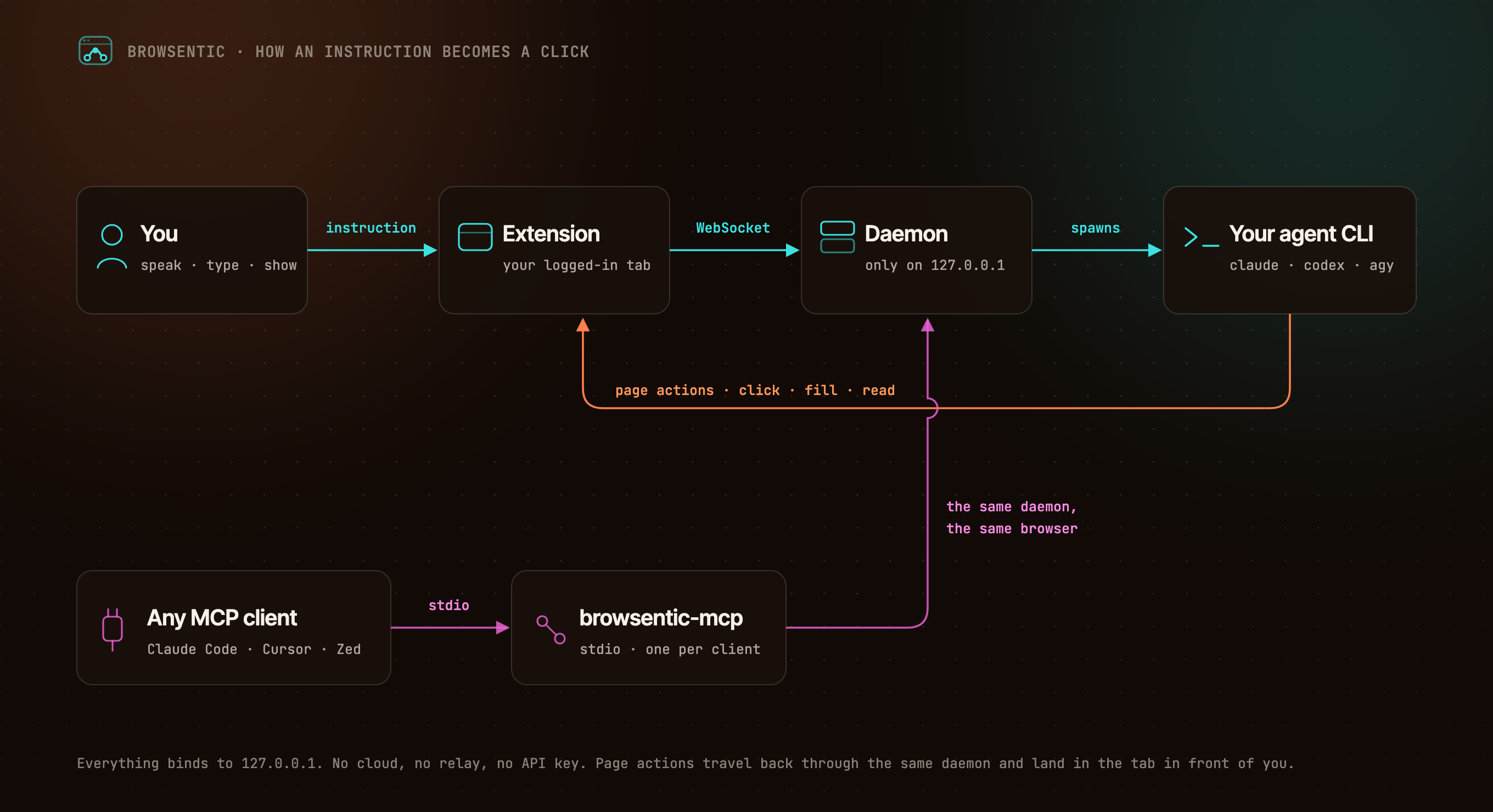
You ──speak or type──> Extension ──local WebSocket──> Browsentic Bridge ──spawns──> your agent CLI
                            ▲                                        (claude │ codex │ agy │ …)
                            └──────────────────── page actions ──────────────────────┘

Any MCP client ──stdio──> browsentic mcp ──> the same Bridge ──> the same browser
The extension dials out to Browsentic Bridge, because a Manifest V3 service worker cannot listen for connections. One Bridge owns the browser link, so several MCP clients can share one browser. Everything binds to 127.0.0.1.
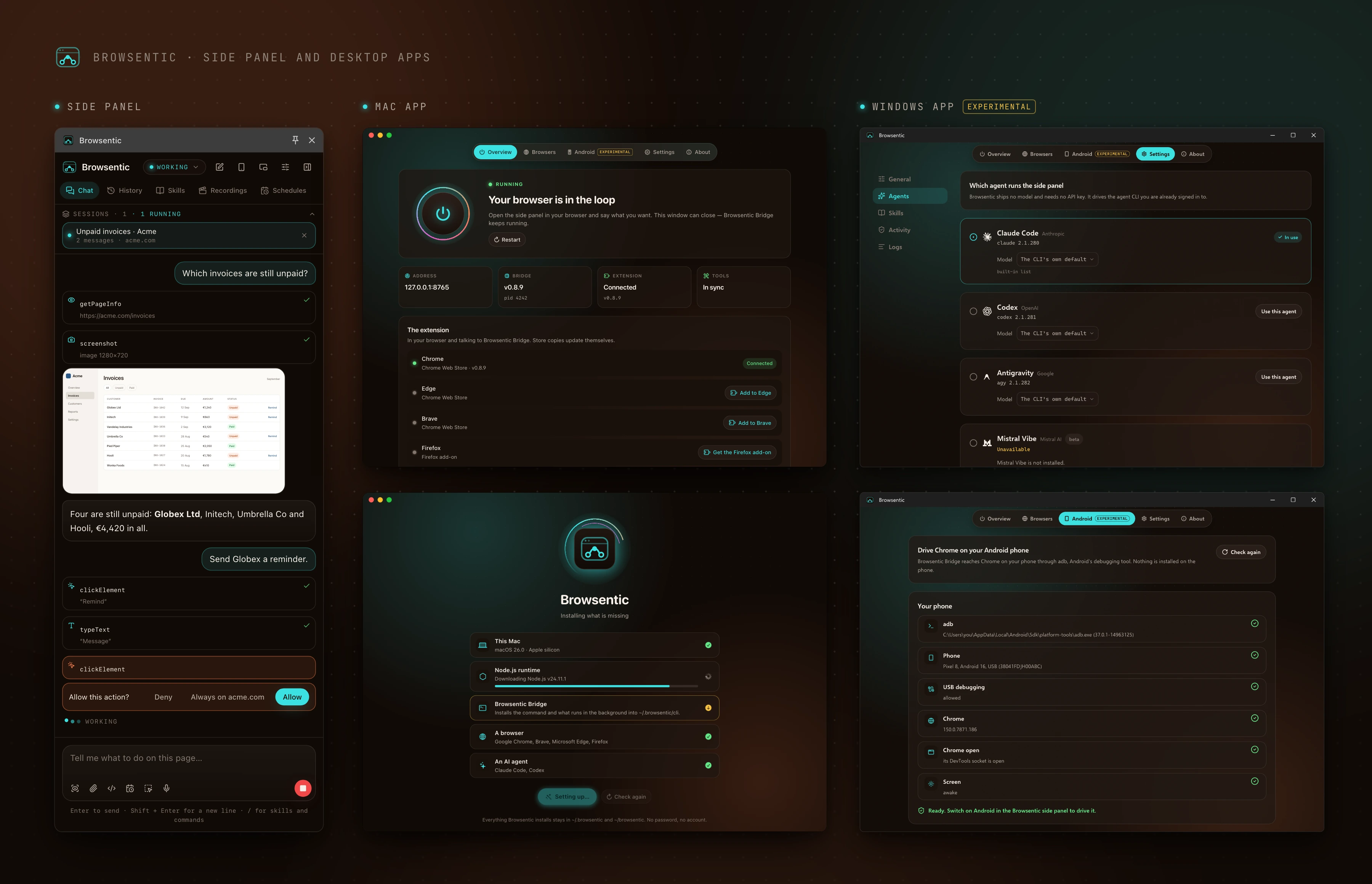
The side panel is where you work with the agent. Every page action shows up as a step, and consequential ones, such as submitting a form, wait for your approval. A new tab opens Browsentic Home, a full-page composer with your frequent sites, which hands the task to the side panel as soon as you send it; you can switch it off.
The desktop apps for macOS and Windows (experimental) install Node and Browsentic Bridge in one click, turn the Bridge on and off, add the extension to each browser, pick the agent CLI and its model, and check an Android phone before the side panel drives it.
Nothing connects except Browsentic's own extension, paired by itself through the browser or with a code, and both ends prove who they are. The agent asks before any consequential action, credentials on a page are sealed before the agent sees them, and the sites you block are off-limits to every agent: the browser enforces that list, where no agent can reach it. The full model is in SECURITY.md, and what it does not cover is in Limits.
Bugs and ideas are welcome. Start at CONTRIBUTING.md.
Browsentic is licensed under the Apache License 2.0. Versions up to 0.7.15 were released under the MIT License.
Short answer: "Browse" + "agentic".
Long answer: Most browser automation hands the work to a different browser: a headless one, in a container, logged in to nothing. Browsentic works the other way round. The agent acts in the browser you are already looking at, with the sessions you are already signed in to: browsing, made agentic, where you already browse.
An agentic browser harness: run the agent CLI you already use (Claude Code, Codex, Cursor) in your real, signed-in browser from a side panel. Sets up Browsentic Bridge and the extension; MCP is option
{ "mcpServers": { "browsentic": { "command": "npx", "args": [ "-y", "[email protected]" ] } }}ภาพรวม
An agentic browser harness: run the agent CLI you already use (Claude Code, Codex, Cursor) in your real, signed-in browser from a side panel. Sets up Browsentic Bridge and the extension; MCP is optional.
เครื่องมือ
ยังไม่มีรายการเครื่องมือ เซิร์ฟเวอร์แบบรีโมตจะได้รายการหลังการตรวจสอบสถานะครั้งแรก
FAQ
คัดลอกคอนฟิก stdio สำหรับ Cursor, Claude Desktop, Claude Code หรือ VS Code ได้ในหน้านี้ คอนฟิกนี้ใช้การติดตั้งของผู้เผยแพร่ ไม่ใช่พร็อกซีของ PlugMCP
ระเบียนนี้ไม่ได้ระบุตัวแปรสภาพแวดล้อมที่จำเป็น
Browsentic ทำงานแบบโลคัลผ่าน stdio
ตรวจสอบล่าสุดเมื่อ 2026-11-11 An agentic browser harness: run the agent CLI you already use (Claude Code, Codex, Cursor) in your real, signed-in browser from a side panel. Sets up Browsentic Bridge and the extension; MCP is optional.