BuyWhere MCP Server — Product Search & Price Comparison for AI Agents
AI agents use BuyWhere to search products, compare prices, and discover deals across Singapore and US merchants in real time.
Power your agent
URL ของผู้เผยแพร่เอง ไม่ใช่เอนด์พอยต์ของ PlugMCP
Host a copy with our keys and logs.
https://api.buywhere.ai/mcpปุ่ม Claude ด้านบนจะเปิด Claude พร้อมกรอกชื่อและ URL ให้แล้ว คุณยังต้องยืนยันที่นั่นเอง
claude mcp add --transport http buywhere-buywhere-mcp https://api.buywhere.ai/mcpRun in a terminal.
{ "mcpServers": { "buywhere-buywhere-mcp": { "command": "npx", "args": [ "-y", "mcp-remote", "https://api.buywhere.ai/mcp" ] } }}claude_desktop_config.json
URL แบบรีโมตหรือคำสั่งบนเครื่องของคุณ? การติดตั้งสองแบบต่างกันอย่างไร
รันบน PlugMCP
A new server you create. It is not this listing's official endpoint. Use the publisher install when you want their URL and their credentials.
เปิดจากผู้เผยแพร่
AI agents use BuyWhere to search products, compare prices, and discover deals across Singapore and US merchants in real time.
BuyWhere MCP server — search 300M+ products across US, Singapore & SEA via Model Context Protocol. Agents self-register a free key in one POST (no email): api.buywhere.ai/v1/auth/register?verify=false
export BUYWHERE_API_KEY=bw_live_xxxx
npx -y @buywhere/mcp-server
Use with Claude Desktop, Cursor, VS Code Copilot, Cline, Windsurf, OpenCode, Codex, Continue.dev, and any MCP-compatible client.
Product search API for AI agents via Model Context Protocol. Built for AI agent commerce, not store management.
Official MCP Registry listing: io.github.BuyWhere/buywhere-mcp
Works with Claude Desktop, Cursor, VS Code Copilot, Cline, Windsurf, OpenCode, Codex, Continue.dev, and any MCP-compatible client. Also supports Agent-to-Agent (A2A) protocol.
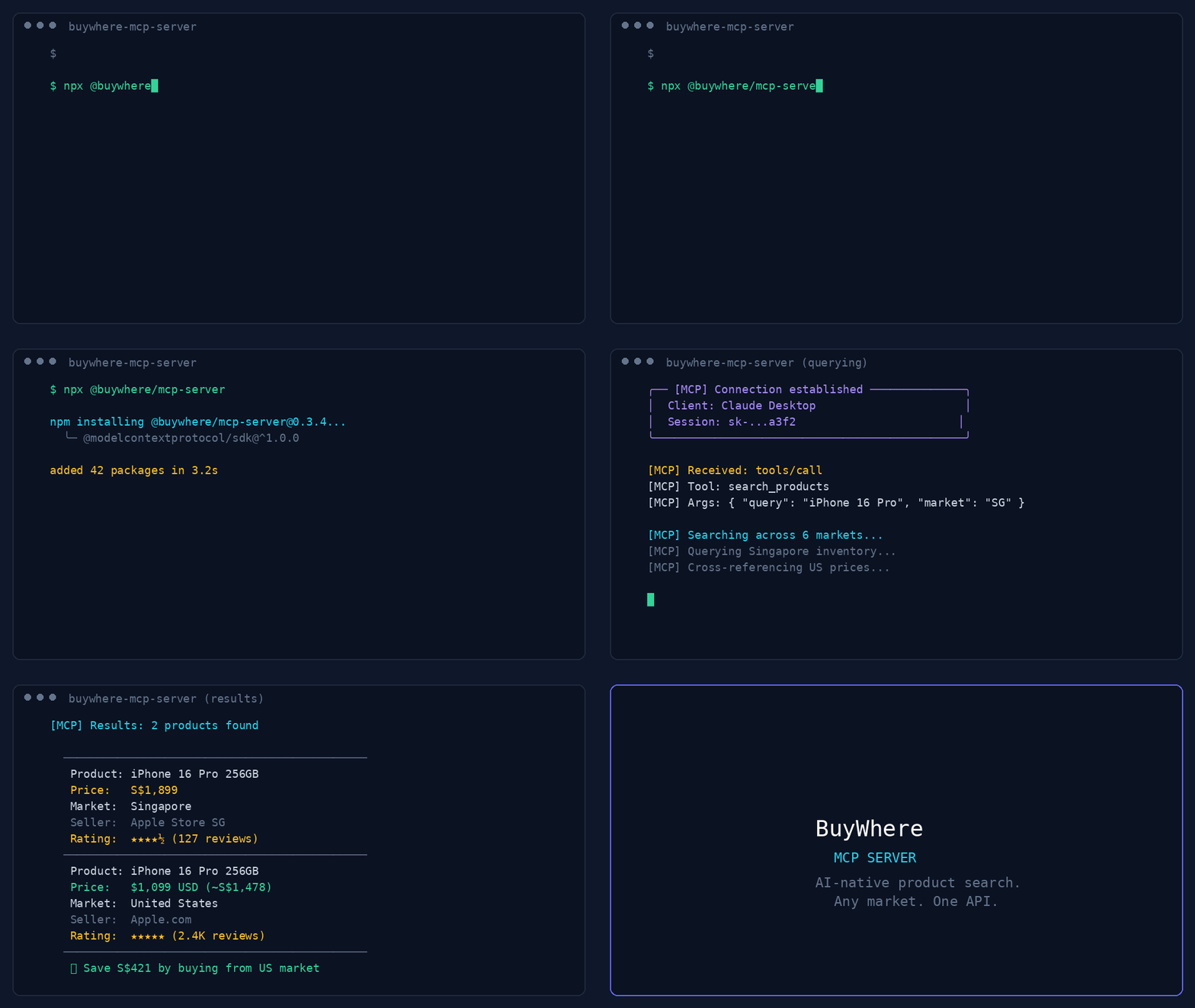
44-second demo: product search, deal discovery, price comparison, and multi-region support.
User:   "Find me wireless earbuds under $50 available in Singapore"
Agent:  [calls search_products → returns 5 matching products]

User:   "Compare the top 3"
Agent:  [calls compare_products → side-by-side with best-value pick]
Get a key in 3 seconds — no signup, no email:
# 1. Register (one call, returns api_key instantly)
curl -X POST https://api.buywhere.ai/v1/auth/register \
  -H "Content-Type: application/json" \
  -d '{"agent_name":"your-agent"}'
# → {"api_key":"bw_...","tier":"unverified","rate_limit":{"rpm":20,"daily":1000}}

# 2. Use the key
export BUYWHERE_API_KEY=bw_...
npx -y @buywhere/mcp-server
Legacy email signup (60s, manual approval) → buywhere.ai/api-keys
Read the BuyWhere Engineering Blog for deep dives on MCP architecture, agent commerce, and the ecosystem.
Also follow the BuyWhere Hashnode blog mirror for the same engineering content on Hashnode.
Remote MCP: POST https://api.buywhere.ai/mcp (JSON-RPC 2.0, protocolVersion 2024-11-05, 13 tools). Glama listing: https://glama.ai/mcp/servers/BuyWhere/buywhere-mcp
Framework quickstarts:
Add to claude_desktop_config.json:
{
  "mcpServers": {
    "buywhere": {
      "command": "npx",
      "args": ["-y", "@buywhere/mcp-server"],
      "env": { "BUYWHERE_API_KEY": "bw_live_xxxx" }
    }
  }
}
Add to your MCP settings file:
{
  "mcpServers": {
    "buywhere": {
      "command": "npx",
      "args": ["-y", "@buywhere/mcp-server"],
      "env": { "BUYWHERE_API_KEY": "bw_live_xxxx" }
    }
  }
}
Add to ~/.windsurf/mcp.json:
{
  "mcpServers": {
    "buywhere": {
      "command": "npx",
      "args": ["-y", "@buywhere/mcp-server"],
      "env": { "BUYWHERE_API_KEY": "bw_live_xxxx" }
    }
  }
}
Add to opencode.json:
{
  "mcpServers": {
    "buywhere": {
      "command": "npx",
      "args": ["-y", "@buywhere/mcp-server"],
      "env": { "BUYWHERE_API_KEY": "bw_live_xxxx" }
    }
  }
}
Add to ~/.continue/config.json:
{
  "experimental": {
    "mcpServers": {
      "buywhere": {
        "command": "npx",
        "args": ["-y", "@buywhere/mcp-server"],
        "env": { "BUYWHERE_API_KEY": "bw_live_xxxx" }
      }
    }
  }
}
Mastra is a TypeScript-first AI agent framework with native MCP support.
npm install @mastra/core @mastra/mcp
import { Mastra } from '@mastra/core';
import { MastraMCPClient } from '@mastra/mcp';

const buywhere = new MastraMCPClient({
  name: 'buywhere',
  server: {
    url: new URL('https://api.buywhere.ai/mcp'),
    requestInit: {
      headers: { 'Authorization': `Bearer ${process.env.BUYWHERE_API_KEY}` },
    },
  },
});

const agent = new Mastra({
  agents: {
    shoppingAgent: {
      instructions: 'You are a shopping assistant. Use BuyWhere to find and compare products.',
      tools: await buywhere.tools(),
    },
  },
});

const result = await agent.agents.shoppingAgent.generate(
  'Find me the best deal on a Sony WH-1000XM5 in Singapore'
);
Full guide: BuyWhere + Mastra Integration
Use BuyWhere tools in LangChain agents via the MCP adapter:
from langchain_mcp_adapters.client import MultiServerMCPClient
from langgraph.prebuilt import create_react_agent
from langchain_anthropic import ChatAnthropic

async def main():
    async with MultiServerMCPClient({
        "buywhere": {
            "url": "https://api.buywhere.ai/mcp",
            "transport": "streamable_http",
            "headers": {"Authorization": f"Bearer {BUYWHERE_API_KEY}"},
        }
    }) as client:
        tools = await client.get_tools()
        agent = create_react_agent(ChatAnthropic(model="claude-sonnet-4-5"), tools)
        result = await agent.ainvoke({"messages": [("user", "Find the cheapest Sony headphones in Singapore")]})
Connect BuyWhere via LlamaIndex MCP client:
from llama_index.tools.mcp import BasicMCPClient, McpToolSpec
from llama_index.agent.openai import OpenAIAgent

async def main():
    mcp_client = BasicMCPClient(
        command_or_url="https://api.buywhere.ai/mcp",
        headers={"Authorization": f"Bearer {BUYWHERE_API_KEY}"},
    )
    mcp_tool_spec = McpToolSpec(client=mcp_client)
    tools = mcp_tool_spec.to_tool_list()
    agent = OpenAIAgent.from_tools(tools)
    response = await agent.achat("Compare prices for iPhone 16 Pro across Singapore and US")
Use BuyWhere in a CrewAI agent with MCP tool integration:
from crewai import Agent, Task, Crew
from crewai_tools import MCPServerAdapter

buywhere_server = MCPServerAdapter(
    server_params={
        "url": "https://api.buywhere.ai/mcp",
        "headers": {"Authorization": f"Bearer {BUYWHERE_API_KEY}"},
        "transport": "streamable-http",
    }
)

shopping_agent = Agent(
    role="Shopping Research Analyst",
    goal="Find the best deals across Singapore and US markets",
    tools=[buywhere_server],
)

task = Task(
    description="Find the best price for Sony WH-1000XM5 headphones across all available markets",
    agent=shopping_agent,
    expected_output="Product comparison with prices and merchant links",
)

crew = Crew(agents=[shopping_agent], tasks=[task])
result = crew.kickoff()
# Run directly (no install)
npx -y @buywhere/mcp-server

# Install globally
npm install -g @buywhere/mcp-server
buywhere-mcp
Developer's AI Agent (Claude, Cursor, etc.)
  │
  ├── MCP Protocol (stdio)
  │
  ├── @buywhere/mcp-server
  │     ├── search_products(q, category, min_price, max_price, country_code, deliver_to)
  │     ├── get_product(product_id)
  │     ├── compare_products(product_ids[])
  │     ├── find_best_price(product_name, country_code, deliver_to)
  │     ├── get_deals(country_code, deliver_to, category)
  │     ├── list_categories()
  │     ├── find_similar(product_id)
  │     └── ingest_products(urls[])
  │
  └── BuyWhere API (api.buywhere.ai)
        └── Product catalog across SG, US, MY, TH, and VN merchants
git clone https://github.com/BuyWhere/buywhere-mcp.git
cd buywhere-mcp
npm install
npm run build
npm start
BuyWhere is a product search API for AI agents. We aggregate product data from Singapore, US, Malaysia, Thailand, and Vietnam merchants into a single, agent-friendly interface — no store management, no Shopify integration. Just search and compare products in real time.
These complementary MCP packages extend BuyWhere into powerful multi-tool workflows:
See CONTRIBUTING.md for how to report issues, submit PRs, and suggest features.
Learn more about MCP servers and the BuyWhere ecosystem:
If you find this project useful:
MIT
BuyWhere MCP server — search 300M+ products across US, Singapore & SEA via Model Context Protocol. Agents self-register a free key in one POST (no email): api.buywhere.ai/v1/auth/register?verify=false
{ "mcpServers": { "buywhere-buywhere-mcp": { "url": "https://api.buywhere.ai/mcp", "headers": {} } }}เครื่องมือ
ยังไม่มีรายการเครื่องมือ เซิร์ฟเวอร์แบบรีโมตจะได้รายการหลังการตรวจสอบสถานะครั้งแรก
FAQ
คัดลอกคอนฟิก http สำหรับ Cursor, Claude Desktop, Claude Code หรือ VS Code ได้ในหน้านี้ คอนฟิกนี้ใช้การติดตั้งของผู้เผยแพร่ ไม่ใช่พร็อกซีของ PlugMCP
ผู้เผยแพร่ระบุตัวแปรสภาพแวดล้อมเหล่านี้: BUYWHERE_API_KEY
Buywhere เข้าถึงได้ผ่าน HTTP
ตรวจสอบล่าสุดเมื่อ 2026-10-27 BuyWhere MCP server — search 300M+ products across US, Singapore & SEA via Model Context Protocol. Agents self-register a free key in one POST (no email): api.buywhere.ai/v1/auth/register?verify=false
