AgentX
AI-native issue tracker designed for developers who live in the terminal.
Fast, keyboard-driven issue tracking with dependency graphs, TUI dashboard, and MCP server integration.
Power your agent
การติดตั้งจากผู้เผยแพร่ ไม่ใช่เอนด์พอยต์ของ PlugMCP
URL แบบรีโมตหรือคำสั่งบนเครื่องของคุณ? การติดตั้งสองแบบต่างกันอย่างไร
รันบน PlugMCP
A new server you create. It is not this listing's official endpoint. Use the publisher install when you want their URL and their credentials.
เปิดจากผู้เผยแพร่
AI-native issue tracker designed for developers who live in the terminal.
Fast, keyboard-driven issue tracking with dependency graphs, TUI dashboard, and MCP server integration.
AI-native issue tracker with MCP server, TUI dashboard, and velocity metrics
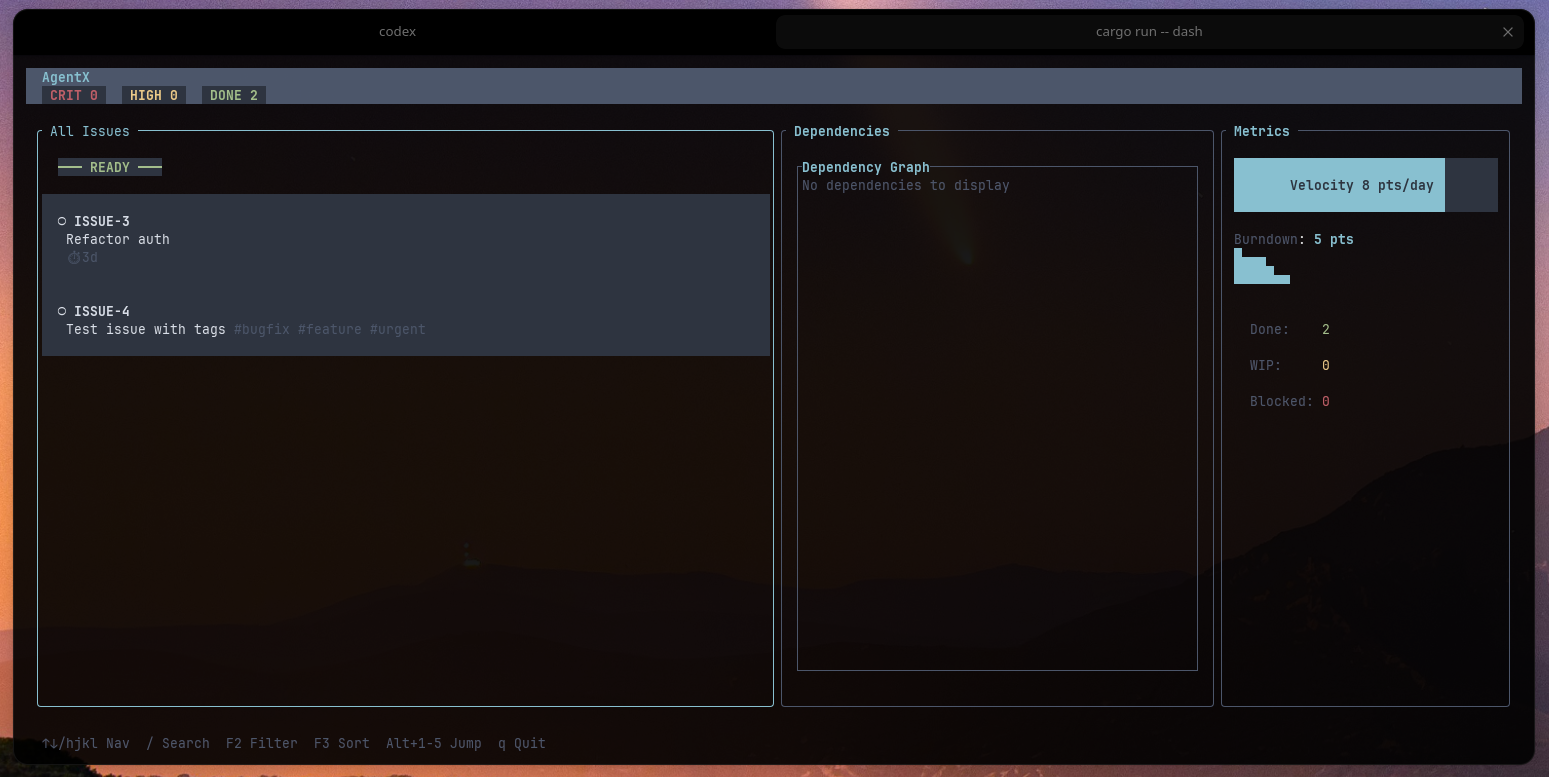
~/.local/share/agentxThe interactive dashboard provides a Jira-like experience in your terminal:
/ and start searching instantlyhjkl navigation + search# Clone and build
git clone https://github.com/can1357/agentx.git
cd agentx
cargo build --release
# Install to PATH
cargo install --path .
# Quick create
agentx new "Fix authentication bug" -p high -e 2d -t bug -t security

# Interactive mode
agentx new -i
agentx ui
# or use the alias:
agentx dash
Navigation:
↑↓ or jk - Navigate issues/ - Search (live results)g/G - Jump to top/bottomPgUp/PgDn - Scroll fasterTab - Switch panesq - Quit# Create new issue
agentx new "Task description" [OPTIONS]
# or use the alias:
agentx add "Task description" [OPTIONS]
-p, --priority <critical|high|medium|low>
-e, --effort <duration> # e.g., "2d", "4h", "1w"
-t, --tag <tag> # Can be used multiple times
-d, --depends <ID> # Add dependency
-i, --interactive # Launch wizard
# Update status
agentx start <ID> # Mark as in-progress
agentx block <ID> <reason> # Mark as blocked
agentx close <ID> # Mark as done
agentx defer <ID> # Move to backlog
agentx activate <ID> # Activate from backlog
# View issues
agentx list # All open issues
# or use the alias:
agentx ls # All open issues
agentx show <ID> # Full details
agentx context # Current work context
agentx focus # Top priorities
agentx blocked # All blocked issues
agentx ready # Ready to start
agentx quick-wins # Low-effort tasks
# Add dependency
agentx depend add <ID> <depends-on>

# Remove dependency
agentx depend remove <ID> <depends-on>

# Visualize graph
agentx deps-graph [ID]        # ASCII art
agentx dependencies <ID>      # Show deps + dependents

# Find bottlenecks
agentx critical-path          # Longest dependency chain
# Add tags
agentx tag add <ID> <tag>

# Remove tags
agentx tag remove <ID> <tag>

# List by tag (in list command)
agentx list -t backend -t api
# Start multiple issues
agentx bulk-start <ID1> <ID2> <ID3>

# Close multiple issues
agentx bulk-close <ID1> <ID2> <ID3>
# Show metrics
agentx metrics

# Recent changes
agentx summary

# Issue counts by status
agentx list --json | jq '.[] | .metadata.status' | sort | uniq -c
AgentX can run as an MCP server for AI assistant integration:
# Start server on stdio
agentx serve
The MCP server exposes these operations to AI assistants:
{
  "mcpServers": {
    "agentx": {
      "command": "agentx",
      "args": ["serve"],
      "env": {}
    }
  }
}
# Bulk import issues
agentx import issues.yaml
Format:
issues:
  - title: "Setup CI/CD pipeline"
    priority: high
    effort: "1w"
    tags: ["devops", "infrastructure"]
    depends_on: []
  - title: "Write integration tests"
    priority: medium
    effort: "3d"
    tags: ["testing"]
    depends_on: ["BUG-123"]
# Create short aliases for long IDs
agentx alias add auth BUG-123
agentx show auth              # Same as: agentx show BUG-123

# List aliases
agentx alias list
Track progress within a single issue:
# Add checkpoint
agentx checkpoint BUG-123 "Completed database migration"
agentx checkpoint BUG-123 "Updated API endpoints"

# View in issue details
agentx show BUG-123
All commands support JSON output for scripting:
# Get JSON output
agentx list --json | jq '.[] | select(.metadata.priority == "Critical")'

# Count issues by status
agentx list --json | jq 'group_by(.metadata.status) | map({status: .[0].metadata.status, count: length})'
agentx/
├── src/
│   ├── main.rs           # CLI entrypoint
│   ├── issue.rs          # Core issue types
│   ├── storage.rs        # File-based persistence
│   ├── commands/         # CLI commands
│   ├── tui/              # Dashboard UI
│   │   ├── mod.rs        # App state & event loop
│   │   ├── widgets/      # Kanban, graphs, charts
│   │   └── views/        # Dashboard layout
│   ├── mcp/              # MCP server
│   └── utils/            # Helpers
├── data/                 # Issue storage (auto-created)
├── Cargo.toml
└── README.md
Data Location: ~/.local/share/agentx/
# Morning: Check context
agentx focus                  # What's important today?
agentx context                # What am I working on?

# Start working
agentx start BUG-123
agentx checkpoint BUG-123 "Initial investigation complete"

# Found blocker
agentx block BUG-123 "Waiting for DB migration approval"

# Switch to quick win
agentx quick-wins
agentx start DOC-45

# End of day
agentx close DOC-45
agentx summary                # What did I accomplish?
# Create feature breakdown
agentx new "API authentication layer" -p high -e 2w -t api
agentx new "Add JWT token generation" -p high -e 3d -t api -d FEA-100
agentx new "Implement token refresh" -p medium -e 2d -t api -d FEA-101
agentx new "Add rate limiting" -p low -e 1d -t api -d FEA-101

# Visualize dependencies
agentx deps-graph FEA-100

# Find critical path
agentx critical-path
# Import bugs from file
agentx import bugs.yaml

# Review critical issues
agentx list -p critical

# Launch dashboard for triage
agentx dash

# (In dashboard: use / to search, mark priorities)
AgentX uses sensible defaults but can be customized:
# Initialize config
agentx init

# Location: ~/.config/agentx/config.yaml
Example config.yaml:
# Issue ID format
id_prefix: "TASK"
id_start: 1

# Default values
defaults:
  priority: medium
  effort: null
  tags: []

# TUI theme
theme:
  name: "default"
# Run tests
cargo test

# Run with logging
RUST_LOG=debug agentx dash

# Check performance
hyperfine 'agentx list'
MIT License - see LICENSE file for details.
AI-native issue tracker with MCP server, TUI dashboard, and velocity metrics
เครื่องมือ
ยังไม่มีรายการเครื่องมือ เซิร์ฟเวอร์แบบรีโมตจะได้รายการหลังการตรวจสอบสถานะครั้งแรก
FAQ
คัดลอกคอนฟิก stdio สำหรับ Cursor, Claude Desktop, Claude Code หรือ VS Code ได้ในหน้านี้ คอนฟิกนี้ใช้การติดตั้งของผู้เผยแพร่ ไม่ใช่พร็อกซีของ PlugMCP
ระเบียนนี้ไม่ได้ระบุตัวแปรสภาพแวดล้อมที่จำเป็น
Agentx ทำงานแบบโลคัลผ่าน stdio
ตรวจสอบล่าสุดเมื่อ 2026-11-05 AI-native issue tracker with MCP server, TUI dashboard, and velocity metrics
