anki-cli
English | 简体中文
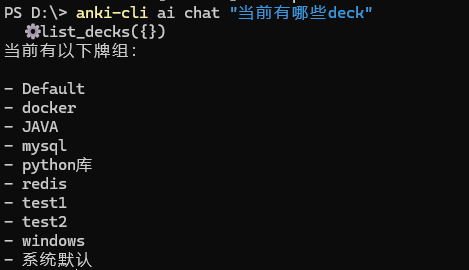
Anki 命令行工具 — 在终端管理你的 Anki 卡片、笔记和牌组。
Power your agent
การติดตั้งจากผู้เผยแพร่ ไม่ใช่เอนด์พอยต์ของ PlugMCP
URL แบบรีโมตหรือคำสั่งบนเครื่องของคุณ? การติดตั้งสองแบบต่างกันอย่างไร
รันบน PlugMCP
A new server you create. It is not this listing's official endpoint. Use the publisher install when you want their URL and their credentials.
เปิดจากผู้เผยแพร่
English | 简体中文
Anki 命令行工具 — 在终端管理你的 Anki 卡片、笔记和牌组。
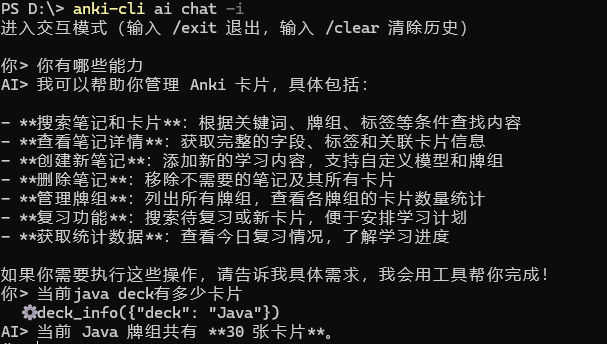
A CLI tool for Anki — manage cards, notes, and decks from the terminal, with MCP Server and Skill integration for AI clients. / Anki 命令行工具 — 在终端管理卡片、笔记和牌组,支持 MCP Server 和 Skill 集成,可对接 AI 客户端。
通过 anki-connect 插件与本地 Anki 桌面版通信,提供完整的 CLI 命令和 TUI 复习界面。
.apkg 文件git clone https://github.com/cicbyte/anki-cli.git
cd anki-cli
go build -o anki-cli
# 测试连接
./anki-cli ping

# 查看所有牌组
./anki-cli deck list

# 复习指定牌组
./anki-cli review --deck "Default"

# 进入 TUI 界面
./anki-cli tui

# 搜索笔记
./anki-cli search "deck:Default java"
所有命令支持 -f json 输出 JSON 格式。
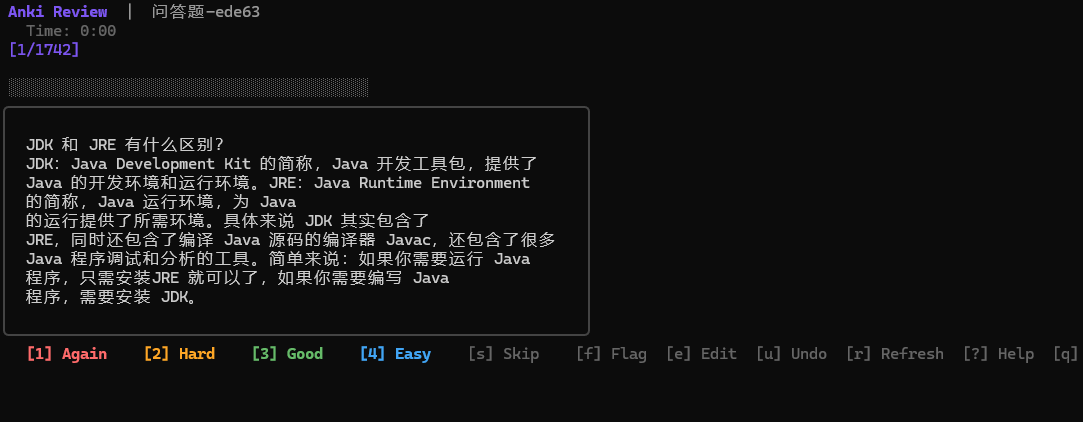


# 直接进入指定牌组复习
./anki-cli review --deck "English"

# 预览模式(不提交评分)
./anki-cli review --deck "English" --preview

# 限制复习数量
./anki-cli review --deck "English" --limit 10
TUI 快捷键:
将 anki-cli 作为 MCP Server 暴露给 LLM 客户端:
{
  "mcpServers": {
    "anki": {
      "command": "anki-cli",
      "args": ["mcp"]
    }
  }
}
可用工具:anki_search_notes、anki_get_note、anki_create_note、anki_update_note、anki_delete_note、anki_list_decks、anki_get_due_cards、anki_review_card、anki_get_stats、anki_list_models
配置文件位置:~/.ciclebyte/anki-cli/config/config.yaml
# 查看所有配置项
./anki-cli config list

# 获取单个配置
./anki-cli config get server.url

# 设置配置
./anki-cli config set server.url http://localhost:8765
MIT © 2026 cicbyte
A CLI tool for Anki — manage cards, notes, and decks from the terminal, with MCP Server and Skill integration for AI clients. / Anki 命令行工具 — 在终端管理卡片、笔记和牌组,支持 MCP Server 和 Skill 集成,可对接 AI 客户端。
เครื่องมือ
ยังไม่มีรายการเครื่องมือ เซิร์ฟเวอร์แบบรีโมตจะได้รายการหลังการตรวจสอบสถานะครั้งแรก
FAQ
คัดลอกคอนฟิก stdio สำหรับ Cursor, Claude Desktop, Claude Code หรือ VS Code ได้ในหน้านี้ คอนฟิกนี้ใช้การติดตั้งของผู้เผยแพร่ ไม่ใช่พร็อกซีของ PlugMCP
ระเบียนนี้ไม่ได้ระบุตัวแปรสภาพแวดล้อมที่จำเป็น
Anki Cli ทำงานแบบโลคัลผ่าน stdio
ตรวจสอบล่าสุดเมื่อ 2026-11-05 A CLI tool for Anki — manage cards, notes, and decks from the terminal, with MCP Server and Skill integration for AI clients. / Anki 命令行工具 — 在终端管理卡片、笔记和牌组,支持 MCP Server 和 Skill 集成,可对接 AI 客户端。
