imap-mcp
Self-hosted remote MCP server that lets an AI (Claude, etc.) read, search and send email through multiple IMAP/SMTP accounts, and read/write the user's calendar through CalDAV — authenticated via Clerk.
Power your agent
การติดตั้งจากผู้เผยแพร่ ไม่ใช่เอนด์พอยต์ของ PlugMCP
URL แบบรีโมตหรือคำสั่งบนเครื่องของคุณ? การติดตั้งสองแบบต่างกันอย่างไร
รันบน PlugMCP
A new server you create. It is not this listing's official endpoint. Use the publisher install when you want their URL and their credentials.
เปิดจากผู้เผยแพร่
Self-hosted remote MCP server that lets an AI (Claude, etc.) read, search and send email through multiple IMAP/SMTP accounts, and read/write the user's calendar through CalDAV — authenticated via Clerk.
Self-hosted remote MCP server that lets an AI (Claude, etc.) read, search and send email through multiple IMAP/SMTP accounts
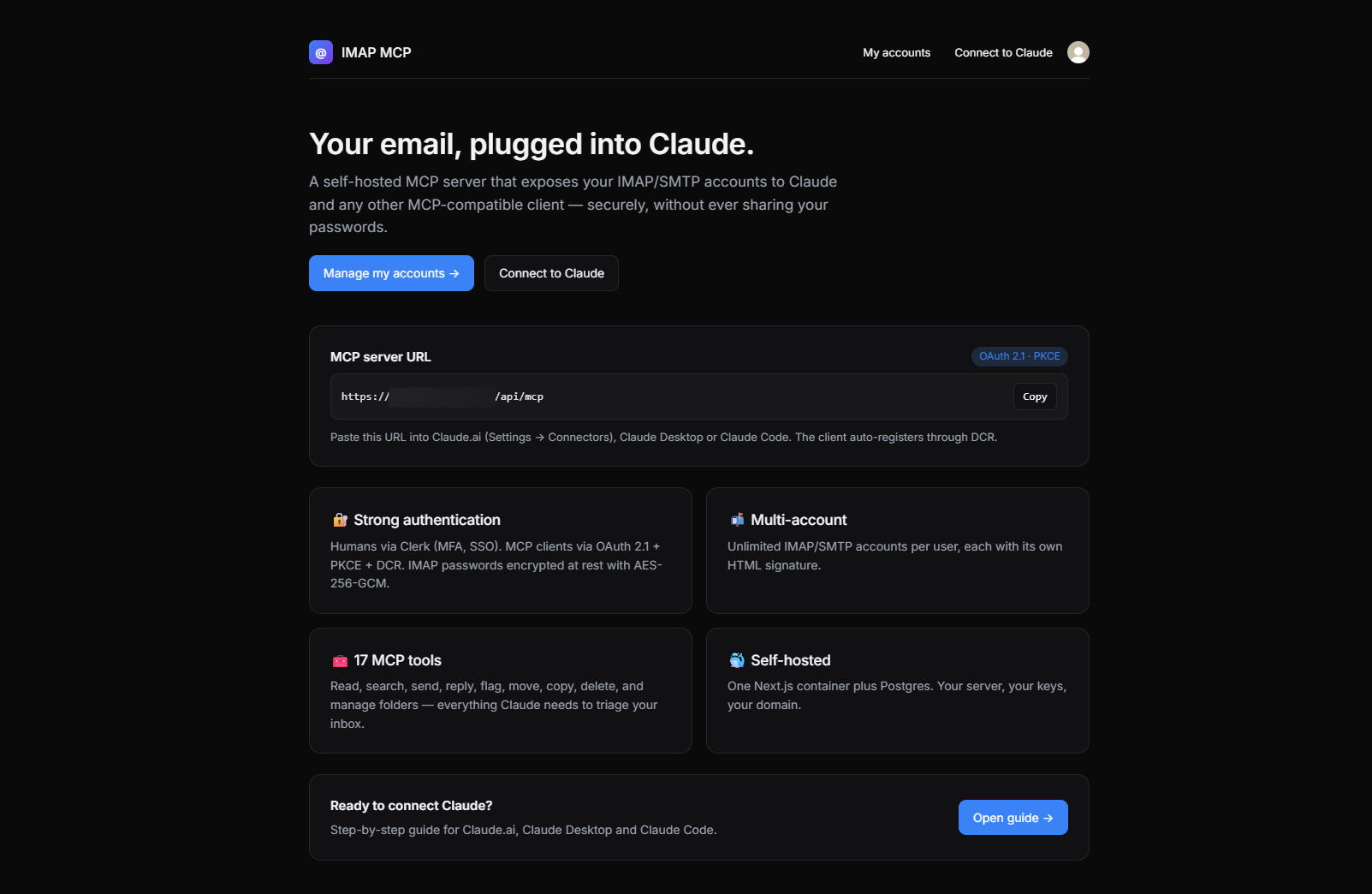
MCP clients (Claude Desktop, Claude.ai, …) can talk to remote servers, but none of them ship with a way to plug your own IMAP/SMTP and CalDAV accounts securely. Shoving raw credentials into a client config or shipping them to a third-party SaaS is a non-starter for anything serious.
imap-mcp is a tiny, self-hosted Next.js app that:
One container, one domain, your server, your keys.
list_calendar_accounts, list_calendars, list_events, get_event, create_event, update_event, delete_event, find_free_slots)NOOP + SMTP VERIFY, CalDAV principal-discovery) with per-account status badges and actionable error hintswrong version number trap before it happens/connect guide with tabbed, copy-to-clipboard setup instructions for Claude.ai (web), Claude Desktop and Claude Codedocker-compose (Postgres + app)┌─────────────────┐ OAuth 2.1 (PKCE + DCR) ┌──────────────────────────┐
│ MCP client │ ◀────────────────────────▶ │ /api/oauth/* │
│ (Claude, …) │ Bearer-auth'd JSON-RPC │ /api/mcp ← tools │
└─────────────────┘ │ │
│ Next.js 15 (App Router)│
┌─────────────────┐ Clerk session │ /accounts ← web UI │
│ Browser │ ─────────────────────────▶ │ │
└─────────────────┘ └──────────────┬───────────┘
│ Drizzle
┌─────▼─────┐
│ Postgres │
└───────────┘
The Next.js app is simultaneously:
/api/mcp),Human auth at the /authorize endpoint is delegated to the active Clerk session.
git clone <your-fork> imap-mcp
cd imap-mcp
cp .env.example .env
Fill in .env:
# Generate a fresh 32-byte master key
openssl rand -base64 32
Paste it as MCP_MASTER_KEY. Add your Clerk keys (pk_test_… / sk_test_…) and set NEXT_PUBLIC_APP_URL to the public URL of your deployment (e.g. https://mcp.example.com or http://localhost:3000 for local).
⚠️ Losing MCP_MASTER_KEY means losing every stored IMAP/SMTP password. Back it up.
docker compose up --build
# In another terminal, apply the schema on first install:
docker compose exec app npx drizzle-kit push
App is now available at http://localhost:3000.
/accounts/new.https://myaccount.google.com/apppasswords)./calendars/new.tsdav auto-discovers the principal and home calendars from there.Every signed-in user has a built-in guide at /connect with tabbed setup instructions
and copy-to-clipboard snippets for the three major Claude surfaces:
https://<your-domain>/api/mcp.Merge into ~/Library/Application Support/Claude/claude_desktop_config.json
(or the equivalent on Windows/Linux):
{
  "mcpServers": {
    "email-mcp": {
      "command": "npx",
      "args": ["-y", "mcp-remote", "https://<your-domain>/api/mcp"]
    }
  }
}
Restart the app; the OAuth browser flow launches on first use. Requires Node ≥ 18.
claude mcp add --transport http email-mcp https://<your-domain>/api/mcp
Then type /mcp in a session — the first tool call triggers OAuth.
The client will:
GET /.well-known/oauth-protected-resource — discover the auth server,POST /api/oauth/register — auto-register itself,/api/oauth/authorize in a browser — you sign in with Clerk and approve,POST /api/oauth/token — exchange the code for an access token,/api/mcp with Authorization: Bearer ….All of this is handled transparently by conformant MCP clients.
tls_validate_record_header:wrong version numberPort/SSL mismatch. The form now warns about this live, and the accounts list surfaces a hint when the test fails. Use one of:
DATABASE_URL is not setThe builder needs a placeholder at build-time; this repo's Dockerfile already sets a
dummy DATABASE_URL and MCP_MASTER_KEY for the build stage, and receives
NEXT_PUBLIC_CLERK_PUBLISHABLE_KEY / NEXT_PUBLIC_APP_URL as build args from
docker-compose.yml. Make sure your .env defines them before docker compose up --build.
docker compose exec app node node_modules/drizzle-kit/bin.cjs push
(The drizzle-kit push command needs esbuild at runtime to load the TS config. If
missing, install it in the container: docker compose exec app npm i esbuild --no-save.)
The authenticated user's ID is always injected from the OAuth token — tools never accept it as an argument, so a client cannot impersonate another user.
Every event response carries:
start / end — UTC ISO 8601 (always present).startLocal / endLocal — wall-clock string when the event has a TZID, otherwise null.tz — IANA timezone name (e.g. Europe/Paris) when the event has a TZID, otherwise null (UTC-stored event).When creating or updating an event you can:
tz → the event is stored in UTC (Z). Simplest, correct for one-off events whose moment-in-time is what matters.tz (IANA name) → the event is stored with DTSTART;TZID=<iana>:<local-time>. start/end may be either a floating local time ("2026-05-01T10:00:00", interpreted in tz) or a zoned/UTC ISO ("…Z" or "…+02:00", converted to tz local time before storage). This is what you want for recurring events ("every Tuesday at 10:00 Paris time"): each occurrence is reconverted from local to UTC independently, so DST transitions stay correct.Internals: src/lib/caldav-tz.ts uses Intl.DateTimeFormat to compute the offset of any IANA zone at any UTC instant — no tzdata bundle, no ical.js TimezoneService registration. The CalDAV write path emits TZID=<iana> without an inline VTIMEZONE block; iCloud, Fastmail, Nextcloud and Baïkal accept this. Strict servers that require VTIMEZONE will reject those events — fall back to omitting tz (UTC mode) until a follow-up adds VTIMEZONE generation.
npm install
# Start postgres however you want (docker, local, …) and export DATABASE_URL
npm run db:push          # apply schema
npm run dev              # Next.js dev server on :3000
npm run typecheck        # strict TypeScript
npm run build            # production build
users(id, clerk_user_id UNIQUE)
mail_accounts(id, user_id, label, email,
              imap_{host,port,secure,user,password_enc},
              smtp_{host,port,secure,user,password_enc},
              signature_html, writing_style, is_default)
calendar_accounts(id, user_id, label,
                  caldav_url, username, password_enc,
                  default_calendar_url, color, is_default)
oauth_clients(id, client_secret_hash, redirect_uris[], token_endpoint_auth_method)
oauth_auth_codes(code, client_id, user_id, redirect_uri,
                 code_challenge, code_challenge_method, expires_at, consumed_at)
oauth_tokens(id, access_token_hash UNIQUE, refresh_token_hash,
             client_id, user_id, access_expires_at, refresh_expires_at, revoked_at)
base64(iv(12) ‖ ct ‖ tag(16)).MCP_MASTER_KEY) and expire in 15 minutes. They encode {userId, accountId, folder, uid, index, exp} — tampering is rejected in constant time, expired tokens are refused. Files are never written to disk on the MCP server; each request streams directly from IMAP and is garbage-collected after the response./api/mcp endpoint always returns WWW-Authenticate: Bearer resource_metadata="…" on 401, per RFC 9728.VTIMEZONE block generation — events are emitted with TZID=<iana> only; strict servers requiring VTIMEZONE are unsupportedPRs welcome for any of the above.
Issues and PRs are welcome. Before opening a PR, please:
npm run typecheck must pass.npm run build must pass.MIT — do whatever you want, no warranty.
Self-hosted remote MCP server that lets an AI (Claude, etc.) read, search and send email through multiple IMAP/SMTP accounts
เครื่องมือ
ยังไม่มีรายการเครื่องมือ เซิร์ฟเวอร์แบบรีโมตจะได้รายการหลังการตรวจสอบสถานะครั้งแรก
FAQ
คัดลอกคอนฟิก stdio สำหรับ Cursor, Claude Desktop, Claude Code หรือ VS Code ได้ในหน้านี้ คอนฟิกนี้ใช้การติดตั้งของผู้เผยแพร่ ไม่ใช่พร็อกซีของ PlugMCP
ระเบียนนี้ไม่ได้ระบุตัวแปรสภาพแวดล้อมที่จำเป็น
Imap ทำงานแบบโลคัลผ่าน stdio
ตรวจสอบล่าสุดเมื่อ 2026-10-28 Self-hosted remote MCP server that lets an AI (Claude, etc.) read, search and send email through multiple IMAP/SMTP accounts

