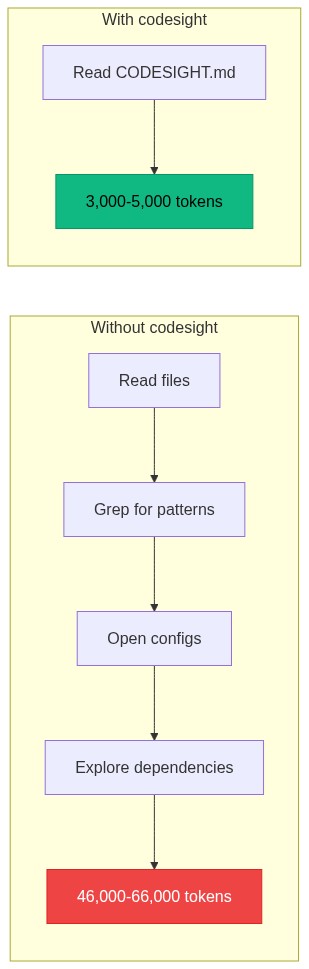
Your AI assistant wastes thousands of tokens every conversation just figuring out your project. codesight fixes that in one command.
4,000+ downloads and counting.
Zero dependencies. AST precision. 30+ framework detectors. 14 ORM parsers. 14 MCP tools. One npx call.
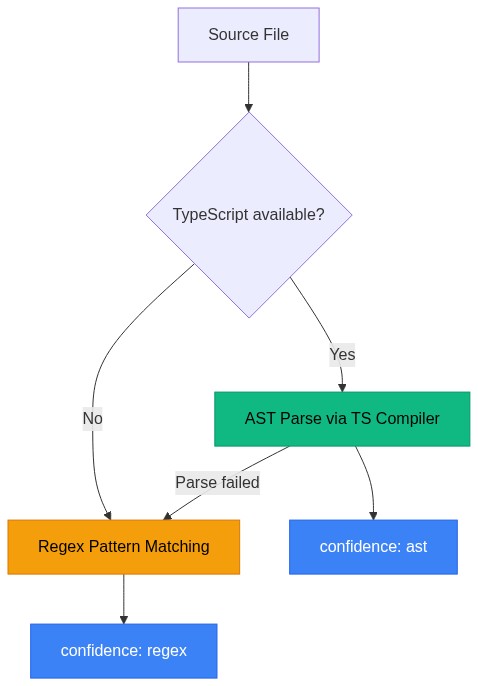
TypeScript projects get full AST precision. Everything else uses battle-tested regex detection across the same 30+ frameworks.
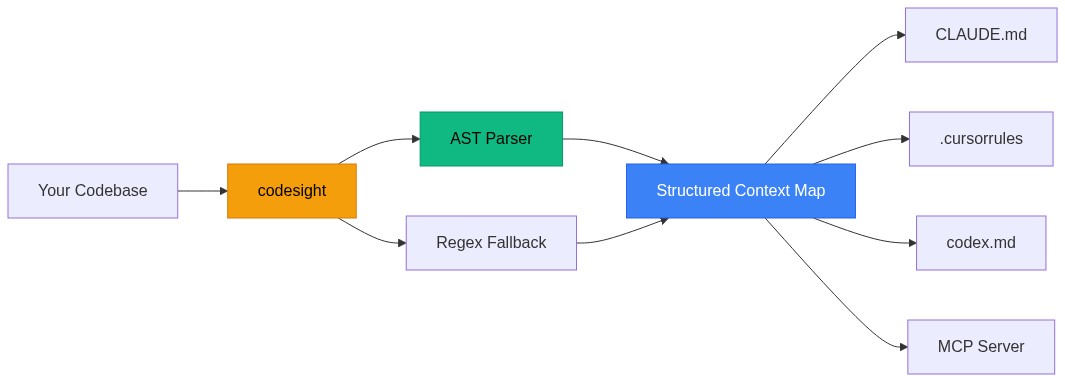
See your codebase clearly. Universal AI context generator that maps routes, schema, components, dependencies, and more for Claude Code, Cursor, Copilot, Codex, and any AI coding tool.
2026-11-15
ดาว
—
เครื่องมือ
—
อัปไทม์
—
Works with TypeScript, JavaScript, Python, Go, Ruby, Elixir, Java, Kotlin, Rust, PHP, Dart, Swift, C#, and BrightScript/BrighterScript (
Roku).
Generates .codesight/wiki/ — a persistent knowledge base of your codebase that survives across every session:
.codesight/wiki/
  index.md      — catalog of all articles (~200 tokens) — read this at session start
  overview.md   — architecture, subsystems, high-impact files (~500 tokens)
  auth.md       — auth routes, middleware, session flow
  payments.md   — payment routes, webhook handling, billing flow
  database.md   — all models, fields, relations, high-impact DB files
  users.md      — user management routes and related models
  ui.md         — UI components with props
  log.md        — append-only record of every wiki operation
Why this cuts token usage further:
Instead of loading the full 5K token context map every conversation, your AI reads one targeted article:
Question
Without wiki
With wiki
"How does auth work?"
~12K tokens (reads 8+ files)
~300 tokens (auth.md)
"What models exist?"
~5K tokens (CODESIGHT.md)
~400 tokens (database.md)
New session start
~5K tokens (full reload)
~200 tokens (index.md)
Persistent across sessions. The wiki lives in .codesight/wiki/, committed to git. Every new Claude Code, Cursor, or Codex session
starts with full codebase knowledge from the first message.
Auto-regenerates. Use --watch to keep the wiki current as you code. Use --hook to regenerate on every commit.
3 new MCP tools for wiki access:
Tool
What it does
codesight_get_wiki_index
Get the wiki catalog (~200 tokens) at session start
codesight_get_wiki_article
Read one article by name: auth, database, payments, etc.
codesight_lint_wiki
Health check: orphan articles, missing cross-links, stale content
The key difference from general-purpose wiki tools: codesight already knows your routes, schema, blast radius, and middleware from AST — no
LLM needed to extract code structure. The wiki is a narrative layer on top of data your codebase already contains.
Knowledge Mode (v1.9.3)
Not just code — your decisions, meeting notes, ADRs, and retrospectives carry as much context as the codebase itself. --mode knowledge maps
them the same way codesight maps code.
npx codesight --mode knowledge              # Scan current directory for .md files
npx codesight --mode knowledge ~/vault      # Scan an Obsidian vault
npx codesight --mode knowledge ./docs       # Scan a project docs folder
Outputs .codesight/KNOWLEDGE.md — a compact AI context primer:
# Knowledge Map — my-project

> 47 notes · 12 decisions · 8 open questions · 2025-09-01 → 2026-04-01

## Key Decisions (12)

- [2026-03-20] Going with Polar.sh over Stripe Connect — simpler global payments
- [2026-03-15] Decided to use PostgreSQL — better JSON support and Drizzle compatibility
- [2026-02-10] Will use Redis for rate limiting — BullMQ already in stack

## Open Questions (8)

- Should we support PayPal later?
- When do we start the Stripe marketplace application?

## Note Index (47)

### Decision Records (8)

- `decisions/adr-002-payments.md` — 2026-03-20 — Going with Polar.sh over Stripe Connect
- `decisions/adr-001-database.md` — 2026-03-15 — We need a relational database...

### Meeting Notes (14)

### Retrospectives (6)

### Specs & PRDs (5)

### Research (4)
What it detects automatically:
Note type
Signals
Decision records
ADR format (## Decision), "decided to", "going with", "chose X over Y"
Read .codesight/CODESIGHT.md   → what the code does
Read .codesight/KNOWLEDGE.md   → why decisions were made
CI: add npx codesight --mode knowledge alongside your existing codesight step. Both files stay current on every push.
Benchmarks (Real Projects)
Every number below comes from running codesight on real production codebases — both small SaaS projects (v1.6.2) and large open-source
platforms with 4K–10K+ files (v1.6.4). Output tokens are measured from actual file size (chars / 4). Exploration tokens are estimated from
what was extracted — routes × 400, models × 300, components × 250, etc. Route counts and model counts are cross-checked against actual
source files.
Three-Level Token Reduction
codesight saves tokens at two distinct layers. The wiki (v1.6.2) adds a second layer on top of the base savings:
Project
Manual exploration
codesight scan
codesight --wiki (targeted)
Total reduction
SaaS A
46,020 tokens
3,936 tokens (11.7x)
~550 tokens
83.7x
SaaS B
26,130 tokens
3,629 tokens (7.2x)
~440 tokens
59.4x
SaaS C
47,450 tokens
4,162 tokens (11.4x)
~360 tokens
131.8x
Average combined reduction: 91x. The wiki's "targeted" number = reading index.md at session start (~200 tokens) + one relevant
article (~160-350 tokens depending on project). Your AI never loads the full context map for targeted questions.
The two savings layers are independent and compound:
Layer 1 — codesight scan eliminates manual file exploration. Instead of your AI running glob/grep/read across 40-138 files to understand
the project, it reads one pre-compiled map.
Layer 2 — --wiki eliminates loading the full map for every question. Instead of loading 3K-5K tokens of full context at session start,
your AI reads a 200-token index and pulls the one relevant article (~160-350 tokens) for each question.
Without codesight:   AI reads 26K-47K tokens per session exploring files
With codesight:      AI reads ~3K-5K tokens (the compiled map)
With --wiki:         AI reads ~200 tokens at start + ~300 per targeted question
Base Scan Results
Project
Stack
Files
Routes
Models
Components
Output Tokens
Exploration Tokens
Savings
Scan Time
SaaS A
Hono + Drizzle
138
38
12
0
3,936
46,020
11.7x
186ms
SaaS B
Hono + Drizzle, 3 workspaces
53
17
8
10
3,629
26,130
7.2x
201ms
SaaS C
FastAPI + MongoDB
40
56
0
0
4,162
47,450
11.4x
890ms
SaaS C has 0 models because it uses MongoDB — no SQL ORM declarations for codesight to parse. This is correct detection, not a false
negative.
Multi-Language OSS Benchmark (v1.6.7)
Tested against real open-source codebases spanning every supported language and framework. Output tokens are measured from actual file size.
Exploration tokens are estimated (routes×400 + models×300 + components×250 + revisit multiplier). Zero false positives across all tests.
Language
Stack
Files
Routes
Models
Components
Output tokens
Est. exploration
Savings
TypeScript · Next.js
Next.js + tRPC + Prisma · 110+ workspaces
7,509
479
173
1,309
158,660
~1,485,000
~9x
TypeScript · NestJS
NestJS + TypeORM + Mongoose
162
19
8
0
5,300
~67,500
~12.7x
TypeScript · Hono
Hono
—
8
0
0
—
—
✓
TypeScript · Remix
Remix + Prisma
36
11
0
9
—
—
✓
TypeScript · SvelteKit
SvelteKit
—
0³
0
23
—
—
✓
TypeScript · Nuxt
Nuxt
141
8
0
64
—
—
✓
JavaScript · Express
Express + Mongoose
51
10
5
0
1,241
~20,800
~17x
Ruby · Rails
Rails + ActiveRecord
4,172
607
116
0
21,711
~386,100
~17.8x
PHP · Laravel
Laravel + Eloquent
3,896
652
59
0
30,739
~493,285
~16x
Python · Django
Django + pyproject.toml
4,232
7¹
56
0
83,842
~631,020
~7.5x
Python · Flask
Flask + SQLAlchemy
30
12
5
0
1,148
~16,705
~14.5x
Python · FastAPI
FastAPI + SQLModel (monorepo)
143
21
2
36
2,487
~38,090
~15.3x
Elixir · Phoenix
Phoenix + Ecto
1,406
198
54
0
9,589
~152,100
~15.9x
Go · Gin
Gin + GORM (enterprise app)
388
202
169
0
15,266
~262,730
~17.2x
Go · Echo
Echo
—
7
0
0
—
—
✓
Go · Fiber
Fiber
—
5
0
0
—
—
✓
Rust · Actix
actix-web
528
30
0
0
1,355
~27,170
~20x
Rust · Axum
Axum
—
6
0
0
—
—
✓
C# · ASP.NET
ASP.NET Core + Entity Framework Core
256
13
7
0
5,126
~63,570
~12.4x
Java · Spring
Spring Boot + Java (Maven)
47
16
0
0
319
~13,208
~41x²
Swift · SwiftUI
SwiftUI
388
0
0
62
7,499
~76,830
~10.2x
Swift · Vapor
Vapor backend
294
81
0
0
6,146
~95,160
~15.5x
Dart · Flutter
Flutter + go_router
204
10
0
89
8,500
~86,125
~10.1x
¹ Django project is GraphQL-first — 7 REST utility endpoints detected accurately, 0 false positives.
² High ratio on small boilerplate: Spring Boot route metadata compresses very well.
³ SvelteKit RealWorld app uses page routes (+page.svelte), not JSON API endpoints (+server.ts). 0 routes is correct.
How exploration tokens are estimated:routes×400 + models×300 + components×250 + hot_files×150 + env_vars×30, times a 1.3 revisit
multiplier, minus the output size. This approximates what an AI would spend asking "what routes exist?", "show me the schema", etc. in a
manual exploration session. Output token count is the actual measured file size.
Wiki Breakdown (v1.6.2)
Project
Full CODESIGHT.md
Wiki index only
Index + 1 article
Wiki articles generated
SaaS A
3,936 tokens
~200 tokens
~550 tokens
9
SaaS B
3,629 tokens
~200 tokens
~440 tokens
11
SaaS C
4,162 tokens
~200 tokens
~360 tokens
17
"How does auth work?" — without wiki: loads 3,945 tokens. With wiki: reads auth.md (~350 tokens). 11x improvement per targeted question,
84x total vs manual.
Detection Accuracy
Verified against actual source files. Route counts cross-checked against route definitions; schema models cross-checked against ORM table
declarations.
Project
Route Recall
Schema Recall
False Positives
Detection Method
SaaS A
38/43 (88%)
12/12 (100%)
0
Schema: AST (Drizzle), Routes: AST (Hono)
SaaS B
17/17 (100%)
8/8 (100%)
0
Full AST (Hono + Drizzle + React)
SaaS C
56/59 (~95%)
0/0 (correct)
0
AST (FastAPI + MongoDB)
SaaS A's 5 missed routes use dynamic url.match(/pattern/) inside request handlers — a developer pattern that static analysis cannot
resolve at scan time. This is an inherent limit of static analysis, not a framework gap. SaaS C missed an estimated 3 of 59 FastAPI routes.
Zero false positives across all three projects.
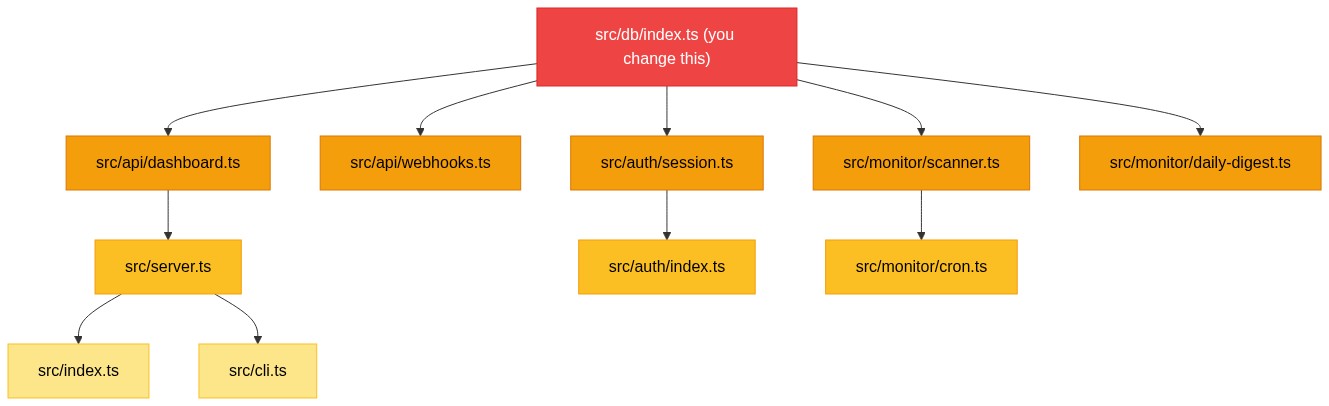
Blast Radius Accuracy
Tested on a production SaaS: changing the database module correctly identified:
5 affected files across API, auth, and server layers
All routes that touch the database
12 affected models (complete schema)
BFS depth: 3 hops through the import graph
What Gets Detected
Measured across the three benchmark projects:
Detector
SaaS A (138 files)
SaaS B (53 files)
SaaS C (40 files)
Routes
38
17
56
Schema models
12
8
0
Components
0
10
0
Env vars
12
7
15
Hot files
20
20
20
How It Works
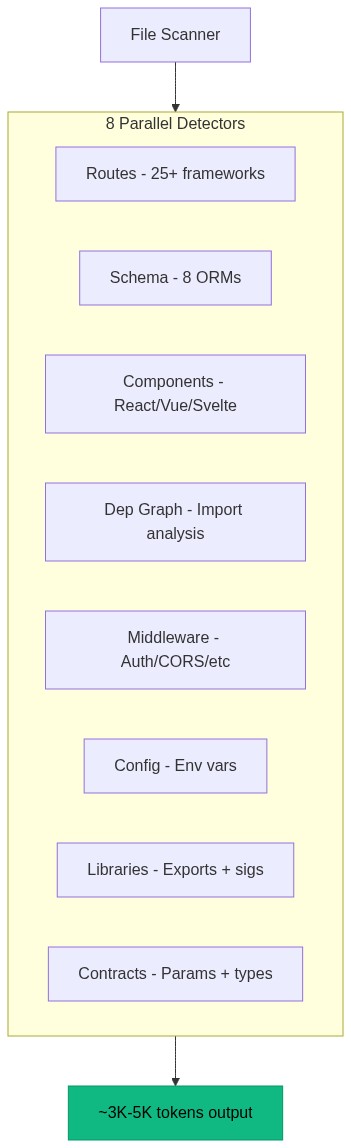
codesight runs all 8 detectors in parallel, then writes the results as structured markdown. The output is designed to be read by an AI in a
single file load.
What It Generates
.codesight/
  CODESIGHT.md     Combined context map (one file, full project understanding)
  routes.md        Every API route with method, path, params, and what it touches
  schema.md        Every database model with fields, types, keys, and relations
  components.md    Every UI component with its props
  libs.md          Every library export with function signatures
  config.md        Every env var (required vs default), config files, key deps
  middleware.md    Auth, rate limiting, CORS, validation, logging, error handlers
  graph.md         Which files import what and which break the most things if changed
  cicd.md          GitHub Actions / CircleCI pipelines (when present)
  githooks.md      lefthook / husky / raw .git/hooks (when present)
  skills.md        .claude/commands + .claude/skills (when present)
  report.html      Interactive visual dashboard (with --html or --open)
The last three come from built-in plugins that scan the dotfile directories
(.github/, .husky/, .claude/) the main pass skips. They run automatically
and stay silent on projects without those files — so they only ever add a
section when there's something to report.
AST Precision
When TypeScript is installed in the project being scanned, codesight uses the actual TypeScript compiler API to parse your code
structurally. No regex guessing.
What AST enables
Regex alone
Follows router.use('/prefix', subRouter) chains
Misses nested routers
Combines @Controller('users') + @Get(':id') into /users/:id
May miss prefix
Parses router({ users: userRouter }) tRPC nesting
Line-by-line matching
Extracts exact Drizzle field types from .primaryKey().notNull() chains
Pattern matching
Gets React props from TypeScript interfaces and destructuring
Regex on { prop }
Detects middleware in route chains: app.get('/path', auth, handler)
No configuration needed. If TypeScript is in your node_modules, AST kicks in automatically. Works with npm, yarn, and pnpm (including
strict mode). Falls back to regex for non-TypeScript projects or frameworks without AST support.
By default codesight uses its built-in extractors (AST for TypeScript, regex for everything else). Opt in with --native-ast to specify
that WebAssembly plugins should be used to acquire full-AST precision for non-TypeScript source files:
npx codesight --native-ast                 # use every discovered plugin (additive)
npx codesight --native-ast=rust,go         # only these languages (authoritative for their files)
npx codesight --native-ast=none            # force off (overrides config)
npx codesight --native-ast-strict          # like --native-ast, but fail if a named plugin is missing
npx codesight --plugin-dir ./wasm          # extra directory to search for plugins
Dispatch to WASM plugins is language-driven: each plugin self-describes (via a describe() export) the file extensions it handles, so
any language works — not just the ones with built-in detectors. Where no plugin handles a file, built-in extraction stands; with
--native-ast unset, behavior is byte-identical to existing codesight behavior.
codesight's npm package ships no plugins — they are separate, opt-in artifacts. The project publishes prebuilt reference plugins (Rust/
syn, Python/ruff, Go/go/parser) as checksummed GitHub release assets; drop the ones you want to use into ~/.codesight/plugins/ (or
point --plugin-dir at them), then enable them with --native-ast. Alternately, you may build your own plugin for any language against
the contract.
→ Full contract, discovery rules, and download/install steps: docs/wasm-plugins.md.
Built-in plugins
Three first-party plugins run on every scan and surface context the main pass
misses because it lives in skipped dotfile directories. Each is inert until its
target files exist, so they cost nothing on projects that don't use them:
Plugin
Reads
Output
cicd
.github/workflows/, .circleci/
Pipeline triggers, jobs, secrets, deploy targets
githooks
lefthook / husky config, .git/hooks/
Which commands run on which git lifecycle
skills
.claude/commands/, .claude/skills/
Available slash commands / agent skills + descriptions
Terraform is opt-in, not auto-loaded — it deliberately reaches outside the
scanned directory (sibling ../infrastructure repos) and is most useful with an
explicit service name, so it stays off until you ask for it:
Not just paths. Methods, URL parameters, what each route touches (auth, database, cache, payments, AI, email, queues), and where the handler
lives. Detects routes across 30+ frameworks automatically.
Models, fields, types, primary keys, foreign keys, unique constraints, relations. Parsed directly from your ORM definitions via AST. No need
to open migration files.
Example output:
### user

- id: text (pk)
- name: text (required)
- email: text (unique, required)
- role: text (default, required)
- stripeCustomerId: text (fk)

### project

- id: uuid (default, pk)
- ownerId: text (fk, required)
- name: text (required)
- settings: jsonb (required)
- _relations_: ownerId -> user.id
Dependency Graph
The files imported the most are the ones that break the most things when changed. codesight finds them and tells your AI to be careful.
Example output:
## Most Imported Files (change these carefully)

- `src/types/index.ts` — imported by **20** files
- `src/db/index.ts` — imported by **12** files
- `src/lib/auth.ts` — imported by **8** files
- `src/lib/cache.ts` — imported by **6** files
- `src/lib/env.ts` — imported by **5** files
Blast Radius
BFS through the import graph finds all transitively affected files, routes, models, and middleware.
Each detector type maps to a measured token cost that an AI would spend to discover the same information manually:
What codesight finds
Tokens saved per item
Why
Each route
~400 tokens
AI reads the handler file, greps for the path, reads middleware
Each schema model
~300 tokens
AI opens migration/ORM files, parses fields manually
Each component
~250 tokens
AI opens component files, reads prop types
Each library export
~200 tokens
AI greps for exports, reads signatures
Each env var
~100 tokens
AI greps for process.env, reads .env files
Each file scanned
~80 tokens
AI runs glob/grep operations to find relevant files
The 1.3x multiplier accounts for AI revisiting files during multi-turn conversations. These estimates are conservative. A developer manually
verified that Claude Code spends 40-70K tokens exploring the same projects that codesight summarizes in 3-5K tokens.
Roku / BrightScript / SceneGraph
codesight treats Roku channels as first-class projects. The manifest file at the channel root anchors detection — the same file Roku
itself uses to identify a channel, so zero configuration is needed for the common case.
Standard single-channel layout (about 90% of Roku repos, matches the Roku docs' getting-started template and projects like
rokucommunity/brighterscript-template):
codesight also recognizes the rokucommunity/brighterscript-template layout where the channel lives under src/ and the root carries a
bsconfig.json for BrighterScript tooling.
Multi-channel monorepo layout (less common — used by larger codebases that ship several branded channels from one repo with
roku-deploy + gulp to merge a shared common/ layer with per-channel assets at build time):
/
  package.json      # depends on roku-deploy, gulp
  gulpfile.js
  src/apps/
    common/         # shared layer, merged into every channel at build
    creatorA/
      manifest
    creatorB/
      manifest
This is detected via a strict structural signal: no manifest at root, roku-deploy in deps, and a common/ directory with at least 2
sibling directories that each have their own manifest. When the signal matches, each channel (plus common/) is registered as a
workspace.
Mappings to codesight's data model
codesight concept
Roku equivalent
Routes
Screens — every child element with an id declared in the Scene XML's <children>. method = VIEW by default, upgraded to MODAL if a navigation call-site passes a literal true as the second argument.
Schema
Every SceneGraph component XML whose <interface> has at least one <field> — the typed contract is the model.
Components
Every <component name="..." extends="..."> XML (views, tasks, scenes, modals). Props = interface fields.
Libraries
.brs / .bs files outside components/ — top-level function/sub plus BrighterScript class / namespace / enum / interface.
Middleware
observeField subscriptions, m.global.AddField registrations. BugsnagTask / RudderstackTask recognized when present.
Dependencies
<script uri="pkg:/..." /> includes in component XML + import "pkg:/..." in .bs.
Events
Observed fields (system: scenegraph-observer) and Rudderstack event names (system: rudderstack).
Config
The Roku manifest key/value lines surfaced as manifest.<name> pseudo env-vars.
Configurable navigation helpers
Many Roku projects use a custom helper to switch the visible screen (names vary: ShowScreen, pushScreen, NavigateTo, showView,
etc.). These are used as optional enrichment to tag routes as MODAL. Defaults cover the common conventions; override with
rokuScreenHelpers in your codesight config if your project uses a different name:
Generates ready-to-use instruction files for every major AI coding tool at once:
File
Tool
CLAUDE.md
Claude Code
.cursorrules
Cursor
.github/copilot-instructions.md
GitHub Copilot
codex.md
OpenAI Codex CLI
AGENTS.md
OpenAI Codex agents
Each file is pre-filled with your project's stack, architecture, high-impact files, and required env vars. Your AI reads it on startup and
starts with full context from the first message.
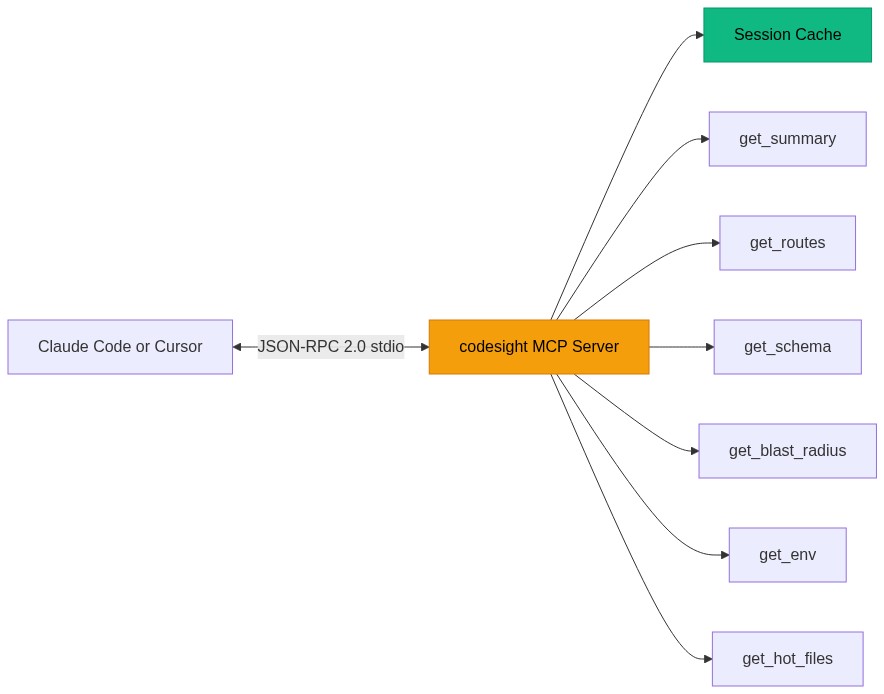
MCP Server (14 Tools)
npx codesight --mcp
Runs as a Model Context Protocol server. Claude Code and Cursor call it directly to get project context on demand.
Codex timeout note:npx has to resolve the package on first run which can exceed the default 30-second timeout. Set
startup_timeout_sec = 60 or install globally (npm install -g codesight) and use command = "codesight" instead — global installs start
significantly faster.
Tool
What it does
codesight_get_wiki_index
Wiki catalog (~200 tokens) — read at session start
codesight_get_wiki_article
Read one wiki article by name: auth, database, payments, etc.
codesight_lint_wiki
Health check: orphan articles, missing cross-links
Test coverage map: which routes and models have test files
codesight_get_knowledge
Knowledge map from --mode knowledge: decisions, open questions, themes, note index
codesight_refresh
Force re-scan (results are cached per session)
Your AI asks for exactly what it needs instead of loading the entire context map. Session caching means the first call scans, subsequent
calls return instantly.
Generates an optimized config file for a specific AI tool. Each profile includes your project summary, stack info, high-impact files,
required env vars, and tool-specific instructions on how to use codesight outputs. For Claude Code, this includes MCP tool usage
instructions. For Cursor, it points to the right codesight files. Each profile writes to the correct file for that tool.
Visual Report
npx codesight --open
Opens an interactive HTML dashboard in your browser. Routes table with method badges and tags. Schema cards with fields and relations.
Dependency hot files with impact bars. Env var audit. Token savings breakdown. Useful for onboarding or just seeing your project from above.
GitHub Action
Add to your CI pipeline to keep context fresh on every push:
Watch mode re-scans automatically when your code changes:
npx codesight --watch
Only triggers on source and config files (.ts, .js, .py, .go, .prisma, .env, etc.). Ignores node_modules, build output, and
non-code files. Shows which files changed before each re-scan. Your config (disabled detectors, plugins) is preserved across re-scans.
Git hook regenerates context on every commit:
npx codesight --hook
Context stays fresh without thinking about it.
All Options
npx codesight                              # Scan current directory
npx codesight ./my-project                 # Scan specific directory
npx codesight --wiki                       # Generate wiki knowledge base
npx codesight --init                       # Generate AI config files
npx codesight --open                       # Open visual HTML report
npx codesight --html                       # Generate HTML report without opening
npx codesight --mcp                        # Start MCP server (14 tools)
npx codesight --blast src/lib/db.ts        # Show blast radius for a file
npx codesight --profile claude-code        # Optimized config for specific tool
npx codesight --watch                      # Watch mode (add --wiki to auto-regenerate wiki)
npx codesight --wiki --watch               # Watch + auto-regenerate wiki on changes
npx codesight --hook                       # Install git pre-commit hook (includes wiki)
npx codesight --benchmark                  # Detailed token savings breakdown
npx codesight --json                       # Output as JSON
npx codesight --mode knowledge             # Map .md knowledge base → KNOWLEDGE.md
npx codesight --mode knowledge ~/vault     # Map Obsidian vault or any .md folder
npx codesight --max-tokens 50000           # Trim output to fit token budget
npx codesight --since HEAD~5               # Show routes from last 5 commits only
npx codesight -o .ai-context               # Custom output directory
npx codesight -d 5                         # Limit directory depth
How It Compares
codesight
File concatenation tools
AST-based tools (e.g. code-review-graph)
Parsing
AST (TypeScript compiler) + regex fallback
None
Tree-sitter + SQLite
Token reduction
7x-12x base scan; 60-131x with targeted wiki queries
codesight is purpose-built for the problem most developers actually have: giving their AI assistant enough context to be useful without
wasting tokens on file exploration. It focuses on structured extraction (routes, schema, components, dependencies) rather than
general-purpose code graph analysis.
Contributing
git clone https://github.com/Houseofmvps/codesight.git
cd codesight
pnpm install
pnpm dev              # Run locally
pnpm build            # Compile TypeScript
pnpm test             # Run 149 tests
PRs welcome. Open an issue first for large changes.
License
MIT
If codesight saves you tokens, star it on GitHub so others find it too.
See your codebase clearly. Universal AI context generator that maps routes, schema, components, dependencies, and more for Claude Code, Cursor, Copilot, Codex, and any AI coding tool.
คัดลอกคอนฟิก stdio สำหรับ Cursor, Claude Desktop, Claude Code หรือ VS Code ได้ในหน้านี้ คอนฟิกนี้ใช้การติดตั้งของผู้เผยแพร่ ไม่ใช่พร็อกซีของ PlugMCP
Codesight ต้องใช้ API key ไหม?
ระเบียนนี้ไม่ได้ระบุตัวแปรสภาพแวดล้อมที่จำเป็น
Codesight ใช้ทรานสปอร์ตแบบใด?
Codesight ทำงานแบบโลคัลผ่าน stdio
Codesight ถูกตรวจสอบล่าสุดเมื่อใด?
ตรวจสอบล่าสุดเมื่อ 2026-11-15 See your codebase clearly. Universal AI context generator that maps routes, schema, components, dependencies, and more for Claude Code, Cursor, Copilot, Codex, and any AI coding tool.