CometChat MCP Server
Add real-time chat, voice, video, and moderation to your app through your AI coding agent.
Power your agent
URL ของผู้เผยแพร่เอง ไม่ใช่เอนด์พอยต์ของ PlugMCP
Host a copy with our keys and logs.
https://mcp.cometchat.com/mcpปุ่ม Claude ด้านบนจะเปิด Claude พร้อมกรอกชื่อและ URL ให้แล้ว คุณยังต้องยืนยันที่นั่นเอง
claude mcp add --transport http cometchat-docs-mcp https://mcp.cometchat.com/mcpRun in a terminal.
{ "mcpServers": { "cometchat-docs-mcp": { "command": "npx", "args": [ "-y", "mcp-remote", "https://mcp.cometchat.com/mcp" ] } }}claude_desktop_config.json
URL แบบรีโมตหรือคำสั่งบนเครื่องของคุณ? การติดตั้งสองแบบต่างกันอย่างไร
รันบน PlugMCP
A new server you create. It is not this listing's official endpoint. Use the publisher install when you want their URL and their credentials.
เปิดCometChat's first-party MCP server. Connect Claude, Cursor, Windsurf, VS Code Copilot, Codex, or any other Model Context Protocol–compatible agent and integrate CometChat into your app from natural-language prompts.
Ask the agent: "add a chat tab where users can DM each other" — it reads CometChat's documentation, picks the right components for your stack, and writes the integration code.
Read-only. No account, no API key, no authentication required.
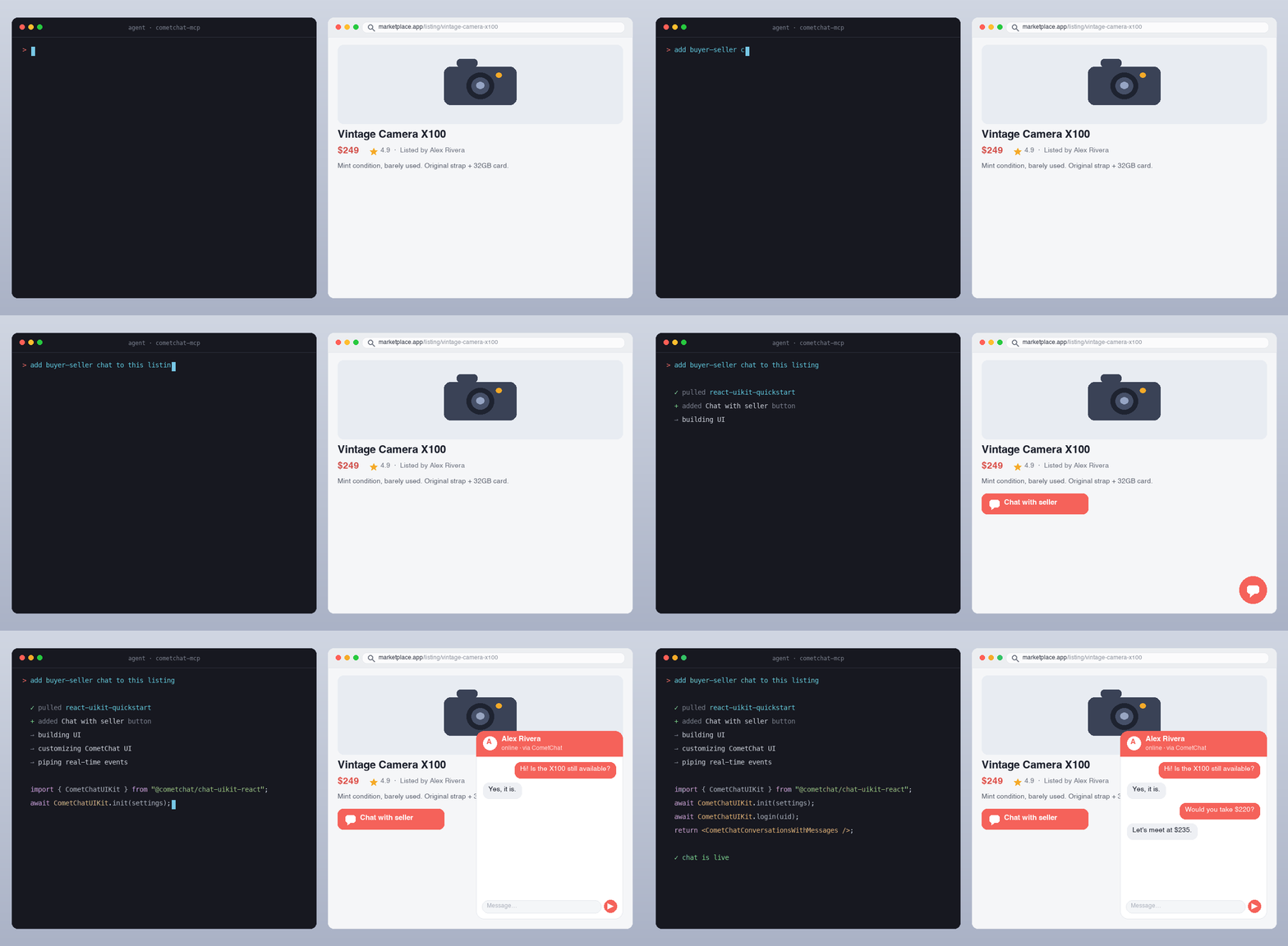
An AI agent reading CometChat's docs and writing a working chat integration from a single prompt.
{
  "mcpServers": {
    "cometchat": {
      "url": "https://mcp.cometchat.com/mcp"
    }
  }
}
After connecting, prompt your agent with any of these:
The agent reads CometChat's documentation, pulls the relevant implementation bundle, and writes the integration code into your project.
search_cometchat_docs — Search the SDK, UI Kit, Calls, REST API, AI agent, notification and moderation docs by topic, API name or error message. Returns ranked snippets with page URLs, current versions first. Optional version filter and limit (up to 25).fetch_cometchat_doc_page — Fetch one documentation page in full as markdown by URL or path, following moved pages. Pages over 50 KiB are truncated with a link to the full page.get_cometchat_implementation_bundle — Return the implementation bundle for a named scenario: the scenario's current docs pages (for a UI Kit: its integration guide, then the platform's AI reference page) compiled into one document, plus related page paths.list_cometchat_bundles — List every available implementation bundle (identifier, title, framework, date its page list was reviewed) for discovery.All four carry readOnlyHint: true, a title annotation, and a declared outputSchema with structured results. Names are ≤ 64 characters. Each description states what the tool does, when it fits and its limits (errors, rate limit), naming this server's other tools only where one serves a specific need ("identifiers come from list_cometchat_bundles"). They carry no directives to the agent, no references to other servers or products, and no marketing language. tests/tools.test.ts guards the tool, parameter and output-field descriptions and the initialize instructions against a list of banned phrasings, and checks that list still rejects the shapes it was written for; it is a banlist, not a proof.
cometchat://skills/overview) to understand which tool/bundle fits your request.CometChat is a real-time communications platform for adding chat, voice, and video calling to web and mobile apps. Used in production across SaaS, marketplaces, gaming, healthcare, education, and creator platforms.
app.cometchat.com — you'll need an App ID, Auth Key, and Region to build with the code the agent writes.Your agent (Claude / Cursor / Windsurf / …)
↓ MCP over Streamable HTTP
↓
mcp.cometchat.com/mcp (this server)
↓
├── search_cometchat_docs → SQLite FTS5 index of cometchat/docs
├── fetch_cometchat_doc_page → cometchat.com/docs/*.md (first-party)
└── get_cometchat_implementation_bundle → live docs pages listed in src/bundles/manifest.ts
github.com/cometchat/docs on every push to that repo's main branch.src/bundles/manifest.ts), read from the live docs on request, so a docs fix reaches the bundle with no MCP change. A built bundle is served for 10 minutes; after that a call still gets it at once and starts one background rebuild. A rebuild that hits a timeout or 5xx never replaces the cached bundle and is retried with a backoff (30 s, doubling, up to 10 minutes), so a docs outage neither drops bundles nor floods the docs site. A deleted page (404) is what the docs say: once a second build in a row agrees, that rebuild is kept and names the missing page. npm run verify:bundles fails when a listed page moves, disappears, no longer fits in its bundle, is no longer the current version in docs.json, or tells people to install a package version that is unpublished, on an older major, or an exact pin a minor behind (checked against npm, pub.dev, CometChat's Maven repo, CocoaPods trunk and GitHub); the maintainers run it daily.# Clone the docs repo (used to build the search index)
git clone --depth 1 https://github.com/cometchat/docs.git ../cometchat-docs-repo
# Install + build the FTS index + run the server
npm install
DOCS_REPO=../cometchat-docs-repo npm run build:index
npm run dev
# Run the test suite (vitest: validation, truncation, bundles, tools, resources, fetch,
# search ranking and the index builder)
npm test
# Score search ranking on the index you built (CI pins the docs commit: see DEPLOY.md)
DOCS_REPO=../cometchat-docs-repo npm run eval:search
# Check every docs page a bundle lists still exists and is current (network)
npm run verify:bundles
The server listens on http://0.0.0.0:3000 by default. Health probe at GET /health, MCP endpoint at POST /mcp.
npx @modelcontextprotocol/inspector
# add server: http://localhost:3000/mcp
You should see all 4 tools with readOnlyHint: true and all 11 resources.
docs-mcp/
├── src/
│   ├── server.ts                  # MCP server entry, transport, tool dispatch
│   ├── tools/{search,fetch,bundle}.ts
│   ├── search/sqlite.ts           # SQLite FTS5 client
│   ├── bundles/manifest.ts        # each bundle's docs pages
│   ├── bundles/loader.ts          # compiles bundles from live docs pages
│   ├── resources/registry.ts      # skill + bundle resources
│   └── lib/{errors,truncate,validation,logger}.ts
├── scripts/build-index.ts         # builds SQLite FTS5 index from cometchat/docs
├── skills/overview.md             # agent orientation skill
├── tests/                         # vitest suite
├── .claude-plugin/
│   ├── plugin.json                # Claude Code plugin manifest
│   └── marketplace.json           # Claude Code marketplace manifest
├── .codex-plugin/plugin.json      # Codex plugin manifest
├── .cursor-plugin/plugin.json     # Cursor Marketplace manifest
├── .mcp.json                      # MCP config (Claude Code auto-discovery)
├── mcp.json                       # Open Plugins standard manifest
└── assets/logo.svg                # CometChat logo
See DEPLOY.md for container build, environment, and platform notes.
The same server URL is listed across multiple agent marketplaces:
[email protected].curl https://mcp.cometchat.com/health returns {"status":"ok"} when healthy.PRs welcome — especially:
src/bundles/manifest.ts listing existing docs pages. If no page covers the scenario, write the page in cometchat/docs first; bundle content always comes from the docs.Out of scope today:
The CometChat MCP server is read-only and requires no account, API key, or authentication. It serves only CometChat's public documentation and does not request, store, or transmit your code, prompts, or personal data. Standard request metadata (such as IP address) may be processed transiently for rate limiting and abuse prevention.
For full details, see CometChat's privacy policy: cometchat.com/legal-privacy-policy.
Apache-2.0. See LICENSE.
CometChat docs search + implementation bundles: add chat, voice, video & moderation to your app through your AI coding agent.
{ "mcpServers": { "cometchat-docs-mcp": { "url": "https://mcp.cometchat.com/mcp", "headers": {} } }}เครื่องมือ
ยังไม่มีรายการเครื่องมือ เซิร์ฟเวอร์แบบรีโมตจะได้รายการหลังการตรวจสอบสถานะครั้งแรก
FAQ
คัดลอกคอนฟิก http สำหรับ Cursor, Claude Desktop, Claude Code หรือ VS Code ได้ในหน้านี้ คอนฟิกนี้ใช้การติดตั้งของผู้เผยแพร่ ไม่ใช่พร็อกซีของ PlugMCP
ระเบียนนี้ไม่ได้ระบุตัวแปรสภาพแวดล้อมที่จำเป็น
Docs เข้าถึงได้ผ่าน HTTP
ตรวจสอบล่าสุดเมื่อ 2026-10-27 CometChat docs search + implementation bundles: add chat, voice, video & moderation to your app through your AI coding agent.