Use Cursor's MCP controls to connect and complete authentication.
Start a new agent session if Tin's tools have not appeared. To check the connection, ask it to call list_projects. Your agent can also delete a project you created when you ask it to; it confirms the exact name first, and billing history stays. Then ask:
Use Tin to grow my project like a pro!
A whole agentic marketing system, not a bunch of skills
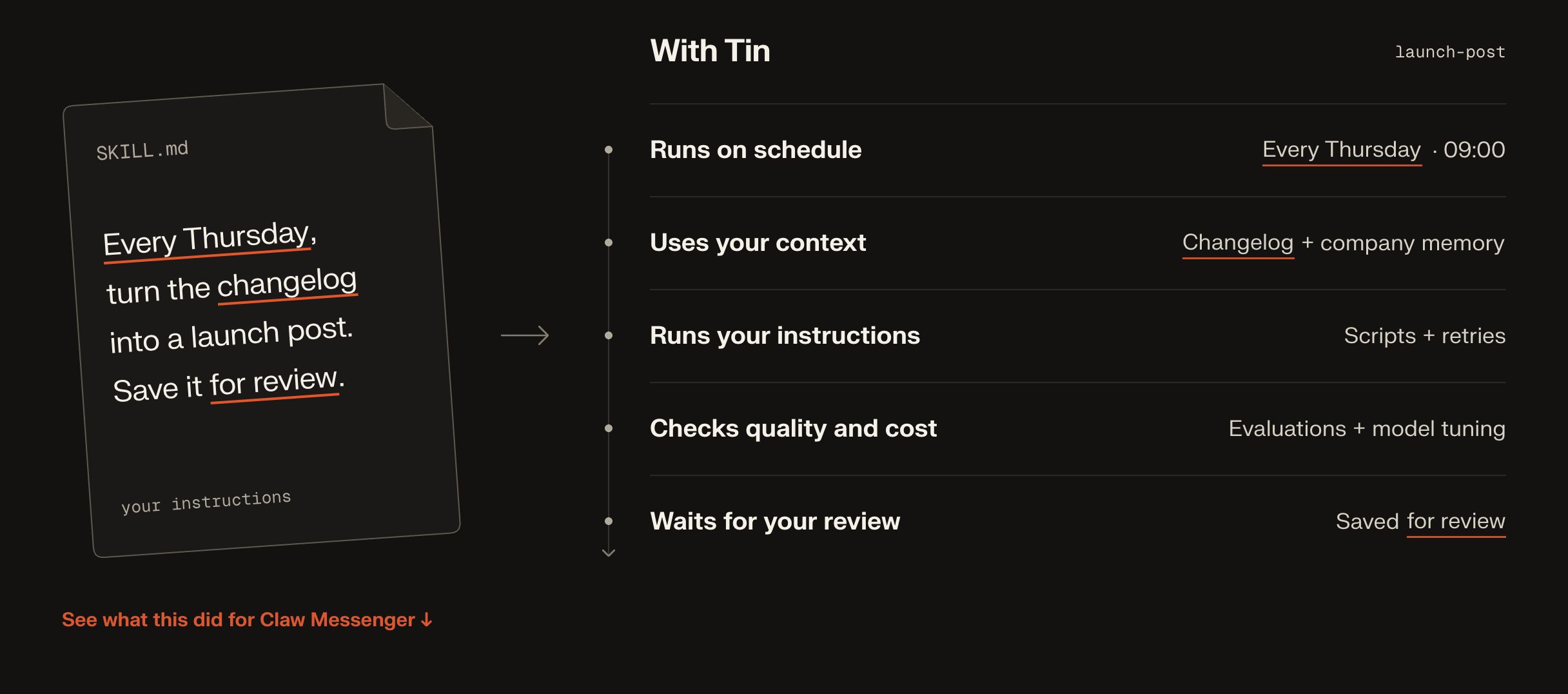
Work that continues between sessions. Save a workflow with its inputs and a schedule. Tin handles its timers, retries, and waits for your approval.
Context that carries forward. Reports, research, and a project wiki live in a git repository. Later runs don't start from scratch.
Workflows you can inspect. The catalog covers organic growth, content, social, outreach and listings, product QA, paid ads, and creative work. Each definition states what it needs, what it produces, and whether it needs review.
Review before delivery. Read an article, request changes, or approve a campaign, an X post or an ad launch. Approved pages reach your site through the delivery setting you choose: a pull request you merge, or a commit to main.
One project across your tools. Your coding agent and the browser share the same files, run history, and decisions, with the same project permissions.
Workflow evaluation, coming. Each template gets an eval set and a blind second reader, so the workflows get sharper week after week.
Growth experiment tracking, coming. Every change becomes an experiment with a before, an after, and a verdict.
Use the agent that already knows your project
Connect Tin over MCP in Claude Code, Codex, or Cursor. Your agent can read your local repository, ask you about the business, and use Tin's onboarding workflow to prepare a plan.
It starts with practical questions: what are you trying to achieve, how much time and budget can you put into it, and what should it avoid? The plan uses that context alongside the workflows and integrations available to your project.
For example, the setup conversation might look like this:
› Use Tin to grow my project like a pro!

I'll read the repository first, then help you choose a starting plan.

If organic growth is the priority, we can audit the site, research
buyer questions, and turn the findings into a content plan.
Search Console can add evidence from your current search traffic.
GitHub lets Tin propose site changes as pull requests.

What would a useful result look like in the next sixty days,
and how much time can you spend reviewing work each week?
You choose the plan and allow the connections it needs. After approval, Tin creates the selected configurations and starts the initial work it can run. It reports what was set up and what is still blocked.
From a useful prompt to work you can rely on
A good skill tells an agent how to do something. Running that skill every week adds other problems: which version should it use, where does its context come from, what happens after a failure, and who approves the result?
Tin handles those parts.
What you can run
These are the main areas covered by the current catalog. Availability depends on the workflow's inputs, connected services, and operator settings. Some workflows run on demand; others can be saved with a schedule.
Area
Examples
Getting started
A growth plan, integration choices, and setup of the work you approve
Organic growth
Site and AI visibility audits, keyword research, content planning, refreshes of pages that rank but rarely get clicked, every fixable audit finding in one pull request, error-message pages, and backlink asks from unlinked mentions
Content
Writing-style and brand capture, researched articles, planned drafts, feedback and revisions, approved pages delivered to your site, release announcements, score quizzes, and starters developers can clone
Social
An X voice learned from your own posts, X drafts published only after you approve the exact post, a weekly social plan, and X and LinkedIn posts from a plan or an article
Outreach and listings
A Gmail and Calendar shortlist with an approved, paced email campaign; who pays and stays from Stripe; community threads, newsletters, talks and podcasts, courses, campus events, integration marketplaces, and awesome lists submitted from your GitHub account after approval
Product QA
Signup walkthroughs, a code map, a feature map, a feature-by-feature audit, a checkout trust check, and a PostHog analytics brief
Paid ads
Whether Google Search ads fit, a campaign launched in your own account after you approve the plan, and daily checks that cut waste and propose changes
Competitors
Pricing and changelog changes, and the users of a tool that is shutting down
Creative work
Diagrams, brand characters, and product demo videos
Project context
A maintained wiki, research reports, and a weekly brief
For work that does not fit a template, project.task gives you a separate Codex task with its own conversation and controls. It can ask questions, pause, and resume. Changes to project files require approval of the proposed diff.
A content plan's dates are editorial targets, not automatic publication times. You can start generation individually; the current organic traffic system can also continue from planning into the next eligible draft, review and delivery. Tin can report that an item is already covered or needs better evidence instead of forcing out another article. With GitHub connected, approved content follows the project's delivery setting: an unmerged PR, or a commit to main; otherwise its Markdown stays in project Files. This does not schedule six months of automatic drafting or publish a website.
The live Registry is the source for each workflow's inputs and requirements. docs/architecture.md explains how the main pieces fit together.
Give it the context you would give a colleague
A repository says a lot about how a product works. It says less about why customers buy it, what they misunderstand, or how you want to sound. Add the material that fills those gaps: customer interviews, support questions, research, and examples of your own writing.
Your project can also hold SKILL.md files under .agents/skills/. Workflows load the skills they declare, such as a writing-style guide. Tin can help extract that guide from samples you select, and you can edit it directly. A skill in your local repository is not automatically available to a hosted run; your agent needs to save the relevant material to the Tin project.
Public articles and planned drafts support feedback in the reader or through MCP. Tell Tin what to change, compare the revision, and approve the version you want. Generation notes stay separate from public copy. With GitHub delivery configured, an approved article follows the project's delivery setting: an unmerged pull request, or a commit to main, where Tin merges its own pull request only when it adds nothing but the page and GitHub reports it clean. Technical fixes always wait for you to merge.
Connect the services the work needs
Connections belong to projects. A workflow uses specific operations from each integration, and Tin checks access before running them.
Connection
What it enables
Boundary
Google Search Console
Read search performance for a property you select
Read-only access
GitHub App
Read a selected repository and open pull requests with proposed changes
Tin merges only its own pull request for approved content, and only under the commit to main delivery setting; credentials stay on the server
GitHub account
Submit the awesome-list entries you approve from your own account
Used only for approved submissions to public repositories
Google Workspace
Research Gmail and Calendar history; send approved campaigns
Reads and sends go through the project's declared capabilities
Google Ads
Launch and look after one Search campaign through Tin's manager account
Nothing is created until you approve the exact plan; budget and bidding changes need your approval
Stripe
Read subscriptions, customers, invoices, prices and charges
Read-only restricted key you create
PostHog
Run bounded queries in one PostHog project you choose
Read-only access
X
Learn your voice from your own posts and publish posts you approve
Publishes only the exact post and media you confirmed
Claude Code, Codex, Cursor
Use Tin through MCP, including files, workflows, and supported review actions
Every call checks the user's project membership
Provider tokens and keys stay on the switchboard, Tin's server. Sandbox tools receive the permitted data or access through a grant tied to the run. Product QA can use a separate Tin test identity to sign into the product it is testing.
For data from Google Docs and Drive, GA4, or other advertising platforms, add relevant exports to project files.
Bring your own workflows
Start with ordinary Python when you know the steps. Add managed model calls where the work
needs judgment; a workflow can have several of them, with code handling the sequence,
branches and validation. Use a Codex procedure when an agent needs to explore and choose
the steps itself.
All three can be contributed as public workflow packages:
A procedure package uses PROMPT.md and skills/ instead of main.py. The manifest declares
typed inputs, bounded outputs, integrations and review. Maintainers review contributions and
explicitly select packages for the Registry; catalog sync publishes each selected package as
one pinned version. Existing runs and saved configurations keep their selected version.
The bounded private-workflow pilot uses the same Python contract: typed inputs, isolated
execution, optional managed model calls, project API connections, durable reports, and
eligible daily or weekly schedules.
Your coding agent authors and tests the package; Tin runs it independently. Code-only
bounded compute needs no model credentials or Tin credits. Hosted model calls use Tin credits;
connected API usage belongs to that provider account.
Private workflows live in a project's files and still require operator enablement. A coding agent writes a package, validates it, and explicitly activates it through MCP. Code workflows produce a bounded text artifact. Private Codex procedures can produce a project artifact or an unmerged GitHub PR, but remain on demand. Direct SDK credentials in author code and general one-command skill imports are not supported. See feature status for the supported-versus-experimental boundaries.
Public or private determines who can use a workflow, not whether it runs code or an agent.
Case study: from $45 to $2,105 a month in four months
Claw Messenger gives AI agents an iMessage number. The original Tin agent worked on its growth from March to July 2026. This predates the workflow engine in this repository; that experience shaped its workflows.
Project
Claw Messenger, developer tools
Timeline
25 March to 27 July 2026, 124 days
Monthly revenue
$45 to $2,105
Paying customers
5 to 257
The reported figures come from Claw's Stripe and PostHog data, filtered to Claw plans. The work included pages answering buyer questions, site fixes, outreach, and weekly reviews. These are historical results from the earlier system, not a benchmark or a promise of results from this repository.
How it is built
Tin's server coordinates the work. Temporal keeps runs alive across failures and waits. Files hold the results, and Postgres holds the state the product reads.
The web app is the interface you open in your browser. The separate browser inside E2B is controlled by the agent. Arrows show calls and work dispatch; sandbox results return to Tin's server for validation and storage.
The switchboard is the FastAPI service behind the product, API, and MCP server. Its workers execute workflow code, create sandboxes when needed, call integrations, and validate writes to project files.
Temporal coordinates runs, schedules, retries, and waits for input. Its history carries identifiers and small control values. Prompts, files, and credentials stay outside that history. Waiting for review does not keep a sandbox or model running.
E2B sandboxes give Codex a temporary workspace with the files and instructions selected for the run. Browser workflows also run Camoufox inside that sandbox to visit websites or test a product. Results are checkpointed before the sandbox is removed. Small text workflows call models directly from trusted activities.
code.storage holds one git repository per project. Outputs survive the sandbox and have a revision you can inspect.
Postgres holds project membership, chat, run status, and decisions. Product status reads do not depend on querying Temporal.
Model access separates native model calls from sandboxed Codex execution. Hosted defaults use protected API runners for supported new Codex runs, including browser, Studio and interactive tasks. Historical artifacts remain available; retired OAuth runs cannot start new compute. Tin does not require a ChatGPT login or auth.json. Provider keys and integration credentials stay on the switchboard; a sandbox is not given your GitHub or Google token.
A typical artifact-producing run looks like this. Its workflow determines whether review or external delivery is part of the job:
The switchboard checks the active run's lease and the repository's expectedHeadSha before making a commit. For procedure outputs, a conflicting destination edit preserves the new result for you to resolve. Completed-step receipts let a retry reuse work that is already done.
That is the foundation: files and recorded results carry forward, while the process that produced them can be replaced. docs/architecture.md goes into more detail; AGENTS.md records the implementation boundaries and acceptance checks.
Run Tin yourself
You host Tin's server on your infrastructure and connect it to Temporal Cloud, E2B, code.storage, Clerk, and Postgres through accounts you control. You pay infrastructure and model providers directly; Stripe is optional.
This is currently an engineering setup path, not a verified turnkey installer. A clean-clone
acceptance run and usable .env.example are still outstanding; see self-hosting limits.
git clone https://github.com/tin-computer/tin.git
cd tin
uv sync
Configure the database and migration roles, Temporal namespace, storage, Clerk, E2B, and model access in a local .env. The service settings and identity and integrations guide list the configuration. Keep credentials out of git.
Then apply migrations, publish the catalog, build the sandbox templates your workflows require, and start the service. It starts the Temporal worker as well:
uv run tin-lite migrate
uv run tin-lite sync-builtins
uv run python sandbox/template.py
uv run tin-lite serve
Customer billing is optional when self-hosting. With TIN_LITE_BILLING_ENABLED=false, you pay your own infrastructure and provider costs without needing Stripe or a Tin credit balance.
The engineering reference covers service configuration, local checks, and deployment.
What is next
The direction is broader coverage with less setup, while keeping the work inspectable.
More workflows and connections. Extend product QA into fixes, add analytics sources such as GA4, take website changes beyond pages, and build out lifecycle marketing and more ad platforms. These need their own provider and approval rules.
Better evaluation. Build workflow-specific evaluation sets and a calibrated chat evaluation harness. Measure whether the work is useful, as well as whether the run completed.
Experiment tracking. Record the intended outcome of a change, the metric, and the measurement window, then compare it with what happened.
More control. Let projects choose which eligible workflow decisions can run automatically. Make private workflow authoring and upgrades easier.
Easier operation. Add deployment options that reduce dependence on the current managed services, plus notifications that bring people back when a run needs attention.
Open source, Apache 2.0
Tin is licensed under the Apache License 2.0. This repository contains the service and built-in workflows, including the instructions you need to inspect or change them. Third-party components retain their own licenses; see third-party notices.
We have spent a lot of time building agents that can do useful work. Tin is about making that work easier to organize, repeat, and improve. We run the hosted version at app.tin.computer, and the same code is here for people who want to operate it themselves.