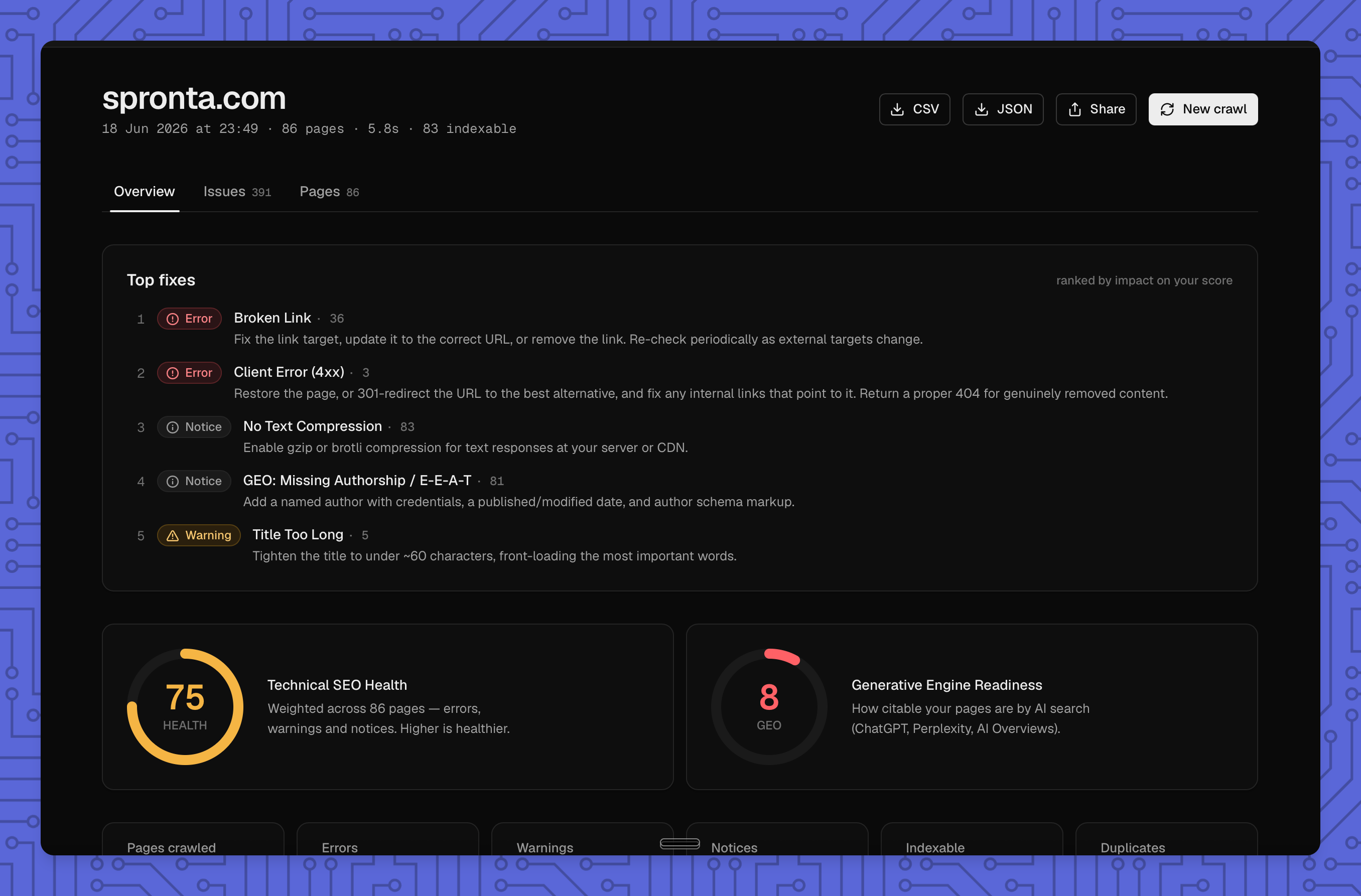
The fast, free, open-source technical SEO + GEO crawler — built for humans and agents.
Crawl any site for broken links, redirects, missing metadata, and 40+ SEO & Generative-Engine checks — with plain-English guidance on every fix. Runs locally, ships a CLI and an MCP server, and costs nothing.
Fast, free, open-source technical SEO + GEO crawler — CLI and MCP server. By Spronta.
Crawlie helps you audit whether your content can be discovered. Spronta helps visitors find it once they reach your website: Search, Answers and Content Analytics for your existing blog, docs or resource library.
Try free site search on your content → Connect a public website and test the demo. Search includes 10,000 requests per workspace each month, with no credit card required. Answers and Analytics are separate paid products.
Crawlie runs locally under the MIT license. Spronta is an optional hosted service.
Setup
The easy way — npm (installs the crawlie CLI and the crawlie-mcp server):
npm i -g crawlie
The macOS app — grab the signed .dmg from Releases.
From source — needs Rust (engine/CLI/MCP) and, for the desktop app, pnpm + Node:
git clone https://github.com/spronta/crawlie
cd crawlie
cargo build --release
# → target/release/crawlie  and  target/release/crawlie-mcp

# or install onto your PATH:
cargo install --path crates/crawlie-cli      # installs `crawlie`
cargo install --path crates/crawlie-mcp      # installs `crawlie-mcp`
How it ships: the CLI + MCP come only through npm — the right native binary installs automatically as a platform package (nothing to download or unblock). The desktop app is the only direct download: a signed, notarized .dmg on Releases.
How to use (CLI)
# Crawl a whole site (respects robots.txt, seeds from sitemap.xml)
crawlie crawl https://example.com --format pretty

# Audit a single page, or a specific set of pages
crawlie audit https://example.com/pricing
crawlie audit https://example.com/a https://example.com/b

# Save a shareable, self-contained HTML report
crawlie crawl https://example.com --format html -o report.html

# Clean JSON on stdout (perfect for piping / scripting / agents)
crawlie crawl https://example.com --format json -o report.json

# Learn why any finding matters and how to fix it
crawlie explain geo-not-answerable
Output formats:pretty (terminal), json (machine-readable, the default), csv (issues), html (shareable file).
Common flags:
Flag
What it does
--max-pages <n>
Cap pages fetched (default 500)
--max-depth <n>
Max click depth from the seed
--concurrency <n>
Parallel requests (default 16)
--include <glob> / --exclude <glob>
Scope the crawl by URL pattern
--no-robots / --no-sitemap / --no-external
Turn off robots.txt, sitemap seeding, external link checks
--severity error|warning|notice
Only output findings at/above a level
--save
Save to local report history (crawlie reports, crawlie report <id>)
--fail-on error|warning
Non-zero exit code for CI gating
Every crawl returns three scores: a Health score (technical SEO), a GEO score (AI-search readiness), and an Accessibility score (WCAG conformance) — each reported separately so one kind of problem never hides another.
Use with agents (MCP)
crawlie ships a Model Context Protocol server so an LLM agent can run a full audit and act on it — no human in the loop. This is the part most SEO tools don't have.
Connect it
After npm i -g crawlie, crawlie-mcp is on your PATH. For Claude Desktop, edit claude_desktop_config.json:
(If you built from source instead, use the absolute path to target/release/crawlie-mcp.)
(Any MCP-compatible client works — Cursor, Cline, your own agent. It speaks JSON-RPC over stdio.)
Hosted: the Crawlie Cloud MCP (no install)
Prefer not to install anything, or want crawls to run on our infrastructure? Point any MCP client at the hosted endpoint and authenticate with a Crawlie API key (create one in the dashboard under Settings, API keys). It speaks MCP Streamable HTTP.
Hosted crawls run on the same engine as the dashboard, are scoped to your team, and are metered against your plan. The tools mirror the local server (crawl_site, audit_url, top_fixes, geo_gaps, affected_urls, diff_reports, plus crawl_status to poll a long crawl and get_report / list_reports over your saved cloud reports). Every crawl returns a reportId you can re-slice later without re-crawling.
One-step install: the Claude Code plugin
The fastest path. The crawlie plugin bundles the MCP server and a set of skills (audit playbooks) in a single install — the MCP server auto-runs via npx, so you don't even pre-install the binary:
# add this repo as a marketplace, then install the plugin
claude plugin marketplace add spronta/crawlie
claude plugin install crawlie@spronta
Skills (works with any agent, even without the MCP)
The skills/ folder holds standalone Agent Skills that teach an agent how to run real audits — full-site SEO + GEO, broken-link fixes, pre-launch gates, and AI-search readiness. Each is self-contained: it needs neither this repo nor a pre-installed crawlie. Missing the binary? The skill runs it on demand via npx -y -p crawlie … (the install is the run), and automatically uses the MCP tools when they're present. See skills/README.md.
Tools exposed
Tool
Purpose
crawl_site
Crawl + audit a whole site (SEO + GEO), returns scores, issues, per-page data
audit_url
Audit a single page
audit_urls
Audit an explicit list of pages
explain_issue
Why a rule matters + how to fix it
list_rules
The full catalogue of checks
list_reports / get_report
Read saved crawl history
Example agent prompts
"Crawl crawlie.dev, then give me the top 5 fixes that would most improve my GEO score, with the exact change for each."
"Audit these three landing pages and tell me which is least ready to be cited by AI search, and why."
"Run a crawl with --fail-on error semantics — are there any broken links or 5xx pages blocking launch?"
The agent calls crawl_site, reads the structured issues, and uses explain_issue to turn findings into a prioritized, actionable plan.
Use cases
Pre-launch QA — catch broken links, redirects, 4xx/5xx, and missing metadata before you ship.
GEO optimization — make pages citable by AI search: structured data, semantic HTML, answer-ready content, authorship/E-E-A-T.
Agent workflows — let a marketing/SEO agent audit a site and propose fixes autonomously via MCP.
CI/CD gating — crawlie crawl … --fail-on error in a pipeline to block regressions.
Client reporting — generate a polished, shareable HTML report in one command.
Auditing AI-generated sites — verify that the site your agent just built is actually built for search.
Why I built this
I'm Sean Ryan. I've spent 6+ years as a Lead Marketing Engineer, and on the side I build AI tooling for marketers.
With AI, it's faster than ever to ship a marketing site — but most of what gets generated is slop that was never built to be found. And the tools meant to catch that fall short: most SEO auditors cost money, don't play nicely with your agents, or tell you what's wrong without telling you how to actually rank for SEO and GEO (Generative Engine Optimization — being cited by AI search like ChatGPT, Perplexity, and Google AI Overviews).
crawlie fixes that. It's free, it's local-first, it's agent-native, and every issue it finds comes with why it matters and how to fix it.
If this is useful to you, connect with me on LinkedIn → — I share what I'm learning building AI for marketers and SEO/GEO tooling, and I'd love to hear how you're using crawlie.
Accessibility (WCAG) — links & buttons without an accessible name · form controls without a label · iframes missing a title · zoom-blocking viewport · positive tabindex · skipped heading levels
Mobile, international & social — viewport · lang · hreflang · Open Graph · Twitter cards · structured data
Structured-data validation — parses JSON-LD and checks each item against Google's rich-result requirements: invalid markup, missing required fields, and missing recommended fields (Product, Article, Recipe, Event, FAQ, Breadcrumb, and more)
JavaScript rendering — crawl with --render to audit each page's post-JavaScript DOM via headless Chrome, so client-rendered content (React/Next/Vue) is seen, and content-requires-js flags pages whose content only exists after JS runs
GEO — Generative Engine Optimization — structured data, semantic HTML, answer-readiness, authorship/E-E-A-T, dated content, question-style headings, and extractable blocks, rolled into a per-page GEO score.
Every finding links to plain-English guidance: why it matters, how to fix it, and what happens if you ignore it.
crawlie-core has zero host dependencies — the same audited engine drops straight into a cloud worker (it already targets wasm32). One engine, every surface, identical results.
Roadmap
Cloud workers (shared Rust core) for scheduled/remote crawls