dcc-mcp-blender
Use Blender with AI agents
Install the official DCC-MCP Agent Skill. Codex users can use the native plugin marketplace:
Power your agent
การติดตั้งจากผู้เผยแพร่ ไม่ใช่เอนด์พอยต์ของ PlugMCP
URL แบบรีโมตหรือคำสั่งบนเครื่องของคุณ? การติดตั้งสองแบบต่างกันอย่างไร
รันบน PlugMCP
A new server you create. It is not this listing's official endpoint. Use the publisher install when you want their URL and their credentials.
เปิดจากผู้เผยแพร่
codex plugin marketplace add dcc-mcp/dcc-mcp-agent-plugins
codex plugin add dcc-mcp@dcc-mcp
For Claude Code, CodeBuddy, Cursor, Gemini CLI, and other supported agents, use the official installation guide. Start Blender, enable this adapter, and verify that the running instance is registered:
dcc-mcp-cli list
Then ask your agent:
Use dcc-mcp to inspect the current Blender scene.
The list must include dcc_type=blender. If it does not, follow the
connection troubleshooting guide.
dcc-mcp-blender — Core Blender adapter for DCC-MCP — Blender add-on with in-process MCP server.
It is one of 47 host adapters in the DCC-MCP catalog. Every adapter speaks the same MCP protocol and builds on the same core runtime contract; each one exposes the tools its own host needs on top of that.
This block is generated from the catalog entry in
dcc-mcp-catalog.yml.
Re-run the generator after changing the catalog.
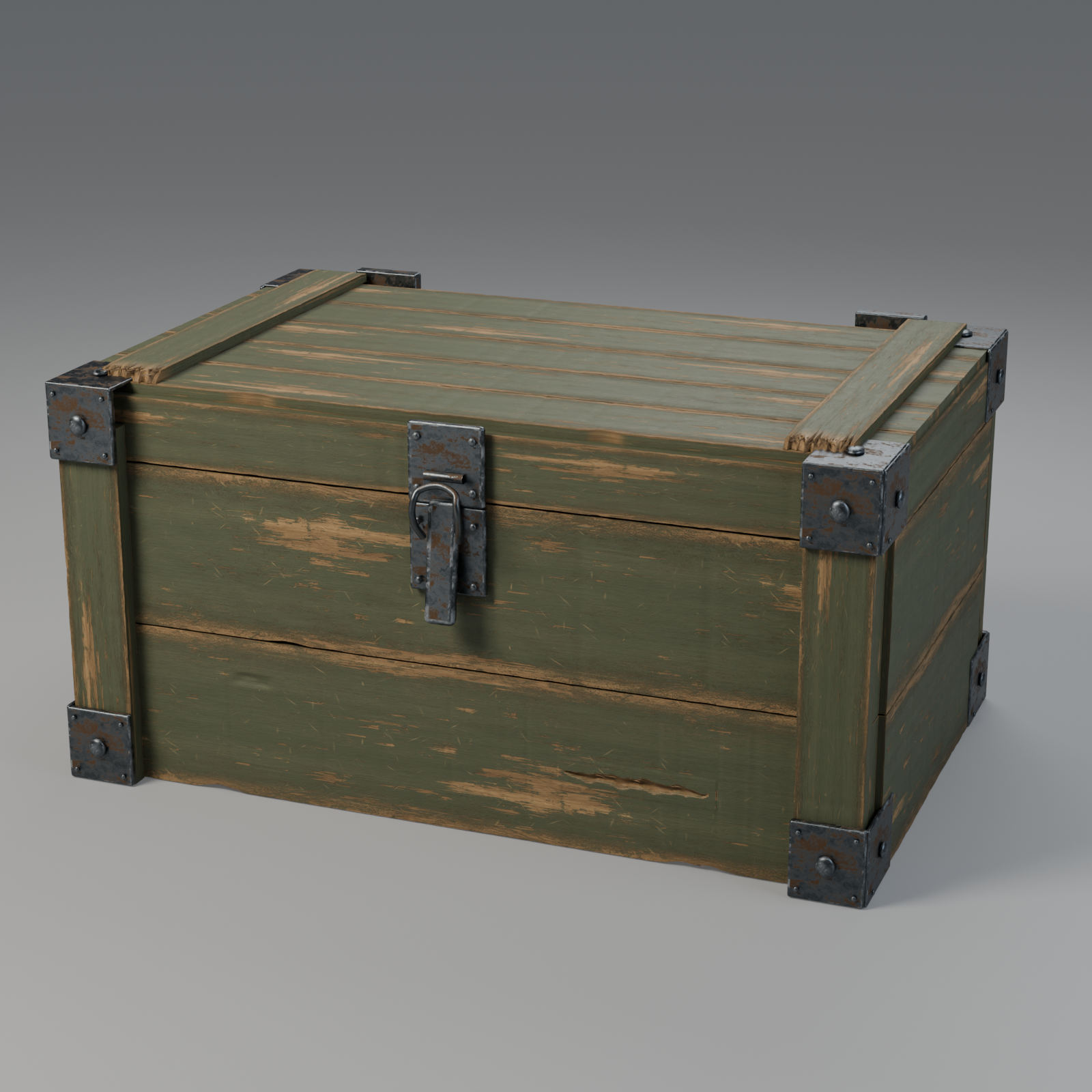
A 2.2 m reference-guided crate with layered broken wood, SD height displacement, rusted steel reflections and verified floor contact. Modeling, UVs and lookdev are editable in Blender; paint, grain, scratches and rust are authored in Substance 3D Designer.
| UV coordinates | Checker on the model |
|---|---|
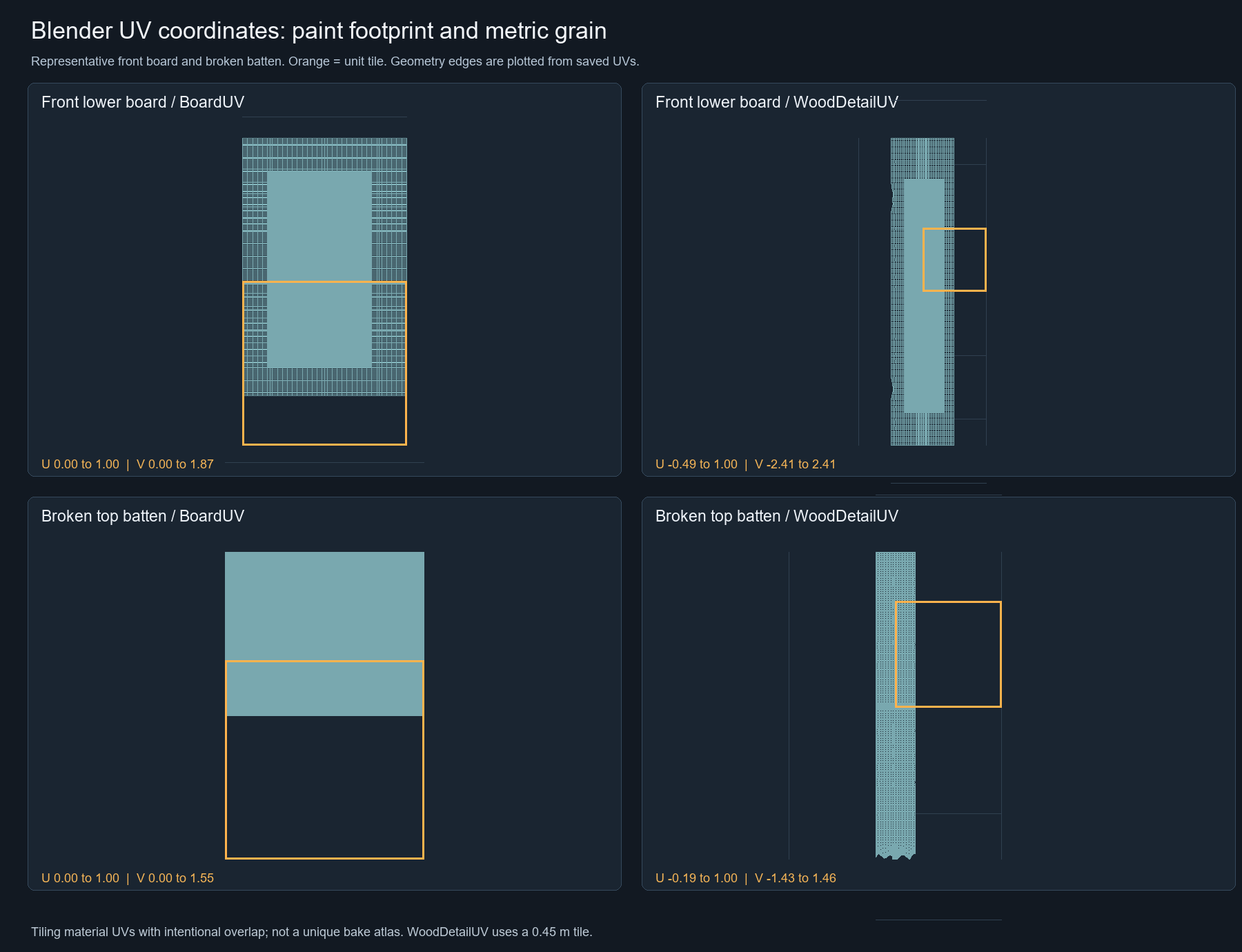 | 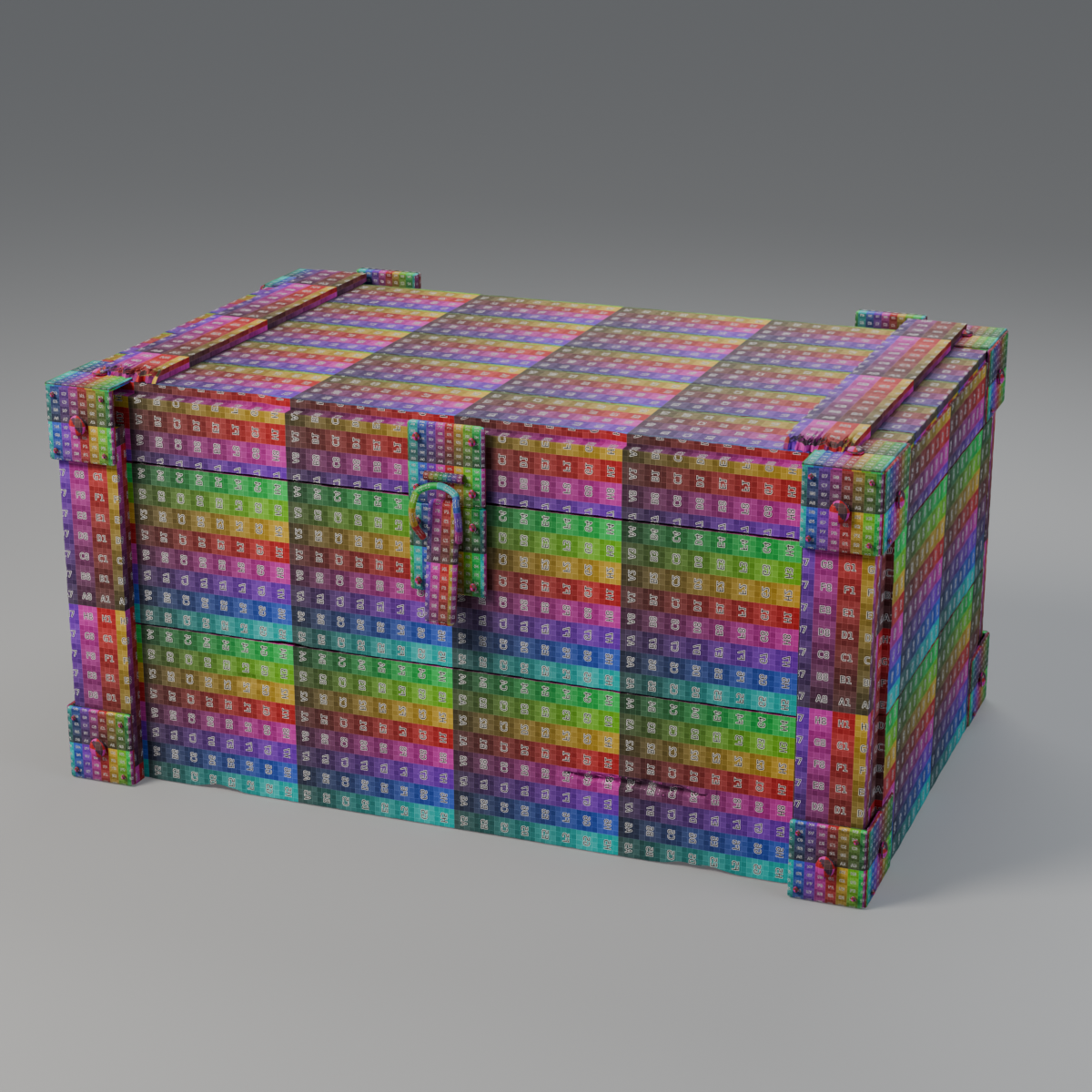 |
Scene, detail renders and UV explanation · Designer materials and full node workflow · Website gallery
AI agents should use the shared gateway through dcc-mcp-cli; IDE users may
continue to use the MCP endpoint. Prefer typed skills and tools over raw scripts.
dcc-mcp-cli is the preferred control path for every shell-capable agent. If
it is missing, ask the user before installing the latest official release:
# Linux/macOS
curl -fsSL https://raw.githubusercontent.com/dcc-mcp/dcc-mcp-core/main/scripts/install-cli.sh | sh

# Windows PowerShell
powershell -ExecutionPolicy Bypass -c "irm https://raw.githubusercontent.com/dcc-mcp/dcc-mcp-core/main/scripts/install-cli.ps1 | iex"
Keep an official build current through the release manifest:
dcc-mcp-cli update check
dcc-mcp-cli update apply
update apply downloads and stages the latest CLI for the next launch. It
does not update a running dcc-mcp-server; update that server in its own
environment.
dcc-mcp-cli dcc-types
dcc-mcp-cli list
dcc-mcp-cli search --query "<task>" --dcc-type blender
dcc-mcp-cli describe <tool-slug>
dcc-mcp-cli call <tool-slug> --json '{"key":"value"}'
dcc-types reports release-catalog support; list reports live sessions. If a
tool belongs to an inactive progressive skill, call dcc-mcp-cli load-skill <skill-name> --dcc-type blender before retrying. For post-task improvement,
attach a stable session id with --meta-json, query dcc-mcp-cli stats --range 24h --session-id <task-id>, then pass the bounded evidence to the
review_skill_improvement prompt from dcc-mcp-skills-creator.
Blender addon for the DCC Model Context Protocol (MCP) ecosystem — embeds a Streamable HTTP MCP server directly inside Blender, letting any MCP-compatible AI client drive your 3D workflow.
The source repository and PyPI package are MIT licensed. The ZIP submitted to Blender Extensions is GPL-3.0-or-later, as required for add-ons listed there; it also retains the bundled MIT notice. Download the platform-specific ZIP from the GitHub Release and install it with Preferences → Get Extensions → Install from Disk.
Built through live dcc-mcp-blender calls with a baked Mantaflow/OpenVDB
nebula, Geometry Nodes particles, native PBR materials, four Cycles view layers,
and Blender Compositor finishing. The subtle Crab Nebula-derived point pass uses
NASA 3D Resources;
observe NASA media usage guidelines.
dcc-mcp-blender turns Blender into a first-class MCP server. Once the addon is enabled, any MCP client (Claude Desktop, custom agents, etc.) can call Blender tools over HTTP without any external gateway.
See MCP protocol compatibility for the adapter-facing negotiation matrix and contract test command. See capability enhancement for live RNA parameter discovery, bounded modifier readback, and the validation rubric.
┌─────────────────────────────────┐
│  Blender (Python 3.10+)         │
├─────────────────────────────────┤
│  dcc_mcp_blender                │
│  ├─ BlenderMcpServer            │
│  ├─ SkillCatalog (200+ tools)   │
│  ├─ ActionRegistry              │
│  └─ HTTP Handlers               │
├─────────────────────────────────┤
│  dcc-mcp-core                   │
│  ├─ McpHttpServer               │
│  ├─ JSON-RPC 2.0                │
│  └─ SSE Streaming               │
└─────────────────────────────────┘
         ↓ http://127.0.0.1:9765/mcp (stable gateway)
┌─────────────────────────────────┐
│  MCP Host (Claude / etc.)       │
└─────────────────────────────────┘
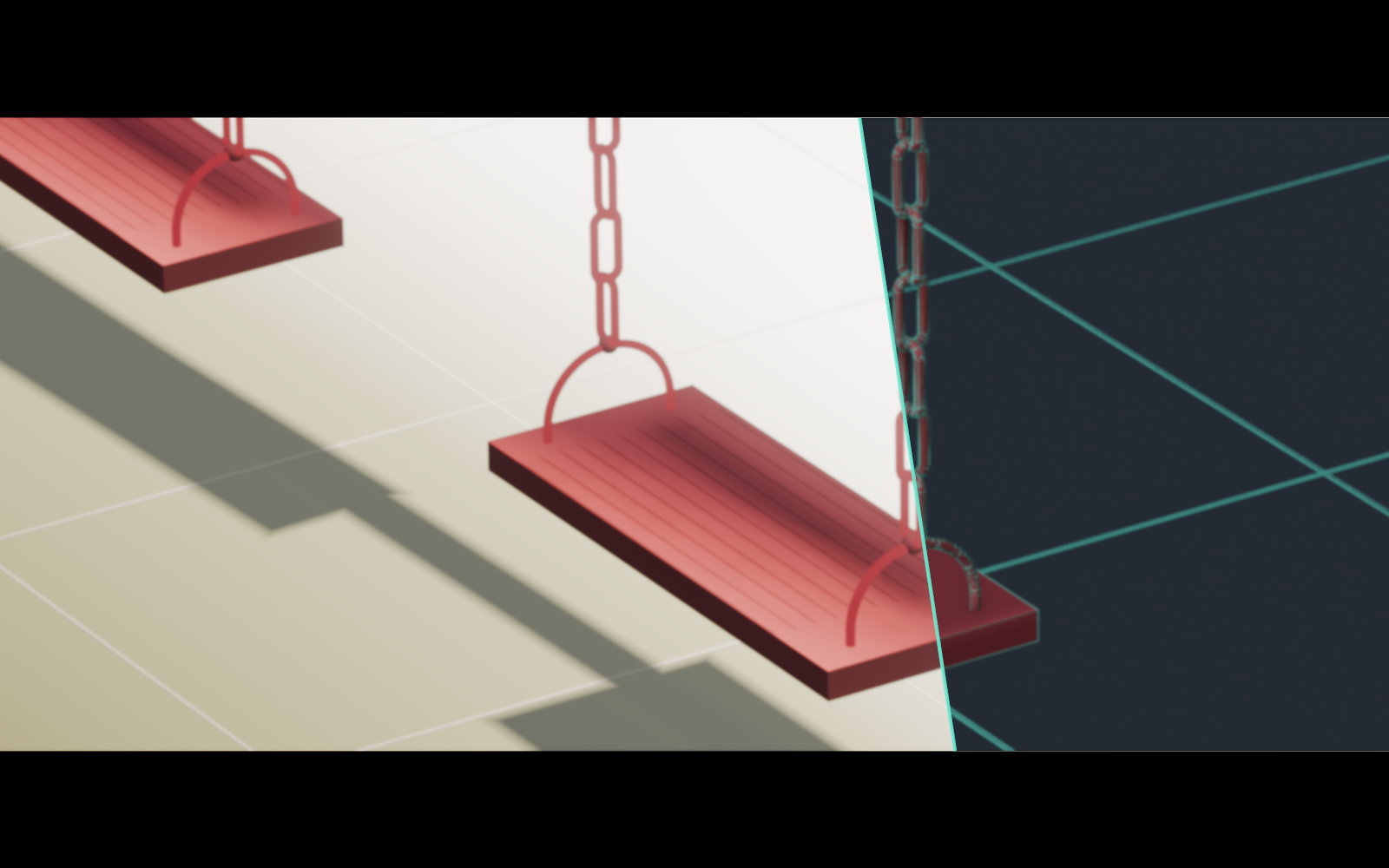
This reference-guided Blender scene was refined through a long render-and-compare loop rather than replaced with a painted image. The final frame preserves editable seat, suspension, chain, and tiled-floor geometry while matching the reference's flattened red materials, projected support shadow, restrained floor gradient, subtle bloom, and cinematic letterboxing. The split view pairs the finished render with a same-camera wireframe generated from the evaluated scene geometry.
Reusable prompt: Use the dcc-mcp Skill to connect to Blender and reconstruct the
supplied stylized swing reference as a fully editable 3D scene. Match the two
parallel seats, suspension arcs and flattened chain links, overhead support and
its continuous projected shadow, tiled floor, orthographic composition, red
material treatment, directional lower-right seat gradient, distant overexposure,
subtle bloom, and cinematic letterboxing. Work in an iterative render-reference
comparison loop: after every preview, measure silhouette, screen-space alignment,
shadow angle and continuity, tile visibility, highlight falloff, and material
flatness; correct geometry, lighting, materials, and compositor settings without
replacing the scene with a painted image. Preserve a real mesh scene, save the
.blend, render the final 16:9 frame, and report validation evidence and output
paths.
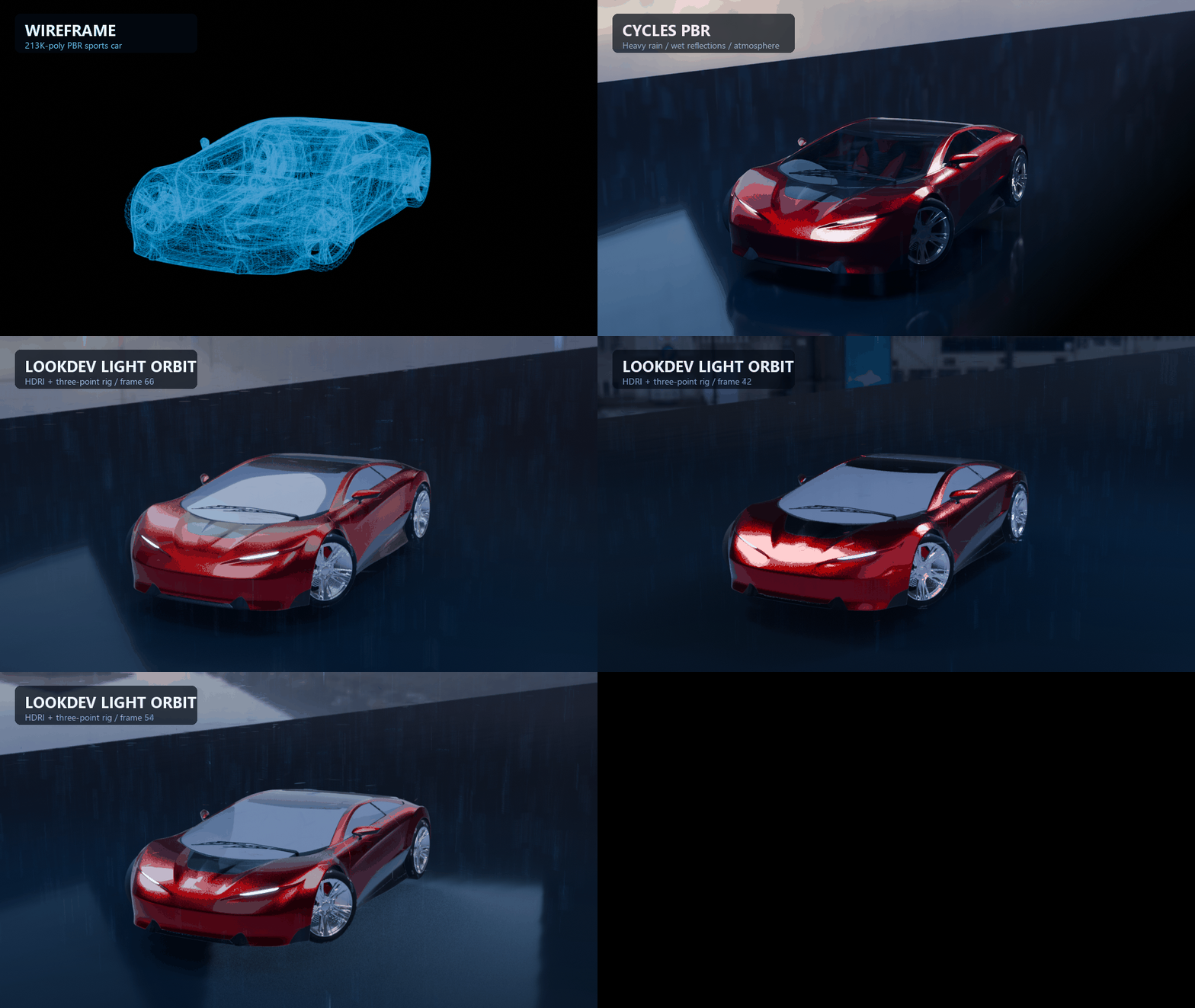
This live Blender 4.5 test moves from the imported mesh wireframe to a Cycles PBR beauty render, then rotates an HDRI and three-point light rig through 360° while a heavy particle rain simulation interacts with the sports car and wet ground. It exercises asset import, clearcoat and transmission materials, particle instancing and collision, depth of field, atmosphere, color management, lighting, animation, and final rendering through MCP.
Showcase assets: Car Concept by Darmstadt Graphics Group GmbH / Eric Chadwick (CC BY 4.0; Khronos logo trademark terms apply), Beach Parking HDRI by Poly Haven (CC0), and Easy Clouds (GPL-3.0-or-later).
HostUiDispatcherBase semantics through BlenderUiDispatcher; headless mode uses BlenderHost with a core BlockingDispatchermcpServers config and you're doneexport_gltf writes a file whose vertex count is systematically higher than the
shared-vertex count Blender reports for the same mesh. glTF stores one vertex per
unique normal + UV combination, so a differing count is expected behavior, not an
export defect.
export_gltf returns no vertex / face / material metrics.
Re-import the asset with import_file and inspect it with get_mesh_info, run
blender-validation checks such as validate_mesh and validate_export_readiness,
or use an external glTF validator.See src/dcc_mcp_blender/skills/SKILLS_INDEX.md for staged loading guidance, task-to-skill chains, and side-effect profiles for all bundled skills.
Blender 4.5 is the minimum supported host version. The CI targets are Blender 4.5.13 LTS (bundled Python 3.11) and Blender 5.2.1 (Python 3.13), using SHA256-verified official archives on Windows x64, Linux x64, and macOS arm64. Hosts older than 4.5 are rejected at install time and are not tested. See the official release list and exact-version E2E matrix.
Blender 5.x Geometry Nodes inputs use RNA properties; animation readback, deletion, and interpolation use the object's assigned Action Slot. Windows runtime DLLs must match Blender's Python minor version.
CI runs real background Blender tests and separate-process MCP smoke tests on every matrix entry. Background tests do not establish GUI, GPU, shared-gateway CLI, or whole-software workflow acceptance. Consult the capability coverage and delivery phases for known gaps; raw Python execution is not counted as typed workflow coverage.
Want an AI agent to install the Blender-side dependencies, write the MCP host config, and walk you through enabling the add-on? Just ask your agent:
帮我参考 dcc-mcp/dcc-mcp-blender/install.md 去安装
The agent follows install.md, which delegates the setup workflow
to skills/dcc-mcp-blender-setup. The remaining
options below are for manual installation.
Important: The release ZIP uses the Blender Extension format with
blender_manifest.tomlat the archive root and a flat package layout. Legacy add-on install (Edit → Preferences → Add-ons → Install) will fail with "ZIP packaged incorrectly;__init__.pyshould be in a directory, not at top-level". This is expected — use the Extensions path below. The Extension format is the only supported GUI installation path.
dcc_mcp_blender_addon_win64_vX.Y.Z.zip, dcc_mcp_blender_addon_linux_vX.Y.Z.zip, or
dcc_mcp_blender_addon_macos_vX.Y.Z.zipRelease ZIPs are Blender Extension packages for Blender 4.5+. They include blender_manifest.toml and the matching dcc-mcp-core wheel under wheels/, so Blender installs the Python dependency into the extension's isolated environment.
The extension ZIP is assembled by packaging/assemble_zip.py. It resolves the latest compatible dcc-mcp-core wheel, places it under wheels/, and injects that wheel into blender_manifest.toml; Blender then installs it through the extension wheel mechanism instead of relying on global pip packages or sys.path edits. Build locally with just blender-addon-zip for the host platform, or just blender-addon-zip win64 dist_addon (replace win64 with linux or macos) for an explicit target. See packaging/release_smoke_checklist.md for the manual smoke test procedure.
Native UI Control requires standalone dcc-cua 0.4.0 or newer on PATH (or
DCC_MCP_CUA_BINARY). Core owns the ui_control__* contract; the Blender ZIP
does not bundle a second capture or input helper. At startup, the extension
binds UI Control to the current Blender process ID and refuses a conflicting
process binding, so a request cannot widen the adapter to another window.
pip install dcc-mcp-blender
Then in Blender's Python console:
import dcc_mcp_blender
dcc_mcp_blender.start_server()
For CI or automation that needs Blender's main thread dispatcher:
blender --background --python src/dcc_mcp_blender/blender_bootstrap.py
The bootstrap prints MCP_URL=..., discovers bundled skills, and drives BlenderHost in headless mode until the process is stopped.
On Blender 5.x the bootstrap also restores PYTHONPATH entries that the isolated interpreter dropped, so the same command works without --python-use-system-env. See Blender 5.x and isolated Python.
In interactive add-on mode, BlenderUiDispatcher subclasses the shared core UI dispatcher and BlenderTimerPump
contains the Blender-specific bpy.app.timers wiring. In background mode, BlenderHost keeps using core
BlockingDispatcher with an explicit headless loop so automation does not depend on Blender UI timers.
Add to your claude_desktop_config.json:
{
  "mcpServers": {
    "blender": {
      "url": "http://127.0.0.1:9765/mcp"
    }
  }
}
Make sure the Blender addon is enabled and the server is running, then restart Claude Desktop.
import dcc_mcp_blender

# Start the server on an OS-assigned instance port
server = dcc_mcp_blender.start_server()
print(server.mcp_url)

# Stop the server
dcc_mcp_blender.stop_server()
For multiple UI views, use acquire_server and explicit server leases
so borrowed services are never stopped by a view. A broker retains creator
ownership and retries pending cleanup on the host main thread.
Core 0.20.42 does not expose the public remote-listener options used below. They were added in Core PR #2735 and are available in Core 0.20.44. The adapter's supported dependency range also permits older builds without this optional API, so check the installed signature before using it.
For an embedded MCP endpoint isolated from shared gateway routing, use this
fallback, including on Core 0.20.42. Use an environment without
DCC_MCP_GATEWAY_REMOTE_HOST / DCC_MCP_GATEWAY_REMOTE_PORT overrides:
import tempfile

import dcc_mcp_blender

dcc_mcp_blender.stop_server()
server = dcc_mcp_blender.start_server(
    port=0,
    gateway_port=0,
    enable_gateway_failover=False,
    registry_dir=tempfile.mkdtemp(prefix="dcc-mcp-blender-private-"),
)
print(server.mcp_url)
gateway_port=0 disables this instance's gateway election and listeners,
leaving the embedded loopback MCP endpoint on an OS-assigned port. Core still
registers the instance; the fresh private registry_dir prevents a running
shared gateway from discovering that registration. Connect an MCP client
directly to server.mcp_url; this example does not use CLI gateway routing.
It does not stop gateways already running elsewhere. Do not simply omit
gateway_remote_port=0 while retaining a nonzero gateway port: Core's default
additional listener can bind to 0.0.0.0.
To keep a private local gateway while disabling its additional remote listener,
first verify that the installed DccServerOptions.from_env signature exposes
gateway_remote_port. Only then start a fresh server with explicit options:
server = dcc_mcp_blender.start_server(
    port=0,
    gateway_port=19765,
    gateway_remote_port=0,
    enable_gateway_failover=False,
    registry_dir="./private-dcc-mcp-registry",
)
gateway_remote_host and gateway_remote_port are keyword-only options on
start_server() and BlenderMcpServer, and fields on BlenderServerOptions.
None preserves Core's defaults and environment configuration, including the
existing LAN listener behavior. gateway_remote_port=0 disables only the
embedded gateway's additional remote listener; the nonzero gateway_port still
enables local gateway registration. enable_gateway_failover=False controls
automatic failover separately and does not disable the remote listener.
Explicit remote arguments and the Core environment overrides
DCC_MCP_GATEWAY_REMOTE_HOST / DCC_MCP_GATEWAY_REMOTE_PORT require a Core build
exposing the public remote gateway options; unsupported builds raise
RuntimeError. Stop an existing singleton with stop_server() before changing
remote settings. Explicit remote arguments are rejected on a running singleton;
changing environment variables does not reconfigure it.
Blender 5.x starts its embedded interpreter with an isolated CPython config
(sys.flags.isolated / sys.flags.ignore_environment set), so PYTHONPATH is
not read: dependencies injected by a package manager or CI resolve never
reach sys.path, and the host ends up with zero adapter capability while the
resolve reports success.
The adapter repairs this from the inside — the process environment is still
readable even when PYTHONPATH is ignored, so the entries are restored before
any adapter import. It happens automatically when you use:
blender --background --python src/dcc_mcp_blender/blender_bootstrap.py, ordcc_mcp_blender once the package itself is visible.For scripts that must import the adapter before it is on sys.path, either
launch Blender with --python-use-system-env (Blender's own switch to honour
PYTHONPATH again) or run the doctor first — it is a no-op on hosts that
already honour PYTHONPATH:
blender --background --python tools/blender_path_doctor.py -- --deep
The doctor prints the interpreter flags, how many PYTHONPATH entries the host
can see, which packages resolve and from where, and the reachable tool surface.
It exits non-zero when the adapter is not importable, so a resolve that yields
an unusable host fails loudly instead of silently.
# Enable hybrid BM25 + vector recall
export DCC_MCP_BLENDER_SEMANTIC_INDEX=1

# Optional: use ONNX for dense embeddings (better semantic matching)
pip install 'dcc-mcp-core[semantic]'
export DCC_MCP_BLENDER_SEMANTIC_EMBEDDER=onnx
When enabled, skill search results include a [semantic] extra field and RRF-fused scores.
The feature is opt-in — BM25-only recall remains the default and is not affected when the
env var is unset.
There is no Blender-official MCP server. If you arrived here searching for the
"official Blender MCP", you are most likely looking for
mcp-for-blender (formerly
blender-mcp), a widely used community project whose README states:
Disclaimer: This is a third-party integration and not made by Blender
The blender GitHub organization publishes no MCP server, and neither the
Blender source tree nor the bundled add-on tree contains MCP code. Verified on
2026-09-23.
Both projects let an agent drive Blender. They optimize for different work:
mcp-for-blender — the fast, exploratory path. A Blender add-on opens a
socket server and a separate process relays MCP over it. It supports Blender
3.0+, runs arbitrary Python by default, and bundles generative-3D and asset
integrations (Poly Haven, Sketchfab, Poly Pizza, Hyper3D Rodin, Hunyuan3D).
Set BLENDER_MCP_SAFE_MODE=1 to pre-check generated scripts; note that the
add-on socket has no authentication or encryption.dcc-mcp-blender — the production path. The MCP server runs embedded in
Blender with no external process, exposing 200+ typed tools across 25+ skill
packages over Streamable HTTP. Typed tools are schema-validated and testable,
the execute_python and execute_script_file escape hatches can be switched
off with DCC_MCP_BLENDER_DISABLE_ARBITRARY_SCRIPT, and Blender shares one
gateway and CLI with Maya, Houdini, USD and 3ds Max.Pick mcp-for-blender for prompt-assisted exploration on a single machine.
Pick dcc-mcp-blender for pipeline work, cross-DCC automation, headless/CI
runs, and places where you want to constrain what the agent can execute.
See Blender MCP vs dcc-mcp-blender for the full comparison, including the architecture, version, and security rows.
Third-party models and asset libraries are not bundled into this adapter. Install them as marketplace skills instead:
dcc-mcp-cli marketplace search
dcc-mcp-cli marketplace install dcc-asset-polyhaven
dcc-mcp-cli marketplace install dcc-ai-hunyuan3d
Generative-3D and asset integrations available this way include
dcc-ai-hunyuan3d, dcc-ai-tripo3d, dcc-asset-polyhaven,
dcc-asset-sketchfab, dcc-asset-poly-pizza and dcc-asset-ambientcg. The
catalog is the source of truth — run dcc-mcp-cli marketplace search for the
current list.
git clone https://github.com/dcc-mcp/dcc-mcp-blender
cd dcc-mcp-blender
pip install -e ".[dev]"
pytest
MIT — see LICENSE for details.
Blender MCP addon for AI agents to model, edit meshes and UVs, rig, build materials and render scenes through typed tools in the DCC-MCP ecosystem.
เครื่องมือ
ยังไม่มีรายการเครื่องมือ เซิร์ฟเวอร์แบบรีโมตจะได้รายการหลังการตรวจสอบสถานะครั้งแรก
FAQ
คัดลอกคอนฟิก stdio สำหรับ Cursor, Claude Desktop, Claude Code หรือ VS Code ได้ในหน้านี้ คอนฟิกนี้ใช้การติดตั้งของผู้เผยแพร่ ไม่ใช่พร็อกซีของ PlugMCP
ระเบียนนี้ไม่ได้ระบุตัวแปรสภาพแวดล้อมที่จำเป็น
Dcc MCP Blender ทำงานแบบโลคัลผ่าน stdio
ตรวจสอบล่าสุดเมื่อ 2026-11-05 Blender MCP addon for AI agents to model, edit meshes and UVs, rig, build materials and render scenes through typed tools in the DCC-MCP ecosystem.

