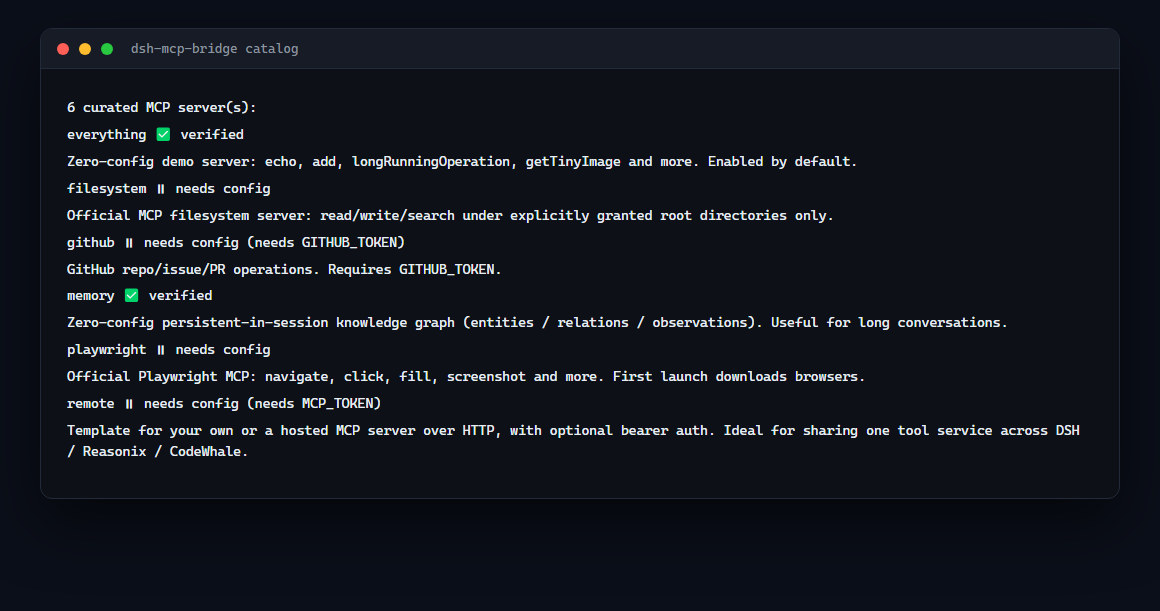
Install six curated MCP servers into DSH in one command — and find out which of them actually work on your machine.
When you need this
You want your DSH agent to have MCP tools (browser automation, session memory, file access) without hand-writing six configs and getting the quoting wrong
Curated, verified MCP server bundle for DeepSeek Harness (dsh): one install brings demo, memory, filesystem, GitHub, Playwright and remote HTTP MCP servers, with a connectivity verifier and CI checks.
2026-11-15
ดาว
—
เครื่องมือ
—
อัปไทม์
—
A server will not start and you cannot tell whether it is the config, the package or your network
You want a list that says which servers are genuinely reachable, rather than another copy of the upstream docs
Every curated server is started, handshaken and its tool count checked in CI — everything answers with 13 tools, memory with 9, filesystem with 14.
One install gives your dsh agent a set of MCP servers that are started and queried on every push — not a raw YAML you have to figure out. Every curated server has a machine-readable definition in servers/, and scripts/verify-servers.mjs checks each one's connectivity, so "verified" is a CI-guaranteed claim, not marketing.
Tools appear to the model as mcp__<serverName>__<toolName> (same server-qualified shape as Claude Code / Codex). The bridge itself is DSH's built-in @deepseek-ai/dsh-mcp-client: stdio + streamable-http, auto-reconnect, HMR hot-swap.
Installs are visible in the download counts; whether this helps is not. If you use it, one line
about the actual task is worth more than a star — particularly if it did not work, which is
the case that never gets reported:
what you were trying to do
whether it did it
what was missing or wrong
Tell me in an issue — or if something is already broken,
just open a normal bug report.
Requirements
This package is a configuration layer, not a plugin of its own. Its cordis.patch.yml
inserts entries that point at @deepseek-ai/dsh-mcp-client, which the host provides.
@deepseek-ai/dsh-mcp-client must be installed in the profile you are adding this to,
at the version matching your DSH line.
It is declared as a permissive optional peer (>=0.1.0-rc.6) rather than a dependency.
Pinning it previously forced an old copy into the tree whose own peers
(dsh-tools@^0.0.1-rc.1) conflict with current DSH releases, which made installation fail
on version resolution. Reported as issue #2.
If installation fails, check that the client version in your profile matches your DSH version:
npx dsh-mcp-bridge init          # pick servers interactively
npx dsh-mcp-bridge list          # catalog + verification status
npx dsh-mcp-bridge validate      # list the MCP entries already in a profile
init writes real insert: entries into the profile's user patch layer
($DSH_HOME/profiles/<name>/cordis.patch.yml), so your selection survives plugin
upgrades and coexists with your own patches. It warns about servers that need
environment variables or a placeholder path to edit.
Why not just configure the MCP servers yourself?
Because the fiddly parts are not the YAML — they are everything around it.
The user patch layer overrides existing entries; naming a new id there fails with
patch: entry "x" not found. New servers need insert:.
Config nested one level too shallow parses to config: null, and the server silently never starts.
A server that connects but exposes no tools looks exactly like a working one until you ask the model.
This bundle ships working shapes, an installer that writes them correctly (init), inspectors
(list, validate) and a verifier that actually connects.
Quick start
Prereqs: dsh and pnpm on PATH (dsh plugin forwards to pnpm; install with npm i -g pnpm).
dsh plugin --profile web add dsh-mcp-bridge
# local checkout:  dsh plugin --profile web add ./dsh-mcp-bridge
dsh web        # restart the profile
The demo server (MCP official everything) is enabled by default — no API key, pure local npx. After restart, ask your model to "call the everything server's echo tool with hello" and it should use mcp__everything__echo.
First run downloads the server packages via npx; subsequent runs are cached.
To enable a commented preset, uncomment its block in the profile's cordis.patch.yml (hot-reloaded via HMR) or edit cordis.patch.yml in this package.
Verify the catalog yourself
npm install          # brings @deepseek-ai/dsh-mcp-client → the MCP SDK
npm run verify       # or: node scripts/verify-servers.mjs
Prints PASS / SKIP / FAIL per server; exits non-zero on any failure. VERIFY_TIMEOUT_MS=15000 tunes the per-server timeout. Single-server troubleshooting: node scripts/probe-server.mjs npx -y your-mcp-server.
Adding your own MCP server
Each server is one @deepseek-ai/dsh-mcp-client entry. Either add it to the profile's user patch layer (recommended, HMR applies it without restart):
# $DSH_HOME/profiles/<name>/cordis.patch.yml
- id: mcp-myserver
  name: '@deepseek-ai/dsh-mcp-client'
  config:
    serverName: myserver          # namespace, unique per process ([A-Za-z0-9_-]{1,32})
    transport: stdio              # or streamable-http
    command: npx
    args: ['-y', 'your-mcp-server']
    env:
      YOUR_TOKEN: !!js process.env.YOUR_TOKEN
…or drop a definition into servers/ (so verify covers it) and add the matching entry to cordis.patch.yml here.
Config fields (from dsh-mcp-client)
Field
Transports
Required
Meaning
transport
both
yes
"stdio" or "streamable-http"
serverName
both
yes
tool namespace, unique among live instances
command / args / env / cwd
stdio
command yes
child process spec
url / headers
http
url yes
endpoint + auth headers
toolCallTimeoutMs
both
no
per-call timeout, default 60000
failOnStartupError
both
no
reject activation on connect failure (default false)
reconnect.*
both
no
auto-reconnect backoff (default on)
Linking up with Reasonix / CodeWhale
All three are agent harnesses — MCP is the shared language. Any server you run for Reasonix or CodeWhale can be added here, and a local streamable-http server you own can serve DSH, Reasonix and CodeWhale from one process. See servers/remote-http.json.
Troubleshooting (Windows)
Headless verification hangs (dsh --profile <name> "task"): the profile needs @deepseek-ai/dsh-headless in dsh.profile.bundles (add it manually; dsh plugin add @deepseek-ai/dsh-headless fails with 404 on its unpublished dependency). Without it the tree activates but no agent consumes the task.
npx is fine on Windows: the MCP SDK uses cross-spawn, which resolves .cmd shims — no npx.exe needed.
Server connects but no tools: check the profile logs; failOnStartupError: false means the entry activates without tools on failure.
Releasing (npm)
npm version patch (or bump package.json manually), commit, tag vX.Y.Z.
git push origin main --tags.
GitHub Actions (publish.yml) publishes to npm — requires npm trusted publisher (OIDC) linked to the repo. Setup: npm → Access Tokens → Generate new token → Publish with GitHub Actions.
Give the repo the GitHub topic dsh-plugin so it shows up in the community lists (awesome-dsh-plugin, WhaleHub).
The catalog is a starting point, not a ceiling. add installs any npm-published MCP server into a
profile and then probes it, so the result is "it works" or "here is what broke":
Wrote memory (@modelcontextprotocol/server-memory) to ~/.dsh/profiles/web/cordis.patch.yml

Checking that it actually starts...
  OK — 9 tool(s) listed
If the probe fails, the entry stays written so you can fix it in place, and the message says where:
  FAILED at connect: MCP error -32000: Connection closed
  the entry is still written so you can fix it in place:
    ~/.dsh/profiles/web/cordis.patch.yml
Options: --profile <name> (defaults to the first profile), --name <serverName> (defaults to a
name derived from the package), --args a,b (extra arguments), --env KEY1,KEY2 (environment
variables passed through from the environment), --timeout <seconds>.
Removing a server
npx dsh-mcp-bridge remove memory --profile web
Removes one - insert: entry from the profile's patch layer, leaving every other entry and the
header comment alone. --dry-run shows what would be removed without writing; an unknown name exits
2 and lists the entries that are present. Restart the profile for it to take effect.
When a server does not start
Installing is half the job. When a server never appears in your tool list, doctor starts each
one, completes the MCP handshake and lists its tools, so you can see where it broke:
Curated, verified MCP server bundle for DeepSeek Harness (dsh): one install brings demo, memory, filesystem, GitHub, Playwright and remote HTTP MCP servers, with a connectivity verifier and CI checks.
คัดลอกคอนฟิก stdio สำหรับ Cursor, Claude Desktop, Claude Code หรือ VS Code ได้ในหน้านี้ คอนฟิกนี้ใช้การติดตั้งของผู้เผยแพร่ ไม่ใช่พร็อกซีของ PlugMCP
Dsh MCP Bridge ต้องใช้ API key ไหม?
ระเบียนนี้ไม่ได้ระบุตัวแปรสภาพแวดล้อมที่จำเป็น
Dsh MCP Bridge ใช้ทรานสปอร์ตแบบใด?
Dsh MCP Bridge ทำงานแบบโลคัลผ่าน stdio
Dsh MCP Bridge ถูกตรวจสอบล่าสุดเมื่อใด?
ตรวจสอบล่าสุดเมื่อ 2026-11-15 Curated, verified MCP server bundle for DeepSeek Harness (dsh): one install brings demo, memory, filesystem, GitHub, Playwright and remote HTTP MCP servers, with a connectivity verifier and CI checks.