MCP Events bridge
Turn webhooks into MCP Events, so AI agents can act the moment something happens: an email arrives, an issue is opened, a workflow fails. Hookdeck Event Gateway receives, verifies and delivers every event.
Power your agent
การติดตั้งจากผู้เผยแพร่ ไม่ใช่เอนด์พอยต์ของ PlugMCP
URL แบบรีโมตหรือคำสั่งบนเครื่องของคุณ? การติดตั้งสองแบบต่างกันอย่างไร
รันบน PlugMCP
A new server you create. It is not this listing's official endpoint. Use the publisher install when you want their URL and their credentials.
เปิดจากผู้เผยแพร่
Turn webhooks into MCP Events, so AI agents can act the moment something happens: an email arrives, an issue is opened, a workflow fails. Hookdeck Event Gateway receives, verifies and delivers every event.
Turn webhooks into MCP Events for AI agents, with the hosted Hookdeck Event Gateway receiving and delivering them. Sources include Resend, GitHub, Stripe, Slack and any signed webhook. Poll tools and a Claude Code plugin cover clients without MCP Events support.
For example, an email arrives at a Resend address, and ChatGPT, subscribed through the bridge, acts on it:
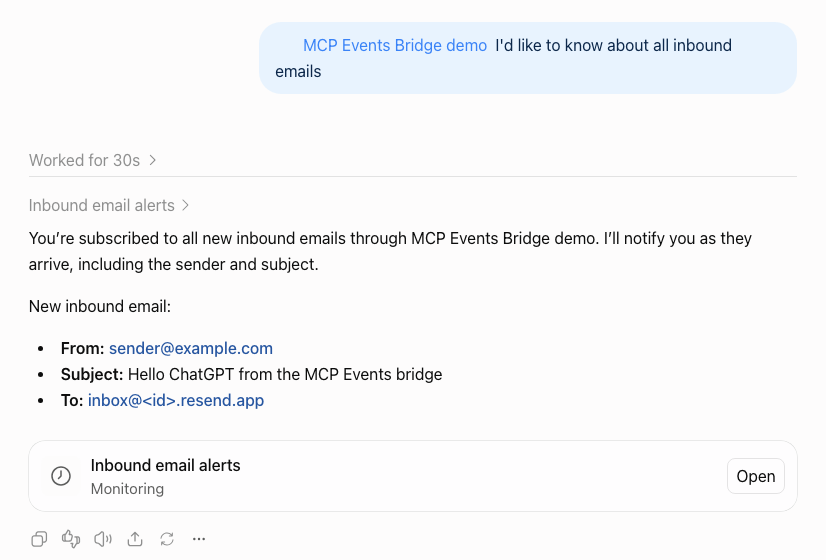
MCP Events is an experimental MCP extension that lets an agent subscribe to events instead of polling for them, and ChatGPT supports it. But an agent can only subscribe to MCP servers that implement it, and almost none do yet, while nearly every service already sends webhooks.
The bridge closes that gap:
defineSource.It's for developers who want agents (ChatGPT, Claude Code, Hermes Agent and others) to react to events from the services they already use.
Status: 0.6, a working demo built in stages. MCP Events is experimental, and this package may change with it. See docs/PLAN.md for what's done and what's next, and CHANGELOG.md for changes between versions.
The design, its trade-offs and how it maps to the spec are in docs/ARCHITECTURE.md.
Clients that support MCP Events subscribe to the bridge, and receive each event as a webhook at their callback URL. Clients that don't, such as Claude Code, poll with the bridge's tools.
Versions are the ones tested against the bridge, in October 2026. MCP Events support is experimental in Hermes Agent and in the three libraries.
The mcp-events-bridge skill walks a coding agent (Claude Code, Cursor, Codex and others that support Agent Skills) through setup, adding sources, connecting an agent and troubleshooting, with a success signal for each step:
npx skills add hookdeck/mcp-events-bridge
Then ask the agent to set up the bridge. It asks you for the credentials. The skill is also in the npm package, under skills/.
You need:
npm run e2e).Create a project and install the bridge:
mkdir my-bridge && cd my-bridge
npm init -y && npm pkg set type=module
npm install @hookdeck/mcp-events-bridge
printf 'node_modules/\n.env\n.hookdeck/\n' > .gitignore   # .env and .hookdeck/ hold credentials
Choose sources in bridge.config.ts:
import { defineConfig, env } from '@hookdeck/mcp-events-bridge';
import { github, resend } from '@hookdeck/mcp-events-bridge/sources';

export default defineConfig({
  sources: [
    resend({ apiKey: env('RESEND_API_KEY') }),
    // Only `setup` uses the token, so it's optional here: a deployed bridge runs without it.
    github({ token: env('GITHUB_TOKEN', { optional: true }), scope: { repos: ['your-org/your-repo'] } }),
  ],
});
Keep only the sources you use, or add others, such as Stripe or your own service: see Sources.
Add credentials to .env:
HOOKDECK_API_KEY=...
HOOKDECK_SIGNING_SECRET=...
RESEND_API_KEY=...      # if you use Resend
GITHUB_TOKEN=...        # if you use GitHub
Create the Event Gateway resources and the webhooks:
npx mcp-events-bridge setup
The first run generates an MCP secret: add it to .env as BRIDGE_MCP_SECRET. Setup is safe to re-run, and updates the webhooks when you add sources or change events or repositories. Removing a source or a repository deletes nothing: delete its webhook (and its Event Gateway connection) yourself.
Run the bridge:
npx mcp-events-bridge serve
Locally, serve checks that setup has run and starts hookdeck listen for every source, so events reach your laptop through the Hookdeck CLI; it restarts listen if it stops, and recovers events that arrived while the bridge was down. Send an email to your Resend address, or open an issue, and the bridge logs it.
Connect an agent: see Connect ChatGPT, Connect Claude Code, or Supported MCP clients for the others. ChatGPT has to reach the bridge's MCP endpoint, so deploy the bridge, or expose your local port with a tunnel such as cloudflared tunnel --url http://127.0.0.1:8080 and use https://<tunnel host>/mcp/<BRIDGE_MCP_SECRET>. Events don't need the tunnel: Event Gateway delivers them to ChatGPT directly.
With Developer mode on (ChatGPT Plus or above), go to Plugins, choose Add > Create MCP App, paste https://<your bridge>/mcp/<BRIDGE_MCP_SECRET>, and choose No Authentication. ChatGPT can't send an Authorization header (it offers only OAuth or no authentication), so it takes the secret in the URL. Then, in a Work chat, ask to be told about new events, for example emails from a particular sender. ChatGPT subscribes and sets up a monitoring task:
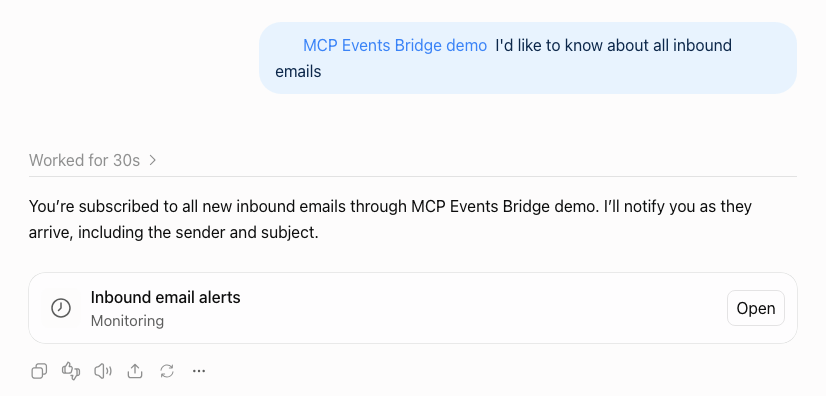
When an event arrives, the task runs with it, as in the screenshot at the top.
ChatGPT keeps the list of events it can subscribe to from when you added the plugin. After you upgrade the bridge or add a source, refresh the plugin in Plugins, or ChatGPT can't subscribe to the new or renamed events (it may still list them, since that call goes to the bridge). Then ask it to subscribe again.
That URL is a credential: anyone with it can use the bridge. Keep it private (see Security and limitations).
Claude Code doesn't support MCP Events yet, so it polls. Install the plugin, which asks for the bridge's MCP endpoint (https://<bridge>/mcp) and its secret (BRIDGE_MCP_SECRET), sent as an Authorization: Bearer header, and keeps both in secure storage:
/plugin install mcp-events-bridge --marketplace hookdeck/mcp-events-bridge
If you skip them (Esc), the plugin still installs. Set them later with /plugin configure mcp-events-bridge@hookdeck, then start a new session. An endpoint with the secret in it (/mcp/<BRIDGE_MCP_SECRET>), set before the secret field existed, still works.
Then, in any project, ask Claude to watch for events your bridge offers ("what events can the bridge give me?" lists them). For example, with the GitHub source set up for a repository, "watch <owner>/<repo> for new issues and comments"; with Resend, "tell me when an email arrives". The plugin keeps a watch list per project and runs watch for the whole session, so each event wakes Claude, between prompts too, and a new session first catches up on what it missed (up to 24 hours). It needs no public URL, so it works with a local bridge.
Without the plugin, add the bridge as an MCP server and ask Claude to wait for events with the poll tools (see Polling). The Claude Code guide has both.
A source is where events come from: a service that sends webhooks. Each source in bridge.config.ts has an id (by default its type: resend, github, stripe), and its events are offered over MCP as {id}.{event}, where event is the service's own name for it: resend.email.received, github.issues, stripe.invoice.paid. So events/list says which source each event comes from, and two sources can offer the same kind of event (two Resend accounts, two trading servers) under different ids. Renaming an id renames its events, so agents need to subscribe again.
Inbound email. Every Resend account has a receiving domain (<id>.resend.app; Emails > Receiving), so no custom domain is needed.
resend({ apiKey }). The API key needs permission to create webhooks.email.received (offered as resend.email.received), with the sender, recipients, subject and Resend's email id. Read the full email with Resend's own API.from (recommended: it limits who can wake the agent) and to.One event per GitHub webhook type: issues, pull_request, push, and so on (26 types), offered as github.issues, github.pull_request, github.push.
events: ['issues', 'push', ...], or ['*'] for all.repository, actions (for example ["opened"]) and sender.Two ways to connect repositories:
Stripe, Slack, Shopify, Twilio, Linear, Clerk and 157 more: source({ type }) takes any Event Gateway source type that's verified with credentials you give it, and Event Gateway checks the service's own signatures, including those that sign a timestamp with the body, as Stripe and Slack do. For example, Stripe:
import { defineConfig, env } from '@hookdeck/mcp-events-bridge';
import { source } from '@hookdeck/mcp-events-bridge/sources';

export default defineConfig({
  sources: [
    source({
      type: 'stripe',                            // the id defaults to the type, so events are stripe.<event>
      secret: env('STRIPE_WEBHOOK_SECRET'),      // the endpoint's signing secret, whsec_...
      events: {
        'invoice.paid': { description: 'A Stripe invoice was paid.' },
        'customer.subscription.deleted': { description: 'A Stripe subscription ended.' },
      },
      eventType: { field: 'type' },              // where Stripe names the event
      eventId: { field: 'id' },                  // evt_..., stable across Stripe's retries
      occurredAt: { field: 'created' },
    }),
  ],
});
secret, the service's webhook signing secret. Others take their own fields: source({ type: 'postmark', username, password, ... }), source({ type: 'twitter', apiKey, ... }). The TypeScript types list each type's fields, and the config won't compile with a missing or unknown one.url_verification challenge, and Event Gateway's slack source answers it itself, so registering the URL in Slack needs no code. A webhook source answers every request with Event Gateway's standard response, not the challenge. Other services' handshakes haven't been checked.VERIFICATION_FAILED). The other source types use the same path, but haven't each been tested.source({ type: 'webhook' }) takes webhooks from any HTTP sender: a service you run yourself, or one without an Event Gateway source type. For example, instead of an agent polling a trading server's orders every bar to see whether an order filled, the server sends a webhook when it fills, and the agent subscribes to fills.order.filled for the symbols it trades:
import { defineConfig, env } from '@hookdeck/mcp-events-bridge';
import { source } from '@hookdeck/mcp-events-bridge/sources';

export default defineConfig({
  sources: [
    source({
      id: 'fills',                       // names the Event Gateway source: bridge-fills
      type: 'webhook',
      verification: { type: 'hmac', algorithm: 'sha256', encoding: 'hex', header: 'x-signature', secret: env('FILLS_WEBHOOK_SECRET') },
      events: { 'order.filled': { description: 'An order on my trading server filled.' } },
      eventId: { header: 'x-delivery-id' },     // stable across the sender's retries
      occurredAt: { field: 'filled_at' },
      filters: ['symbol', 'side'],              // an agent subscribes with { "symbol": "AAPL" }
    }),
  ],
});
The server signs each request's raw body with HMAC-SHA256 and the shared secret, hex-encoded in x-signature, and POSTs JSON such as { "symbol": "AAPL", "side": "buy", "quantity": 100, "price": 187.5, "filled_at": "2026-10-07T14:30:00Z" }.
verification (required for webhook): Event Gateway verifies every request and rejects the rest before they reach the bridge. One of:
{ type: 'hmac', algorithm, encoding, header, secret }: an HMAC of the raw body in a header. algorithm is sha1, sha256 or sha512; encoding is hex, base64 or base64url. A sha256= prefix on the value is accepted. The key is the secret string as written (UTF-8), not decoded from hex or base64.{ type: 'standard-webhooks', secret }: Standard Webhooks signatures, usually with a whsec_... secret.{ type: 'basic-auth', username, password } or { type: 'api-key', header, key }: a shared credential sent with every request. Prefer a signature: Event Gateway keeps request headers, so these credentials are stored with each request, and anyone who sees one can replay it.
There's no unverified option: anyone with the URL could otherwise wake your agents with whatever they send.These options work for every source(), whatever its type:
events: the sender's event names (offered as {id}.{name}, e.g. fills.order.filled), as a list or with a description each. Keep a description under about 400 characters: ChatGPT has been reported to leave out events with longer ones, and setup and serve warn about them. With more than one, eventType says where the sender names the event, { header } or { field } (a dot path into the body), and each event's value is the sender's name for it (default: the event name). Requests for other values are ignored.eventId: the sender's id for an event, from { header } or { field }. It becomes the MCP event's eventId (and its webhook-id), and Event Gateway drops repeats within an hour. Default: Event Gateway's request id, which stays the same when Event Gateway retries but not when the sender does, so set it if your sender retries.occurredAt: a body field with an ISO 8601 or Unix time. Default: when the request was received (by the bridge for a delivery; by Event Gateway for get_event and list_events).fields: [...]. Bodies must be JSON (anything else is ignored, and stays in Event Gateway), and the event at most 256 KiB. An integer beyond 2^53 (an int64 id) arrives at a callback URL as a string of its digits, since a JavaScript number would round it; events read back from Event Gateway (poll mode and watch, get_event, list_events, and callbacks caught up after downtime) carry it rounded for now.filters: top-level body fields subscribers can filter on, by exact match.Credentials are env() references. A service usually gives you its secret only after you register the URL, so the bridge can create the source first:
Create the source and the config entry:
npx mcp-events-bridge sources add fills --type webhook --event order.filled --event-id-header x-delivery-id --filter symbol --filter side
npx mcp-events-bridge sources add stripe --type stripe --event invoice.paid --event-type-field type --event-id-field id --occurred-at-field created
It creates the Event Gateway source (bridge-fills, bridge-stripe) and prints its URL, adds the credential variables to .env (FILLS_WEBHOOK_SECRET=, STRIPE_WEBHOOK_SECRET=: empty, and only if .env doesn't have them), and prints the source({...}) entry to paste into sources. --write-config adds the entry to bridge.config.ts itself (creating the file if there isn't one), or prints it if the file isn't a shape it can edit safely (for example sources built conditionally). For --type webhook, --verification chooses hmac (the default; --algorithm, --encoding and --header set the rest), standard-webhooks, basic-auth or api-key; sources add --help lists every option. Re-running it reuses the source and adds nothing twice.
Register the URL with the sender, and copy the secret it gives you (or, for your own server, generate one with openssl rand -hex 32 and give it to the server).
Put the secret in .env: FILLS_WEBHOOK_SECRET=....
Run npx mcp-events-bridge setup. It sets the secret on the source and connects the source to the bridge. A new or changed secret can take up to about a minute to take effect at Event Gateway; the bridge ignores any request Event Gateway didn't verify in the meantime.
Until the secret is set, delivery is held: setup creates no connection from the source to the bridge, so requests that arrive are kept in Event Gateway but never delivered. setup still sets up everything else, then exits with an error naming the variable (so a deploy script or CI notices), and serve refuses to start.
When the options above aren't enough (a payload that needs summarizing, filters on nested fields, registering the webhook through the service's API), write a defineSource({...}) definition: the Event Gateway source type (or a WEBHOOK source with the verification config in sourceConfig), how to recognize and summarize each event, the subscribe filters, and optionally how to register the webhook. See "Adding a source" and the built-in Resend and GitHub sources, and source().
Sources were called providers before 0.6.0. The old names still work in 0.6.0, with a warning, and will be removed in a later release: providers in the config (now sources), webhook() (now source({ type: 'webhook', ... })), defineProvider (now defineSource), @hookdeck/mcp-events-bridge/providers (now /sources), providers add webhook (now sources add), and the list_providers tool (now list_sources).
Any host that runs Node works; Fly.io is the reference. The bridge needs no volume, since Event Gateway is the store.
Add a Dockerfile to your project:
FROM node:22-slim
WORKDIR /app
ENV NODE_ENV=production
COPY package.json package-lock.json ./
RUN npm ci --omit=dev
COPY bridge.config.ts ./
EXPOSE 8080
CMD ["npx", "mcp-events-bridge", "serve"]
Then:
fly launch --no-deploy        # creates fly.toml: set internal_port = 8080, and BRIDGE_DEPLOYMENT = 'fly' under [env]
fly secrets set HOOKDECK_API_KEY=... HOOKDECK_SIGNING_SECRET=... RESEND_API_KEY=... BRIDGE_MCP_SECRET=...
BRIDGE_DEPLOYMENT=fly BRIDGE_INBOUND=http BRIDGE_PUBLIC_URL=https://<app>.fly.dev npx mcp-events-bridge setup
fly deploy
On Fly.io, the bridge receives events over HTTP at its public URL instead of through the Hookdeck CLI, using the fly resources that setup created. Only setup needs GITHUB_TOKEN, so it doesn't have to be a Fly secret; in GitHub's manual mode, set GITHUB_WEBHOOK_SECRET as a Fly secret too, and likewise each source()'s credentials. The Dockerfile copies only bridge.config.ts: copy any other files your config imports, such as your own source definitions.
Use a separate Hookdeck project for each environment you want isolated: deployments in one project share the sources and the subscriptions. An optional namespace for sharing a project is proposed in #13.
In the Event Gateway dashboard, a running bridge looks like this:
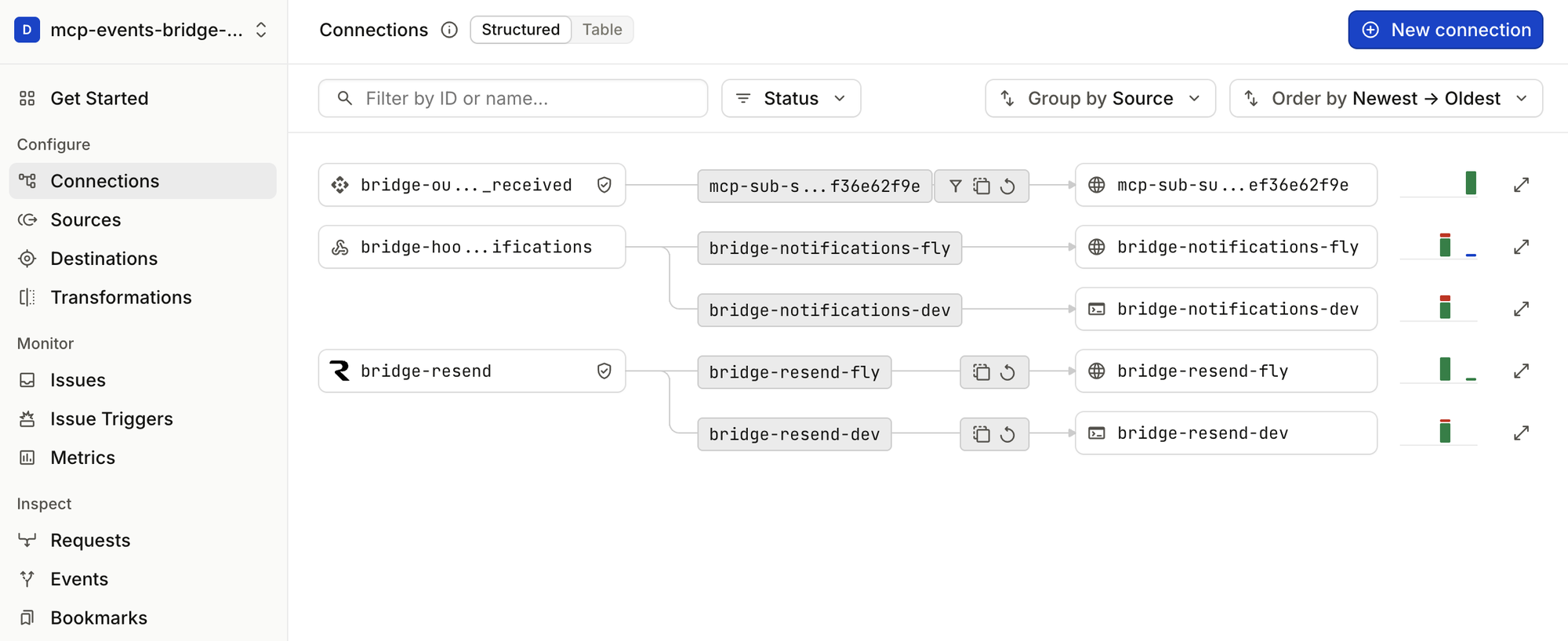
bridge-<source id> (here bridge-resend) is the source's Event Gateway source. It feeds one inbound connection per deployment: bridge-resend-local (CLI, to a bridge on your machine) and bridge-resend-fly (HTTP, to the bridge on Fly.io; the screenshot predates the local name).bridge-out-<event> (the MCP event name, slugged: bridge-out-resend_email_received; the screenshot predates {id}.{event} naming) is the topic source the bridge publishes each MCP event to. Each subscription is one connection from it, mcp-sub-<id>, with filter, dedupe and retry rules, to a destination at the subscriber's callback.bridge-hookdeck-notifications receives Event Gateway's issue notifications and forwards them to each deployment, so the bridge hears about failing callbacks and reports them to subscribers.Locally (CLI inbound), setup also logs the Hookdeck CLI in to the bridge's project in .hookdeck/config.toml (gitignore it: it holds a key), so hookdeck commands run in the bridge's directory use that project rather than your global login.
Every deployment needs these, whichever sources it uses.
defineConfig also takes inbound, publicUrl, port and hookdeck directly, and subscriptions for subscription lifetimes. Run npx mcp-events-bridge for the commands and flags.
Set only what the sources in your bridge.config.ts need. The names are the ones the examples pass to env(); use your own if you prefer.
source()Each source()'s credentials, named as its env() references name them. sources add <id> uses these names:
<ID> is the source id, upper-cased, with other characters as _ (fills gives FILLS_WEBHOOK_SECRET). Needed wherever the bridge runs: setup sets them on the Event Gateway source, and serve refuses to start without them.
events/list, events/subscribe, events/unsubscribe, with webhook delivery, and events/poll, for poll delivery. Event names are {id}.{event} (see Sources).poll_events(name, arguments?, cursor?, maxAgeMs?, maxEvents?) and wait_for_event(name, arguments?, cursor?, timeoutMs?): the same polling as tools, for MCP clients without MCP Events support (see Polling).get_event(name, eventId) and list_events(name?, since?, limit?): events that happened, read from Event Gateway (events/list is the catalog of events you can subscribe to). get_event takes the event's name as well as its id, since an id is the service's own and two sources can share one.list_sources(): configured sources, their types and events, and their subscriptions (list_providers(), the old name, still answers in 0.6.0).create_tunnel_url and list_tunnel_urls: public URLs for agents on the same machine as a local bridge (see below). Not offered by a deployed bridge.For MCP clients that can't receive webhooks, or don't support MCP Events yet. A client that implements MCP Events poll mode calls events/poll; any other MCP client, such as Claude Code, Codex or Cursor, calls the poll_events and wait_for_event tools, which take the same arguments and cursor:
claude mcp add --transport http events-bridge https://<bridge>/mcp --header "Authorization: Bearer <BRIDGE_MCP_SECRET>"
Any MCP client that can send a header connects the same way: the /mcp endpoint, with BRIDGE_MCP_SECRET as a bearer token.
Then ask the agent to wait for an event (Claude Code: see the guide), for example "wait for fills.order.filled for AAPL and tell me about each fill". It calls wait_for_event, which returns as soon as there are events (or after up to 50 seconds with none), and calls it again with the cursor it returned.
list_events.eventId. truncated: true means events were skipped (maxAgeMs, or older than Event Gateway keeps).nextPollMs it's given (wait_for_event does). When the limit runs low, nextPollMs grows to 30 seconds.watchmcp-events-bridge watch polls a running bridge from now on and prints each event on its own line, as JSON ({ eventId, name, timestamp, data }), until stopped:
npx @hookdeck/mcp-events-bridge watch github.issues github.issue_comment --filter repository=<owner>/<repo>
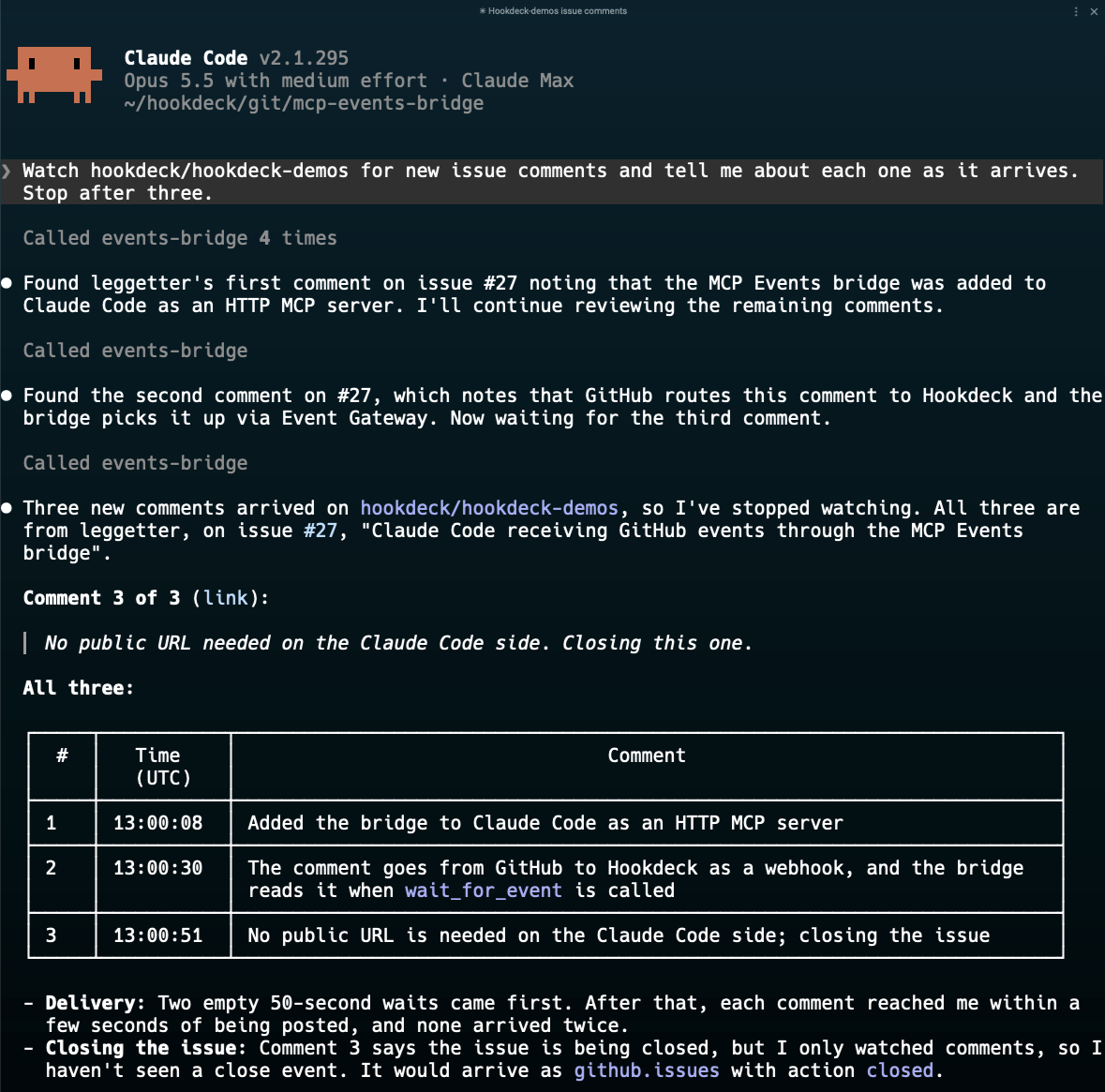
Run it under an agent that wakes on a command's output, and the agent hears about events while it's idle or busy with something else. Here Claude Code runs watch with its Monitor tool, answers another question, then reports an issue opening, two comments and the issue closing, each as it happens, with no prompt:
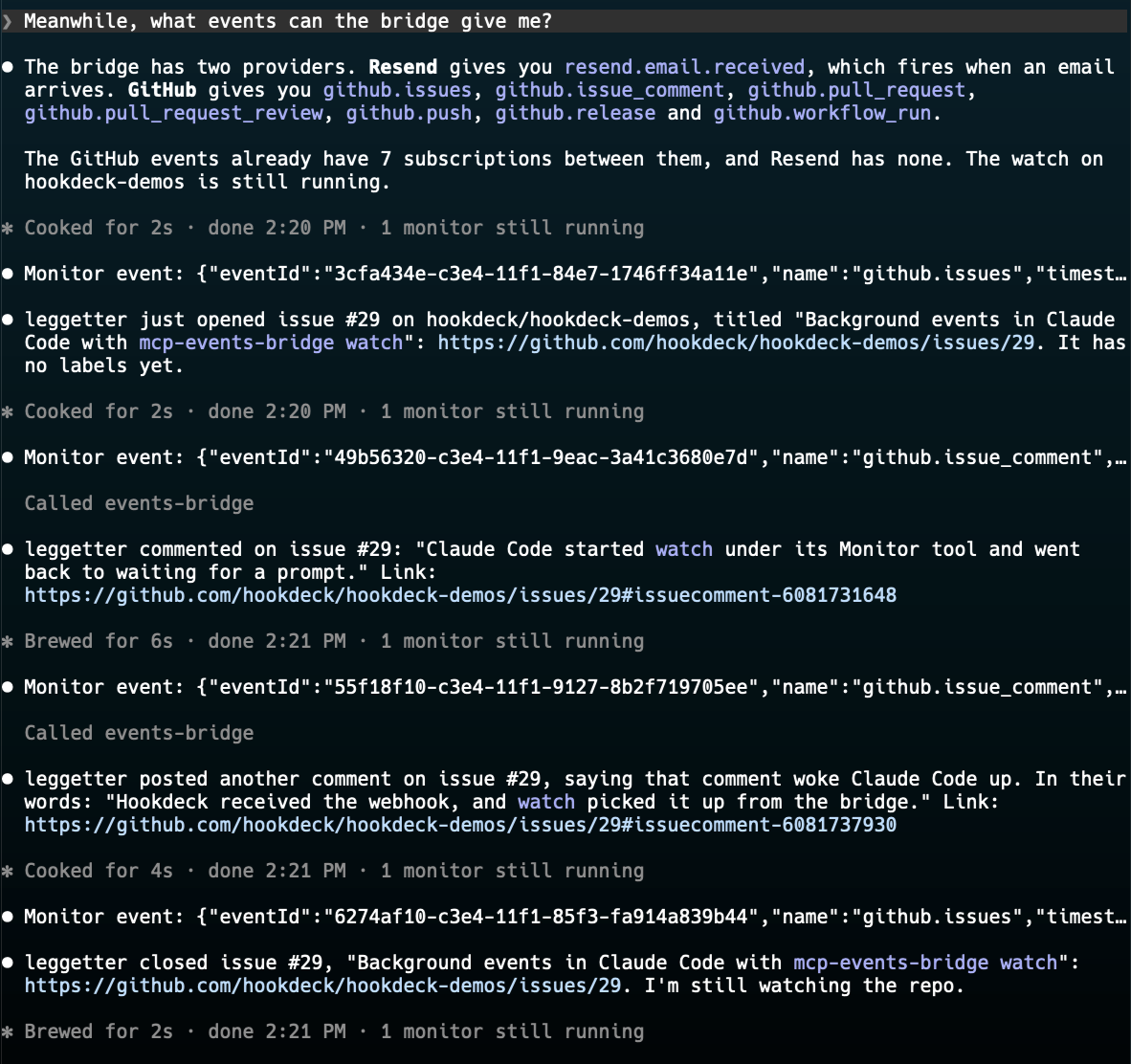
In Claude Code, install the plugin, which runs watch for the whole session and lets you say "watch <owner>/<repo> for new issues" (see the guide):
/plugin install mcp-events-bridge --marketplace hookdeck/mcp-events-bridge
watch also follows a watch list file that changes while it runs (--list, edited with mcp-events-bridge watches add|remove|list), and resumes where it left off. It reads the MCP URL from --url or BRIDGE_MCP_URL, else uses BRIDGE_PUBLIC_URL (or the local port) plus /mcp; to a URL ending /mcp it sends BRIDGE_MCP_SECRET as Authorization: Bearer. It retries when the bridge can't be reached. watch --help lists the options.
An agent on a laptop has no public URL to receive webhooks on. Run the bridge on the same machine, in its own Hookdeck project, and it gives the agent one per subscription, through Event Gateway and the Hookdeck CLI:
create_tunnel_url tool: your agent name, a name for the subscription, and your local port (default 3000) and path (default /events). Your first URL sets the port and path, and the rest share them.events/subscribe, using the URL and a whsec_ secret your agent generates. Event Gateway answers the challenge. Deliveries arrive at http://localhost:<port><path>, signed with your secret; route them by X-MCP-Subscription-Id.That's all the agent does. The bridge runs hookdeck listen for your port, and restarts it to cover each new URL. Deliveries missed while listen was down (the laptop slept, or during a restart) wait in Event Gateway, and the bridge sends them again when it reconnects, with the same webhook-id and a fresh signature, so standard verification (including its 5-minute window) passes. Delivery is at least once: dedupe by webhook-id. Source events that reach Event Gateway while the bridge itself is stopped are recovered the same way when it starts again.
If your agent builds every callback URL from one base URL plus a path, create one tunnel URL with path / and use it as the base: the URL covers the paths under it. A tunnel URL only accepts deliveries signed by the bridge, and one that no subscription has used for an hour is deleted. An agent name is a label, not an identity: any client of the bridge's owner can use it.
What an agent's receiver has to do (signatures, dedupe, missed deliveries) is in skills/mcp-events-bridge/references/receiving-deliveries.md. npm run e2e tests this path with a mock agent; see docs/PLAN.md.
Hermes Agent v0.22.5 and later work with a local bridge through a tunnel URL: Hermes subscribes, with your approval, and each event starts an agent run. MCP Events is experimental in Hermes too, and Hermes supports webhook delivery only.
skills/mcp-events-bridge/references/hermes-agent.md covers installing Hermes with what it needs, the tunnel URL, Hermes's configuration, subscribing and checking a delivery. The bridge is an MCP server in Hermes's config.yaml with events: true, and its secret goes in an Authorization: Bearer header that reads it from Hermes's .env, so the secret stays out of the model's context and Hermes's other files.
Three TypeScript MCP client libraries have experimental MCP Events support, and each works with the bridge (tested 26 Oct 2026, with a deployed bridge's /mcp endpoint or a local one through a tunnel URL):
skills/mcp-events-bridge/references/library-clients.md has the code for each: the bearer header, the callback URL (your own route, or a path under a tunnel URL with a local bridge), and the receiver.
BRIDGE_MCP_SECRET authenticates one owner, sent as Authorization: Bearer to /mcp, or in the URL (/mcp/<secret>) by clients that can only take a URL, such as ChatGPT. Prefer the header where the client supports it: a URL is easily logged or saved in a client's files, a header much less so. A bridge no ChatGPT connects to can turn the URL form off (BRIDGE_MCP_SECRET_URL=false). The secret is redacted from the bridge's logs and can be rotated by changing BRIDGE_MCP_SECRET. OAuth is planned, for ChatGPT without a secret in the URL.~/.claude/plugins/data/mcp-events-bridge-hookdeck/ (mcp-url and mcp-secret), readable only by you. Uninstalling the plugin deletes that directory.sender is the authenticated user, but an email's from can be forged, so don't rely on it alone.events/stream) may come later if clients need it. Local agents receive webhooks through the Hookdeck CLI (above). Poll mode misses a request that takes more than 60 seconds to appear in Event Gateway's request listing (it took up to 15 when measured).git clone https://github.com/hookdeck/mcp-events-bridge && cd mcp-events-bridge
npm install
cp .env.example .env # fill in; the comments explain each variable
npm test # unit and in-process integration tests, with a fake Event Gateway
npm run typecheck
npm run build # compiles to dist/, as published
npm run bridge -- setup # the CLI from source; this repo's bridge.config.ts imports from ./src
npm run e2e checks the whole path against real services. It starts a bridge and hookdeck listen, subscribes test subscribers whose callbacks are Event Gateway MCP Events sources (they answer the spec's challenge; hookdeck listen forwards deliveries), sends real email through Resend, and checks delivery, filters, get_event and unsubscribe. E2E_SOURCE=webhook drives the same checks with signed fills to a webhook source instead of emails, so it sends no email and uses no Resend quota (needs FILLS_WEBHOOK_SECRET, as below). E2E_GITHUB=1 adds a real GitHub push; E2E_LOCAL=1 adds a mock local agent receiving through tunnel URLs, with the bridge running hookdeck listen and catching up by itself, and the bridge recovering its own missed inbound; E2E_WEBHOOK=1 adds a webhook source, with the script as a trading server sending signed and wrongly signed fills (needs FILLS_WEBHOOK_SECRET, which enables the fills instance in this repo's bridge.config.ts, and setup run with it); E2E_EXTENDED=1 adds retries, duplicates, a 410 and failing callbacks (about 10 minutes; the status-code subscribers use a cloudflared tunnel, since an MCP Events source acknowledges deliveries itself); E2E_BRIDGE_URL=https://... runs against a deployed bridge.
Issues and pull requests are welcome. AGENTS.md has the project's conventions, for people and coding agents alike.
Releases are published to npm by GitHub Actions when a maintainer creates a GitHub Release, following the release skill.
Turn webhooks into MCP Events for AI agents, with the hosted Hookdeck Event Gateway receiving and delivering them. Sources include Resend, GitHub, Stripe, Slack and any signed webhook. Poll tools and
ภาพรวม
Turn webhooks into MCP Events for AI agents, with the hosted Hookdeck Event Gateway receiving and delivering them. Sources include Resend, GitHub, Stripe, Slack and any signed webhook. Poll tools and a Claude Code plugin cover clients without MCP Events support.
เครื่องมือ
ยังไม่มีรายการเครื่องมือ เซิร์ฟเวอร์แบบรีโมตจะได้รายการหลังการตรวจสอบสถานะครั้งแรก
FAQ
คัดลอกคอนฟิก stdio สำหรับ Cursor, Claude Desktop, Claude Code หรือ VS Code ได้ในหน้านี้ คอนฟิกนี้ใช้การติดตั้งของผู้เผยแพร่ ไม่ใช่พร็อกซีของ PlugMCP
ระเบียนนี้ไม่ได้ระบุตัวแปรสภาพแวดล้อมที่จำเป็น
MCP Events Bridge ทำงานแบบโลคัลผ่าน stdio
ตรวจสอบล่าสุดเมื่อ 2026-11-13 Turn webhooks into MCP Events for AI agents, with the hosted Hookdeck Event Gateway receiving and delivering them. Sources include Resend, GitHub, Stripe, Slack and any signed webhook. Poll tools and a Claude Code plugin cover clients without MCP Events support.

