PostgreSQL SSH MCP Server
A secure PostgreSQL MCP server with built-in SSH tunneling. Connect to databases through bastion hosts automatically — no manual required.
Power your agent
คำสั่งของผู้เผยแพร่เอง ไม่ใช่เอนด์พอยต์ของ PlugMCP
Host a copy with our keys and logs.
npx -y @iflow-mcp/[email protected]Claude Code ไม่มีลิงก์ติดตั้งสำหรับคำสั่งแบบโลคัล ให้คัดลอกคำสั่งด้านล่างแล้วรันในเทอร์มินัล
claude mcp add iflow-mcp-zlash65-postgresql-ssh-mcp -- npx -y @iflow-mcp/zlash65-postgresql-ssh-mcp@1.2.1รันในเทอร์มินัล
{ "mcpServers": { "iflow-mcp-zlash65-postgresql-ssh-mcp": { "command": "npx", "args": [ "-y", "@iflow-mcp/[email protected]" ] } }}claude_desktop_config.json
URL แบบรีโมตหรือคำสั่งบนเครื่องของคุณ? การติดตั้งสองแบบต่างกันอย่างไร
รันบน PlugMCP
A new server you create. It is not this listing's official endpoint. Use the publisher install when you want their URL and their credentials.
เปิดssh -L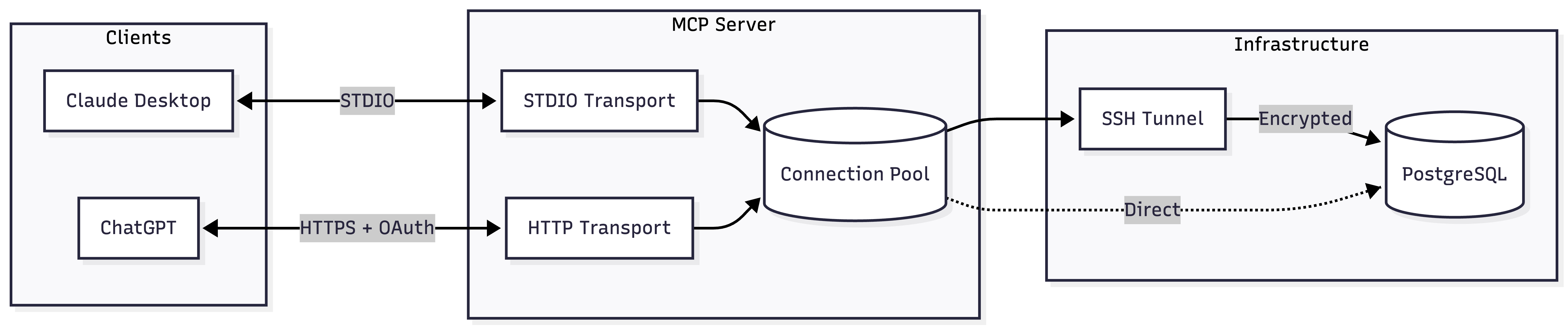
Add to your Claude Desktop config:
{
  "mcpServers": {
    "postgres": {
      "command": "npx",
      "args": ["-y", "@zlash65/postgresql-ssh-mcp"],
      "env": {
        "DATABASE_URI": "postgresql://user:password@localhost:5432/mydb"
      }
    }
  }
}
DATABASE_URI="postgresql://user:pass@localhost:5432/mydb" npx @zlash65/postgresql-ssh-mcp-http
Then configure ChatGPT to connect to https://your-subdomain.example.com/mcp.
Note: ChatGPT requires HTTPS. Use a tunnel (ngrok, Cloudflare Tunnel) for local testing.
*Either DATABASE_URI or all individual connection variables are required.
*Required when SSH_ENABLED=true
**Either SSH_PRIVATE_KEY_PATH or SSH_PASSWORD is required
*Required when MCP_AUTH_MODE=oauth
docker build --target runtime -t postgresql-mcp .
docker run -e DATABASE_URI="postgresql://..." postgresql-mcp
docker build --target runtime-http -t postgresql-mcp-http .
docker run -p 3000:3000 -e DATABASE_URI="postgresql://..." postgresql-mcp-http
# Install dependencies
npm install

# Build
npm run build

# Run tests
npm test

# Type check
npm run typecheck

# Lint
npm run lint
PostgreSQL MCP Server with built-in SSH tunneling for secure database access through bastion hosts
{ "mcpServers": { "iflow-mcp-zlash65-postgresql-ssh-mcp": { "command": "npx", "args": [ "-y", "@iflow-mcp/[email protected]" ] } }}เครื่องมือ
ยังไม่มีรายการเครื่องมือ เซิร์ฟเวอร์แบบรีโมตจะได้รายการหลังการตรวจสอบสถานะครั้งแรก
FAQ
คัดลอกคอนฟิก stdio สำหรับ Cursor, Claude Desktop, Claude Code หรือ VS Code ได้ในหน้านี้ คอนฟิกนี้ใช้การติดตั้งของผู้เผยแพร่ ไม่ใช่พร็อกซีของ PlugMCP
ระเบียนนี้ไม่ได้ระบุตัวแปรสภาพแวดล้อมที่จำเป็น
@iflow MCP/zlash65 Postgresql Ssh ทำงานแบบโลคัลผ่าน stdio
ตรวจสอบล่าสุดเมื่อ 2026-11-16 PostgreSQL MCP Server with built-in SSH tunneling for secure database access through bastion hosts
