mcp-telemetry
Instrument any MCP server's tool calls with a few lines, and any MCP client watching (Claude Code, Cursor, or your own tooling) gets live, structured progress — no polling, no context-flooding tool calls.
Power your agent
คำสั่งของผู้เผยแพร่เอง ไม่ใช่เอนด์พอยต์ของ PlugMCP
Host a copy with our keys and logs.
npx -y [email protected]Claude Code ไม่มีลิงก์ติดตั้งสำหรับคำสั่งแบบโลคัล ให้คัดลอกคำสั่งด้านล่างแล้วรันในเทอร์มินัล
claude mcp add io.github.arnavranjan005-mcp-telemetry-server -- npx -y mcp-telemetry-server@0.1.3รันในเทอร์มินัล
{ "mcpServers": { "io.github.arnavranjan005-mcp-telemetry-server": { "command": "npx", "args": [ "-y", "[email protected]" ] } }}claude_desktop_config.json
URL แบบรีโมตหรือคำสั่งบนเครื่องของคุณ? การติดตั้งสองแบบต่างกันอย่างไร
รันบน PlugMCP
A new server you create. It is not this listing's official endpoint. Use the publisher install when you want their URL and their credentials.
เปิดจากผู้เผยแพร่
Instrument any MCP server's tool calls with a few lines, and any MCP client watching (Claude Code, Cursor, or your own tooling) gets live, structured progress — no polling, no context-flooding tool calls.
Streams live progress from mcp-telemetry-sdk-instrumented tools to any connected MCP client.
Your MCP server                    mcp-telemetry server         Agent
─────────────────                  ────────────────────         ─────
mcp-telemetry-sdk
  job.stepStart('build')
       │
       │ local socket (queued, persistent connection)
       ▼
  collector receives event
  store updates job state
       │
       │ MCP notifications/progress
       ▼
                                    telemetry_subscribe tool     Claude Code
                                    pushes event to agent   →   sees inline
                                                                 live status
MCP tool calls are synchronous: an agent calls a tool, waits, gets a result. For anything long-running, that leaves two bad options — block the whole call with no visibility, or have the agent poll a status tool in a loop (which floods the conversation with repeated tool calls and burns context for no new information).
MCP does have one legitimate way for a server to push updates mid-call: notifications/progress, keyed to a progressToken on the in-flight request. But every MCP server author ends up re-implementing the same plumbing — extracting the token, wiring a timer, tailing output, cleaning up on completion. mcp-telemetry is that plumbing, factored out once, plus a companion server so a job started in one session can be watched from a completely different one.
Two packages, one job each:
These two packages are architecturally independent — the SDK never calls any MCP tool, and the server never imports your tool's code. They only ever meet at a local socket, so a producer with a broken connection can't take down anything, and a collector that's overwhelmed can't block your tool call.
mcp-telemetry-sdk)npm install mcp-telemetry-sdk
import { McpServer } from "@modelcontextprotocol/sdk/server/mcp.js";
import { MCPTelemetry } from "mcp-telemetry-sdk";

const server = new McpServer({ name: "my-deploy-server", version: "1.0.0" });
const telemetry = new MCPTelemetry(); // zero config — derives a socket path from cwd

server.tool("deploy", { env: z.string() }, async ({ env }) => {
  const job = telemetry.createJob({ task: `deploy ${env}` });

  job.start();
  job.stepStart("build");
  await runBuild();
  job.stepDone("build", { duration: 2100 });

  job.stepStart("test");
  const passed = await runTests();
  if (!passed) {
    job.stepFailed("test", "3 tests failed");
    await job.done(1);
    return { content: [{ type: "text", text: "Deploy failed at test stage" }] };
  }
  job.stepDone("test");

  await job.done(0);
  return { content: [{ type: "text", text: "Deployed successfully" }] };
});
That's the entire integration. If nothing is listening on the socket, every call is a fast no-op — your server behaves identically with or without a collector running.
mcp-telemetry-server)npm install -g mcp-telemetry-server
Register it as an MCP server, alongside your instrumented one:
{
  "mcpServers": {
    "deploy": { "command": "npx", "args": ["-y", "deploy-mcp"] },
    "telemetry": { "command": "npx", "args": ["-y", "mcp-telemetry-server"] }
  }
}
Then, in your agent session:
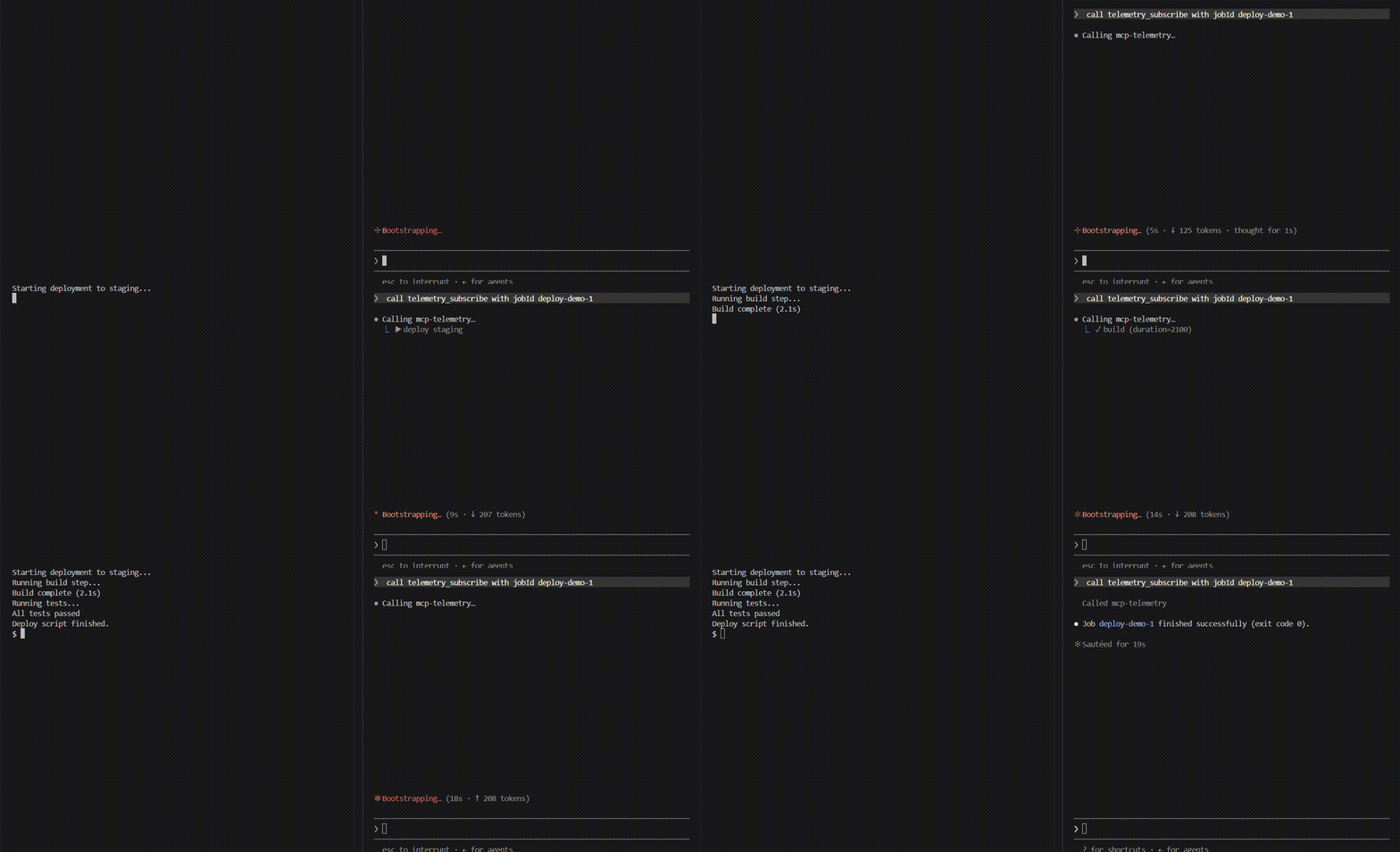
You:   deploy to staging
Agent: calls the deploy tool, then telemetry_subscribe with the returned job id

  ▶ deploy staging
  ↻ build
  ✓ build (duration=2100)
  ↻ test
  ✓ test
  ✓ job done (exit 0)

Agent: "Deployed to staging successfully."
No polling, no separate terminal, no context-flooding tool calls — one deploy call plus one telemetry_subscribe call, regardless of how long the job runs.
mcp-telemetry-sdknew MCPTelemetry(opts?)
Creates a telemetry client. opts.socketPath overrides the default (derived from process.cwd() via getSocketPath()). Owns one persistent, queued connection shared by every job it creates.
telemetry.createJob({ id?, task }) → JobHandle
Starts tracking a job. id defaults to an auto-incrementing job-N.
telemetry.disconnect()
Closes the underlying connection. Call on server shutdown if you want a clean teardown instead of letting it idle.
getSocketPath(root?) is also exported, for advanced cases where you need to compute the same path a producer and a server will independently derive.
mcp-telemetry-serverExposes three MCP tools:
Three genuinely different categories of approach exist near this space — none of them solve the same problem:
Relationship to SEP-1686 (MCP Tasks): the MCP spec's own answer to this problem — Accepted into the spec (not just proposed), giving requests a durable task handle (taskId) with tasks/get polling and a progressToken valid for the task's whole lifetime. It's the eventual "correct" fix, backed by real production cases (Amazon cites healthcare data pipelines, CI/CD wrapping, and multi-agent systems in the SEP itself). The catch: it's labeled awaiting-sdk-change — the standard is settled, but client/server SDKs haven't implemented it yet, so it isn't something you can rely on today. mcp-telemetry solves the same problem now, on the current stable protocol — a working bridge you can adopt today and retire once Tasks lands in the SDKs you depend on, not a competing standard.
done(). Every other event silently drops if the collector isn't reachable and nothing else triggers a retry — this is deliberate (telemetry should never be able to block or crash your actual tool call). done() is the one event that actively retries for a bounded window, since it's usually the last thing a job ever sends.telemetry_subscribe only shows live-forward events — it doesn't replay history. If a job already finished before you subscribed, use telemetry_job_status instead.git clone https://github.com/arnavranjan005/mcp-telemetry.git
cd mcp-telemetry
npm install
npm run build
npm test
See CONTRIBUTING.md for the full setup, monorepo layout, and PR expectations.
Streams live progress from mcp-telemetry-sdk-instrumented tools to any connected MCP client.
{ "mcpServers": { "io.github.arnavranjan005-mcp-telemetry-server": { "command": "npx", "args": [ "-y", "[email protected]" ] } }}เครื่องมือ
ยังไม่มีรายการเครื่องมือ เซิร์ฟเวอร์แบบรีโมตจะได้รายการหลังการตรวจสอบสถานะครั้งแรก
FAQ
คัดลอกคอนฟิก stdio สำหรับ Cursor, Claude Desktop, Claude Code หรือ VS Code ได้ในหน้านี้ คอนฟิกนี้ใช้การติดตั้งของผู้เผยแพร่ ไม่ใช่พร็อกซีของ PlugMCP
ระเบียนนี้ไม่ได้ระบุตัวแปรสภาพแวดล้อมที่จำเป็น
MCP Telemetry Server ทำงานแบบโลคัลผ่าน stdio
ตรวจสอบล่าสุดเมื่อ 2026-11-09 Streams live progress from mcp-telemetry-sdk-instrumented tools to any connected MCP client.
