Design Constraint Validator (DCV)
Mathematical constraint validator for design systems — ensuring consistency, accessibility, and logical coherence.
Power your agent
คำสั่งของผู้เผยแพร่เอง ไม่ใช่เอนด์พอยต์ของ PlugMCP
Host a copy with our keys and logs.
npx -y [email protected]Claude Code ไม่มีลิงก์ติดตั้งสำหรับคำสั่งแบบโลคัล ให้คัดลอกคำสั่งด้านล่างแล้วรันในเทอร์มินัล
claude mcp add io.github.cseperkepapp-design-constraint-validator -- npx -y design-constraint-validator@2.3.0รันในเทอร์มินัล
{ "mcpServers": { "io.github.cseperkepapp-design-constraint-validator": { "command": "npx", "args": [ "-y", "[email protected]" ] } }}claude_desktop_config.json
URL แบบรีโมตหรือคำสั่งบนเครื่องของคุณ? การติดตั้งสองแบบต่างกันอย่างไร
รันบน PlugMCP
A new server you create. It is not this listing's official endpoint. Use the publisher install when you want their URL and their credentials.
เปิดDesign Constraint Validator (DCV) validates design constraints across token sets and styles:
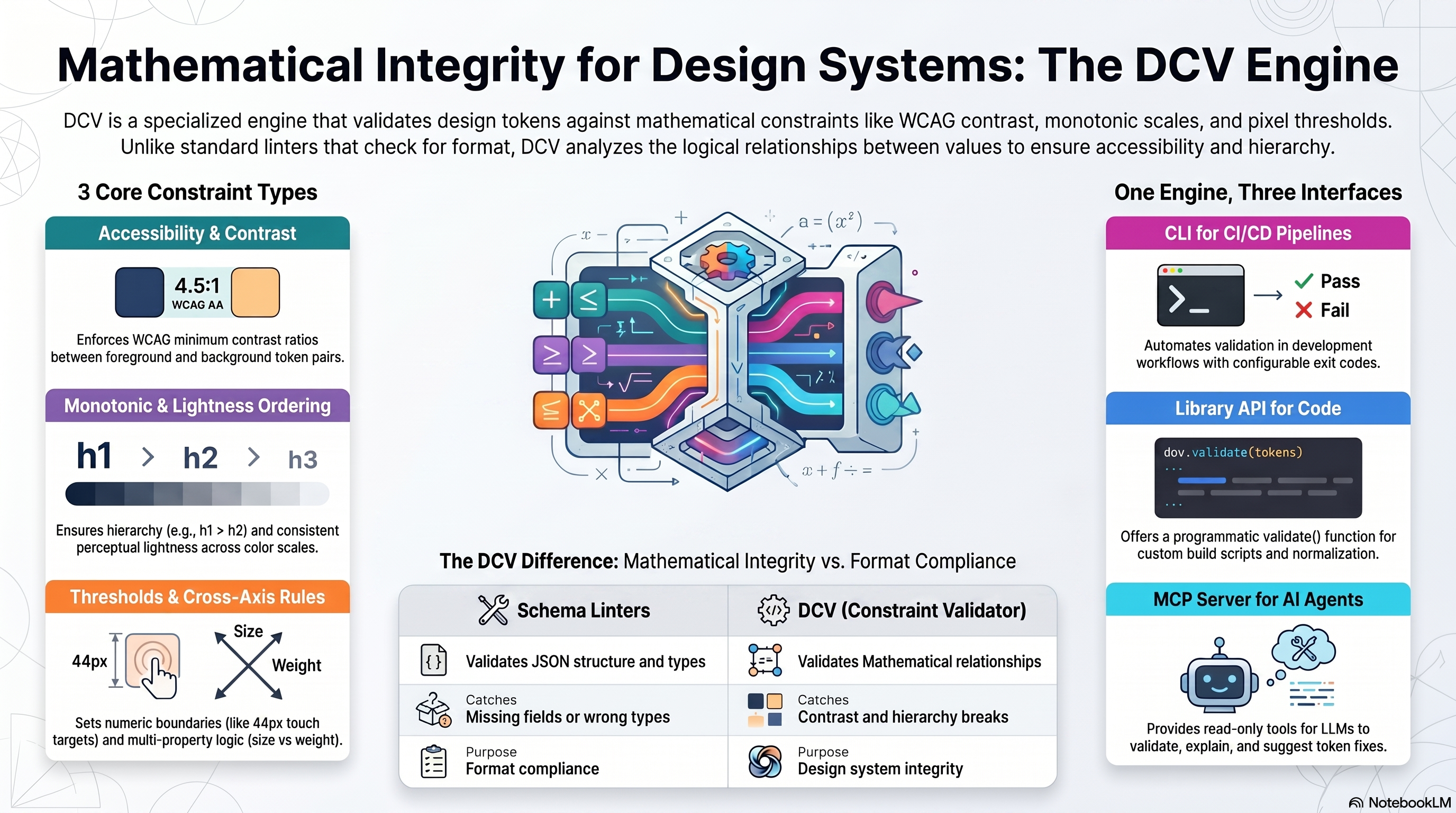
This is not a schema linter; it's a reasoning validator for values and relationships.
# Local (recommended)
npm i -D design-constraint-validator

# One-off run, no install (the bin name `dcv` belongs to an unrelated package)
npx design-constraint-validator --help
After a local install, the shorter dcv bin is available (e.g. npx dcv --help).
Requirements: Node.js ≥ 18.x (ESM)
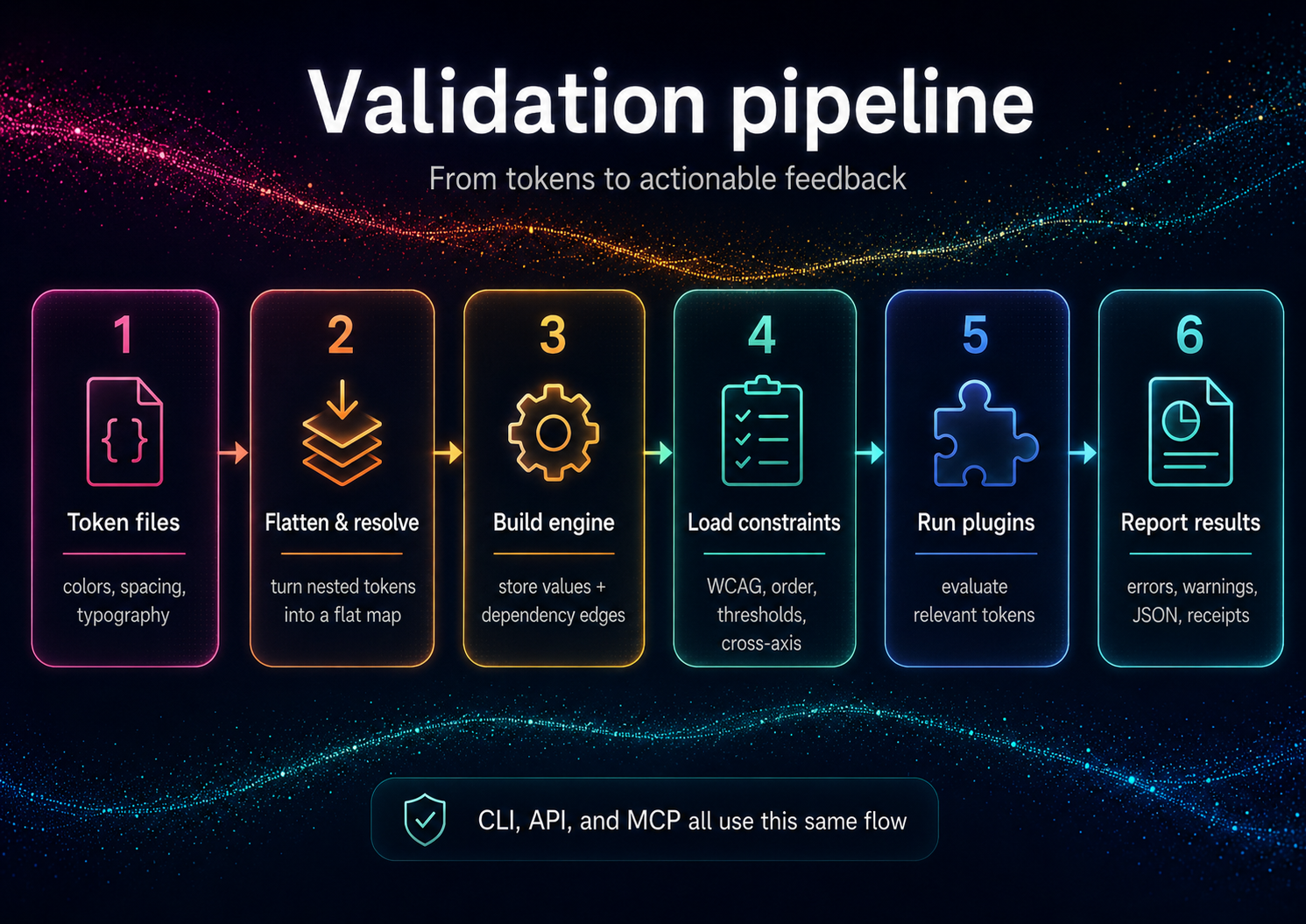
DCV validates your tokens against your constraints. From an empty directory:
# 1. Your design tokens (DTCG-style "$value")
cat > tokens.json <<'JSON'
{
  "color": {
    "text": { "$value": "#888888" },
    "bg":   { "$value": "#999999" }
  }
}
JSON

# 2. Your constraints — auto-discovered as dcv.config.json in the cwd
cat > dcv.config.json <<'JSON'
{
  "constraints": {
    "enableBuiltInWcagDefaults": false,
    "enableBuiltInThreshold": false,
    "wcag": [
      { "foreground": "color.text", "background": "color.bg", "ratio": 4.5, "description": "Body text on background" }
    ]
  }
}
JSON

# 3. Validate (positional path or --tokens; exits non-zero on violations)
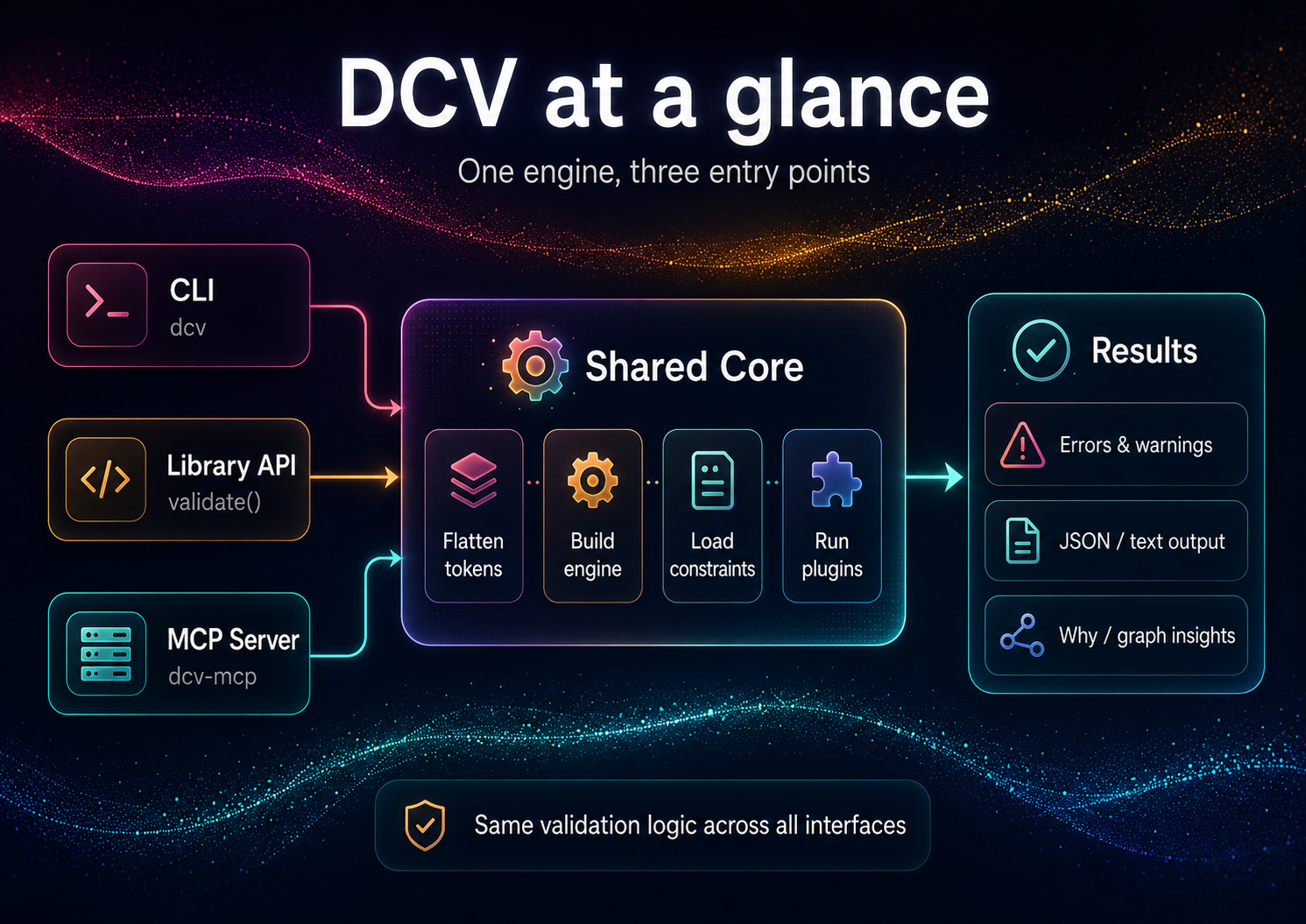
npx design-constraint-validator validate tokens.json --summary table

# Explain one token (the tokenId is required)
npx design-constraint-validator why color.text --tokens tokens.json --format table

# Export the dependency graph
npx design-constraint-validator graph --tokens tokens.json --format mermaid > graph.mmd
These one-offs use the full package name because the bare
dcvbin name on npm belongs to an unrelated package. Afternpm i -D design-constraint-validator, use the shorternpx dcv ….
Example output (validate):
validate: 1 error(s), 0 warning(s)
ERROR wcag-contrast  color.text|color.bg @ Body text on background — Contrast 1.24:1 < 4.5:1
scope   rules  warnings  errors
------  -----  --------  ------
global  1      0         1
Exit code is 1 when violations are found, 0 when clean (use --fail-on off to always exit 0). The built-in WCAG/threshold defaults target the bundled example token ids, so disable them (as above) when validating your own token names.
import { validate } from 'design-constraint-validator';

// Synchronous. Point at files, or pass `tokens` / `constraints` inline.
const result = validate({
  tokensPath: './tokens.json',
  configPath: './dcv.config.json', // omit to auto-discover dcv.config.json in the cwd
});

if (!result.ok) {
  for (const v of result.violations) {
    console.log(`[${v.ruleId}] ${v.message}`);
  }
  process.exitCode = 1;
}
See API Reference for complete programmatic usage.
DCV ships a second binary, dcv-mcp, that exposes the validator over MCP stdio for agent clients. Add it to a Claude Desktop or generic MCP client config like this:
{
  "mcpServers": {
    "dcv": {
      "command": "npx",
      "args": ["-y", "--package", "design-constraint-validator", "dcv-mcp"]
    }
  }
}
The server exposes six read-only, JSON-returning tools:
validate - validate inline tokens or a tokensPath against inline constraints or a config file.why - explain provenance, aliases, dependencies, dependents, and alias chain for one token id.graph - return token dependency nodes and edges.list-constraints - enumerate the active constraints (WCAG pairs, thresholds, order/lightness scales, cross-axis) for the given input.explain - turn a violation into plain-English text plus machine-readable facts.suggest-fix - compute a verified satisfying value for a violation (WCAG color, threshold/monotonic boundary) without writing anything.The three derivation tools (list-constraints, explain, suggest-fix) stay read-only — they return suggestions; applying them is up to you (dcv set / dcv patch). See AI Guide for the full agent loop.
Tool failures are returned as structured JSON: { "ok": false, "error": { "code": "...", "message": "..." } }.
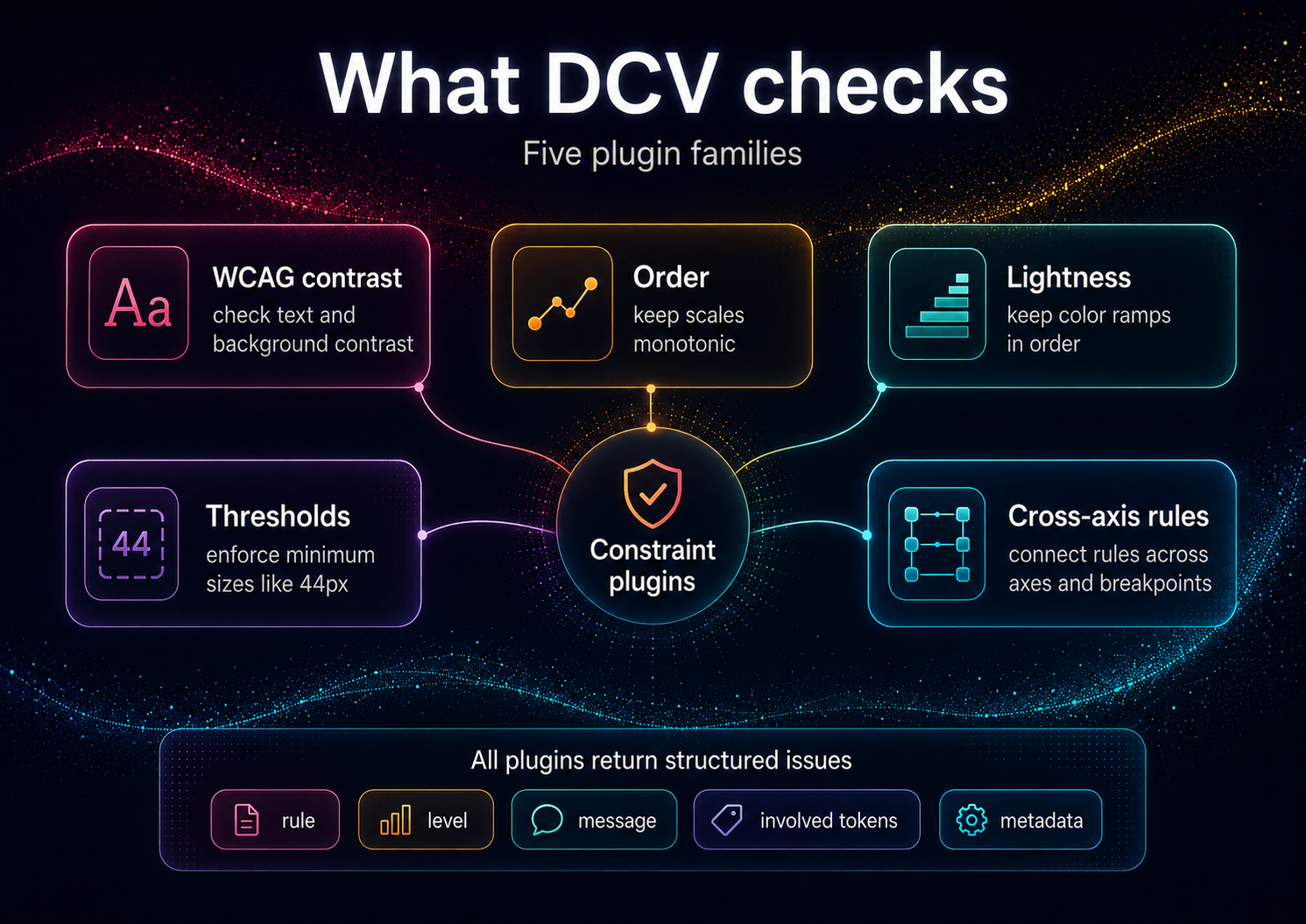
Conventional linters catch schema issues ("has a value, has a type"). DCV enforces relationships that matter to users and brand integrity:
This transforms tokens from "bags of numbers" into a formal design system.
DCV is not affiliated with Anima's
design-tokens-validator(schema-focused).
DCV accepts token JSON (flat or nested) and optional policy JSON. Adapters normalize common ecosystems:
{alias} references, $extensions passthrough; non-sRGB spaces warn rather than mis-calculate; composite types out of scope). See examples/dtcg/Full adapter documentation: Adapters
DCV is the standalone validation engine — use it for any token system.
DecisionThemes (coming 2026) is a complete design system framework built on DCV:
DCV powers DecisionThemes' validation layer — but works perfectly standalone. Preview: www.decisionthemes.com
The Design Constraint Validator engine is based on a theming and validation method published as defensive prior art.
To understand the underlying architecture (Decision Themes / Value Themes, deterministic compute, post-compute validation and receipts):
These documents keep the method openly implementable and prevent patent lock-up.
DCV generates CycloneDX-compliant SBOMs for supply chain transparency:
npx @cyclonedx/cyclonedx-npm in project rootDownload:
dcv validate --receipt already emits environment + input content hashes today; cryptographic signing is the roadmap partConstraints, not conventions.
Design systems need mathematical guarantees. This validator:
This is the core validation engine. For a complete decision-driven design system with a 5-axis framework (Tone, Emphasis, Size, Density, Shape) and theme configurator UI, see DecisionThemes (coming soon).
Contributions welcome! See CONTRIBUTING.md
MIT © Cseperke Papp
Validate design tokens for accessibility, scales, and design-system constraint consistency.
{ "mcpServers": { "io.github.cseperkepapp-design-constraint-validator": { "command": "npx", "args": [ "-y", "[email protected]" ] } }}เครื่องมือ
ยังไม่มีรายการเครื่องมือ เซิร์ฟเวอร์แบบรีโมตจะได้รายการหลังการตรวจสอบสถานะครั้งแรก
FAQ
คัดลอกคอนฟิก stdio สำหรับ Cursor, Claude Desktop, Claude Code หรือ VS Code ได้ในหน้านี้ คอนฟิกนี้ใช้การติดตั้งของผู้เผยแพร่ ไม่ใช่พร็อกซีของ PlugMCP
ระเบียนนี้ไม่ได้ระบุตัวแปรสภาพแวดล้อมที่จำเป็น
Design Constraint Validator ทำงานแบบโลคัลผ่าน stdio
ตรวจสอบล่าสุดเมื่อ 2026-11-09 Validate design tokens for accessibility, scales, and design-system constraint consistency.

