doc2mcp
Documentation infrastructure for AI agents
Paste any docs URL → get a hosted, Cursor-ready MCP server in under 60 seconds.
Power your agent
URL ของผู้เผยแพร่เอง ไม่ใช่เอนด์พอยต์ของ PlugMCP
Host a copy with our keys and logs.
https://doc2mcp.site/api/mcp/52d6b035-f43d-409a-abcb-affb352eee63/mcpปุ่ม Claude ด้านบนจะเปิด Claude พร้อมกรอกชื่อและ URL ให้แล้ว คุณยังต้องยืนยันที่นั่นเอง
claude mcp add --transport http io.github.doc2mcp-uagents https://doc2mcp.site/api/mcp/52d6b035-f43d-409a-abcb-affb352eee63/mcpRun in a terminal.
{ "mcpServers": { "io.github.doc2mcp-uagents": { "command": "npx", "args": [ "-y", "mcp-remote", "https://doc2mcp.site/api/mcp/52d6b035-f43d-409a-abcb-affb352eee63/mcp" ] } }}claude_desktop_config.json
URL แบบรีโมตหรือคำสั่งบนเครื่องของคุณ? การติดตั้งสองแบบต่างกันอย่างไร
รันบน PlugMCP
A new server you create. It is not this listing's official endpoint. Use the publisher install when you want their URL and their credentials.
เปิด⭐ Star this repo — it helps developers discover doc2mcp on GitHub and the MCP Registry.
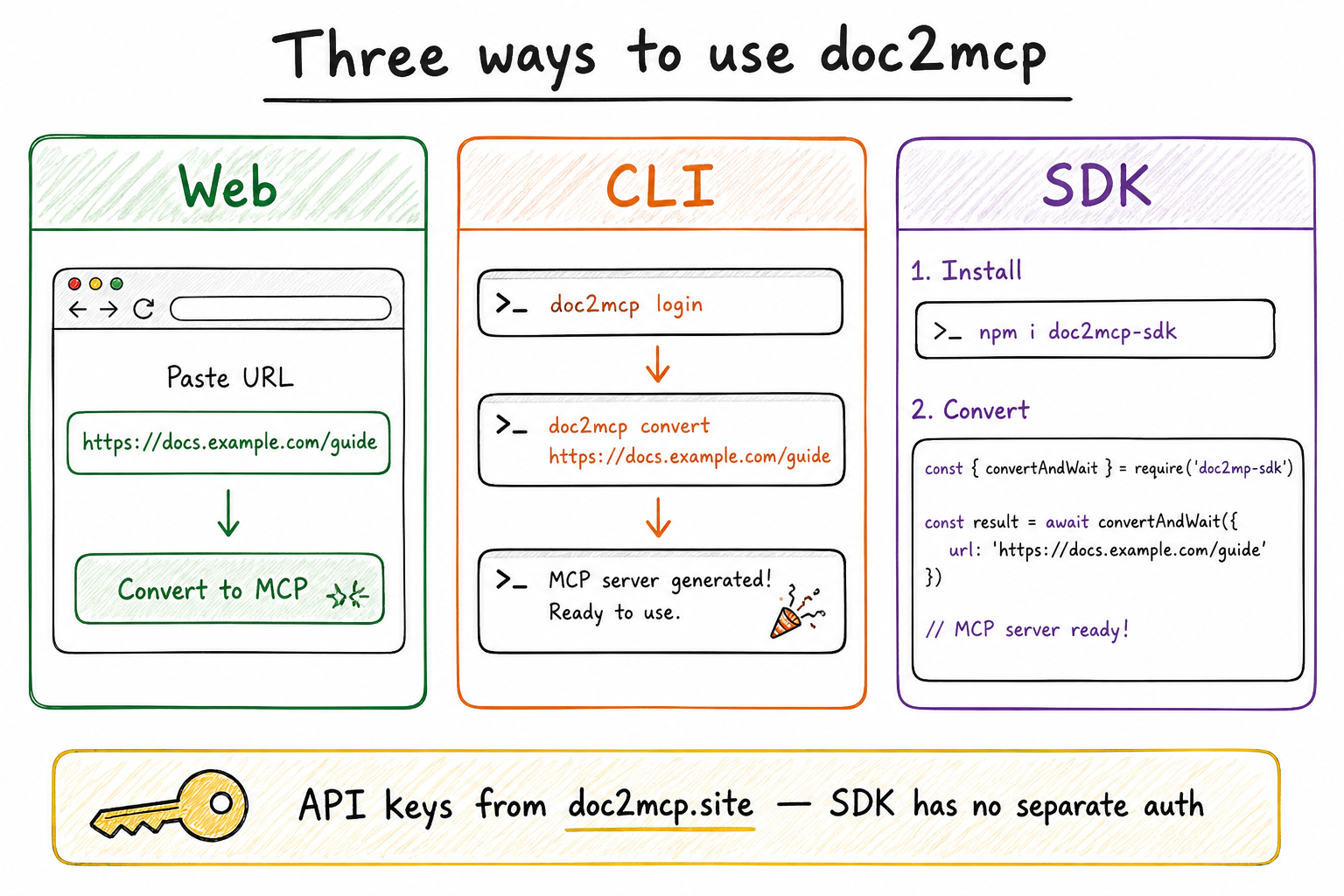
API keys always come from doc2mcp.site (User PAT + project token). The SDK has no separate login.
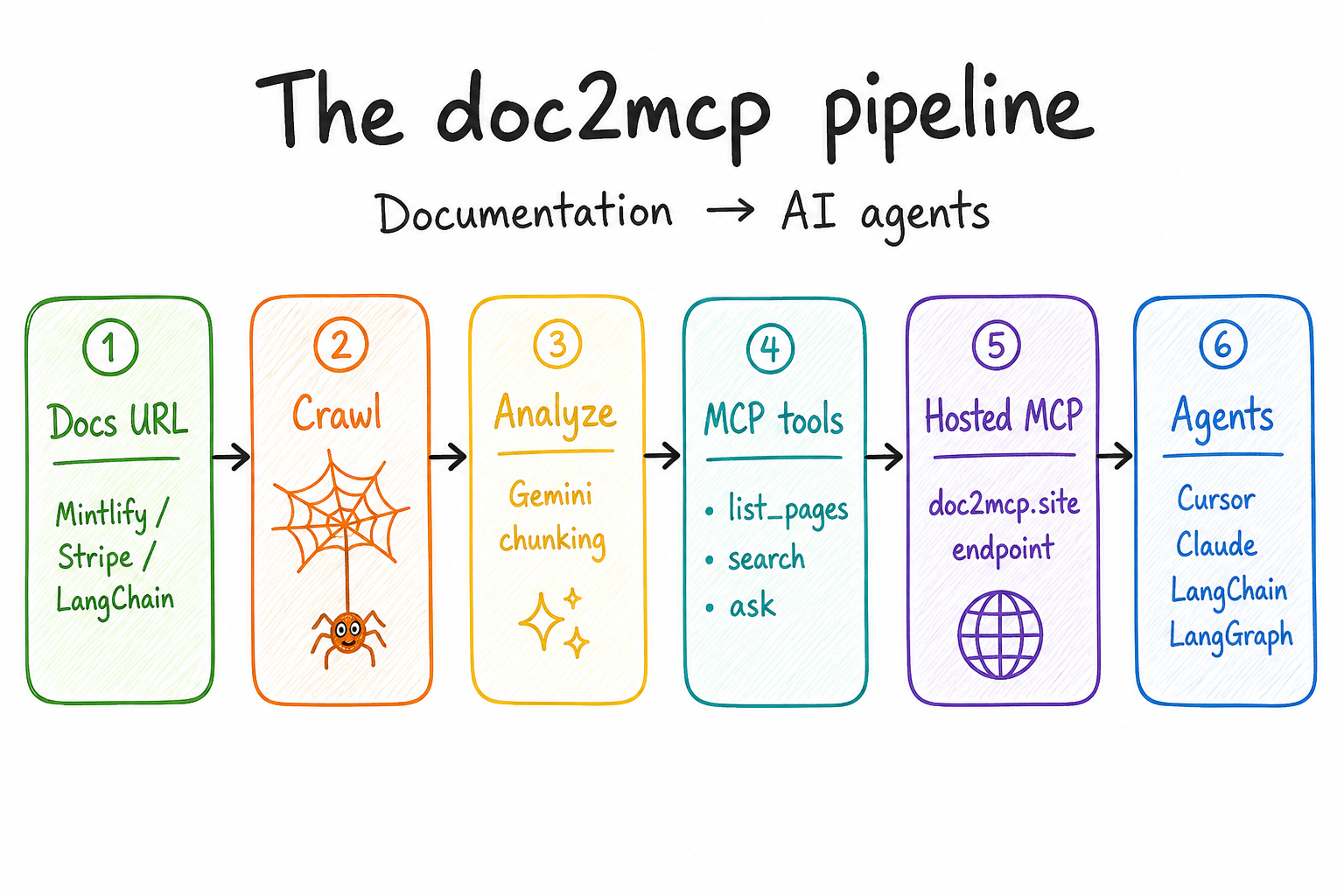
Docs URL → crawl → analyze → MCP tools → hosted endpoint → Cursor / Claude / LangChain / LangGraph.
{
  "mcpServers": {
    "my-docs": {
      "url": "https://doc2mcp.site/api/mcp/{project_id}/mcp",
      "headers": { "Authorization": "Bearer <project-token>" }
    }
  }
}
npm install -g doc2mcp
doc2mcp login                 # creates User PAT (d2mcp_pat_…)
doc2mcp https://docs.example.com
Lists the same projects as the dashboard. Install helpers for Cursor / VS Code / Claude / Windsurf.
doc2mcp-sdk)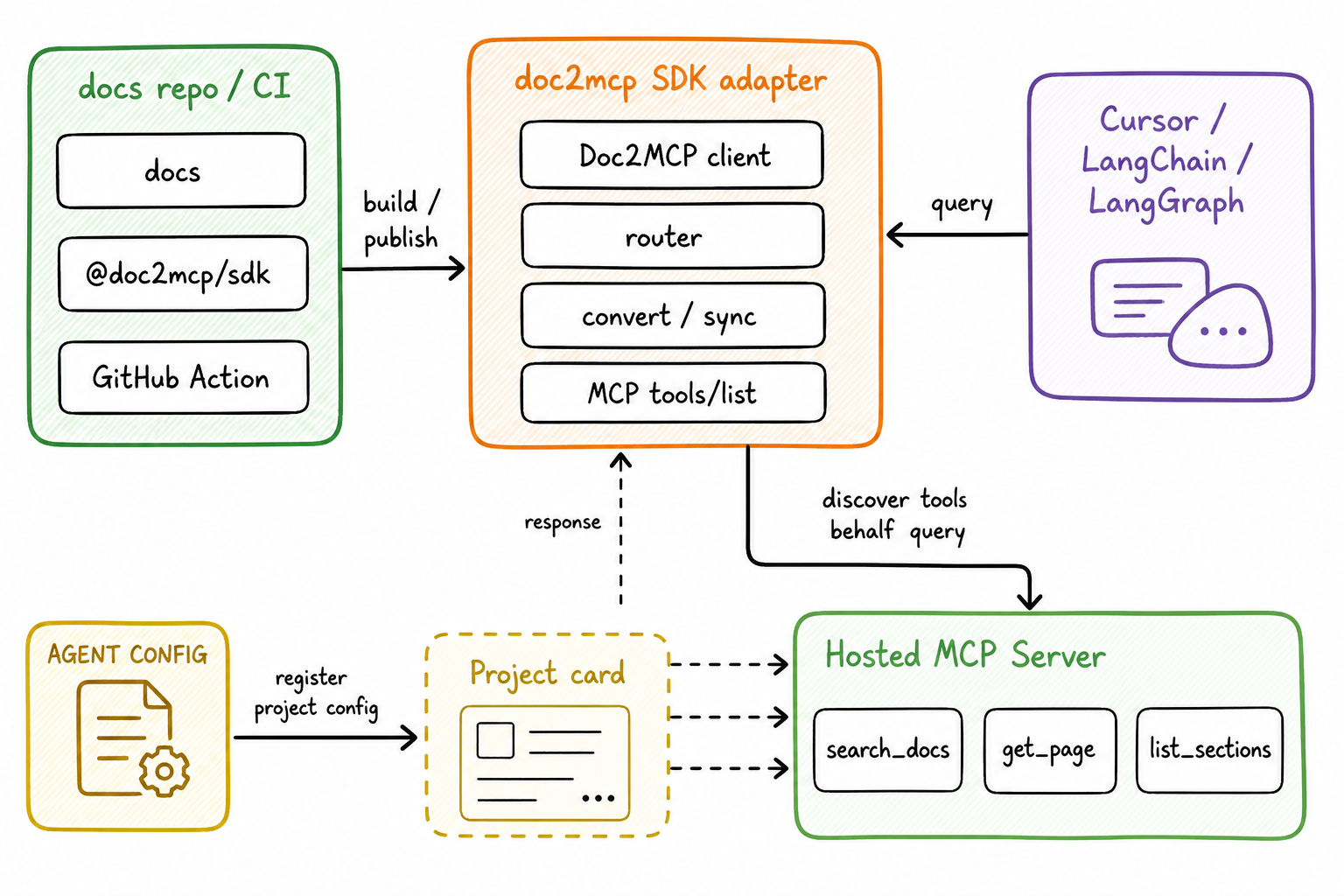
npm i doc2mcp-sdk
import { Doc2MCP } from "doc2mcp-sdk";

// User PAT from doc2mcp.site / `npx doc2mcp login` — SDK has no auth of its own
const client = new Doc2MCP({ token: process.env.DOC2MCP_API_TOKEN! }); // Settings → d2mcp_usr_…

const ready = await client.convertAndWait({
  sourceUrl: "https://js.langchain.com/docs",
});

const answer = await client.callToolText({
  mcpUrl: ready.mcp.url,
  mcpToken: ready.mcp.token, // project token d2mcp_…
  name: "search_documentation",
  arguments: { query: "how do runnables work?" },
});
Full handbook (API keys, Cursor, Claude, LangChain, LangGraph, LangSmith, OpenAI, Vercel AI SDK, CrewAI, AutoGen, Mastra):
Product docs page: doc2mcp.site/docs/sdk
staging → open PR → stagingGemini PR review) fails the check on must-fix — fix blockers before mergeopensourcedoc2mcp → Starter free for 12 months on PricingMore: doc2mcp.site/open-source
pnpm install
cp .env.example .env.local
pnpm dev
pnpm check
pnpm exec tsc --noEmit --skipLibCheck
Feature → staging (preview) → main → v* tag deploys production on Vercel.
PR checks: Biome/Ultracite, TypeScript, Next build, CLI build, Gemini AI review (must-fix → failed check).
MIT — see LICENSE.
MCP server for uagents documentation, generated by doc2mcp.
{ "mcpServers": { "io.github.doc2mcp-uagents": { "url": "https://doc2mcp.site/api/mcp/52d6b035-f43d-409a-abcb-affb352eee63/mcp", "headers": {} } }}เครื่องมือ
ยังไม่มีรายการเครื่องมือ เซิร์ฟเวอร์แบบรีโมตจะได้รายการหลังการตรวจสอบสถานะครั้งแรก
FAQ
คัดลอกคอนฟิก http สำหรับ Cursor, Claude Desktop, Claude Code หรือ VS Code ได้ในหน้านี้ คอนฟิกนี้ใช้การติดตั้งของผู้เผยแพร่ ไม่ใช่พร็อกซีของ PlugMCP
ระเบียนนี้ไม่ได้ระบุตัวแปรสภาพแวดล้อมที่จำเป็น
Uagents เข้าถึงได้ผ่าน HTTP
ตรวจสอบล่าสุดเมื่อ 2026-11-09 MCP server for uagents documentation, generated by doc2mcp.