Rotate API keys and tokens across providers from one CLI: mint the new key,
push it to everything that uses it, verify it, retire the old one. Includes an
MCP server.
Only touches accounts you administer — every provider acts with your own
credential.
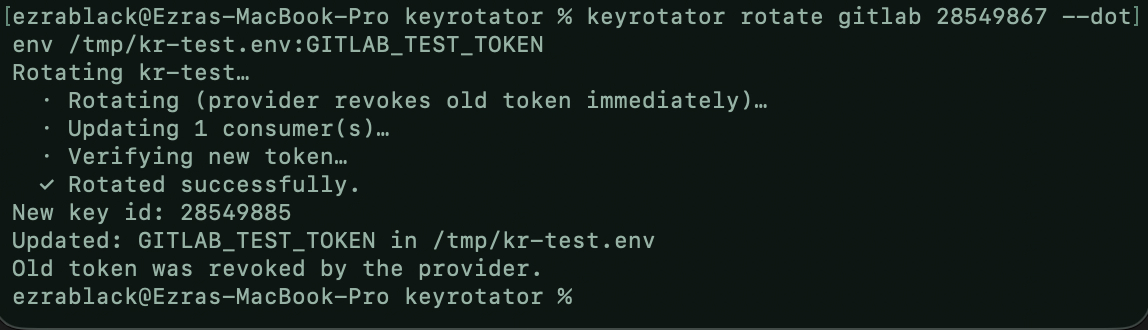
CLI — rotate a GitLab token straight into a .env file:
Rotate API keys across AWS, GitLab, Cloudflare, OpenAI & more. Secrets never reach the model.
2026-11-09
ดาว
—
เครื่องมือ
—
อัปไทม์
—
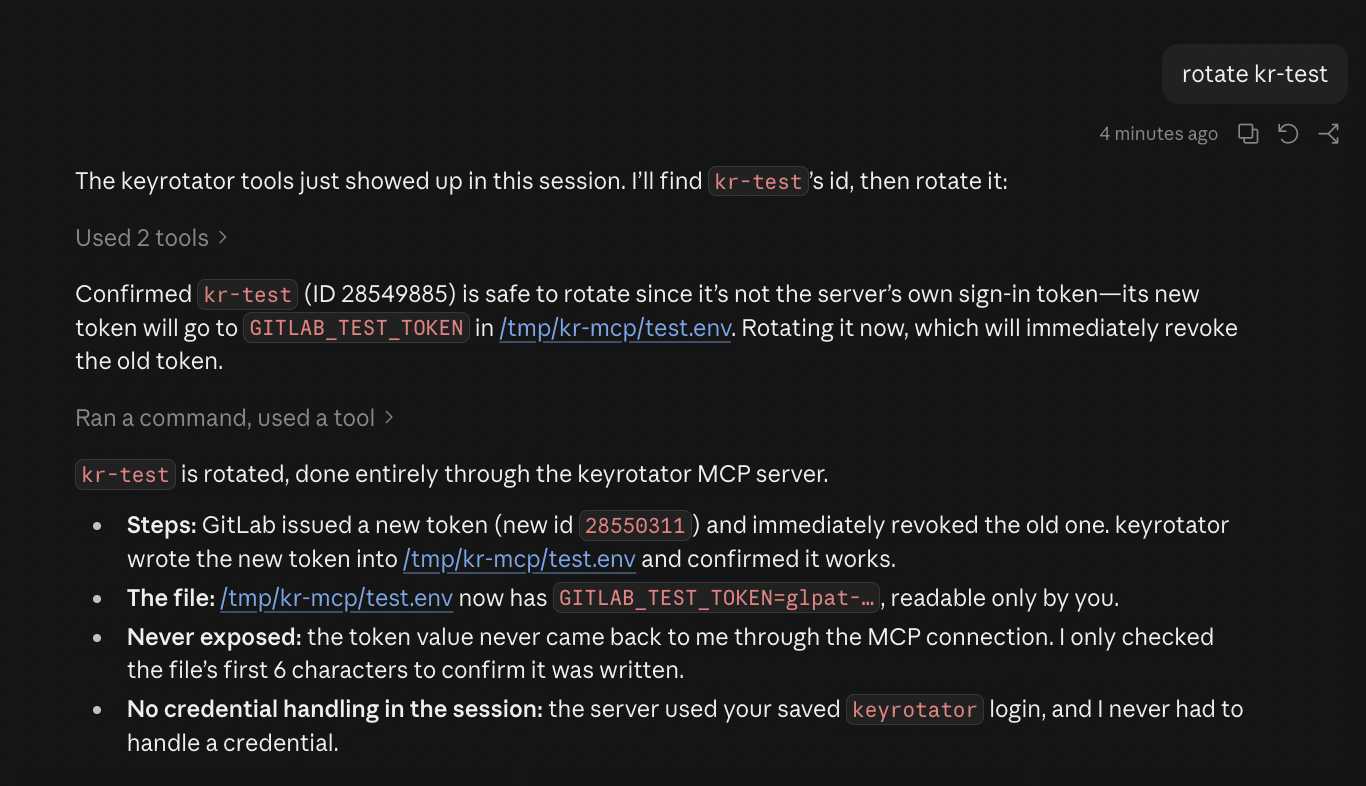
MCP — Claude rotating the same token through rekey mcp; the secret
never reaches the model:
Install
Prebuilt binaries for macOS, Linux and Windows:
Releases.
Here's what will happen:
  1. GitLab replaces "kr-test" with a new token and immediately revokes the old one. This can't be undone.
  2. The new token is saved to KR_TEST_TOKEN in /tmp/kr-test.env.
  3. rekey checks that the new token works.

Go ahead? [Y/n] y

Rotating kr-test…
  · Rotating (provider revokes old token immediately)…
  · Updating 1 consumer(s)…
  · Verifying new token…
  ✓ Rotated successfully.

New key id: 28550312
Updated: KR_TEST_TOKEN in /tmp/kr-test.env
Old token was revoked by the provider.
For real keys: run rekey rotate gitlab with no arguments — it lets
you pick the key and destination and can save that to rekey.toml, so
the next rotation is one command. In scripts/CI:
Opens the provider's token page (GitLab: pre-filled), takes the pasted token, verifies it, saves it to the OS keychain. --url for self-hosted GitLab / Datadog site. No provider: show status.
logout <provider>
Remove saved credentials (doesn't revoke them).
connect <provider>
Check credentials and key-management access.
list <provider>
List keys. Column 1 is the id other commands take.
rotate <provider> [id]
Rotate one key.
rotate-all <provider>
Rotate every key that has a destination. Skips the key you're signed in with.
retire <provider> [id]
Deactivate (where supported) or delete an old key. --delete to delete a deactivated key.
mcp
MCP server on stdio.
Global: --config <path>, --no-input (fail instead of prompting).
--yes skips confirmation. Omitted args are prompted for in a TTY. Flags go in
any order. stdout carries only list output and --print-secret values;
everything else is stderr.
Destinations
rotate refuses to start unless the new secret has at least one destination.
Flag
Destination
--dotenv <path>[:VAR]
Set VAR in a .env file. Default VAR per provider; AWS also writes AWS_ACCESS_KEY_ID.
--gh-secret <owner/repo>:<NAME>
GitHub Actions secret via gh (stdin).
--ssm <name>:<region>
AWS SSM SecureString via aws (stdin).
--secret-file <path>
File, mode 0600.
--secret-dir <dir>
rotate-all: one 0600 file per key.
--keychain
OS keychain, service rekey.
--print-secret
stdout.
Repeatable flags: --dotenv, --gh-secret, --ssm.
--delete-old-now deletes the old key right after the new one is delivered.
Config
./rekey.toml, then ~/.config/rekey/config.toml. Contains no
secrets. Interactive rotate can write entries for you.
[[keys]]
provider = "gitlab"
name = "ci-deploy"            # match on id, name and/or principal
consumers = [
  { type = "dot_env_file", path = ".env", variable = "GITLAB_TOKEN" },
  { type = "github_actions_secret", repo = "me/app", secret_name = "GITLAB_TOKEN" },
]

[[keys]]
provider = "aws"
principal = "ci-user"         # IAM user; survives the new key id
consumers = [
  { type = "dot_env_file", path = ".env", variable = "AWS_SECRET_ACCESS_KEY", id_variable = "AWS_ACCESS_KEY_ID" },
  { type = "aws_ssm_parameter", name = "/ci/aws", region = "us-east-1" },
]
Consumer types: dot_env_file, github_actions_secret, aws_ssm_parameter,
file, keychain. Match on name/principal for providers that issue a new
id per rotation. Relative paths resolve against the config file. Full example:
rekey.toml.example.
Credentials
Lookup order: environment variable → saved login (rekey login) → prompt
(TTY only, offers to save). Never taken as flags. Rotating the token rekey
signs in with (GitLab, Cloudflare) updates the saved login.
REKEY_DISABLE_KEYCHAIN=1 disables keychain reads/writes.
Providers
Provider
Style
Rotates
Credentials
Notes
aws
overlap
IAM access keys
aws CLI session, AWS_PROFILE
Max 2 keys per user; refuses if both exist. Old key → Inactive.
Verify fails or all deliveries fail: new key deleted, nothing changed. Some deliveries fail: both keys stay live, exit 1.
atomic
rotate (old revoked by provider) → deliver → verify
Irreversible. All deliveries fail: secret written to rekey-rescue-*.secret (0600).
ephemeral
mint → verify → deliver
Old token expires on its own.
manual
—
Prints manual steps.
Without --delete-old-now, an old key with no disabled state stays active;
the output gives the retire command. Exit code is non-zero whenever
something needs attention.
Delivers only to consumers in your config. No destination args.
retire_key
--allow-retire
Refuses the server's own login key.
Secret values are never returned to the client. Credentials come from the
environment or saved logins. On macOS, allow Keychain access once after
installing a new build.
Security
Secrets go to subprocesses via stdin, never argv.
Files rekey creates are 0600; existing .env permissions are kept;
writes are atomic.
Secret values are printed only with --print-secret.
Report vulnerabilities privately via the repo's Security tab.