Power your agent
คำสั่งของผู้เผยแพร่เอง ไม่ใช่เอนด์พอยต์ของ PlugMCP
Host a copy with our keys and logs.
npx -y [email protected]Claude Code ไม่มีลิงก์ติดตั้งสำหรับคำสั่งแบบโลคัล ให้คัดลอกคำสั่งด้านล่างแล้วรันในเทอร์มินัล
LINKEDIN_TOOLKIT_HOME=<value> claude mcp add io.github.formatixai-linkedin-toolkit -- npx -y linkedin-toolkit-mcp@2.1.0รันในเทอร์มินัล
{ "mcpServers": { "io.github.formatixai-linkedin-toolkit": { "command": "npx", "args": [ "-y", "[email protected]" ], "env": { "LINKEDIN_TOOLKIT_HOME": "<value>" } } }}claude_desktop_config.json
URL แบบรีโมตหรือคำสั่งบนเครื่องของคุณ? การติดตั้งสองแบบต่างกันอย่างไร
รันบน PlugMCP
A new server you create. It is not this listing's official endpoint. Use the publisher install when you want their URL and their credentials.
เปิดOperator, Browser Use, computer-use models and Playwright bots get challenged or banned on LinkedIn: headless fingerprints, datacenter IPs, machine-speed clicks. LinkedIn Toolkit gives any agent a safe, structured API to your own logged-in Chrome session — through the same internal endpoints the LinkedIn page itself calls, at human pace, under hard caps, with a human approval queue. It is also a free replacement for Waalaxy and PhantomBuster if you never touch an agent at all. No headless browser, no proxies, no cloud session, no telemetry, no subscription.
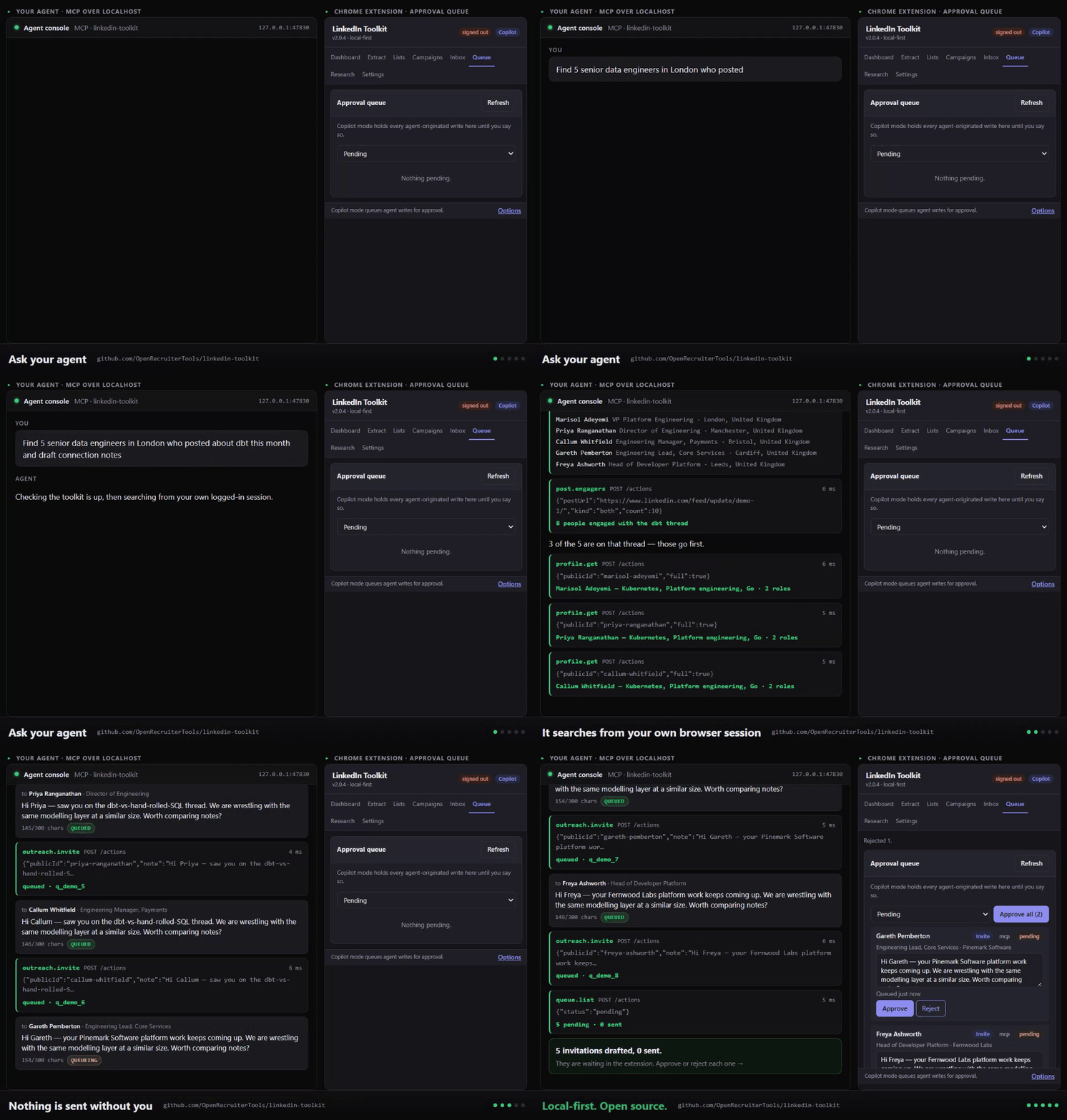
Recorded against the toolkit's own demo mode (lit serve --http --fake). Every tool call is real; everyone in it is invented.
One command, then three clicks in Chrome.
npx linkedin-toolkit-mcp setup --client claude-code
That downloads the extension for your version, checks it, unpacks it to
~/.linkedin-toolkit/extension, prints the pairing token, waits for the extension to connect,
and writes the MCP config block into your client's own config file — keeping every other
server in it and backing the file up first. --client takes claude-desktop, claude-code,
cursor, windsurf, vscode, n8n or print; add --dry-run to see what it would do
without touching anything.
Then the three steps Chrome does not let any installer do for you:
chrome://extensions — type it in the address bar; it does not come up in search.Paste the pairing token into the popup → Settings → Local bridge, and check it took:
lit status
Download linkedin-toolkit-extension-v*.zip from the
Releases page, unzip it
somewhere permanent (Chrome loads it from that folder on every start), then do the three steps
above. Run npx linkedin-toolkit-mcp for the pairing token, and copy the config block for your
client out of docs/clients.md.
docs/install.md is the same thing with screenshots, written for somebody who has never loaded an unpacked extension.
Mass unfollow — Preview first, then a small number, then the rest — is in docs/install.md. Read the "Connections are followed too" part before you decide the feature is broken: LinkedIn's Following list does not include your connections, who are followed automatically when you connect, so emptying that list to zero leaves a feed still full of posts. Ticking "Also unfollow my connections" scans your followers list instead, which is the only place that state is visible.
Every client's config file, path and shape: docs/clients.md · one page per ecosystem.
Not using MCP? lit serve --http gives you POST /actions/{action} and a generated
GET /openapi.json. Examples in seven languages.
[!IMPORTANT] Nothing sends without you. Copilot mode is the default: every write an agent makes queues for your approval in the popup. Hard caps live in the extension — 100 invites, 150 messages, 500 profile visits, 1,000 search results a day — and no agent, CLI flag or config file can raise them. Read the safety page before you turn Autopilot on.
Structured errors carry code, message, retryAfter and howToFix, so an agent recovers or
explains itself instead of retrying into a wall. There is an
llms.txt and an agent quickstart written for an agent to
read and self-install.
The long version, with the actual detection mechanisms: Why browser agents fail on LinkedIn.
LinkedIn's web client now serves nearly all of its data through
GET /voyager/api/graphql?queryId=<name>.<32-hex hash>&variables=(...), and those hashes change
with each web client release (current: 1.13.46474). The old REST Voyager paths that a generation of
2024–2025 extensions hard-coded return 400, 410 or 500 today. That is the mechanism — not a ban
wave. This extension calls the same GraphQL queries the page calls, from inside your own tab, and
keeps every query ID in one refreshable table with its capture date and client version:
docs/voyager-endpoints.md. lit endpoints check reports which are ok,
failed or unverified, and lit endpoints doctor names the query id whose hash went stale and the
key in the table that holds it, so drift is a maintenance task rather than an architecture change.
Honestly: those IDs will drift, and re-capturing them is the contribution this project most
needs. It is a table edit, not a rewrite — open DevTools on LinkedIn, filter the Network tab for
voyager/api, and copy the queryId from a request the page makes; the same hashes are also
literal strings inside LinkedIn's JS bundles if you would rather grep for them.
Competitor prices are public list prices checked September 2026 and are approximate — they change, vary by currency and billing term, and each vendor's tiers differ. Feature claims are taken from each vendor's public product pages, also checked September 2026, and tiers move. Check their sites before deciding anything. Corrections welcome via PR — if we have a feature wrong, open one and it gets fixed. Source for the Waalaxy column: its current Chrome extension listing, "Alien Copilot" by Waapi (Montpellier) — v1.1.3, updated August 2026, roughly 2,000 users, 3.0★ from 3 ratings — which describes itself as "your Waalaxy companion, helps you import prospects". On that listing the extension imports prospects into Waalaxy, and the automation runs on Waalaxy's servers using your session. Listing details read September 2026.
Drop in a CSV with any of name, linkedin_url, email, domain, company. Get back a dossier
per row, an enriched CSV, and a list — all local.
lit research leads.csv --out ./packs
linkedin-research-pack skill has
your agent use its own web search for news, talks, GitHub and podcasts, and write them into
the pack with sources. The extension never crawls the open web.pack.md and pack.json per row, an output.csv with every original column plus
resolved URL, title, company, location, signals and match confidence, and a new list.Caps apply throughout: resolution spends search quota, capture spends visit quota. A 500-row CSV is a multi-day job by design, and you get the ETA up front.
The honest position: LinkedIn's User Agreement prohibits automated access. This tool automates LinkedIn. Nothing below makes that risk zero.
What it does do:
config.set clamps whatever you pass.What it does not do is make you invisible. Running inside your own session removes the fingerprint and IP signals that get browser agents caught — it does nothing about how much you do or how regularly you do it, and LinkedIn counts both. That is exactly why the caps and the pacing are not configurable past a ceiling: they are the only defence left once the easy tells are gone. An account sending 90 invites a day at perfectly spaced intervals is still an account sending 90 invites a day.
Recommended settings, signs to stop, and your data-protection obligations: docs/safety.md.
flowchart LR
    A["Your agent<br/>Claude · Cursor · LangChain<br/>CrewAI · n8n · curl"]
    M["linkedin-toolkit-mcp<br/><i>your machine</i><br/>MCP · HTTP · SQLite · CLI"]
    E["Extension engine<br/><i>your Chrome</i><br/>quotas · delays · queue<br/>campaigns · lists"]
    Q["Approval queue<br/><i>you</i>"]
    L["LinkedIn<br/><i>your session, your cookies,<br/>your IP, your device</i>"]

    A -->|"MCP stdio / HTTP"| M
    M <-->|"ws://127.0.0.1:47829"| E
    E --> Q
    Q -->|"you approve"| E
    E -->|"Voyager API, human pace"| L
One engine, several clients: the popup, the CLI, an MCP tool call and a campaign step all go
through the same handle(action, params, origin) switch. The caps and the queue sit below it, so
there is no path around them — there is only one path. Full architecture ·
action contract · tool reference.
lit ships in the same npm package as the server.
lit setup --client cursor                                # install, pair, configure. Start here
lit status
lit search "CTO fintech London" --source salesnav --count 100 --csv out.csv
lit profile https://www.linkedin.com/in/... --full --json
lit engagers <post-url> --list "Post engagers 8 Sep"
lit invite <profile-url> --note "..."                    # queues in Copilot mode
lit campaign create --from sequences/warm-connect.json --list "Data leads"
lit inbox --since 24h --sentiment
lit research leads.csv --out ./packs
lit sql "select company, count(*) from profiles group by 1 order by 2 desc limit 20"
lit export --table profiles --csv
lit serve --http                                         # HTTP MCP + /actions + /openapi.json
Everything you capture mirrors into ~/.linkedin-toolkit/toolkit.db. Agents get read-only SQL over
it — no network, no quota, no rate limit — and you can open the same file in any SQLite tool.
-- Who accepted an invite but never replied
SELECT p.full_name, p.company, p.headline, a.created_at
FROM actions a
JOIN profiles p ON p.public_id = a.public_id
WHERE a.action = 'outreach.invite' AND a.accepted = 1
  AND p.public_id NOT IN (SELECT from_public_id FROM messages)
ORDER BY a.created_at DESC;
lit sql "select company, count(*) n from profiles group by 1 order by n desc limit 20"
An agent reaches the same thing through linkedin_query_sql with { "sql": "SELECT …" }.
SELECT only — anything else is rejected.
The server POSTs { event, payload } to a URL you set — invite_accepted, reply_received,
positive_reply, campaign_step_done, campaign_completed, quota_hit, challenge_detected,
queue_item_added, queue_item_sent, campaign_note_truncated, research_progress,
research_completed.
lit config set webhookUrl https://your-n8n/webhook/linkedin-events
An importable n8n workflow does the obvious thing with them: accepted invite →
profile.get → an LLM drafts a first message → it queues → Slack asks a human → approval link →
queue.approve.
Six task recipes in the Agent Skills format. They carry the guardrails — facts only, quota awareness, the approval queue as the expected destination — not just the tool sequence.
cp -r skills/* ~/.claude/skills/ # or ~/.openclaw/skills/, or ./.claude/skills/
linkedin-sourcer ·
linkedin-outreach-writer ·
linkedin-campaign-runner ·
linkedin-profile-to-dossier ·
linkedin-reply-triage ·
linkedin-research-pack
What is coming, and the things that will never be built because they need a server or break the local-first guarantee: docs/roadmap.md.
Adding an extractor is the best first contribution and touches four files: how to build one. Sequences, skills and agent integrations are merged fastest because they are additive and self-contained.
See CONTRIBUTING.md, pick up a good first issue, or open a Discussion.
THIS SOFTWARE IS PROVIDED "AS IS", WITHOUT WARRANTY OF ANY KIND. The authors and contributors accept no responsibility or liability for any consequences arising from its use, including but not limited to:
By using this software you acknowledge that:
This tool never bypasses a security measure: no CAPTCHA solving, no challenge circumvention, no detection evasion, no proxies, no cookie theft, no session sharing, no accounts you are not signed into. When LinkedIn puts up a wall, it stops and hands the problem to you.
Provided for educational and research purposes. We do not encourage or endorse violation of any platform's terms of service.
MIT.
This project uses all-contributors. Contributions of any kind are recognised here — code, docs, sequences, skills, bug reports, and design.
To add someone, comment on any issue or PR:
@all-contributors please add @username for code, doc
If it is useful, a star helps other people find it.
LinkedIn for AI agents from your own Chrome session: search, profiles, lists, outreach queue.
{ "mcpServers": { "io.github.formatixai-linkedin-toolkit": { "command": "npx", "args": [ "-y", "[email protected]" ], "env": { "LINKEDIN_TOOLKIT_HOME": "<value>" } } }}เครื่องมือ
ยังไม่มีรายการเครื่องมือ เซิร์ฟเวอร์แบบรีโมตจะได้รายการหลังการตรวจสอบสถานะครั้งแรก
FAQ
คัดลอกคอนฟิก stdio สำหรับ Cursor, Claude Desktop, Claude Code หรือ VS Code ได้ในหน้านี้ คอนฟิกนี้ใช้การติดตั้งของผู้เผยแพร่ ไม่ใช่พร็อกซีของ PlugMCP
ผู้เผยแพร่ระบุตัวแปรสภาพแวดล้อมเหล่านี้: LINKEDIN_TOOLKIT_HOME
LinkedIn Toolkit ทำงานแบบโลคัลผ่าน stdio
ตรวจสอบล่าสุดเมื่อ 2026-11-12 LinkedIn for AI agents from your own Chrome session: search, profiles, lists, outreach queue.
