multi-gmail-mcp
A Model Context Protocol (MCP) server that lets Claude Desktop manage multiple Gmail accounts simultaneously. Listed on the official Anthropic MCP registry and published on npm.
Power your agent
คำสั่งของผู้เผยแพร่เอง ไม่ใช่เอนด์พอยต์ของ PlugMCP
Host a copy with our keys and logs.
npx -y [email protected]Claude Code ไม่มีลิงก์ติดตั้งสำหรับคำสั่งแบบโลคัล ให้คัดลอกคำสั่งด้านล่างแล้วรันในเทอร์มินัล
GOOGLE_CLIENT_ID=<value> GOOGLE_CLIENT_SECRET=<secret> claude mcp add io.github.gx-55-multi-gmail-mcp -- npx -y multi-gmail-mcp@1.0.1รันในเทอร์มินัล
{ "mcpServers": { "io.github.gx-55-multi-gmail-mcp": { "command": "npx", "args": [ "-y", "[email protected]" ], "env": { "GOOGLE_CLIENT_ID": "<value>", "GOOGLE_CLIENT_SECRET": "<secret>" } } }}claude_desktop_config.json
URL แบบรีโมตหรือคำสั่งบนเครื่องของคุณ? การติดตั้งสองแบบต่างกันอย่างไร
รันบน PlugMCP
A new server you create. It is not this listing's official endpoint. Use the publisher install when you want their URL and their credentials.
เปิดจากผู้เผยแพร่
A Model Context Protocol (MCP) server that lets Claude Desktop manage multiple Gmail accounts simultaneously. Listed on the official Anthropic MCP registry and published on npm.
Manage multiple Gmail accounts in Claude Desktop — search, send, reply, draft, and organize.
~/.gmail-mcp-tokens.db — never committed to gitnpm install -g multi-gmail-mcp
This registers two global commands: gmail-mcp (the MCP server) and gmail-mcp-cli (account manager).
You only need to do this once.
gmail.readonly, gmail.send, gmail.modify, gmail.labels~/.gmail-mcp-oauth.jsonAlternatively, set environment variables in the Claude Desktop config (see below).
# Add accounts (opens browser for Google sign-in)
gmail-mcp-cli add [email protected]
gmail-mcp-cli add [email protected]

# List authenticated accounts
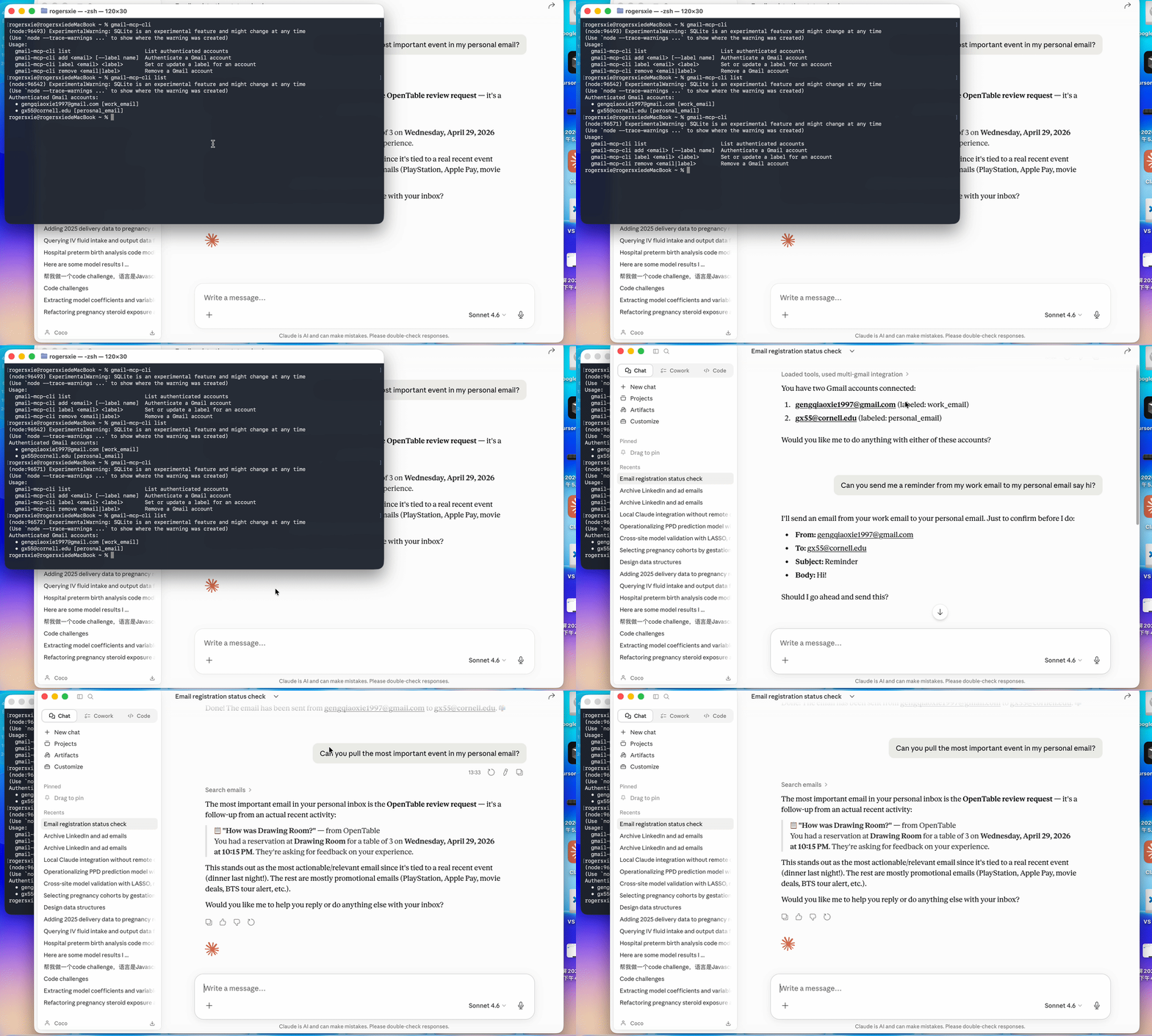
gmail-mcp-cli list

# Remove an account
gmail-mcp-cli remove [email protected]
Tokens are saved to ~/.gmail-mcp-tokens.db and refreshed automatically.
Edit ~/Library/Application Support/Claude/claude_desktop_config.json:
{
  "mcpServers": {
    "multi-gmail": {
      "command": "gmail-mcp"
    }
  }
}
If you prefer environment variables over ~/.gmail-mcp-oauth.json:
{
  "mcpServers": {
    "multi-gmail": {
      "command": "gmail-mcp",
      "env": {
        "GOOGLE_CLIENT_ID": "your-client-id.apps.googleusercontent.com",
        "GOOGLE_CLIENT_SECRET": "your-client-secret"
      }
    }
  }
}
Restart Claude Desktop after saving. Click the hammer icon to confirm 19 tools are loaded.
List all my authenticated Gmail accounts.
Search my [email protected] inbox for unread emails from this week.
Reply to that email from my personal account saying I'll be there Saturday.
Send an email from [email protected] to [email protected]
with subject "Dinner plans" and body "Are you free Saturday?"
Archive everything older than a week in my side-project inbox that's already read.
Check both my accounts for emails from GitHub and summarize them.
~/.gmail-mcp-oauth.json and ~/.gmail-mcp-tokens.db live in your home directory — outside the project, never committed.gitignore excludes *.db, .gmail-mcp-oauth.json, and .envSee SECURITY.md for full details: token storage, network behavior, scope rationale, revocation steps, and how to report a vulnerability.
Listed on the official Anthropic MCP registry:
io.github.gx-55/multi-gmail-mcp
curl "https://registry.modelcontextprotocol.io/v0.1/servers?search=io.github.gx-55"
multi-gmail-mcp/
├── bin/
│   ├── gmail-mcp.js        # Entry point for the MCP server command
│   └── gmail-mcp-cli.js    # Entry point for the CLI command
├── src/
│   ├── server.js           # MCP server — all 19 tools
│   ├── gmail-client.js     # Gmail API wrapper
│   ├── auth.js             # OAuth2 flow with auto-refresh
│   ├── db.js               # SQLite token storage (node:sqlite)
│   └── cli.js              # Account management CLI
└── package.json
"No OAuth credentials found"
Make sure ~/.gmail-mcp-oauth.json exists or set GOOGLE_CLIENT_ID / GOOGLE_CLIENT_SECRET in the Claude Desktop config.
"Account not found. Authenticate it first"
Run gmail-mcp-cli add [email protected] before using that account in Claude.
Tools not appearing in Claude Desktop
Confirm gmail-mcp is in your PATH (which gmail-mcp) and restart Claude Desktop.
Token expired errors
Tokens auto-refresh if a valid refresh token is stored. If refresh fails, remove the account and re-authenticate: gmail-mcp-cli remove [email protected] && gmail-mcp-cli add [email protected].
Manage multiple Gmail accounts in Claude Desktop — search, send, reply, draft, and organize.
{ "mcpServers": { "io.github.gx-55-multi-gmail-mcp": { "command": "npx", "args": [ "-y", "[email protected]" ], "env": { "GOOGLE_CLIENT_ID": "<value>", "GOOGLE_CLIENT_SECRET": "<secret>" } } }}เครื่องมือ
ยังไม่มีรายการเครื่องมือ เซิร์ฟเวอร์แบบรีโมตจะได้รายการหลังการตรวจสอบสถานะครั้งแรก
FAQ
คัดลอกคอนฟิก stdio สำหรับ Cursor, Claude Desktop, Claude Code หรือ VS Code ได้ในหน้านี้ คอนฟิกนี้ใช้การติดตั้งของผู้เผยแพร่ ไม่ใช่พร็อกซีของ PlugMCP
ผู้เผยแพร่ระบุตัวแปรสภาพแวดล้อมเหล่านี้: GOOGLE_CLIENT_ID, GOOGLE_CLIENT_SECRET
Multi Gmail ทำงานแบบโลคัลผ่าน stdio
ตรวจสอบล่าสุดเมื่อ 2026-11-09 Manage multiple Gmail accounts in Claude Desktop — search, send, reply, draft, and organize.

