Fuse
Power your agent
คำสั่งของผู้เผยแพร่เอง ไม่ใช่เอนด์พอยต์ของ PlugMCP
Host a copy with our keys and logs.
nuget FuseClaude Code ไม่มีลิงก์ติดตั้งสำหรับคำสั่งแบบโลคัล ให้คัดลอกคำสั่งด้านล่างแล้วรันในเทอร์มินัล
claude mcp add io.github.litenova-solutions-fuse -- nuget Fuseรันในเทอร์มินัล
{ "mcpServers": { "io.github.litenova-solutions-fuse": { "command": "nuget", "args": [ "Fuse" ] } }}claude_desktop_config.json
URL แบบรีโมตหรือคำสั่งบนเครื่องของคุณ? การติดตั้งสองแบบต่างกันอย่างไร
รันบน PlugMCP
A new server you create. It is not this listing's official endpoint. Use the publisher install when you want their URL and their credentials.
เปิดFaster .NET build and test loop for AI coding agents.
AI agents check their work by running dotnet build and dotnet test, often dozens of times in one task. Each run is slow and prints far more than the agent needs. With several subagents, the builds also use a lot of memory and fail on each other's locked files.
Fuse fixes that. It keeps your solution loaded in the background, and after each edit it tells the agent:
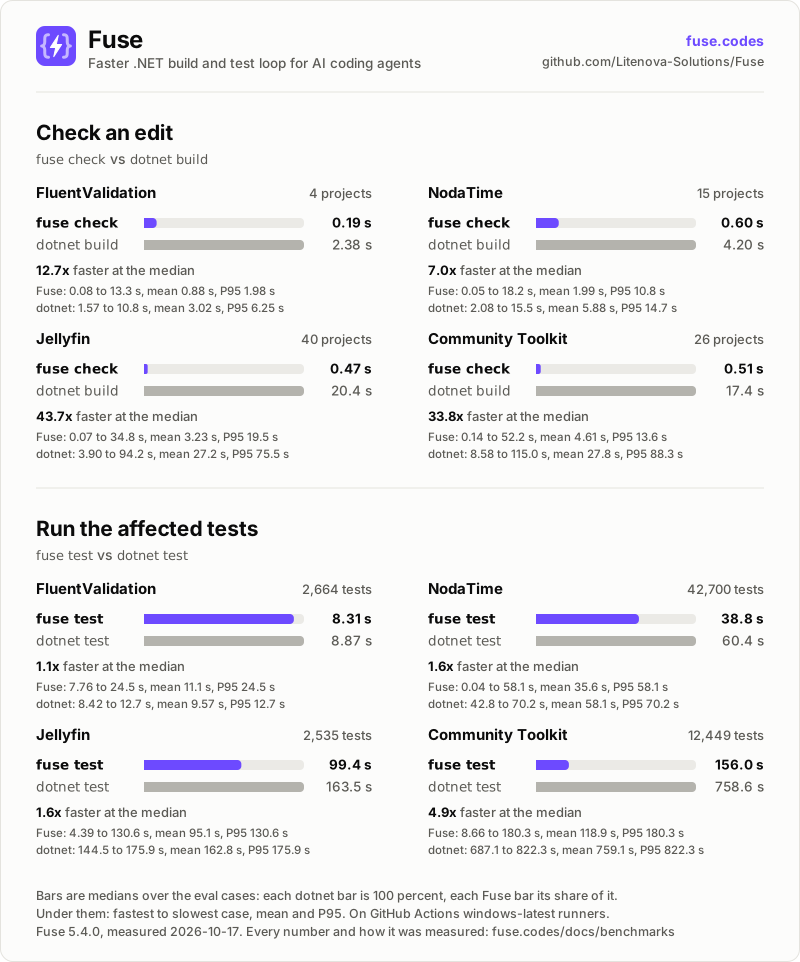
dotnet build at the median on four open-source repositoriesdotnet testRun fuse init once. After that, the agent's tool (Claude Code, Cursor, Codex and others) runs Fuse by itself.
.cs files changed, the tests run without a rebuild.fuse init is the only setup.fuse build or fuse test --all. Limits lists them.fuse init detects each one by its folder or file in the repository root and sets up Claude Code when it finds none. Connect your agent lists what it writes for each one.
dotnet restore on its owndotnet tool install -g Fuse
This puts fuse in ~/.dotnet/tools (%USERPROFILE%\.dotnet\tools on Windows). That folder must be on your PATH and your agent's.
In the root of your repository:
fuse init
wrote .claude/settings.json
wrote .gitignore
fuse: hooks registered; after each edit your agent gets the compiler errors the edit introduced, `dotnet test` runs the affected tests, and `dotnet build` prints only its errors
That is the whole setup. The agent now hears from Fuse only when an edit caused an error.
The commands print exactly what the agent receives, so you can try Fuse in a terminal. For example, after renaming Calc.Add in a library, fuse check lists the callers it broke in other projects:
$ fuse check
App/Program.cs(3,30): error CS1061: 'Calc' does not contain a definition for 'Add' and no accessible extension method 'Add' accepting a first argument of type 'Calc' could be found (are you missing a using directive or an assembly reference?)
  removed: public int Add(int a, int b)
Lib.Tests/CalcTests.cs(6,54): error CS1061: 'Calc' does not contain a definition for 'Add' and no accessible extension method 'Add' accepting a first argument of type 'Calc' could be found (are you missing a using directive or an assembly reference?)
  removed: public int Add(int a, int b)
fuse: 2 error(s) introduced in 2 file(s) (App, Lib.Tests); Lib declarations changed, 2 dependent project(s) checked
Getting started shows each command's output and what the hooks send the agent.
fuse init sets up for each harness, and how an MCP host runs Fuse.Bug reports, feature requests and pull requests are welcome on GitHub, and questions in Discussions. Contributing describes how to build, test and submit a change, and every commit needs a Developer Certificate of Origin sign-off. AI-assisted contributions are welcome under the AI policy, and everyone follows the code of conduct.
To report a vulnerability, follow Security instead of opening a public issue.
Fuse is licensed under the Apache License 2.0.
Local .NET compiler verification, change impact, and typed wiring for AI agents.
{ "mcpServers": { "io.github.litenova-solutions-fuse": { "command": "nuget", "args": [ "Fuse" ] } }}เครื่องมือ
ยังไม่มีรายการเครื่องมือ เซิร์ฟเวอร์แบบรีโมตจะได้รายการหลังการตรวจสอบสถานะครั้งแรก
FAQ
คัดลอกคอนฟิก stdio สำหรับ Cursor, Claude Desktop, Claude Code หรือ VS Code ได้ในหน้านี้ คอนฟิกนี้ใช้การติดตั้งของผู้เผยแพร่ ไม่ใช่พร็อกซีของ PlugMCP
ระเบียนนี้ไม่ได้ระบุตัวแปรสภาพแวดล้อมที่จำเป็น
Fuse ทำงานแบบโลคัลผ่าน stdio
ตรวจสอบล่าสุดเมื่อ 2026-11-12 Local .NET compiler verification, change impact, and typed wiring for AI agents.