mcp-comfy-ui-builder
Control ComfyUI from Claude or Cursor — 50+ MCP tools for node discovery, dynamic workflow building, real-time WebSocket execution, and model management. No JSON editing required.
Power your agent
คำสั่งของผู้เผยแพร่เอง ไม่ใช่เอนด์พอยต์ของ PlugMCP
Host a copy with our keys and logs.
npx -y [email protected]Claude Code ไม่มีลิงก์ติดตั้งสำหรับคำสั่งแบบโลคัล ให้คัดลอกคำสั่งด้านล่างแล้วรันในเทอร์มินัล
COMFYUI_HOST=<value> COMFYUI_PATH=<value> COMFYUI_KNOWLEDGE_DIR=<value> claude mcp add io.github.mit9-comfy-ui-builder -- npx -y mcp-comfy-ui-builder@2.4.1รันในเทอร์มินัล
{ "mcpServers": { "io.github.mit9-comfy-ui-builder": { "command": "npx", "args": [ "-y", "[email protected]" ], "env": { "COMFYUI_HOST": "<value>", "COMFYUI_PATH": "<value>", "COMFYUI_KNOWLEDGE_DIR": "<value>" } } }}claude_desktop_config.json
URL แบบรีโมตหรือคำสั่งบนเครื่องของคุณ? การติดตั้งสองแบบต่างกันอย่างไร
รันบน PlugMCP
A new server you create. It is not this listing's official endpoint. Use the publisher install when you want their URL and their credentials.
เปิดจากผู้เผยแพร่
Tell your AI assistant what image to generate — it builds and runs the ComfyUI workflow for you.
Works with Claude Desktop, Cursor, and any MCP-compatible client.
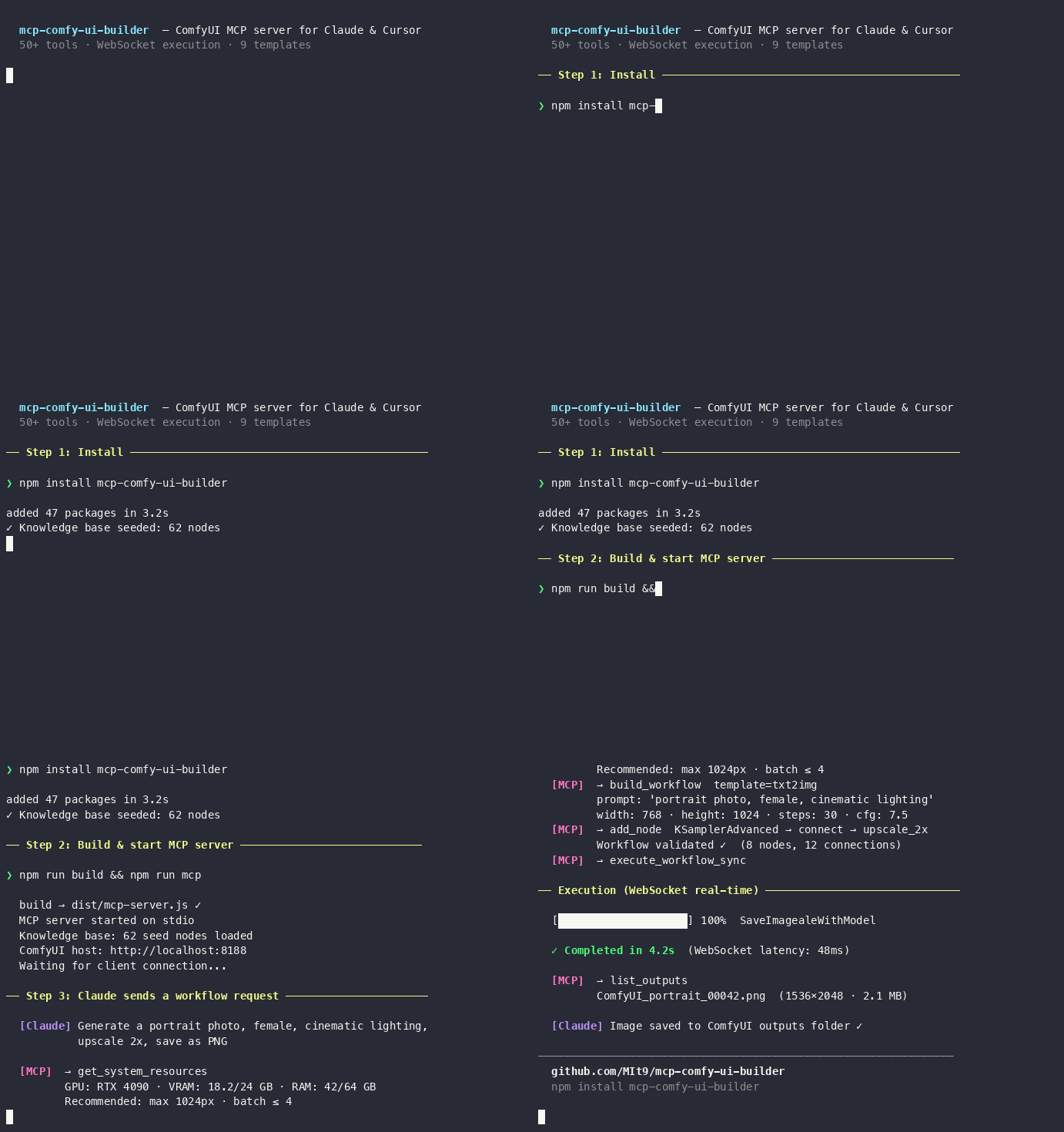
Publishable to the MCP Registry via server.json and mcpName.
knowledge/base-nodes.json and node-compatibility.json from bundled data (62 seed nodes; 100–600+ after sync). No external services required for suggest/build.sync-nodes CLI or on MCP startup.npm install mcp-comfy-ui-builder
Or from source: git clone https://github.com/MIt9/mcp-comfy-ui-builder.git && cd mcp-comfy-ui-builder && npm install
Build (postbuild fills knowledge from seed)
npm run build
npm run mcp
Use knowledge in code
import baseNodes from './knowledge/base-nodes.json' assert { type: 'json' };
Single entry point — task-oriented navigation:
docker pull siniidrozd/mcp-comfy-ui-builder | docker-compose for MCP + ComfyUImcpName in package.json; see MCP Registry quickstart to publish after npm publish.Server provides 50+ tools across 9 categories:
Node Discovery:
Dynamic Workflow Builder:
Templates & Macros:
Real-time execution 📡
Resources & Model Management:
Outputs & Queue:
Plugins:
Install (requires COMFYUI_PATH):
Set COMFYUI_HOST environment variable for execution/model/output tools:
export COMFYUI_HOST="http://localhost:8188"
See doc/MCP-SETUP.md for full tool list and doc/WEBSOCKET-GUIDE.md for real-time features.
From project root, first build the project, then start the server:
npm run build
npm run mcp
Or without npm: node dist/mcp-server.js. Server works via stdio (stdin/stdout). More details → doc/MCP-SETUP.md.
What you need: Node.js 18+, one-time build (npm run build), absolute path to dist/mcp-server.js, restart after config change. If the server fails to start with «spawn node ENOENT», use the full path to node in command (run which node and put that path). See doc/MCP-SETUP.md → Troubleshooting.
Minimal config (knowledge and workflow tools only):
{
  "mcpServers": {
    "comfy-ui-builder": {
      "command": "node",
      "args": ["/ABSOLUTE/PATH/TO/mcp-comfy-ui-builder/dist/mcp-server.js"]
    }
  }
}
Use full path in command (e.g. "/opt/homebrew/bin/node") if Cursor/IDE reports «spawn node ENOENT».
With ComfyUI execution (execute_workflow, get_execution_status, list_outputs, etc.): add "env": { "COMFYUI_HOST": "http://127.0.0.1:8188" } to the server block. See doc/MCP-SETUP.md for full checklist, optional env vars (COMFYUI_PATH, COMFYUI_KNOWLEDGE_DIR), and troubleshooting.
Create a new repository on GitHub: name mcp-comfy-ui-builder, visibility Public (or Private). Do not initialize with README, .gitignore, or license (project already has them).
Add remote and push:
git remote add origin https://github.com/MIt9/mcp-comfy-ui-builder.git
git branch -M main
git push -u origin main
If you fork this repo, replace MIt9 with your GitHub username in the URLs above.
Cursor: Settings → MCP; Claude Desktop: config file ~/Library/Application Support/Claude/claude_desktop_config.json (macOS). Replace the path with your absolute path to dist/mcp-server.js, then restart the app. Full guide: doc/MCP-SETUP.md.
MIT
ComfyUI MCP server: knowledge base, workflow builder, real-time execution, models, plugins.
{ "mcpServers": { "io.github.mit9-comfy-ui-builder": { "command": "npx", "args": [ "-y", "[email protected]" ], "env": { "COMFYUI_HOST": "<value>", "COMFYUI_PATH": "<value>", "COMFYUI_KNOWLEDGE_DIR": "<value>" } } }}เครื่องมือ
ยังไม่มีรายการเครื่องมือ เซิร์ฟเวอร์แบบรีโมตจะได้รายการหลังการตรวจสอบสถานะครั้งแรก
FAQ
คัดลอกคอนฟิก stdio สำหรับ Cursor, Claude Desktop, Claude Code หรือ VS Code ได้ในหน้านี้ คอนฟิกนี้ใช้การติดตั้งของผู้เผยแพร่ ไม่ใช่พร็อกซีของ PlugMCP
ผู้เผยแพร่ระบุตัวแปรสภาพแวดล้อมเหล่านี้: COMFYUI_HOST, COMFYUI_PATH, COMFYUI_KNOWLEDGE_DIR
ComfyUI Builder ทำงานแบบโลคัลผ่าน stdio
ตรวจสอบล่าสุดเมื่อ 2026-11-09 ComfyUI MCP server: knowledge base, workflow builder, real-time execution, models, plugins.
